1. Bubuka
This manual provides detailed instructions for the installation, operation, and maintenance of your AINAVI 11.5-inch Car Radio Stereo GPS Navigation System. Please read this manual thoroughly before use to ensure proper functionality and to maximize your experience with the device.
2. Produk Langkungview
The AINAVI 11.5-inch Car Radio Stereo is an advanced in-dash navigation and entertainment system designed for select Jeep Wrangler JK, Compass, Grand Cherokee, and Dodge Ram models. It features a high-definition QLED touchscreen, integrated GPS navigation, wireless CarPlay and Android Auto compatibility, 5G WiFi, Bluetooth connectivity, and a powerful 8-core CPU with 4GB RAM and 64GB ROM for smooth performance. The system also includes a 1080P rearview camera input and advanced audio equalization options.
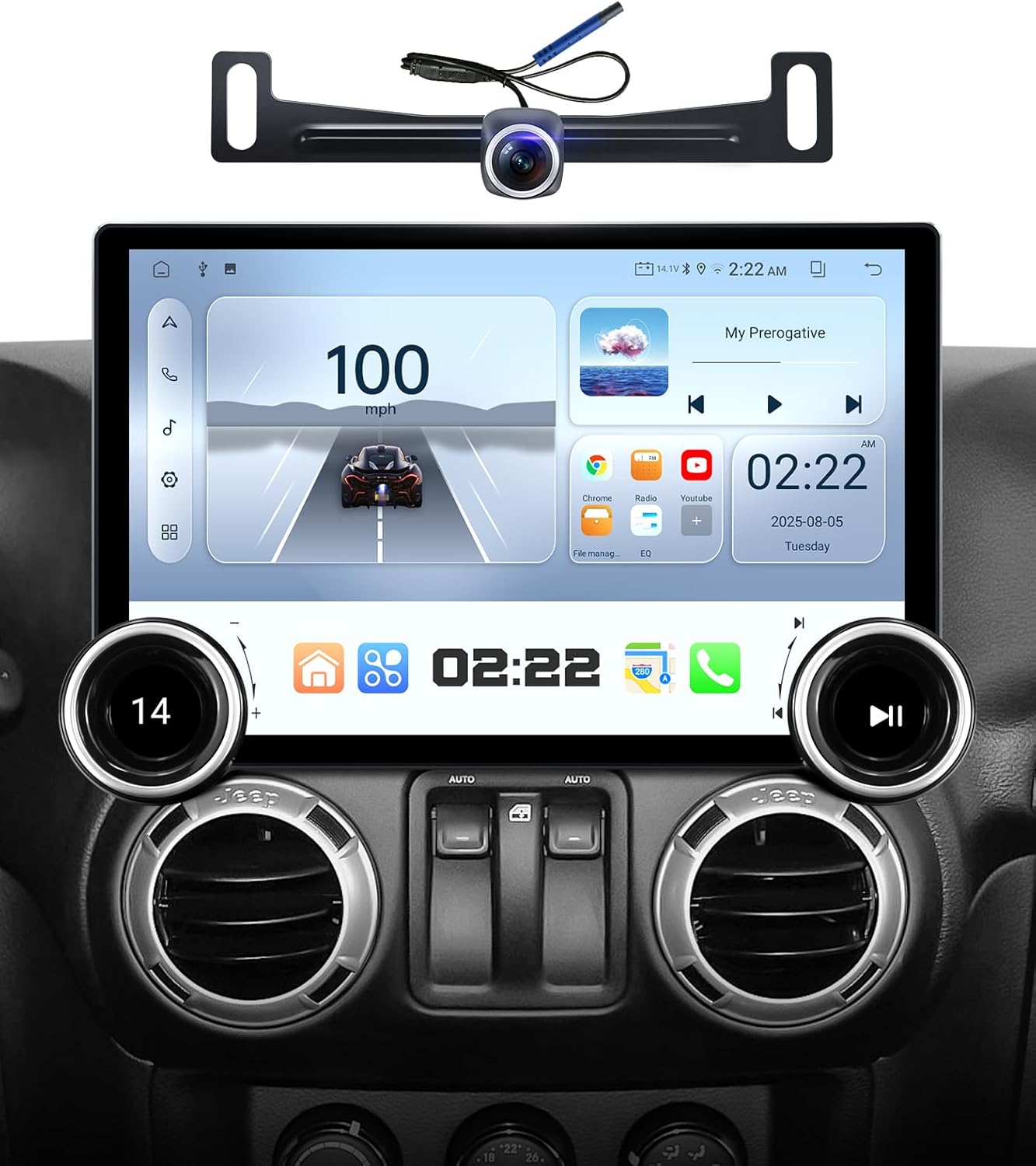
AINAVI 11.5-inch Car Stereo with included rearview kaméra.
3. Naon Kaasup
Pastikeun yén sadaya komponén aya dina bungkusan:
- Car Head Unit (1280*720) with Frame for Jeep Wrangler JK
- AHD 1080P Rear View Kaméra
- Mikropon
- Blue Frame Removal Tool
- Antena GPS
- USB 4Pin Cable
- USB 6Pin Cable
- Manual pamaké
- Power Cable (some models with CANbus)
- RCA Kabel
- Reversing Control Cable

All components included in the product package.
4. Setup & Instalasi
Installation of the AINAVI car stereo involves replacing your vehicle's existing head unit. Due to the complexity of automotive electronics, professional installation is recommended. Ensure the vehicle's power is disconnected before beginning installation.
4.1 Kasaluyuan
This unit is compatible with Jeep Wrangler JK, Compass, Grand Cherokee, and Dodge Ram models. Verify your vehicle's specific year and model against the product specifications to ensure proper fitment.

The AINAVI car stereo installed in a vehicle dashboard, indicating compatibility with various Jeep and Dodge models.
4.2 Léngkah-léngkah Instalasi
- Pasang bracket: Secure the provided mounting bracket to the car radio position in your vehicle's dashboard.
- Sambungkeun kabel: Plug in all necessary cables (power, USB, GPS antenna, rearview camera, etc.) to the head unit. Refer to the wiring diagram in the included user manual for specific connections.
- Pasangkeun alatna: Install the head unit into the bracket, ensuring it is securely fastened and flush with the dashboard.

Three-step visual guide for installing the car stereo.
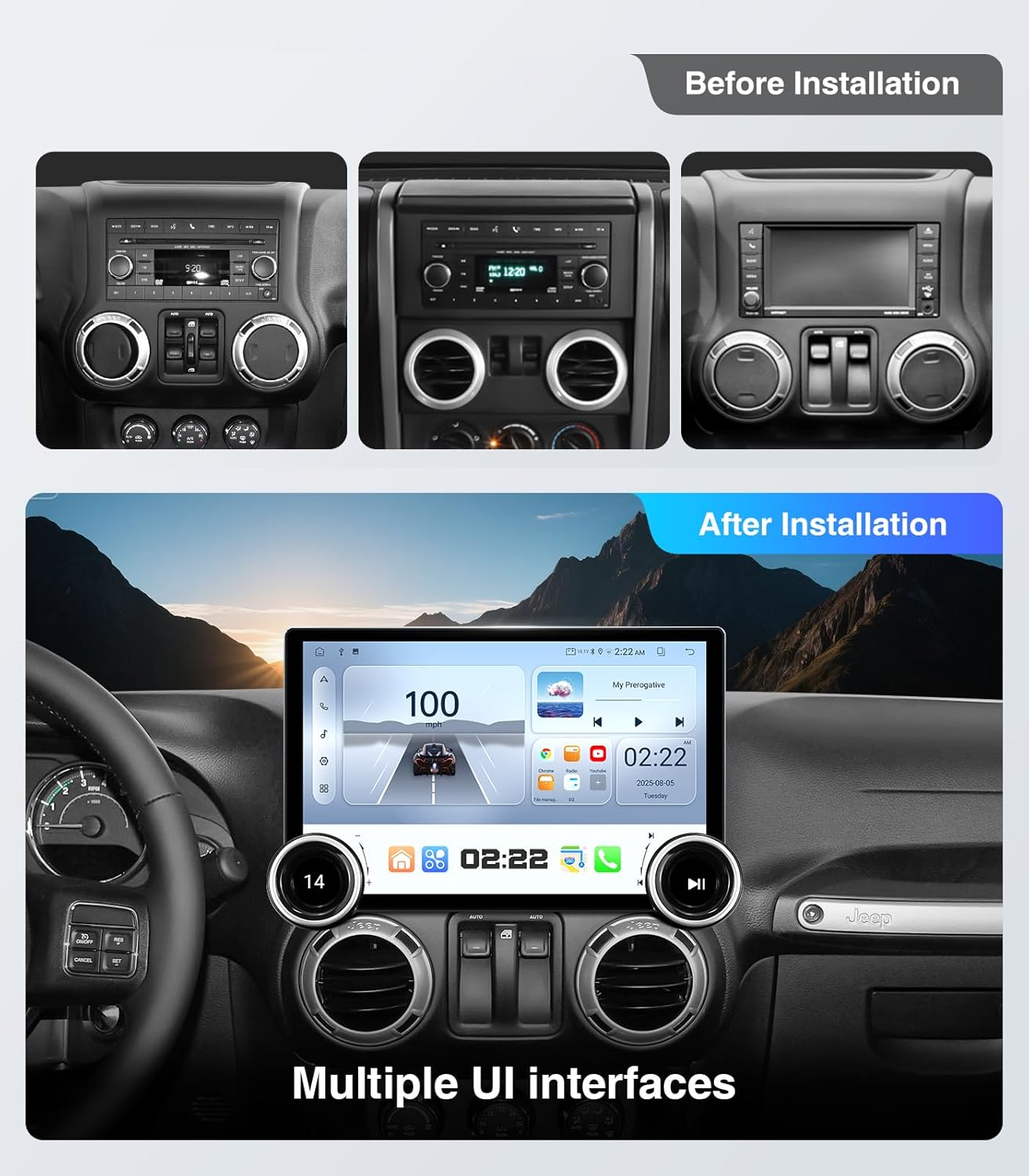
Dashboard before and after installation in a Jeep Wrangler.
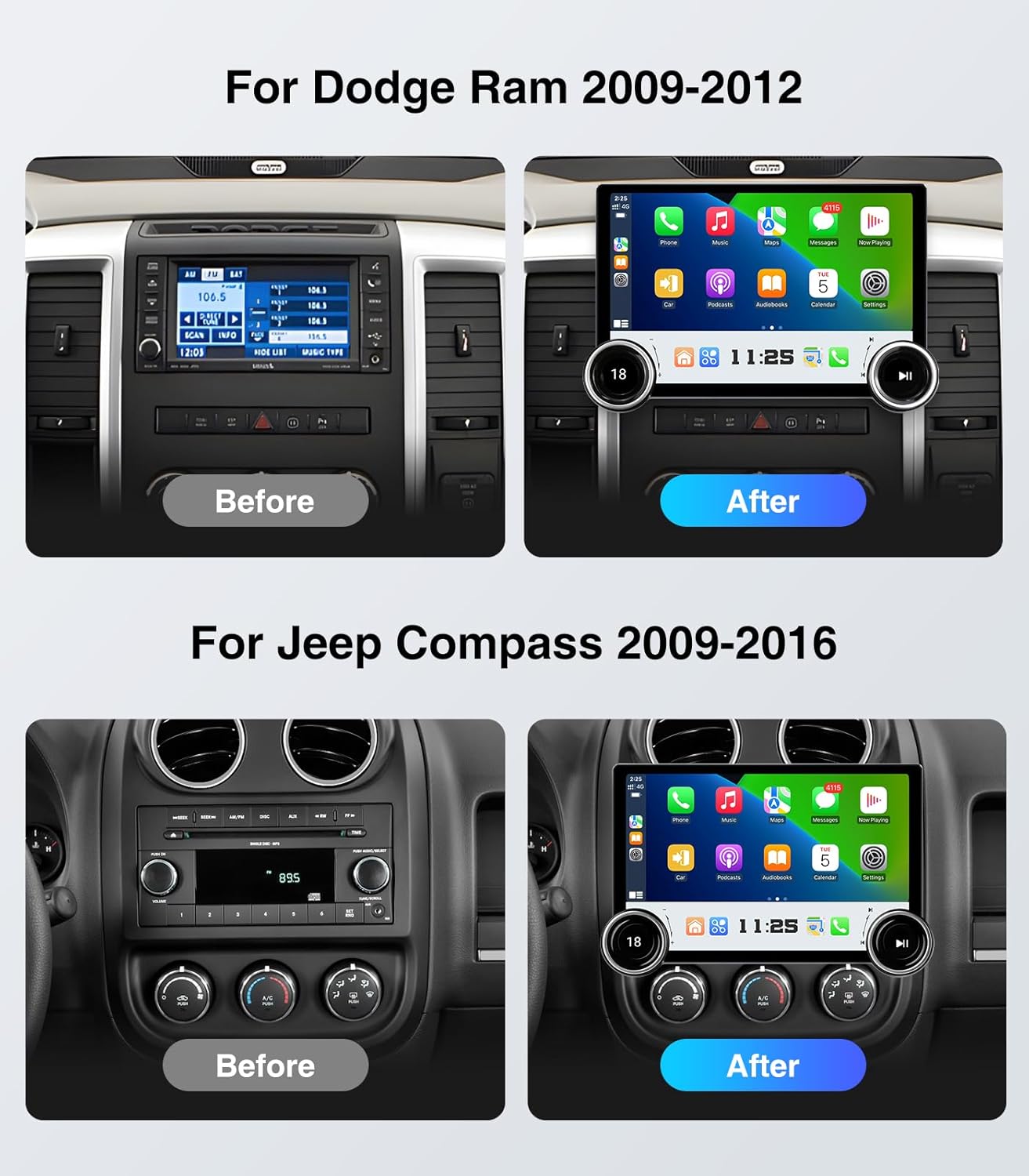
Dashboard before and after installation in a Dodge Ram and Jeep Compass.
5. Parentah Operasi
5.1 Kadali Dasar
The unit features dual physical knobs and supports steering wheel controls for convenient operation.
- Kenop kénca: Rotate to adjust volume (+/-). Press to mute/unmute audio.
- Kenop katuhu: Rotate for previous/next track or station. Press to play/pause media.
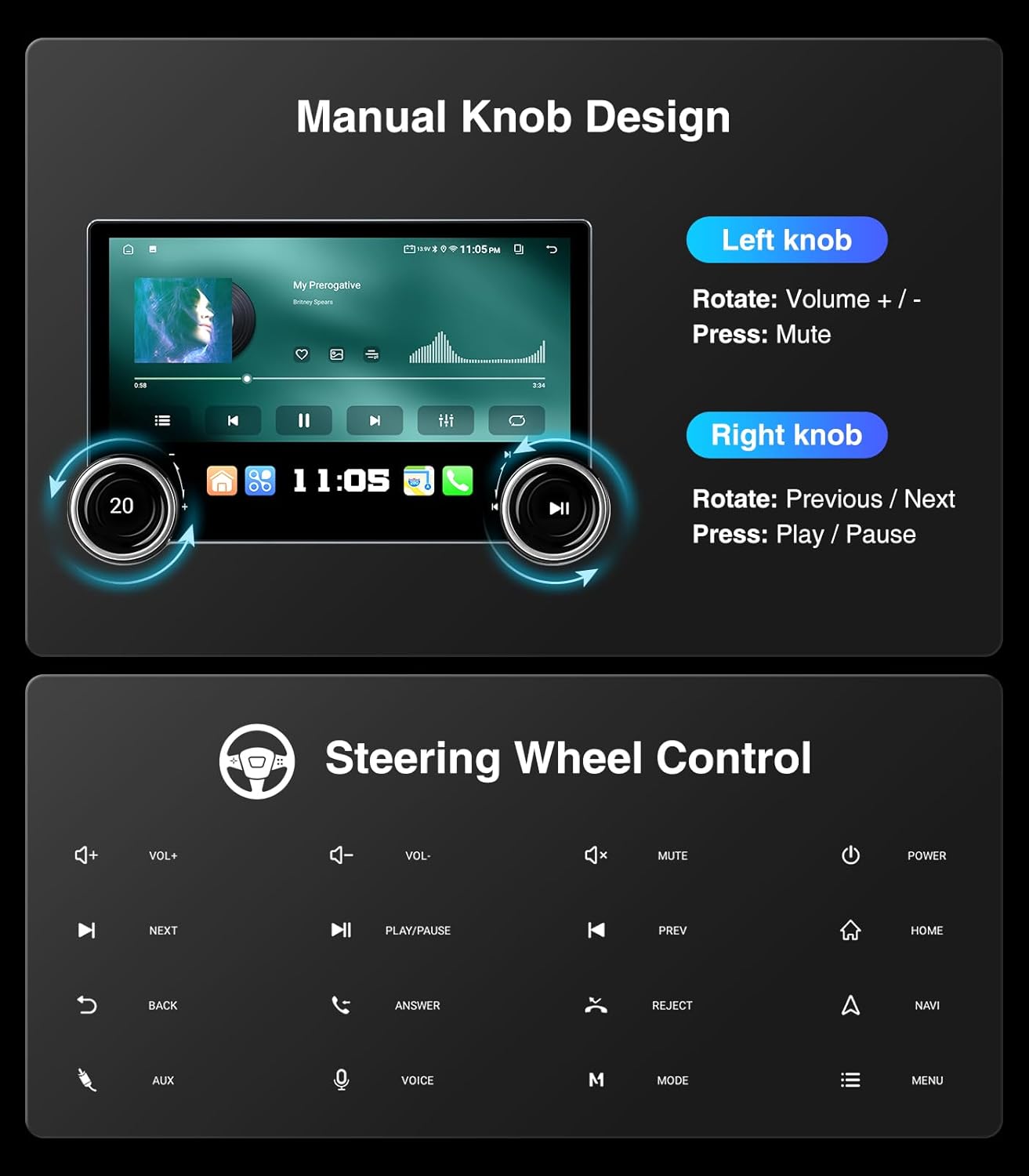
Functions of the dual manual knobs and supported steering wheel controls.
5.2 Napigasi GPS
The system supports most satellite services and utilizes 5G WiFi for accurate navigation. Access Google Maps for 2D and 3D perspectives, various route options (driving, cycling, pedestrian), obstacle alerts, and voice guidance.

GPS navigation interface with voice assistant options.
5.3 Wireless CarPlay & Android Auto
Connect your smartphone wirelessly for seamless integration of CarPlay or Android Auto. This allows for hands-free navigation, music playback, messaging, and access to compatible apps directly on the touchscreen.

Side-by-side comparison of iOS CarPlay and Android Auto interfaces.

CarPlay interface with wireless smartphone connectivity.
5.4 Split Screen & Screen Mirroring
Utilize the split-screen function to run two applications simultaneously, such as navigation and music. Screen mirroring allows you to display your smartphone's screen directly onto the head unit.

Split-screen functionality and smartphone screen mirroring.
5.5 Bluetooth & 5G WiFi
Connect your phone via Bluetooth for hands-free calls and music streaming. The integrated 5G WiFi module provides faster network speeds for online applications and real-time traffic updates.

Phone dialer interface, highlighting 5G WiFi and Bluetooth connectivity.

Safe hands-free phone use via Bluetooth.
5.6 Fitur Audio
The system includes a professional DSP and 48-band equalizer with voice point touch control. Adjust sound settings for various genres (Normal, Jazz, Pop, Classical, Heavy Metal, Vocal, Soft) and customize surround sound patterns, bass boost, and individual speaker volumes.

Multi-band audio equalization settings.
The unit also supports AM/FM/RDS radio with clear reception for various channels.

AM/FM/RDS radio interface.
5.7 Tukangeun View Kaméra
The included 1080P AHD rearview camera provides a wide 170° view, minimizing blind spots for safer reversing. The display includes astern ruler lines and supports vehicle astern trajectory if your car is equipped with this feature.

1080P rearview tampilan kaméra kalawan pituduh parkir.
5.8 USB to RCA Output
The USB to RCA output function allows for independent video playback on multiple screens, providing entertainment for backseat passengers. An adapter (not included) may be required to connect to headrest monitors.
6. Pangropéa
- Ngabersihan layar: Anggo lawon anu lemes sareng henteu ngaganggu pikeun ngusap layar rampa sacara lembut. Hindarkeun pembersih atanapi pangleyur anu abrasif.
- Apdet parangkat lunak: Periodically check for available software updates to ensure optimal performance and access to new features. Follow the on-screen instructions for any updates.
- Kaayaan Lingkungan: Hindarkeun ngalaan unit ka suhu anu ekstrim atanapi sinar panonpoé langsung kanggo waktos anu berkepanjangan.
7. Cara ngungkulan
- Henteu aya kakuatan: Pariksa sadaya sambungan listrik sareng sekering. Pastikeun kontak kendaraan hurung.
- Henteu aya sora: Verify volume settings, check speaker connections, and ensure the audio source is correctly selected.
- CarPlay/Android Auto Disconnects: Ensure your phone's software is up to date. Try restarting both the head unit and your phone. Check for strong WiFi and Bluetooth signals.
- GPS Inaccurate: Pastikeun anteneu GPS dipasang kalawan bener sareng gaduh tampilan anu jelas view of the sky. Check for updated map data.
- Kadali Setir Teu Gawé: Access the system settings to configure or re-sync steering wheel controls. Refer to the detailed instructions in the included user manual.
- Layar teu ngaréspon: Perform a soft reset of the unit (refer to the main user manual for instructions). If the issue persists, contact customer support.
8. Spésifikasi
| Fitur | Spésifikasi |
|---|---|
| Nomer modél | 4+64G |
| Ukuran tampilan | 11.5 inci |
| Sistem operasi | Android |
| Mémori (RAM) | 4 GB |
| Panyimpenan (ROM) | 64 GB |
| Konektipitas | Bluetooth, USB, Wi-Fi (2.4GHz & 5GHz), Wired, Wireless |
| Fitur husus | Bluetooth handsfree, GPS navigation, AM/FM/RDS, CarPlay, Android Auto, Mirror Link, AirPlay, Touch Screen, 48EQ (Sound Point Control), Premium DSP, QLED Display, Split Screen Function, Equalizer |
| Mode Kaluaran Audio | Sakuliling stereo |
| Map Type Support | Europe, North America, South America, Worldwide |
| Item Beurat | 5.06 pon |
| Ukuran Paket | 13.07 x 13.07 x 5.67 inci |

Internal high-performance chip with 4GB RAM and 64GB ROM.
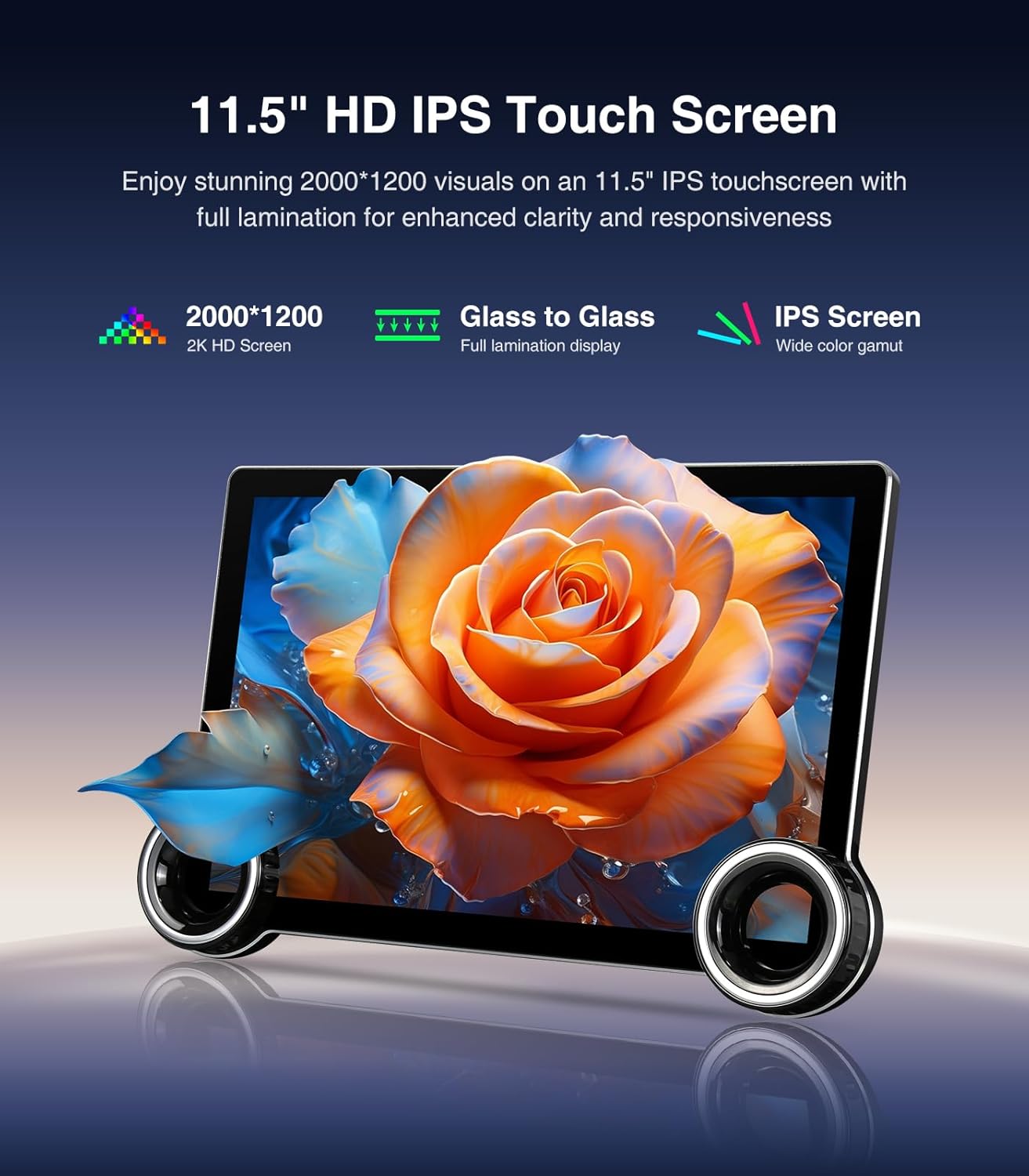
11.5-inch HD IPS touchscreen with enhanced clarity.
9. Émbaran jaminan
Produk ieu hadir kalawan a 12 Months Manufacturer Guarantee. Please retain your proof of purchase for warranty claims. For specific terms and conditions, refer to the warranty card included in your package or contact customer support.
10. Rojongan Palanggan
For technical assistance, installation support, or any inquiries, please contact AINAVI customer support:
- Telepon: +1 (833) 858-5016
- Jam Gawé: 01:00 PM to 00:00 AM PST
- Surélék: info@ainavi.com
You can also seek help via your order center on Amazon by navigating to the seller's page and using the 'Ask a question' option.

Customer support contact information.

Accessing customer installation support.


