1. Bubuka
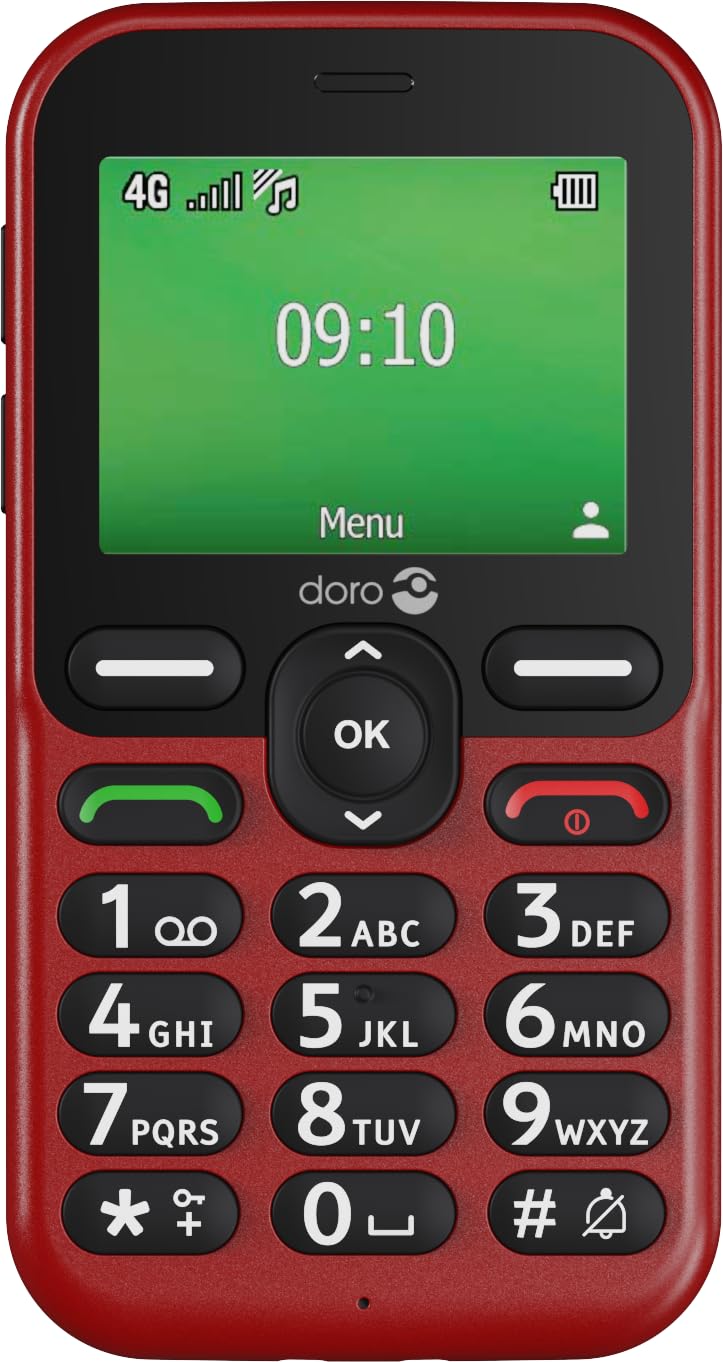
Welcome to the user manual for your Doro Leva E11 4G mobile phone. This guide provides essential information on setting up, operating, maintaining, and troubleshooting your device. The Doro Leva E11 is designed for ease of use, featuring a 2.4-inch display, high-contrast buttons, clear sound quality, and a dedicated security button, making it ideal for seniors.
fitur konci ngawengku:
- Intuitive design with a 2.4-inch landscape display.
- Clearly spaced, high-contrast buttons for easy dialing and texting.
- HD Voice for particularly clear sound quality.
- Integrated camera for taking and sending photos.
- Dedicated security button for emergencies.
- 4G connectivity for reliable calls and messages.
- Includes a convenient charging station.


2. Ngamimitian
2.1 Ngabongkar bungkusan
Pastikeun yén sadaya komponén aya dina bungkusan:
- Doro Leva E11 Mobile Phone
- Tempat ngecas
- Kabel USB
- Batré (tiasa dipasang sateuacanna atanapi misah)
2.2 Nyelapkeun Batré
If the battery is not pre-installed, carefully remove the back cover of the phone. Align the battery contacts with the phone's terminals and gently press the battery into place. Replace the back cover, ensuring it clicks securely.
2.3 Nyelapkeun Kartu SIM
Your Doro Leva E11 requires a SIM card to make calls and send messages. With the phone turned off and the battery removed (if necessary), locate the SIM card slot. Insert your SIM card according to the diagram usually found near the slot, ensuring the gold contacts face down. Reinsert the battery and back cover.
2.4 Ngecas Telepon
Before first use, fully charge your Doro Leva E11. Connect the USB cable to the charging station and then to a power adapter (not always included) or a computer USB port. Place the phone in the charging station. The charging indicator on the phone will show when it is charging. A full charge typically takes a few hours.

3. Operating Your Doro Leva E11
3.1 Hurungkeun / Pareum
To turn on the phone, press and hold the red End Call/Power button until the screen lights up. To turn off, press and hold the same button, then follow the on-screen prompts.
3.2 Nelepon
Enter the phone number using the keypad. Press the green Call button to initiate the call. To end a call, press the red End Call button.
3.3 Ngawalon Telepon
When the phone rings, press the green Call button to answer. To reject a call, press the red End Call button.
3.4 Sending SMS Messages
Navigate to the 'Messages' menu. Select 'New Message'. Enter the recipient's number or select from contacts. Type your message using the keypad. Press 'Send'.
3.5 Ngagunakeun kaméra
Access the camera from the main menu. Point the camera at your subject. Press the 'OK' button to take a photo. Photos can be viewed in the 'Gallery' and sent via MMS.
3.6 The Security Button
The Doro Leva E11 features a dedicated security button on the back. In an emergency, press and hold this button to automatically alert pre-set contacts. Ensure emergency contacts are configured in the phone settings.

4. Pangropéa sarta perawatan
To ensure the longevity of your Doro Leva E11, follow these guidelines:
- beberesih: Use a soft, dry cloth to clean the phone's surface. Avoid liquid cleaners or aerosols.
- Tahan cai: The phone is splash-proof (IP54 rated), meaning it can withstand light splashes of water. Do not immerse the phone in water or expose it to heavy rain.
- Suhu: Avoid exposing the phone to extreme temperatures, direct sunlight, or very humid environments.
- Perawatan batré: Do not attempt to replace the battery yourself unless it is designed for user replacement. Use only Doro-approved chargers and batteries.
- Panyimpenan: Upami teu dianggo salami lami, simpen telepon di tempat anu tiis sareng garing.
5. Cara ngungkulan
If you encounter issues with your Doro Leva E11, try the following solutions:
5.1 Phone Does Not Turn On
- Pastikeun batréna leres diselapkeun sareng dicas pinuh.
- Connect the phone to the charger and wait a few minutes before attempting to turn it on again.
5.2 Cannot Make or Receive Calls/SMS
- Pariksa naha kartu SIM parantos dipasang kalayan leres.
- Verify that you have network coverage.
- Ensure your SIM card is active and has sufficient credit/plan.
- Balikan deui telepon.
5.3 Kualitas Sora Miskin
- Adjust the volume settings during a call.
- Ensure the speaker and microphone are not obstructed.
- If using a hearing aid, ensure the phone's hearing aid compatibility feature is enabled (if applicable).
5.4 Batré Drains Gancang
- Ngurangan kacaangan layar.
- Tutup aplikasi anu henteu dianggo.
- Ensure the phone is not in an area with very poor network signal, as this can increase battery consumption.
- Consider replacing the battery if it is old and consistently performing poorly.
6. Spésifikasi Téknis
| Fitur | Spésifikasi |
|---|---|
| merek | Doro |
| Ngaran modél | Doro Leva E11 |
| Nomer Modél Item | 8996 |
| Sistem operasi | Mocor RTOS |
| Téhnologi sélular | 4G |
| Ukuran layar | 2.4 inci |
| Tipe tampilan | LCD |
| Resolusi | 320x240 |
| Jenis prosésor | Cortex A7 |
| Laju prosésor | 1 GHz |
| RAM Mémori Dipasang Ukuran | 64 MB |
| Flash Mémori dipasang Ukuran | 64 MB |
| Kapasitas Panyimpenan Digital | 128 MB (Internal), supports up to 128 GB external memory card |
| Peunteun Daya Batré | 1150 mAh |
| Faktor Bentuk | Bar |
| Komponén Kaasup | USB Cable, Charging Station |
| Fitur husus | Contrast-rich buttons, HD Voice, Camera, Security button, Splash-proof (IP54), Hearing aid compatible, Flashlight |
7. Garansi jeung Rojongan
Your Doro Leva E11 is covered by a manufacturer's warranty. Please refer to the warranty card included in your product packaging for specific terms and conditions. For technical support, service, or to find more information, please visit the official Doro website or contact Doro customer service.
Doro Official Websitus: www.doro.com


