
boAt Rockerz Trinity Gen 2
boAt Rockerz Trinity Gen 2 Bluetooth Neckband Earphones User Manual
Model: Rockerz Trinity Gen 2
Bubuka
Thank you for choosing the boAt Rockerz Trinity Gen 2 Bluetooth Neckband Earphones. This manual provides essential information for setting up, operating, and maintaining your earphones. Please read it carefully to ensure proper use and to maximize your listening experience. These earphones are designed for extended audio playback, high-resolution sound, and clear communication.
Naon dina Box
- boAt Rockerz Trinity Gen 2 Earphones
- Kabel Ngecas
- Manual pamaké
The package includes the boAt Rockerz Trinity Gen 2 Earphones, a charging cable, and this user manual.
Produk Leuwihview
The boAt Rockerz Trinity Gen 2 features a flexible neckband design with in-ear earbuds. It includes integrated controls for media playback, call management, and voice assistant activation. The neckband houses the battery and main electronics.
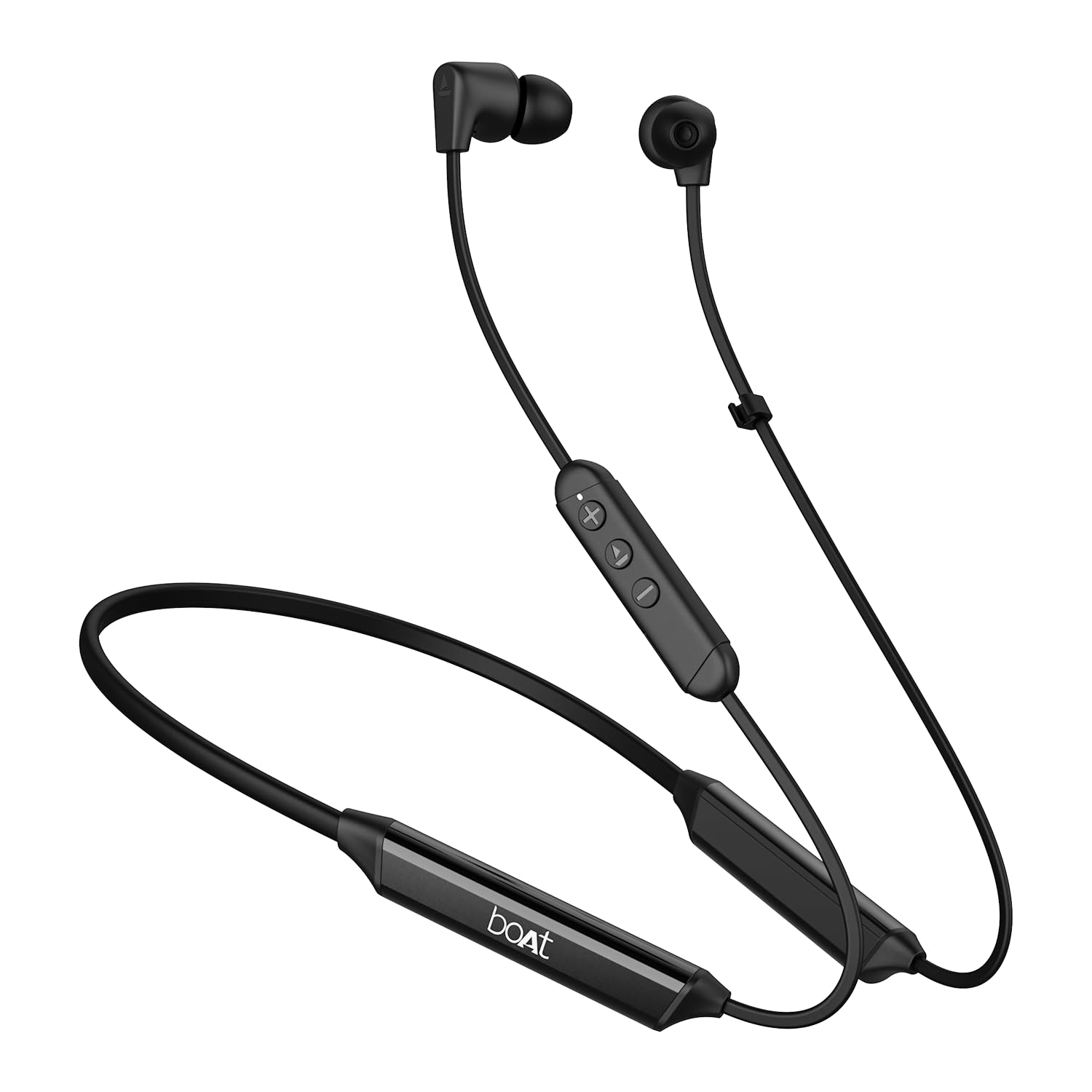
Image: The boAt Rockerz Trinity Gen 2 neckband earphones, highlighting the flexible neckband and in-ear design.

Gambar: A lengkep view of the boAt Rockerz Trinity Gen 2 earbuds and the inline control panel, showing buttons for volume and playback.
Disetél
1. Ngecas Earphone
Before first use, fully charge your earphones. Connect the provided charging cable to the charging port on the neckband and to a USB power source. The LED indicator will show charging status. A full charge provides up to 150 hours of playback. With ASAP Charge, 10 minutes of charging provides up to 24 hours of playback.
Image: The boAt Rockerz Trinity Gen 2 neckband, illustrating its long battery life with "150 HOURS PLAYBACK" text.
2. Powering on / Pareum
- Pikeun Ngahurungkeun: Press and hold the Multi-function button (usually the center button on the inline control) for approximately 3 seconds until the LED indicator flashes blue and you hear a power-on prompt.
- Pikeun mareuman: Press and hold the Multi-function button for approximately 5 seconds until the LED indicator flashes red and you hear a power-off prompt.
3. Papasangan Bluetooth
- Pastikeun earphone-na pareum.
- Press and hold the Multi-function button for about 5-7 seconds until the LED indicator flashes red and blue alternately, indicating pairing mode.
- On your device (smartphone, laptop), enable Bluetooth and search for available devices.
- Select "boAt Rockerz Trinity Gen 2" from the list of found devices.
- Once connected, the LED indicator will flash blue slowly, and you will hear a confirmation tone.

Image: The boAt Rockerz Trinity Gen 2 earphones connected to both a smartphone and a tablet, illustrating the dual pairing feature.
4. Dual Pairing (Multipoint)
The Rockerz Trinity Gen 2 supports dual pairing, allowing connection to two devices simultaneously. After pairing with the first device, disable Bluetooth on that device. Put the earphones back into pairing mode and connect to the second device. Once connected to the second device, re-enable Bluetooth on the first device. The earphones will automatically connect to both devices, allowing seamless switching between them for calls and media.
Parentah Operasi
Kadali dasar
- Puter / Reureuh: Pencét tombol Multi-fungsi sakali.
- Volume Up: Pencét tombol '+'.
- Volume Turun: Pencét tombol '-'.
- Lagu salajengna: Pencét jeung tahan tombol '+'.
- Lagu Sateuacanna: Pencét jeung tahan tombol '-'.
- Ngajawab / mungkas Telepon: Pencét tombol Multi-fungsi sakali.
- Nolak Telepon: Pencét jeung tahan tombol Multi-fungsi salila 2 detik.
- Aktipkeun Asisten Sora: Pencét dua kali tombol Multi-fungsi.
Hi-Res Audio with LDAC
The Rockerz Trinity Gen 2 supports Hi-Res Audio with LDAC codec, providing superior sound quality. Ensure your connected device also supports LDAC for the best audio experience. This feature allows for high-resolution audio transmission over Bluetooth, preserving more detail from your music.

Image: The boAt Rockerz Trinity Gen 2 earphones displaying the "Hi-Res Audio Wireless" and "LDAC" logos, indicating high-resolution audio support.
Modeu EQ Dual
Switch between different equalizer modes to customize your audio experience. Refer to the product's quick start guide or experiment with button combinations (often a triple-press of the Multi-function button or a combination with volume buttons) to cycle through available EQ presets. This allows you to adjust the sound profile kana karesep anjeun.

Image: A close-up of the boAt Rockerz Trinity Gen 2 earbuds, highlighting the availability of dual EQ modes for sound customization.
AI-ENx™ Technology for Clear Calls
The earphones feature AI-ENx™ technology, which enhances call clarity by eliminating background noise. This ensures your voice is heard clearly during calls, even in noisy environments.

Image: A close-up of a boAt Rockerz Trinity Gen 2 earbud, emphasizing the AI-ENx™ technology for clear voice calls.
Modeu BEAST™ (Latensi Leutik)
Activate BEAST™ Mode for a low-latency gaming experience (65ms). This mode synchronizes audio with visuals, providing a more immersive gaming session. To activate/deactivate BEAST™ Mode, refer to the specific instructions in your quick start guide, usually involving a dedicated button press or a combination.

Image: The boAt Rockerz Trinity Gen 2 earphones with "BEAST™ MODE 65ms Low Latency" text, depicted alongside gaming characters to illustrate its use for gaming.
Pangropéa
beberesih
- Wipe the earphones with a soft, dry, lint-free cloth.
- Ulah make bahan kimia kasar, pangleyur beberesih, atawa detergents kuat.
- Regularly clean the ear tips to prevent wax buildup, which can affect sound quality.
Tahan cai (IPX5)
The earphones are IPX5 rated, meaning they are resistant to sweat and light splashes of water. They are not designed for submersion in water. Avoid exposing them to heavy rain or direct water jets. Ensure the charging port cover is securely closed when not charging to maintain water resistance.

Image: The boAt Rockerz Trinity Gen 2 earbuds with water droplets on them, illustrating their IPX5 water resistance rating.
Panyimpenan
Store the earphones in a cool, dry place away from direct sunlight and extreme temperatures. Avoid storing them with sharp objects that could damage the cables or earbuds.
Pamérésan masalah
Taya Daya
- Pastikeun yén earphone dicas pinuh.
- Press and hold the Multi-function button for 3-5 seconds to power on.
Teu Bisa Masangkeun jeung Alat
- Ensure the earphones are in pairing mode (LED flashing red and blue alternately).
- Pastikeun Bluetooth dina alat anjeun diaktipkeun sareng aya dina jangkauan (biasana 10 méter).
- Forget "boAt Rockerz Trinity Gen 2" from your device's Bluetooth list and try pairing again.
- Balikan deui alat sareng earphone anjeun.
Low or Distorted Sound
- Adjust the volume on both the earphones and your connected device.
- Ensure the ear tips are clean and properly seated in your ears.
- Coba tips ceuli ukuran béda pikeun segel hadé.
- Pindah ngadeukeutan ka alat Anjeun nu disambungkeun pikeun nyegah gangguan.
Mikropon Teu Gawé
- Pastikeun yén earphone disambungkeun leres ka alat Anjeun.
- Check your device's audio settings to ensure the earphones are selected as the input device.
- Clean the microphone opening if it appears obstructed.
spésifikasi
| merek | parahu |
| Ngaran modél | Rockerz Trinity Gen 2 |
| Panempatan Ceuli | Dina Ceuli |
| Faktor Bentuk | Dina Ceuli |
| Kontrol bising | AI-ENx™ Technology (for calls) |
| Téhnologi konektipitas | Bluetooth |
| Batré Rata Kahirupan | 150 Jam |
| Waktu Ngeusi batre | 10 Minutes (for 24 hours playback via ASAP Charge) |
| Tipe Supir Audio | Dynamic Driver (10mm, inferred from description) |
| Rentang Frékuénsi | 20 Hz - 40,000 Hz |
| Tahan cai | IPX5 |
| Fitur husus | Hi-Res Audio with LDAC, Dual EQ Modes, AI-ENx™ Technology, Dual Pairing, BEAST™ Mode (65ms Low Latency), ASAP Charge |
| Métode kontrol | Sora, Tombol |
| Item Beurat | 60 gram |
Garansi sareng Rojongan
Émbaran jaminan
The boAt Rockerz Trinity Gen 2 earphones come with a garansi 1 taun from the date of purchase. This warranty covers manufacturing defects. Please retain your purchase receipt for warranty claims. The warranty does not cover damage caused by misuse, accidents, unauthorized modifications, or normal wear and tear.
Rojongan Palanggan
For technical assistance, warranty claims, or any other inquiries, please contact boAt customer support:
- Surélék: info@imaginemarketingindia.com
- Pabrikan: Bayangkeun Marketing Ltd
Mangga sumping ka situs resmi BOA websitus pikeun inpormasi pangrojong anu paling anyar sareng detil kontak.
Dokumén Patali - Rockerz Trinity Gen 2
 |
Buku Panduan Pangguna Earphone Neckband Nirkabel boAt Rockerz 200 Buku pituduh pikeun earphone neckband nirkabel boAt Rockerz 200. Rincian fitur, pasangan Bluetooth, ngecas, spésifikasi, tindakan pencegahan kaamanan, sareng fungsi pasangan ganda. |
 |
boAt Rockerz 268 Wireless Earphone Neckband Manual Pamaké Buku pituduh pikeun earphone neckband Bluetooth nirkabel boAt Rockerz 268. Diajar ngeunaan pungsi, papasangan, ngecas, spésifikasi, sareng pancegahan kaamanan pikeun panggunaan optimal. |
 |
boAt Rockerz 371 Wireless Neckband Earphones Guide pamaké Pituduh pangguna pikeun earphone neckband nirkabel boAt Rockerz 371. Panggihan fitur-fitur sapertos 50 jam pamuteran, Modeu BEAST™ pikeun kaulinan kalayan latency rendah, ENx™ Tech pikeun telepon anu jelas, sareng konéktivitas Bluetooth anu mulus. |
 |
boAt Rockerz 210 ANC Wireless Neckband Earphones Smart Guide This smart guide provides comprehensive information on the boAt Rockerz 210 ANC wireless neckband earphones. Learn about features like Active Noise Cancellation (ANC), BEAST™ Mode, Spatial Audio, dual pairing, app compatibility, detailed specifications, and charging guidelines for optimal performance. |
 |
boAt Rockerz 260 Wireless Bluetooth Earphone Manual and Features Comprehensive user manual for the boAt Rockerz 260 wireless Bluetooth neckband earphones. Learn about pairing, functions, charging, specifications, and safety precautions. |
 |
boAt Rockerz 185 Pro Wireless Neckband Earphone User Manual Official user manual for the boAt Rockerz 185 Pro wireless neckband earphones. Learn about pairing, functionalities, charging, specifications, and safety precautions. |
Ask a question about this manual
Ask about setup, troubleshooting, compatibility, parts, safety, or missing instructions. Manuals+ will review the question and use this page’s manual context to help answer it.