Émbaran Kasalametan penting
- Baca jeung dengekeun parentah ieu.
- Ulah make produk ieu deukeut cai.
- Ngabersihan ngan ku kaén garing.
- Pariksa voltage suplai utama lokal Anjeun.
- Do not block any ventilation openings. Install under the manufacturer's instructions.
- Entong dipasang di deukeut sumber panas sapertos radiator, register panas, kompor, atanapi aparat sanésna (kalebet ampLiifiers) anu ngahasilkeun panas.
- Ngan ukur nganggo kaunggulan napel / aksésori anu ditunjuk ku produsén.
- Cabut colokan produk ieu nalika badai kilat sareng teu dianggo lami.
- Rujuk sadayana jasa ka tanaga jasa anu mumpuni.
Eusi pakét
The Donner MAMP4 5.1 Channel Audio Amppakét liifier ngawengku:
- Donner MAMP4 Panarima stereo
- Kadali jauh
- Antena FM
- Manual pamaké
Guide Setup
1. Connecting Speakers and Subwoofer
The MAMP4 amplifier supports a 5.1 channel setup, allowing connection of 5 speakers and 1 subwoofer. Ensure correct polarity (+/-) when connecting speakers.

Image: Diagram showing the 5.1 channel speaker and subwoofer connections on the rear panel of the Donner MAMP4 amppangagung.

Gambar: Detil view of the rear panel of the Donner MAMP4 amplifier, highlighting speaker terminals and various input/output ports.
2. Nyambungkeun Sumber Audio
The amplifier offers multiple input options for various audio sources:
- Bluetooth 5.3: Pikeun streaming audio nirkabel tina alat anu cocog.
- USB: Connect a USB drive (up to 64 GB) for direct music playback.
- RCA: Connect devices like CD/DVD players or other audio equipment.
- AC-3: For surround sound input.
- Optik/Coaxial: Digital audio inputs for smart TVs and other digital sources.
- AUX IN: General auxiliary input.
- Radio FM: Connect the included FM antenna for radio reception.
- Microphone Inputs (2x 1/4''): For karaoke or public address.

Image: Front panel of the Donner MAMP4 amplifier showing various input options including USB, AUX, and microphone jacks, along with Bluetooth and FM indicators.
3. Sambungan Daya
Connect the power cord to a wall outlet. Ensure the unit is turned off before making any connections.
4. Daya Awal Hurung
Pencét tombol Daya dina panel hareup pikeun muterkeun amplifier on. The LED display will illuminate.

Image: The Donner MAMP4 amplifier integrated into a home theater setup, demonstrating its role in enhancing stereo and surround sound.
Parentah Operasi
1. Pamilihan Input
Use the 'MODE' button on the front panel or the 'INPUT' button on the remote control to cycle through available input modes: Bluetooth, USB, FM, RCA, AC-3, Optical, Coaxial, and AUX.
2. Volume and EQ Control
Adjust the master volume using the large knob on the front panel or the 'VOL+/-' buttons on the remote. The amplifier features independent controls for Treble, Midrange, and Bass on both the unit and the remote, allowing for customized sound profiles. The MAMP4 automatically saves your mode selection, volume, and EQ settings for convenience.
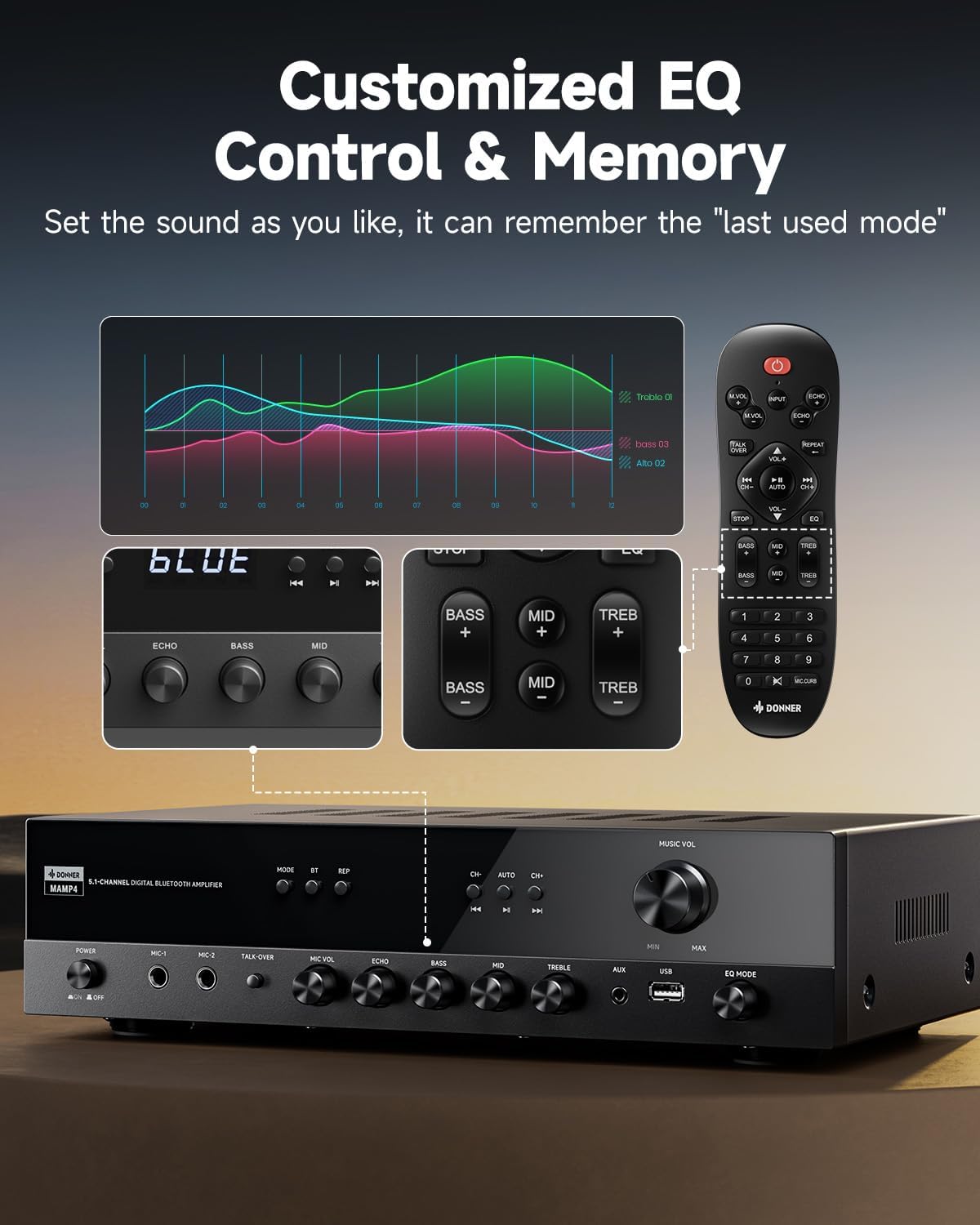
Image: Close-up of the Donner MAMP4 amplifier's front panel and remote control, illustrating the customizable EQ settings for bass, mid, and treble, and the memory function.
3. Papasangan Bluetooth
Select 'Bluetooth' mode. On your device, search for 'DONNER MAMP4' and pair. Use the Play/Pause button or Prev/Next buttons on the remote to control playback.
4. Operasi Radio FM
In FM mode, you can quickly select your preferred FM frequency by entering the numbers directly using the remote control. Use the 'CH+/-' buttons for automatic channel search.

Image: The Donner MAMP4 amplifier with its remote control, demonstrating the ease of selecting FM frequencies by direct numerical input.
5. Fungsi Mikropon
The amplifier includes dual 1/4'' microphone jacks. Adjust microphone volume and echo effect using dedicated knobs. The 'Talk Over' function lowers background music for clearer voice output during events or speeches.
6. Kadali jauh
The upgraded remote control provides full functionality, including treble, midrange, bass, echo, and Talkover settings in any input mode.

Image: Comparison of the new and old style remote controls for the Donner amplifier, highlighting the expanded functionality of the upgraded remote for input selection, EQ, echo, and Talkover.
7. Product Summary Video
Video: A product summary video for the Donner amplirén, nuduhkeuncasing its features and functionalities.
8. Donner 5.1 Channel Stereo Receiver Overview
Pidéo: Pajabat parantos réngséview video from DonnerDirect, detailing the features and benefits of the Donner 5.1 Channel Stereo Receiver.
Pangropéa
To ensure the longevity and optimal performance of your Donner MAMP4 ampLifier, turutan tungtunan pangropéa ieu:
- beberesih: Use a soft, dry cloth to clean the exterior of the unit. Avoid liquid cleaners or abrasive materials.
- Ventilasi: Ensure that all ventilation openings on the amplifier are clear and unobstructed to prevent overheating.
- Panyimpenan: If the unit will not be used for an extended period, unplug the power cord from the outlet.
- Batré Remote Control: Replace batteries in the remote control as needed. Dispose of used batteries properly according to local regulations.
Pamérésan masalah
If you encounter issues with your Donner MAMP4 amplifier, tingal solusi umum ieu:
- Henteu aya kakuatan: Pastikeun kabel listrikna dipasang pageuh kana duanana amplifier and a working wall outlet. Check the power switch on the front panel.
- Henteu aya sora: Verify that the correct input source is selected. Check all speaker and audio source connections for proper seating and polarity. Adjust volume levels.
- Hissing Sound in Standby: The MAMP4 has optimized noise reduction with added relays. If a persistent hissing sound occurs, ensure all connections are secure and try unplugging the unit for a few minutes before reconnecting.
- Masalah Nyapasangkeun Bluetooth: Pastikeun amplifier is in Bluetooth mode and your device's Bluetooth is enabled and discoverable. Try restarting both devices.
- FM Radio Reception Poor: Ensure the FM antenna is properly connected and extended. Try repositioning the antenna for better signal.
- Mikropon Teu Gawé: Ensure microphones are securely plugged into the correct jacks. Adjust 'MIC VOL' and 'ECHO' knobs.
For persistent issues, please contact Donner customer support or refer to qualified service personnel.
spésifikasi
| Fitur | Katerangan |
|---|---|
| Modél | MAMP4 |
| Daya Kaluaran (RMS) | L/R Speakers: 60W/4R; Surround & Center Speakers: 25W × 3 |
| Saluran | 5.1 Saluran |
| Vérsi Bluetooth | 5.3 |
| Rojongan USB | Nepi ka 64 GB |
| Input audio | 1 RCA, 1 AC-3, 2 Mic-in, AUX IN, Optical, Coaxial |
| Frékuénsi Radio FM | 76-108 MHz |
| Kontrol EQ | Treble, Midrange, Bass (independent adjustment) |
| Fitur husus | Talk Over function, Settings Memory, Low Noise Design |
| Dimensi produk | 9.76 x 14.96 x 3.86 inci |
| Item Beurat | 13.2 pon |
Garansi & Rojongan
For warranty information, technical support, or any inquiries regarding your Donner MAMP4 amplifier, please contact Donner customer service.
- Pabrikan: Donner
- E-mail jasa saatos penjualan: service@donnermusic.com
- Bantuan profésional: Rujuk sadayana jasa ka tanaga jasa anu mumpuni.


