1. Bubuka
This manual provides detailed instructions for the installation, operation, and maintenance of your AINAVI 10-inch Touch Screen Car Stereo Radio for Toyota Highlander models manufactured between 2009 and 2013. Please read this manual thoroughly before installation and use to ensure proper function and safety.

Image 1.1: AINAVI 10-inch Car Stereo Radio installed in a Toyota Highlander dashboard, showcasing the CarPlay interface.
2. Setup jeung Instalasi
2.1. Eusi Paket
Pastikeun yén sadaya komponén aya dina pakét anjeun:

Image 2.1: Included components for the AINAVI Car Stereo Radio.
- Head Unit (1280*720) for Toyota Highlander
- Manual pamaké
- Kabel Daya
- AHD 1080P Rear View Kaméra
- Mikropon
- Blue Tool (Frame Removal Tool)
- Antena GPS
- USB Cables (4Pin & 6Pin)
2.2. Catetan Pra-Pasang
- JBL System Compatibility: If your Toyota Highlander is equipped with a JBL sound system, an additional JBL cable (ASIN: B0BRFHH8D4) is required for proper audio integration.
- Warning Indicator Switch:
If your car dashboard has a leutik alarm button, you will need to acquire an emergency alarm button compatible with the 10.2-inch multimedia player. If your car dashboard has a badag alarm button, direct installation is possible without changing the alarm button. Please consult with technical support if unsure.

Image 2.2: Guide for Toyota Highlander warning indicator switch types.
2.3. General Installation Advice
Professional installation is recommended due to the complexity of car stereo systems. Ensure the vehicle's battery is disconnected before beginning installation. Refer to your vehicle's specific service manual for dashboard disassembly and reassembly procedures.
3. Parentah Operasi
3.1. Sistim Leuwihview
The AINAVI Car Stereo operates on Android 12.0, providing a responsive and feature-rich interface. It features an 8-Core CPU and Dual-Core GPU for smooth performance, along with 3GB RAM and 32GB ROM for applications and data storage.

Image 3.1: System hardware and connectivity features.
3.2. Fitur konektipitas
- Wired/Wireless CarPlay & Android Auto: Connect your smartphone for seamless integration of navigation, music, calls, and messages.
- MirrorLink/AirPlay: Mirror your phone's screen directly onto the stereo display. Supports 1280x720 resolution for HD projection.
- Bluetooth: Pikeun nelepon tanpa nganggo leungeun sareng streaming audio.
- 5G WiFi: Ensures faster network speeds for online applications and navigation updates.

Image 3.2: Wired and Wireless CarPlay, Android Auto, MirrorLink, and AirPlay functionality.

Image 3.3: Mobile Phone Mirroring feature.
3.3. Tampilan jeung Interface pamaké
- 10-inch QLED Touch Screen: Enjoy a high-resolution (1280x720) display with enhanced color gamut (up to 90% color standard) and high touch sensitivity.
- Fungsi Layar Pamisah: Run two applications simultaneously on the screen for multitasking (e.g., navigation and music). Note: Not all apps support split-screen functionality.
- Colorful Panel Light: Customize the button backlighting with 7 color options, either static or cycling.

Image 3.4: High Grade QLED Quantum Screen technology.

Image 3.5: Split Screen Functionality.
3.4. Fitur Audio
The stereo includes a professional DSP (Digital Signal Processor) and 48-band EQ for advanced audio customization.
- 48-EQ (Voice Point Touch Control): Saluyukeun sora profiles including Normal, Jazz, Pop, Classical, Heavy Metal, Vocal, Soft, and 6 kinds of Surround Sound patterns. Fine-tune bass boost and individual speaker volume.
- USB to RCA Output: Connect external headrest monitors (ASIN: B0CCV2GC25) to play videos independently for rear seat passengers.

Ékualiser

Volume Control

Sound Point Control
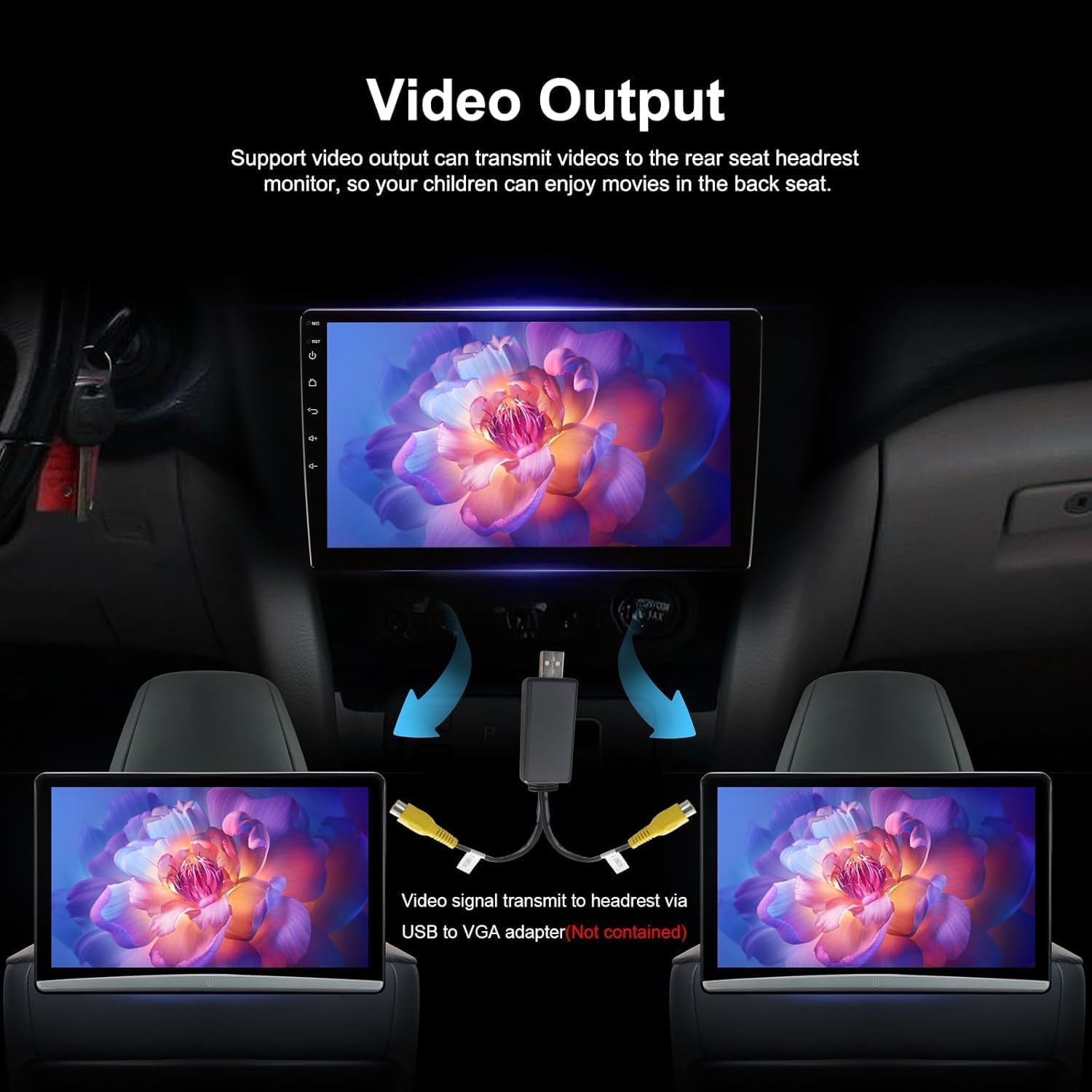
Image 3.6: Video Output to Headrest Monitors.
3.5. Navigation and Rear View Kaméra
- Napigasi GPS: Supports most satellite services and Google Maps, offering 2D/3D perspectives, various route types, and voice guidance.
- 1080P Pungkur View Kaméra: Provides a clear HD reversing scene with astern ruler lines. If your car supports astern trajectory, it will also be displayed.
4. Pangropéa
To ensure the longevity and optimal performance of your AINAVI Car Stereo, follow these general maintenance guidelines:
- Jaga layar tetep bersih nganggo lawon anu lemes sareng henteu ngaganggu. Hindarkeun pembersih anu kasar.
- Ensure all cables are securely connected. Periodically check connections for looseness.
- Ulah ngalaan unit ka suhu ekstrim atawa sinar panonpoé langsung pikeun période nambahan.
- Regularly update the system software if updates are available, following instructions provided by AINAVI.
5. Cara ngungkulan
If you encounter issues with your AINAVI Car Stereo, consider the following general troubleshooting steps:
- Henteu aya kakuatan: Pariksa sadaya sambungan listrik sareng sekering. Pastikeun kontak kendaraan hurung.
- Henteu aya sora: Verify speaker connections, volume settings, and audio source selection. Check if the mute function is active.
- Layar rampa teu ngaréspon: Try restarting the unit. Ensure the screen is clean and free of debris.
- Connectivity Issues (Bluetooth/CarPlay/Android Auto): Ensure your phone's Bluetooth/Wi-Fi is on and discoverable. Try re-pairing devices. Check for software updates on both the stereo and your phone.
- Navigation Inaccurate: Pastikeun anteneu GPS dipasang kalawan bener sareng gaduh tampilan anu jelas view ti langit.
For persistent issues or complex problems, please refer to the technical support section for assistance.
6. Spésifikasi
| Fitur | Rincian |
|---|---|
| Item Beurat | 5.17 pon |
| Ukuran Paket | 17.63 x 15.27 x 5.94 inci |
| Nomer modél | 3G+32G |
| Ukuran tampilan | 10 inci |
| Sistem operasi | Android 12 |
| Kapasitas Panyimpenan Mémori | 32 GB |
| Téhnologi konektipitas | Android Mirroring+Airplay, Bluetooth, FM+AUX, USB, Wi-Fi, Wireless/Wire (Carplay&Android Auto) |
| Fitur husus | 48EQ (Sound Point Control)+Premium DSP, 8-Core and Dual USB (4Pin+6Pin), Highest Level QLED, Panel light and Four Themes, Split Screen Function, Equalizer, Touch Screen, Voice Control, Volume Control, Hands-Free Calling, FM Tuner, Music Streaming, RCA, Screen Mirroring, Subwoofer, Spotify, Rear View Camera Input, Full RCA Video Output for Back Seat Headrest Monitor |
| Tipe Peta | Europe, North America, South America, Worldwide |
| Mode Kaluaran Audio | Sakuliling Sora stereo |
7. Émbaran jaminan
The AINAVI Car Stereo Radio comes with a 12-garansi sasih from the date of purchase. This warranty covers manufacturing defects and malfunctions under normal use. Please retain your proof of purchase for warranty claims. For detailed warranty terms and conditions, please contact AINAVI customer support.
8. Technical Support and Customer Service
For installation assistance, technical questions, or customer service, please follow these steps:
8.1. Rojongan Online
- Buka halaman produk di Amazon.
- Locate the "Sold by" section and click on "HomeCar" (the seller's name).
- Dina halaman anu ngajual, klik "Tanyakeun patarosan".
- Provide pictures or videos of the technical or installation questions you have.

Image 8.1: Steps to contact technical support via Amazon.
8.2. Direct Contact Information
You can also reach AINAVI customer service directly:
- Hotline: +1 (833) 858-5016
- Jam Gawé: 01:00 PM to 00:00 AM PST
- Surélék: info@ainavi.com

Image 8.2: AINAVI Customer Service Contact Information.


