1. Bubuka
Thank you for choosing the Proscenic F10 Ultra Wet Dry Vacuum Cleaner. This appliance is designed to provide efficient and versatile cleaning for various hard floor surfaces, combining vacuuming and wiping functions. Please read this manual thoroughly before initial use to ensure proper operation, maintenance, and safety. Keep this manual for future reference.
2. Parentah Kasalametan penting
Nalika nganggo alat listrik, pancegahan dasar kedah diturutan, kalebet ieu:
- Baca sadaya parentah sateuacan nganggo alat ieu.
- Ulah make di luar atawa dina surfaces baseuh.
- Ulah ngantep dipaké salaku cocooan. Perhatian caket diperyogikeun nalika dianggo ku atanapi caket barudak.
- Anggo ngan sakumaha anu dijelaskeun dina manual ieu. Paké ngan kantétan dianjurkeun produsén urang.
- Ulah make jeung ari ruksak atawa colokan. Upami alat henteu jalan sakumaha sakuduna, parantos diturunkeun, ruksak, ditinggalkeun di luar, atanapi murag kana cai, balikkeun deui ka pusat layanan.
- Ulah narik atawa mawa ku ari, make ari salaku cecekelan, nutup panto dina ari, atawa narik ari sabudeureun ujung seukeut atawa juru. Ulah ngajalankeun alat ngaliwatan kabel. Tetep ari jauh ti surfaces dipanaskeun.
- Ulah cabut colokan ku cara narik kana kabel. Pikeun cabut colokan, keupeul colokan, teu ari.
- Ulah nanganan colokan atawa alat ku leungeun baseuh.
- Ulah nempatkeun obyék nanaon kana bukaan. Entong nganggo sareng bukaan anu diblokir; tetep bébas tina lebu, serat, rambut, sareng naon waé anu tiasa ngirangan aliran hawa.
- Jauhkeun buuk, pakean longgar, ramo, sareng sadaya bagian awak tina bukaan sareng bagian anu obah.
- Ulah nyokot naon bae anu kaduruk atawa ngaroko, kayaning roko, korek api, atawa lebu panas.
- Entong dianggo pikeun nyandak cairan anu gampang kaduruk atanapi kaduruk, sapertos béngsin, atanapi dianggo di daérah anu aya.
- Ulah nyokot bahan toksik, kayaning pemutih klorin, amonia, atawa solokan cleaner.
- Ulah make tanpa tank jeung saringan di tempat.
- Pareuman sadaya kadali sateuacan cabut colokan.
- Paké perawatan tambahan nalika meresihan dina tangga.
- Ulah dipaké pikeun nyokot barang teuas atawa seukeut kayaning kaca, paku, screws, koin, jsb.
- Nyegah ngamimitian teu dihaja. Pastikeun saklar dina posisi pareum samemeh nyambung ka pak batre, nyokot atawa mawa alat.
- Ngecas ukur nganggo carjer anu ditunjuk ku produsén.
3. Komponén produk
Familiarize yourself with the parts of your Proscenic F10 Ultra Wet Dry Vacuum Cleaner.
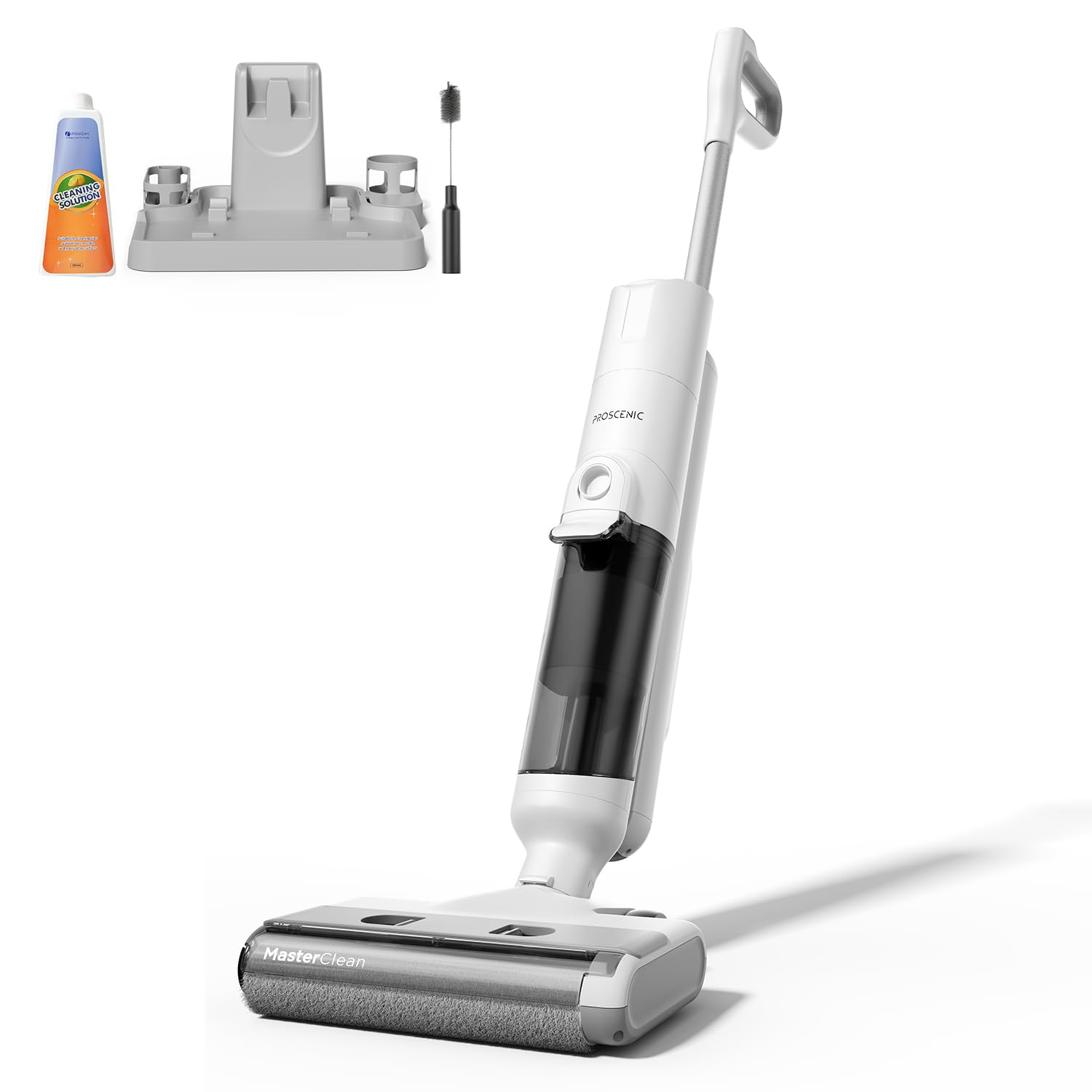
Image 1: Proscenic F10 Ultra Wet Dry Vacuum Cleaner. This image displays the main body of the vacuum cleaner, showcasing its sleek design and primary components such as the handle, main unit, and floor head.
Eusi pakét:
- Unit vakum utama
- Majelis Pakem
- Tangki Cai Bersih
- Tangki Cai kotor
- Base ngecas
- Adaptor kakuatan
- Pakakas Sikat Bebersih
- Saringan HEPA (tos dipasang atanapi cadangan)
- Manual pangguna (dokumén ieu)
Komponén konci:
- Témbong LED: Provides real-time information on battery status, cleaning mode, and alerts.
- Pitunjuk sora: Guides users through operation and maintenance tasks.
- Tangki cai bersih: Nyimpen cai tawar sareng larutan pembersih.
- Tangki Cai Kotor: Ngumpulkeun cai kotor jeung lebu.
- Gulungan Sikat: Sacara aktif ngagosok sareng ngabersihkeun lanté.
- Sénsor Infrabeureum: Detects dirt levels in Smart Mode.
- Tombol Bebersih Mandiri: Initiates the automatic brush cleaning cycle.
4. Setup jeung Pamakéan Awal
4.1 Majelis
- Selapkeun rakitan gagang kana unit utama dugi ka ngaklik pageuh kana tempatna.
- Pastikeun tank cai beresih jeung tank cai kotor bener seated dina posisi masing-masing.
4.2 Ngecas Batré
- Simpen panyedot debu dina dasar pangisi dayana.
- Connect the power adapter to the charging base and then to a power outlet.
- The LED display will indicate the charging status. A full charge takes approximately 4 hours.
- Ensure the appliance is fully charged before its first use to maximize battery life.
4.3 Ngeusian Tangki Cai Beresih
- Cabut tank cai bersih tina unit utama.
- Open the tank cap and fill with clean tap water. You may add a small amount of non-foaming cleaning solution suitable for wet/dry vacuums, following the solution's instructions. Do not overfill.
- Close the cap securely and reinsert the tank into the vacuum cleaner.
5. Parentah Operasi
5.1 Powering on / Pareum
Press the Power button on the handle to turn the vacuum cleaner on or off. The LED display will illuminate, and voice prompts will guide you.
5.2 Milih Modeu beberesih
The Proscenic F10 Ultra offers three cleaning modes:
- Smart Mode: Infrared sensors automatically detect the level of dirt and adjust suction power and water flow accordingly. Ideal for general cleaning and varying dirt levels.
- Modeu Vakum: Provides economical cleaning with reduced water output, suitable for wooden floors or light dry debris.
- Mode Max: Delivers intensive stain removal with maximum suction and water flow, recommended for heavily soiled areas like kitchens and terraces.
Press the Mode button on the handle to cycle through the available cleaning modes. The selected mode will be displayed on the LED screen.
5.3 Prosés beberesih
- Pastikeun tank cai bersih dieusian jeung tank cai kotor kosong.
- Turn on the appliance and select your desired cleaning mode.
- Tilt the vacuum cleaner back to engage the brush roll and begin cleaning. The self-propelled design assists in effortless movement.
- Move the vacuum cleaner slowly over the floor surface, allowing it to vacuum and wipe simultaneously.
- For edge cleaning, guide the vacuum cleaner along walls and baseboards.
- Monitor the LED display for battery status and any alerts. Voice prompts will also provide guidance.
- When finished, turn off the appliance and return it to the charging base.
6. Pangropéa sarta perawatan
Regular maintenance ensures optimal performance and extends the lifespan of your Proscenic F10 Ultra.
6.1 Fungsi timer beberesih
- Saatos unggal dianggo, simpen panyedot debu dina dasar pangisi dayana.
- Pastikeun aya cai bersih anu cekap dina tangki cai bersih.
- Press the Self-Cleaning button (usually indicated by a water drop icon).
- The appliance will automatically clean the brush roll and internal pathways. This process typically takes about 1 minute.
- Once the self-cleaning cycle is complete, empty the dirty water tank.
6.2 Ngosongkeun sareng Ngabersihan Tangki Cai Kotor
- Cabut tank cai kotor tina unit utama.
- Buka tangkina kalawan ati-ati teras miceun cai kotor sareng runtah.
- Bilas tank tuntas ku cai bersih.
- Clean the filter assembly within the dirty water tank.
- Ngidinan sadaya bagian ka hawa garing lengkep sateuacan reassembling.
6.3 Ngabersihan Sikat Roll
- Even with the self-cleaning function, periodic manual cleaning of the brush roll is recommended.
- Pareuman jeung cabut colokan alat.
- Remove the brush roll cover and then the brush roll itself.
- Use the provided cleaning brush tool to remove any tangled hair or debris from the brush roll.
- Bilas sikat roll handapeun cai ngocor.
- Allow the brush roll to air dry completely before reinstalling.
6.4 Ngabersihan Filter HEPA
Saringan HEPA kedah dibersihkeun sacara rutin sareng digentos unggal 3-6 bulan sakali, gumantung kana panggunaanana.
- Locate and remove the HEPA filter, typically found within the dirty water tank assembly.
- Tap the filter gently to dislodge dust and debris. You may rinse it under cool running water.
- Ensure the filter is completely dry before reinstallation to prevent mold growth and maintain suction performance.
7. Cara ngungkulan
Tingali kana bagian ieu pikeun masalah umum sareng solusina.
| Masalah | Mungkin Cukang lantaranana | Solusi |
|---|---|---|
| Alat henteu hurung. | Batré béak. | Charge the appliance fully. |
| Tombol daya teu dipencet leres. | Pastikeun tombol daya dipencet pageuh. | |
| Kinerja nyeuseup atanapi beberesih anu goréng. | Tangki cai kotor pinuh. | Kosongkeun sareng ngabersihan tank cai anu kotor. |
| Gulungan sikat kusut atanapi kotor. | Clean the brush roll, remove any hair or debris. | |
| Saringan HEPA mampet. | Ngabersihan atawa ngaganti saringan HEPA. | |
| Tangki cai beresih kosong. | Eusian deui bak cai bersih. | |
| Leak cai. | Tanks not properly installed. | Pastikeun tank cai bersih sareng kotor aman di tempatna. |
| Tank caps are not sealed. | Check that all tank caps are tightly closed. | |
| Fungsi beberesih mandiri teu jalan. | Insufficient water in clean water tank. | Ensure the clean water tank is filled above the minimum level. |
| Tangki cai kotor pinuh. | Empty the dirty water tank before initiating self-cleaning. |
8. Spésifikasi
| merek | Proscenic |
| Modél | F10 Ultra |
| Item Beurat | 8.8 pon |
| Faktor Bentuk | Handheld (referring to the main unit's design for maneuverability) |
| Jenis Batré | Litium-Ion |
| Jenis Filter | Saringan HEPA |
| Sumber Daya | Batré Powered |
| Voltage | 28.8 volt |
| Capacity (Water Tanks) | 1.3 liter |
| Wattage | 350 watt |
| Waktu Ngecas | 4 Jam |
| Ngajalankeun Time | Up to 60 minutes (depending on mode) |
| Warna | Bodas |
9. Garansi sarta Rojongan Palanggan
Proscenic products are manufactured to high-quality standards. For specific warranty information, please refer to the warranty card included with your purchase or visit the official Proscenic website. If you encounter any issues or have questions regarding your Proscenic F10 Ultra Wet Dry Vacuum Cleaner, please contact Proscenic customer support for assistance.
Pabrikan: Proscenic
Kanggo dukungan salajengna, mangga buka Proscenic Store on Amazon.


