1. Bubuka
This manual provides detailed instructions for the setup, operation, and maintenance of your Oakcastle SB80 Split Soundbar. Please read this manual thoroughly before using the product to ensure proper function and to maximize your audio experience. Keep this manual for future reference.
2. Émbaran Kasalametan
- Do not expose this appliance to dripping or splashing liquids.
- Ulah nempatkeun barang-barang anu dieusi cairan, sapertos vas, dina alat.
- Pastikeun ventilasi anu leres. Ulah meungpeuk sagala bukaan ventilasi.
- Entong dipasang di deukeut sumber panas sapertos radiator, register panas, kompor, atanapi aparat sanésna (kalebet ampLiifiers) anu ngahasilkeun panas.
- Ngajaga kabel listrik tina leumpang atanapi diciwit, khususna dina colokan, wadah genah, sareng titik dimana aranjeunna kaluar tina alat.
- Ngan anggo kantétan/aksésori anu ditunjuk ku produsén.
- Cabut colokan alat ieu nalika badai kilat atanapi nalika henteu dianggo kanggo waktos anu lami.
- Rujuk sadayana jasa ka tanaga jasa anu mumpuni. Diperlukeun ngalayanan nalika aparatur ruksak ku cara naon waé, sapertos kabel catu daya atanapi colokan rusak, cairan tumpah atanapi barang murag kana aparatur, aparatur parantos kakeunaan hujan atanapi lembab, henteu beroperasi normal. , atawa geus turun.
3. Eusi Paket
Carefully unpack your Oakcastle SB80 Soundbar and ensure all items listed below are present and in good condition.

Gambar 3.1: The Oakcastle SB80 Soundbar and its complete set of accessories, including cables, remote, and bases, as packaged.
- Oakcastle SB80 Soundbar (main unit)
- Kadali jauh
- 2 x Pedestal Bases (for split configuration)
- Kit Pamasangan témbok
- 2 x RCA Cables
- Kabel Optik
- Kabel AUX
- Guide pamaké
- Power Adapter (UK/EU specific)
4. Produk Langkungview
The Oakcastle SB80 is a versatile 2.2 channel split soundbar designed to enhance your audio experience. It features 120W peak power output, multiple connectivity options, and a unique dual design allowing it to function as a single soundbar or two separate tower speakers.
4.1. Fitur Unit Utama
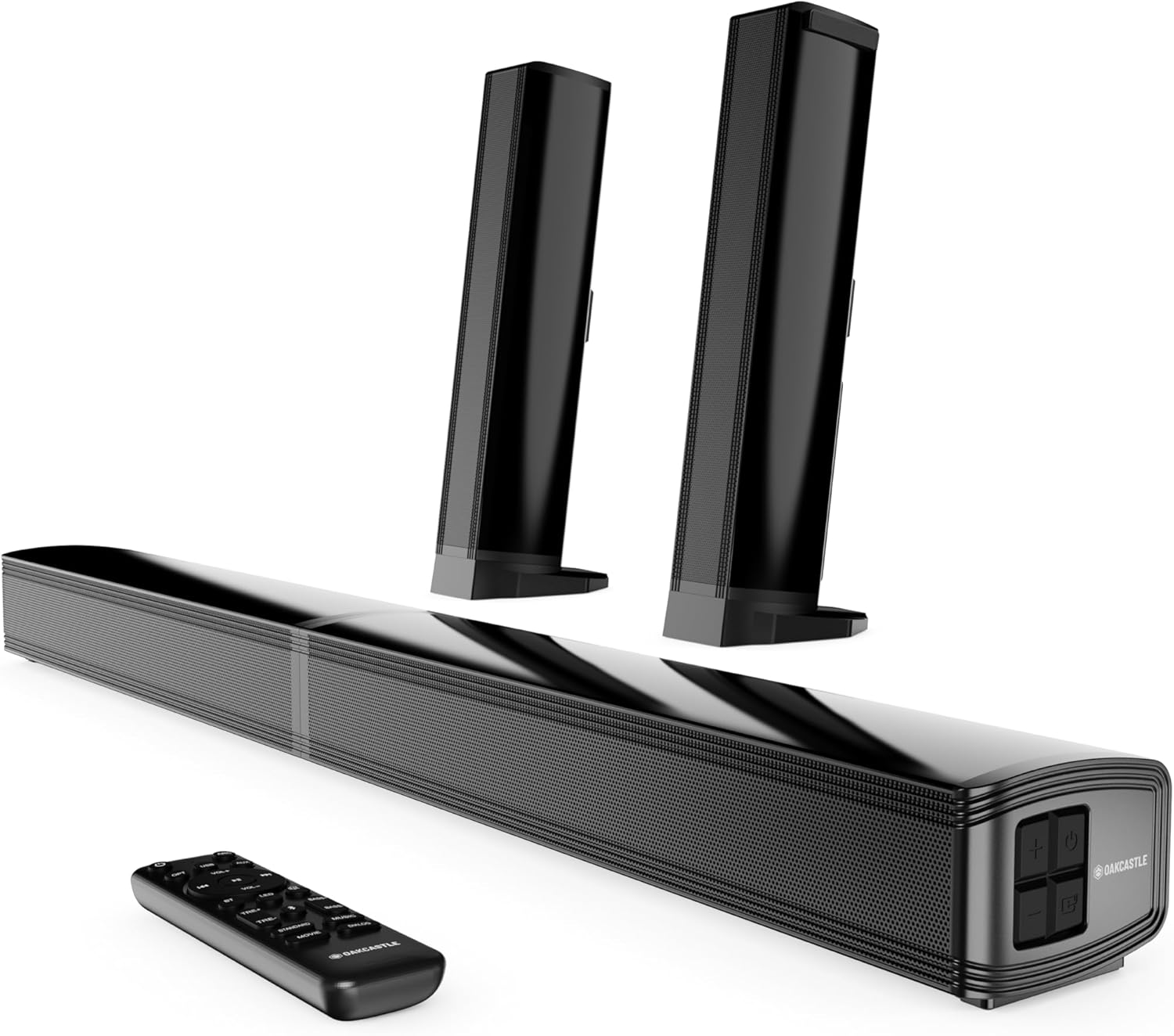
Gambar 4.1: The Oakcastle SB80 Soundbar showcasing its ability to be used as a single bar or split into two vertical speakers, accompanied by its remote control.
- Desain Ganda: Can be used as a single horizontal soundbar or split into two vertical tower speakers.
- Kaluaran Audio: 120 Watts peak power, 2.2 channel stereo sound.
- Supir: Features full-range high-fidelity drivers and dynamic bass drivers for rich sound.
- Konektipitas: Bluetooth 5.3, HDMI ARC, Optical, AUX, USB.
- Kontrol: Integrated buttons on the unit and a full-function remote control.
4.2. Sambungan Panel Rear
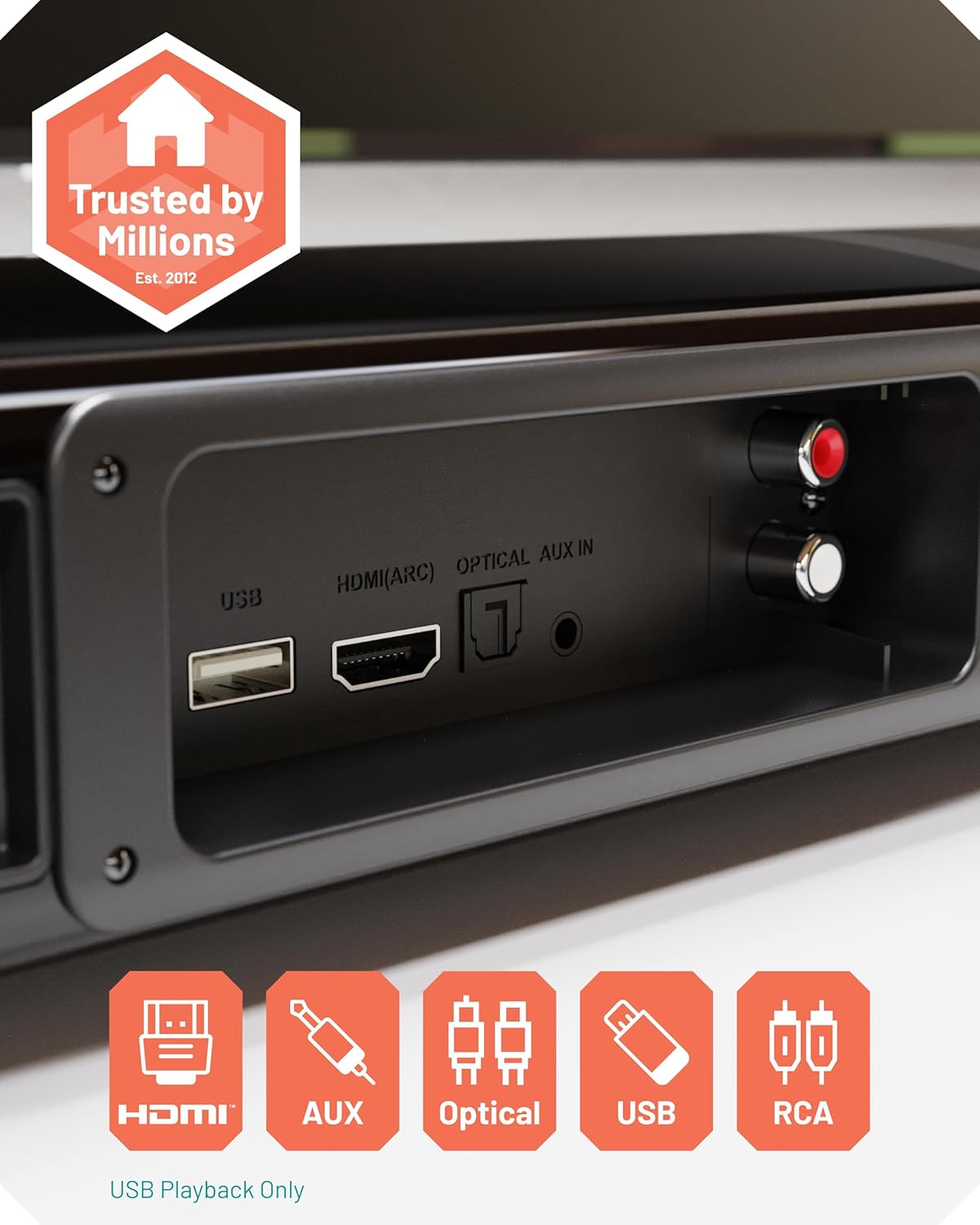
Gambar 4.2: A nutup-up view of the rear connection panel of the soundbar, highlighting the various input ports available for connecting external devices.
- Port USB: For USB media playback only.
- Port HDMI (ARC): Connect to your TV's HDMI ARC port for high-quality audio and TV remote control integration.
- OPTIK DI Port: Connect to your TV or other devices using an optical cable for digital audio.
- Port AUX IN: Connect to devices with a 3.5mm audio output.
- RCA IN Ports: Connect to devices with RCA audio output (red/white).
4.3. Kadali jauh
The included remote control allows for convenient operation of all soundbar functions from a distance. Ensure batteries are correctly inserted.

Gambar 4.3: The soundbar's main unit with its remote control, emphasizing the internal speaker components.
- Tombol Daya: Ngahurungkeun atanapi mareuman bar sora.
- Pilihan Input: Cycles through HDMI, Optical, AUX, Bluetooth, USB inputs.
- Kontrol volume: Nyetél volume master.
- Tombol Bisu: Ngajempékeun atanapi nganonaktipkeun audio.
- Modeu EQ: Selects between different equalizer presets (e.g., Music, Movie, News, 3D).
- Kontrol Bass/Treble: Saluyukeun tingkat bass sareng treble.
5. Setélan
5.1. Choosing Your Configuration
The Oakcastle SB80 offers two primary configurations: a single horizontal soundbar or two separate vertical tower speakers.

Gambar 5.1: The soundbar in its split configuration, with each speaker placed vertically on a surface, demonstrating its flexible design.
- Single Soundbar: Connect the two halves of the soundbar together to form a single horizontal unit. Place it on a flat surface below your TV or mount it on the wall.
- Split Speakers: Separate the two halves of the soundbar. Attach each half to a pedestal base. Place the two speakers vertically on either side of your TV for a wider stereo soundstage.
5.2. Pamasangan Tembok
A wall mounting kit is included for installing the soundbar in its single configuration on a wall. Ensure the wall material can support the weight of the soundbar and use appropriate tools and fasteners. Consult a professional if unsure.
5.3. Connecting to Your Devices
Choose the appropriate connection method based on your TV or audio source.
- HDMI ARC (Disarankeun):
- Connect one end of an HDMI cable to the HDMI (ARC) port on the soundbar.
- Connect the other end to the HDMI ARC port on your TV.
- This connection allows for high-quality digital audio and often enables control of the soundbar's volume using your TV remote.
- Optik:
- Connect one end of the optical cable to the OPTICAL IN port on the soundbar.
- Sambungkeun tungtung anu hiji deui ka port Optical Digital Audio Out dina TV atanapi sumber audio anjeun.
- AUX:
- Connect one end of the 3.5mm AUX cable to the AUX IN port on the soundbar.
- Connect the other end to the 3.5mm audio output (headphone jack) on your TV, smartphone, or other audio device.
- RCA:
- Connect the RCA cables to the RCA IN ports on the soundbar (red to red, white to white).
- Connect the other ends to the corresponding RCA audio output ports on your TV or audio source.
- Sambungan Daya:
- Sambungkeun adaptor kakuatan ka port DC IN dina soundbar.
- Colokkeun adaptor kakuatan kana stop kontak témbok.
6. Parentah Operasi
6.1. Daya Hurung / Pareum
Pencét tombol Daya dina bar sora atanapi kadali jauh pikeun ngaktipkeun atanapi mareuman unit.
6.2. Milih Modeu Input
Press the 'Input' or 'Source' button on the soundbar or remote control repeatedly to cycle through the available input modes: HDMI ARC, Optical, AUX, Bluetooth, and USB. The current input mode will be indicated on the soundbar's display.
6.3. Papasangan Bluetooth
- Turn on the soundbar and select Bluetooth mode using the 'Input' button. The soundbar will enter pairing mode, indicated by a flashing Bluetooth indicator.
- Dina alat anjeun anu nganggo Bluetooth (contona, smartphone, tablet), buka setélan Bluetooth teras milarian alat anu sayogi.
- Select "Oakcastle SB80" from the list.
- Once paired, the Bluetooth indicator on the soundbar will stop flashing and remain solid. You can now play audio from your device through the soundbar.
- To disconnect, turn off Bluetooth on your device or select a different input mode on the soundbar.

Gambar 6.1: The soundbar positioned below a television, illustrating its seamless integration into a home entertainment setup and its Bluetooth connectivity feature.
6.4. USB Playback
Selapkeun USB flash drive nu ngandung audio files into the USB port on the soundbar. Select USB mode using the 'Input' button. The soundbar will automatically begin playing compatible audio files. Use the remote control to navigate tracks and adjust playback.
6.5. Audio Adjustment
- Volume: Use the Volume Up/Down buttons on the soundbar or remote control.
- Modeu EQ: Press the 'EQ' button on the remote to cycle through preset equalizer modes (e.g., Music, Movie, News, 3D Sound Mode) to optimize audio for different content.
- Bass/Tréble: Use the dedicated Bass and Treble buttons on the remote control to fine-tune the low and high frequencies.
7. Pangropéa
- beberesih: Anggo lawon anu lembut sareng garing pikeun ngabersihan permukaan soundbar. Ulah make cleaners cair atawa bahan abrasive.
- Panyimpenan: Upami nyimpen soundbar kanggo waktos anu panjang, pegatkeun sambungan listrik sareng simpen di tempat anu tiis sareng garing.
- Ventilasi: Pastikeun bukaan ventilasi bersih tina lebu sareng lebu pikeun nyegah overheating.
8. Cara ngungkulan
| Masalah | Mungkin Cukang lantaranana | Solusi |
|---|---|---|
| Taya kakuatan | ari kakuatan teu disambungkeun; Stopkontak teu aktip. | Pastikeun kabel listrik disambungkeun aman. Coba colokan listrik anu béda. |
| Taya sora | Incorrect input mode selected; Volume too low; Muted; Incorrect cable connection. | Select the correct input mode. Increase volume. Unmute the soundbar. Check all cable connections. |
| Bluetooth teu nyambung | Soundbar not in pairing mode; Device too far; Device already connected to another unit. | Ensure soundbar is in Bluetooth pairing mode. Move device closer. Disconnect from other Bluetooth devices. |
| Kadali jauh teu jalan | Batteries depleted; Obstruction between remote and soundbar; Remote not pointed correctly. | Replace batteries. Remove any obstructions. Point remote directly at the soundbar's sensor. |
| Sora distort | Volume too high; Poor audio source quality; Incorrect EQ settings. | Reduce volume. Try a different audio source. Adjust EQ settings. |
9. Spésifikasi

Gambar 9.1: An internal perspective of the soundbar's speaker drivers, illustrating its 120W power output and 2.2 channel audio configuration.
| Ngaran modél | SB80 |
| merek | Oakcastle |
| Tipe Speaker | Soundbar (Split Design) |
| Daya Kaluaran Max | 120 Watt |
| Mode Kaluaran Audio | Stereo (2.2 Channel Surround Sound Configuration) |
| Téknologi Komunikasi Nirkabel | Bluetooth 5.3 |
| Konektipitas | Bluetooth, HDMI (ARC), Optik, AUX, USB |
| Métode kontrol | Remote Control, Tombol on-unit |
| Tipe Pamasangan | Tembok Mountable |
| Sumber Daya | Kabel Listrik |
| Product Dimensions (Single Bar) | 38.8 x 7.2 x 5.4 cm (L x W x H) |
| Beurat | 2.91 kg |
| Alat nu cocog | Home Cinema, Game Console, MP3 Player, Smartphone, Television |
10. Garansi jeung Rojongan
For warranty information or technical support, please refer to the warranty card included with your product or visit the official Oakcastle website. If you encounter any issues not covered in this manual, please contact Oakcastle customer service for assistance.
Dukungan Online: www.oakcastle.co.uk/support (Kelamptautanana, mangga pariksa dukungan anu saleresna URL)


