1. Bubuka
Thank you for choosing the MONODEAL CD401 Portable HiFi Stereo CD Player. This versatile device combines classic CD playback with modern connectivity options, including Bluetooth, FM radio, USB, and AUX input. Enjoy high-fidelity audio with built-in speakers, dynamic RGB lighting, and convenient remote control. This manual provides essential information for setup, operation, and maintenance to ensure optimal performance.
2. Naon dina Box
- 1x MONODEAL CD401 CD Player
- 1 x Manual Pamaké
- 1x Kadali Jauh
- 1x 3.5mm Kabel Audio
- 1x Charging Cable and Plug
3. Produk Langkungview
The MONODEAL CD401 is designed for both portability and desktop use, offering a blend of classic and contemporary audio features. Its compact design includes integrated speakers and a clear display for easy navigation.
Gambar 1: Hareupeun view of the MONODEAL CD401 Portable CD Player, showcasing its compact design and central display.
Fitur konci:
- Multi-Color RGB Lighting: Dynamic lighting effects that change color to the beat of the music, enhancing visual and auditory experience.
- Bluetooth 5.3: Functions as both a Bluetooth transmitter (to headphones/speakers) and receiver (from phones/tablets).
- Integrated 4*HIFI Speakers: Provides surround sound for an immersive listening experience.
- Sababaraha Modeu Playback: Easily switch between CD, Bluetooth, FM Radio, AUX, and USB modes via a large LCD screen.
- Wide CD Compatibility: Supports CD, CD-R, CD-RW, MP3, and WMA formats.
- Balukar sora: Choose from five equalizer presets: Flat, Rock, Pop, Jazz, and Classic.
- Radio FM: Access FM frequencies from 76MHz to 108MHz.
- USB & AUX Connectivity: Play music from a USB flash drive or connect external devices via the 3.5mm AUX cable.
- Batré anu tiasa dicas deui: Built-in 3000mAh battery offers up to 8 hours of continuous playback.
- Timer Saré: Customizable sleep timer from 10 to 90 minutes.

Figure 2: The MONODEAL CD401 displaying its multi-color RGB lighting effects, which synchronize with the music.
Kontrol sareng palabuhan:
The device features intuitive controls on its top panel and essential ports on the side for easy access.

Figure 3: Top panel of the CD player showing playback controls, mode selection, and display.

Figure 4: The side panel of the CD player, illustrating the AUX input, USB port, and charging port.
Video Produk Resmi:
Video 1: Official product video from MonoDeals showcasing the Desktop CD Player with Bluetooth and RGB Light features.
Video 2: Official product video from MonoDeals demonstrating the Desktop Player's Bluetooth functionality and colorful lighting effects.
4. Setélan
4.1 Ngecas Alat
- Connect the provided USB charging cable to the charging port on the side of the CD player.
- Plug the other end of the USB cable into a compatible USB power adapter (included) or a computer's USB port.
- The battery indicator on the LCD screen will show charging status. A full charge provides up to 8 hours of playback.
4.2 Nyelapkeun CD
- Buka panutup kompartemen CD lalaunan.
- Place the CD with the label side facing up onto the spindle. Ensure it clicks into place.
- Close the CD compartment cover firmly until it latches.
4.3 Powering on / Pareum
- To power on, slide the ON/OFF switch to the 'ON' position. The LCD screen will light up.
- Pikeun mareuman, geser saklar ON/OFF ka posisi 'OFF'.
5. Parentah Operasi
5.1 Pamilihan Mode
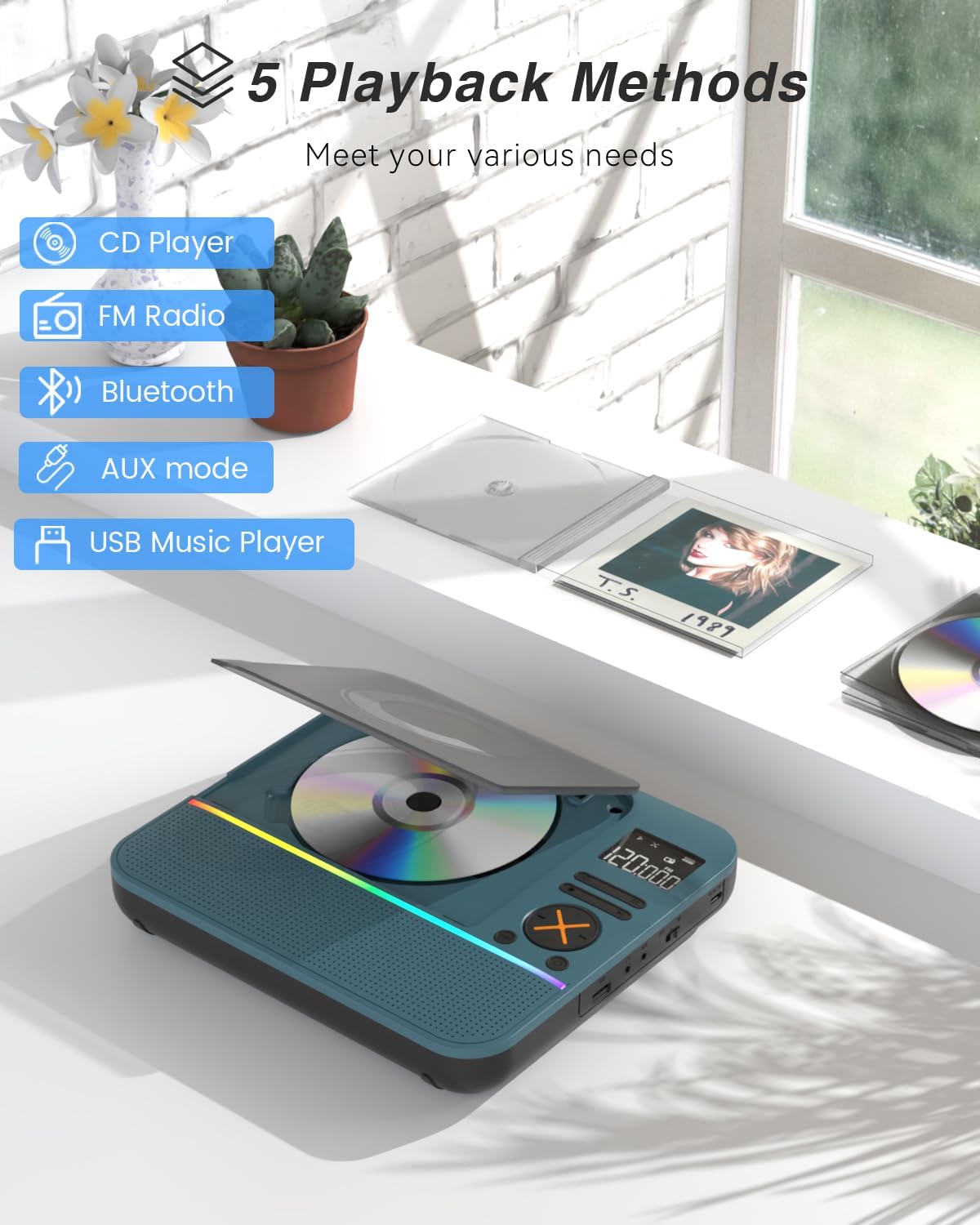
Pencét éta MODÉ button on the device or remote control to cycle through the available modes: CD, Bluetooth, FM, AUX, and USB.

Figure 5: The CD player's display indicating the five available playback methods: CD, FM Radio, Bluetooth, AUX mode, and USB Music Player.
5.2 Playback CD
- Insert a compatible CD (CD, CD-R, CD-RW, MP3, WMA).
- Select 'CD' mode. The player will automatically start reading the disc.
- Ngagunakeun éta Play / Reureuh, Lagu salajengna, jeung Lagu saméméhna tombol pikeun ngadalikeun playback.
- Pencét éta ULANGAN button to cycle through repeat options (e.g., repeat one, repeat all).
- Pencét éta EQ button to select desired sound effects (Flat, Rock, Pop, Jazz, Classic).
5.3 Modeu Bluetooth
The CD401 supports both Bluetooth transmission (BT TX) and reception (BT RX).
- Bluetooth Receiver (BT RX): Select 'Bluetooth' mode. The device will enter pairing mode. On your phone/tablet, search for 'CD401' and connect. Audio from your device will play through the CD player's speakers.
- Bluetooth Transmitter (BT TX): Select 'Bluetooth' mode. Press and hold the BT TX button. The CD player will search for nearby Bluetooth headphones or speakers. Once connected, CD audio will transmit to the external Bluetooth device.

Figure 6: Illustration of the CD player's dual Bluetooth functionality, allowing it to receive audio from a phone (RX) or transmit to headphones (TX).
5.4 Radio FM
- Select 'FM' mode.
- Ngagunakeun éta Lagu salajengna jeung Lagu saméméhna buttons to scan for radio stations.
- The FM frequency range is 76MHz to 108MHz.
5.5 Input AUX
- Select 'AUX' mode.
- Connect an external audio device (e.g., smartphone, computer) to the AUX IN port using the provided 3.5mm audio cable.
- The CD player will now act as a wired speaker for the connected device.
- Note: Bluetooth connectivity is not supported in cars; use the 3.5mm AUX cable for car audio.
5.6 Playback USB
- Select 'USB' mode.
- Selapkeun USB flash drive nu ngandung audio MP3 atawa WMA files kana port USB.
- The player will automatically detect and begin playing the audio files.
5.7 Volume Control
Adjust the volume using the dedicated volume buttons on the device or the remote control.
5.8 Timer Saré
- Pencét éta SARE tombol dina kadali jauh.
- Cycle through the available sleep timer durations (10, 20, 30, 40, 50, 60, 70, 80, 90 minutes).
- The device will automatically power off after the selected time.

Figure 7: The CD player featuring its sleep timer function, allowing users to set automatic shutdown after a specified duration.
6. Pangropéa
6.1 beberesih
- Lap alatna ku lawon anu lemes sareng garing. Ulah nganggo pembersih cair atanapi bahan anu kasar.
- Jaga kompartemen CD tetep bersih sareng bébas tina lebu.
6.2 Panyimpenan
- Simpen pamuter CD di tempat anu tiis, garing, sareng jauh tina sinar panonpoé langsung sareng suhu anu ekstrim.
- Remove any CDs or USB drives before storing for extended periods.
7. Cara ngungkulan
| Masalah | Mungkin Cukang lantaranana | Solusi |
|---|---|---|
| Alat teu hurung | Batré lemah atanapi saklar daya pareum. | Charge the device fully. Ensure the ON/OFF switch is in the 'ON' position. |
| Teu aya sora ti panyatur | Volume is too low or incorrect mode selected. | Increase volume. Verify correct playback mode (CD, Bluetooth, FM, AUX, USB). |
| CD teu diputer | CD kotor, calar, atanapi teu leres dipasangna. | Clean the CD. Check for scratches. Reinsert the CD correctly with the label side up. |
| Nyapasangkeun Bluetooth gagal | Device is not in pairing mode or too far from the source. | Ensure the CD player is in Bluetooth pairing mode. Move devices closer. Disconnect from other Bluetooth devices. |
8. Spésifikasi
| Fitur | Rincian |
|---|---|
| Nomer modél | CD401 |
| merek | MONODEAL |
| Téhnologi konektipitas | Bluetooth 5.3 |
| Tipe Speaker | 4*HIFI Stereo |
| Kapasitas batré | 3000mAh (Built-in) |
| Waktu Playback | Nepi ka 8 jam (dina muatan pinuh) |
| Format Cakram anu Dirojong | CD, CD-R, CD-RW |
| Format Audio Dirojong | MP3, WMA |
| Rentang Frékuénsi FM | 76MHz nepi ka 108MHz |
| Ukuran Paket | 10.83 x 9.13 x 1.93 inci |
| Item Beurat | 2.48 pon |
9. Garansi jeung Rojongan
For warranty information, technical support, or customer service inquiries, please refer to the contact details provided in your product packaging or visit the official MONODEAL websitus. Simpen resi pameseran anjeun pikeun klaim jaminan.


