1. Bubuka
This manual provides comprehensive instructions for the installation, operation, and maintenance of your BlackVue Elite 8-2CH Dash Cam. Please read this manual thoroughly before using the product to ensure proper functionality and to maximize your user experience. The BlackVue Elite 8-2CH is a dual-channel dash camera system designed to record high-quality video footage from both the front and rear of your vehicle, featuring advanced imaging technology and smart parking surveillance capabilities.
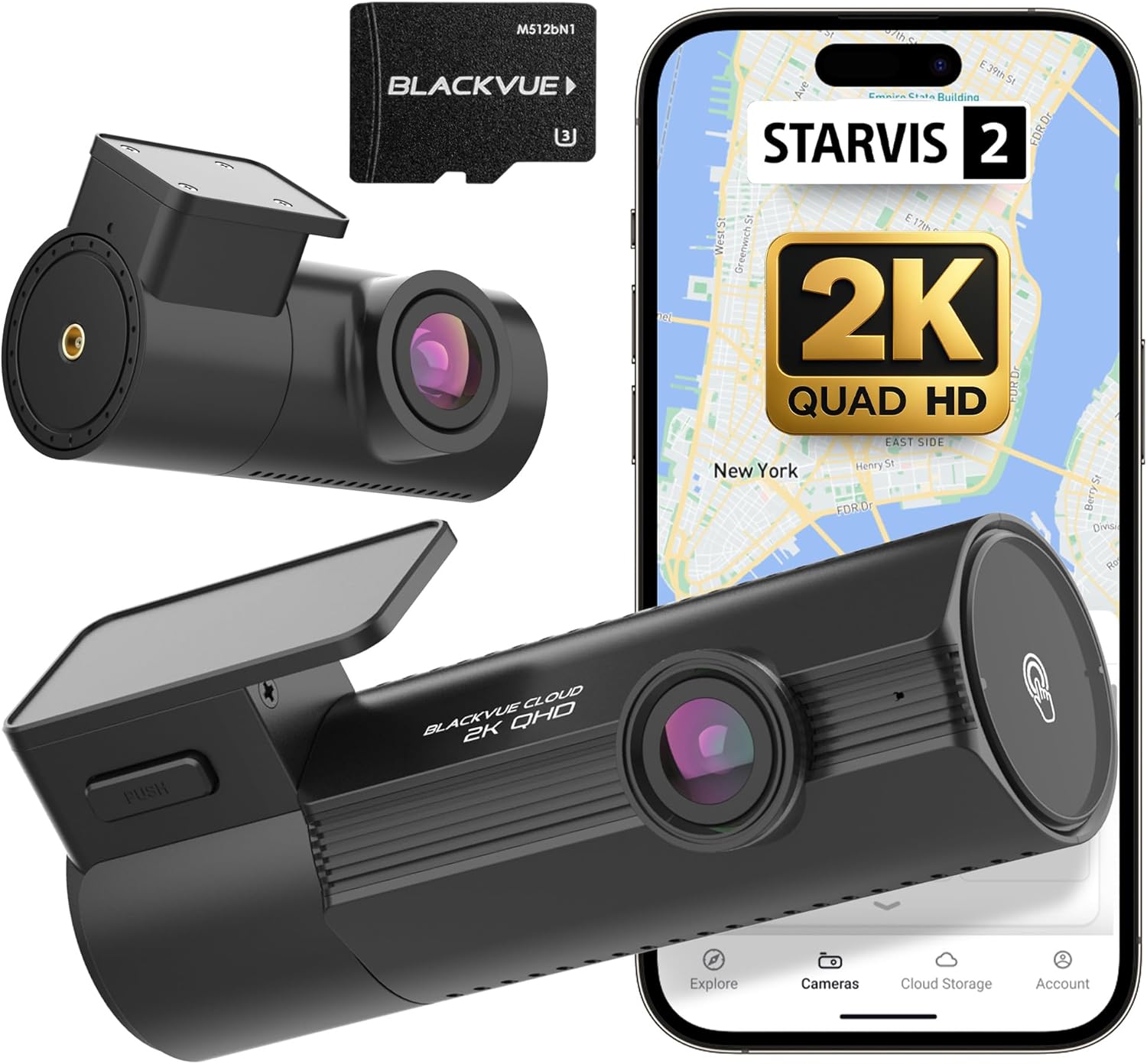
Image 1.1: BlackVue Elite 8-2CH Dash Cam components and app interface.
2. Produk Langkungview
2.1. Fitur konci
- Dual 2K QHD Recording: Captures video at 2560p resolution from both front and rear cameras at 30 frames per second.
- STARVIS 2 Image Sensors: Enhanced low-light performance for clear night vision.
- Dual HDR: Balances brightness and contrast in varying light conditions.
- Smart Parking Mode: Automatically detects motion and impacts, saving footage with pre-event recording.
- Power Saving Parking Mode: Minimizes power consumption for extended surveillance.
- Diwangun-di GPS: Records vehicle location and speed data.
- G-Sénsor: Detects impacts and sudden movements for event recording.
- Wi-Fi & Cloud Connectivity: Enables instant video playback, download, and remote access via smartphone.
- Daya USB-C: Modern and efficient power connection.
2.2. Eusi Paket
Pastikeun yén sadaya item aya dina pakét produk anjeun:
- Front Dash Cam Unit
- Rear Dash Cam Unit
- Kabel Sambungan kaméra pungkur
- Kabel Daya (USB-C)
- Car Mount (for front camera)
- MicroSD Card (128GB, pre-installed or separate)
- MicroSD Card Reader
- Klip kabel
- Alat Pry
- Manual pangguna (dokumén ieu)
3. Setup jeung Instalasi
3.1. Nyiapkeun pikeun Instalasi
Before installation, ensure your vehicle's windshield is clean and dry. Choose a mounting location that does not obstruct the driver's view atawa ngaganggu airbags.
3.2. Pamasangan Kaméra Hareup
- Lokasi Pasang: Position the front camera mount on the windshield, ideally behind the rearview mirror, to ensure a clear view tina jalan payun.
- Ngamankeun Gunung: Peel off the protective film from the adhesive pad on the mount and firmly press it onto the chosen location on the windshield for at least 30 seconds.
- Pasang kaméra: Slide the front dash cam unit onto the mounted bracket until it clicks into place.

Image 3.1: Visual guide for mounting, connecting, and operating the dash cam.
3.3. Pamasangan kaméra pungkur
- Lokasi Pasang: Pasang kaméra tukang dina kaca hareup tukang, pikeun mastikeun gambarna jelas view tina jalan tukangeun.
- Connect to Front Camera: Use the provided rear camera connection cable to link the rear camera to the front camera unit. Route the cable neatly along the vehicle's headliner and pillar trim using the pry tool and cable clips.
3.4. Sambungan Daya
- Sambungkeun Kabel Daya: Plug the USB-C power cable into the front dash cam unit.
- Sambungkeun ka Daya Kendaraan: Insert the other end of the power cable into your vehicle's 12V power outlet (cigarette lighter socket). For advanced parking mode features, hardwiring to the vehicle's fuse box is recommended (professional installation may be required).

Image 3.2: Illustration of the USB-C power connection for the dash cam.
4. Operasi
4.1. Initial Power On and Recording
Once powered, the dash cam will automatically turn on and begin continuous recording. A voice prompt will confirm operation. The front and rear cameras will record simultaneously.
4.2. Modeu Rekaman
- Modeu Normal: Continuous recording while the vehicle is in motion.
- Mode Acara: Triggered by G-sensor detection (impacts, sudden braking/acceleration). These recordings are saved separately and are protected from being overwritten.
- Modeu Manual: Initiated by pressing the manual recording button on the camera.
- Mode parkir: Activated when the vehicle's ignition is turned off (requires hardwiring). See Section 5 for details.
4.3. Wi-Fi and Cloud Connectivity
The BlackVue Elite 8-2CH features built-in Wi-Fi for direct connection to your smartphone and Cloud connectivity for remote access.
- BlackVue App: Download the official BlackVue app from your smartphone's app store.
- Pasangan mulus: Follow the in-app instructions for easy pairing with your dash cam. This allows for live view, video playback, settings adjustment, and firmware updates.
- Cloud Features: With an active internet connection (e.g., via a mobile hotspot in your vehicle), you can access Cloud features such as remote live view, instant impact alerts, and video backup.

Image 4.1: Seamless app pairing process for the BlackVue dash cam.

Gambar 4.2: Leuwihview of BlackVue Cloud services accessible via the app.
4.4. Video Playback and Download
Videos can be played back directly on your smartphone via Wi-Fi or downloaded for later viewing. The app provides fast browsing and lag-free playback.

Image 4.3: Confirmation of video download completion via the BlackVue app.
5. Modeu parkir
The BlackVue Elite 8-2CH offers advanced parking surveillance features to protect your vehicle when parked. Hardwiring the dash cam to your vehicle's power supply is required for full parking mode functionality.
5.1. Smart Parking Mode
- Motion & Impact Detection: The camera automatically detects movement around your vehicle and impacts, triggering event recordings. These recordings include 10 seconds of pre-impact footage.
- Modeu Selang Waktu: Records one frame per second, optimizing microSD card usage and allowing for quick review of long parking periods (30x playback speed).

Image 5.1: Explanation of Buffered Parking Mode features.
5.2. Power Saving Parking Mode
This mode significantly reduces power consumption (less than 1mA in standby) while still providing reliable surveillance. It instantly captures impacts within 1 second, enabling stable multi-day recording even in high temperatures.

Image 5.2: Benefits of Power Saving Parking Mode.
6. Pangropéa
6.1. Manajemén Kartu MicroSD
The microSD card is a critical component for video storage. Regular maintenance ensures optimal performance.
- pormat: It is recommended to format the microSD card regularly (e.g., once a month) using the BlackVue app or desktop viewer to prevent data corruption and maintain recording stability.
- ngagantian: MicroSD cards have a limited lifespan. Replace the card if you experience frequent errors or recording issues. Use only BlackVue-approved microSD cards for best results.
6.2. Apdet firmware
Keep your dash cam's firmware updated to ensure access to the latest features, improvements, and bug fixes. Firmware updates can be performed via the BlackVue app or by manually loading the firmware onto the microSD card.
6.3. beberesih
Gently wipe the camera lenses with a soft, lint-free cloth to maintain clear video quality. Do not use harsh chemicals or abrasive materials.
7. Cara ngungkulan
| Masalah | Mungkin Cukang lantaranana | Solusi |
|---|---|---|
| Dash cam teu hurung. | No power supply; faulty cable; vehicle power outlet issue. | Check power cable connection. Test power outlet with another device. Ensure vehicle ignition is on if not hardwired. |
| Ngarekam eureun atawa freezes. | MicroSD card error; card full; incompatible card. | Format the microSD card. Replace with a new BlackVue-approved card if issues persist. |
| Masalah sambungan Wi-Fi. | Incorrect password; too far from camera; app issue. | Ensure correct Wi-Fi password. Move closer to the camera. Restart the app and camera. |
| Kualitas pidéo goréng. | Lénsa kotor; pilem pelindung masih kénéh dipasang dina lénsa; kaayaan cahaya nu goréng. | Clean lenses. Remove any protective film. Ensure HDR is enabled in settings for challenging light. |
| Modeu parkir teu diaktipkeun. | Not hardwired; incorrect settings; low battery voltage. | Ensure the camera is hardwired. Check parking mode settings in the app. Verify vehicle battery voltage. |
8. Spésifikasi
| Fitur | Rincian |
|---|---|
| Modél | BlackVue Elite 8-2CH |
| Resolusi kaméra hareup | 2K QHD (2560p) @ 30FPS |
| Résolusi kaméra pungkur | 2K QHD (2560p) @ 30FPS |
| Sénsor Gambar | STARVIS 2 |
| Fitur Video | Dual HDR, ISP Tuning |
| Konektipitas | Wi-Fi (5GHz), Cloud |
| GPS | Diwangun-di |
| G-Sénsor | Diwangun-di |
| Modeu Parkir | Smart Parking Mode (Motion & Impact Detection, Time Lapse), Power Saving Parking Mode |
| Panyimpenan | MicroSD Card (up to 1TB supported, 128GB included) |
| Input kakuatan | USB-C |
| Diménsi (Hareup) | Approx. 3.7"D x 6.26"W x 3.54"H |
| Beurat | Kira-kira. 1.57 pon |
8.1. Accessory Compatibility

Image 8.1: BlackVue accessory compatibility chart for Elite 8 Series.
9. Garansi jeung Rojongan
BlackVue products are designed for reliability and performance. For warranty information, please refer to the warranty card included in your product packaging or visit the official BlackVue website. For technical support, firmware downloads, and frequently asked questions, please visit the BlackVue support portal.
- Resmi Websitus: www.blackvue.com
- Rojongan: Tingal bagian rojongan on resmi websitus pikeun inpo kontak jeung sumber.


