
1. Bubuka
The NZXT H2 Flow (CI-H21FB-01) is a compact vertical Mini-ITX PC case designed to maximize airflow and save space while accommodating high-performance components. It features smart cable management, tool-less access, and includes dual top fans and a premium PCIe 5.0 riser cable for a streamlined building experience.
Fitur konci:
- Hybrid Glass-and-Mesh Side Panel: Showcases your build while supporting up to a 280 mm radiator for efficient cooling.
- Desain kompak: A 20.7 L volume fits most GPUs up to 331 mm, offering high-end power in a small footprint.
- High Airflow Panels: Ultra-fine mesh panels on multiple sides maximize fresh air intake and filter dust, keeping components cooler and cleaner.
- Effortless Building: Tool-less panels, integrated cable routing Velcro straps, and intuitive wire management channels simplify installation.
- Pre-Installed Performance: Includes a premium PCIe 5.0 riser cable for vertical GPU mounting and dual F120Q CV fans for immediate exhaust cooling.
2. Émbaran Kasalametan
WARNING: Always disconnect power from your PC before performing any installation, maintenance, or troubleshooting. Failure to do so may result in personal injury or damage to components.
- Baca sagala parentah taliti saméméh instalasi.
- Anggo tali pigeulang anti statik atanapi sering noel barang logam anu dibumikeun pikeun nyegah karusakan éléktrostatik (ESD) kana komponén.
- Handle components with care. Avoid touching pins or exposed circuitry.
- Jauhkeun bagian leutik sareng bahan bungkusan tina murangkalih.
- Mastikeun ventilasi ditangtoskeun sabudeureun kasus PC pikeun nyegah overheating.
3. Eusi Paket
Verify that all items are present in your NZXT H2 Flow package:
- NZXT H2 Flow Mini-ITX PC Case
- 2 x 120mm F120Q CV Top Fans (pre-installed)
- Premium PCIe 5.0 Riser Cable (pre-installed)
- Kotak aksésori (ngandung sekrup, dasi kabel, sareng bagian leutik sanésna)
4. kasaluyuan komponén
The NZXT H2 Flow case is designed to accommodate specific component sizes for optimal performance and fit:
- motherboard: Mini ITX
- Kartu Grafis (GPU): Up to 331 mm in length
- Radiator: Up to 280 mm (for liquid cooling solutions)
- Catu daya (PSU): SFX/SFXL form factor is recommended for best compatibility and cable management.
- Fans: Includes 2 x 120mm top fans. Additional fan mounting options may be available depending on other component choices.
5. Setup & Instalasi
Follow these steps to assemble your PC within the NZXT H2 Flow case. Refer to your individual component manuals for specific installation details.
5.1. Case Overview sareng Diménsi
The NZXT H2 Flow is a compact vertical Mini-ITX case. Understanding its dimensions is crucial for planning your build.

5.2. Accessing the Case Interior
The H2 Flow features tool-less panels for easy access to the interior.

5.3. Motherboard jeung Instalasi CPU
Install your Mini-ITX motherboard and CPU (with cooler) before placing it into the chassis.
5.4. Pamasangan Power Supply Unit (PSU).
The case supports SFX/SFXL power supplies. Mount the PSU in its designated area, typically at the bottom of the case.

5.5. Manajemén kabel
Utilize the integrated cable routing channels and Velcro straps for a clean and organized interior.
5.6. Pamasangan Kartu Grafika (GPU).
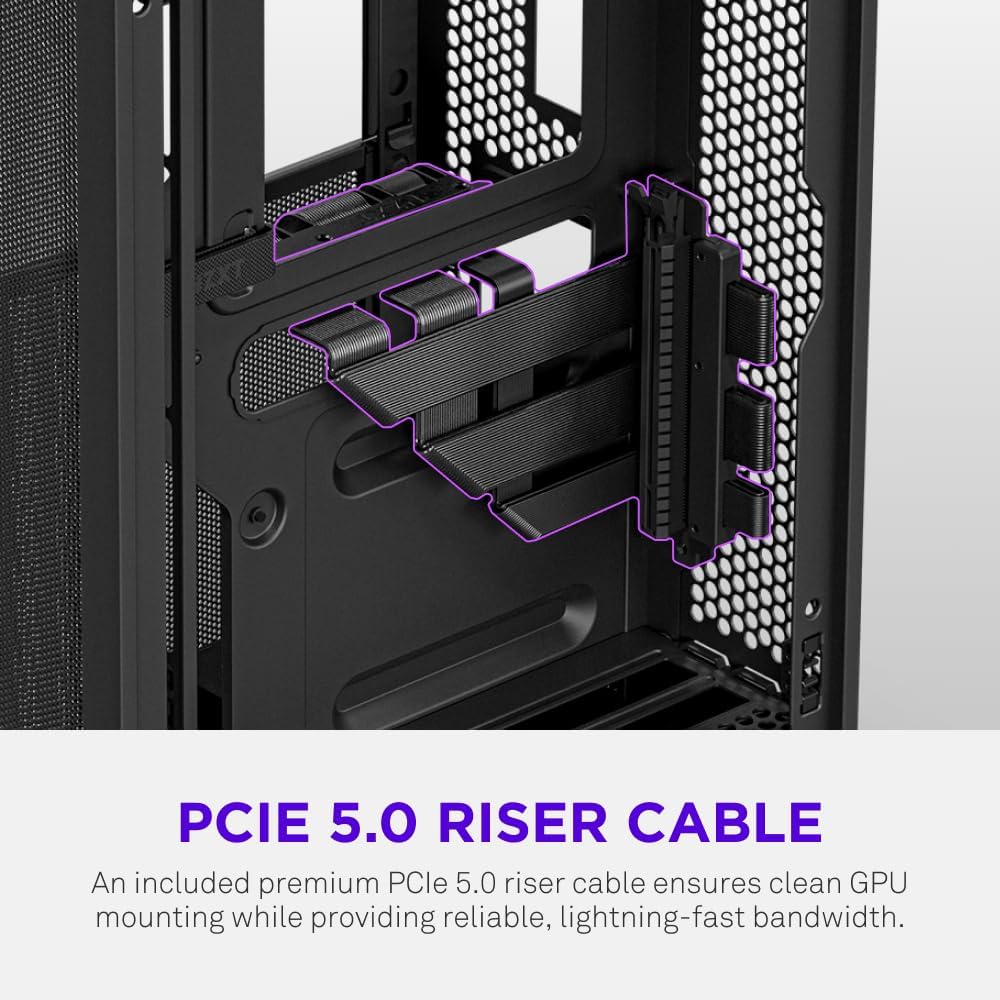
The H2 Flow supports GPUs up to 331 mm in length and includes a premium PCIe 5.0 riser cable for vertical mounting.

5.7. Sistim cooling
The case comes with two pre-installed 120mm F120Q CV fans at the top for exhaust. It also supports up to a 280mm radiator for liquid cooling.


5.8. Produk Langkungview Video
Tonton pidéo resmi ieu pikeun tampilan visualview of the NZXT H2 Flow Mini-ITX PC Gaming Case.
6. Parentah Operasi
6.1. Daya Hurung / Pareum
Press the power button located on the front I/O panel to turn your PC on or off.
6.2. Hareupna I / O Ports
The front I/O panel provides convenient access to:
- USB 3.0 palabuhan
- Palabuhan USB-C
- Audio Jack (if applicable)
Connect your peripherals such as keyboards, mice, and headsets to these ports.
7. Pangropéa
7.1. Ngabersihkeun Saringan Lebu
The NZXT H2 Flow features ultra-fine mesh panels that act as dust filters. Regularly clean these panels to maintain optimal airflow and prevent dust buildup inside your PC.
- Gently remove the mesh panels from the case.
- Use compressed air or a soft brush to remove accumulated dust.
- Reattach the panels securely.
7.2. beberesih umum
Ngagunakeun lemes, damp lawon pikeun ngusap bagian luar wadahna. Hindarkeun pembersih atanapi pangleyur anu abrasif.
8. Cara ngungkulan
Upami anjeun ngalaman masalah sareng pangwangunan PC anjeun, pertimbangkeun léngkah-léngkah ngungkulan masalah umum ieu:
- Henteu aya kakuatan: Pastikeun sadaya kabel kakuatan (PSU ka témbok, PSU ka motherboard, CPU, GPU) disambungkeun aman. Pariksa switch kakuatan dina PSU.
- Henteu aya tampilan: Verify that your monitor is connected to the graphics card (not the motherboard I/O unless using integrated graphics) and that the GPU has proper power connections. Reseat the GPU and RAM.
- Overheating: Check fan connections and orientation. Ensure mesh panels are clean and not obstructed. Verify CPU cooler installation and thermal paste application.
- Komponén Teu Dideteksi: Reseat the component (GPU, RAM, storage drives). Check power and data connections.
For more complex issues, consult your individual component manuals or NZXT customer support.
9. Spésifikasi
| Fitur | Rincian |
|---|---|
| merek | NZXT |
| Ngaran modél | NZXT H2 Flow |
| Jenis Kasus | Mini-Menara |
| Motherboard kasaluyuan | Mini ITX |
| Pangrojong Panjang GPU | Nepi ka 331 mm |
| Rojongan Radiator | Nepi ka 280 mm |
| Kaasup Fans | 2 x 120mm F120Q CV Top Fans |
| Included Riser Cable | Premium PCIe 5.0 |
| Power Supply ningkatna Tipe | Bottom Mount (SFX/SFXL recommended) |
| Métode Cooling | Air, Liquid |
| Warna | Hideung |
| Bahan | Kaca, Logam |
| Item Beurat | 4.55 kg |
| Total USB 3.0 Ports | 1 |
| Other Special Features | Tool-less Installation, Integrated Cable Management |
10. Jaminan & Dukungan
10.1. Émbaran jaminan
The NZXT H2 Flow Mini-ITX PC Case comes with a 2-Taun Garansi Produsén. Punten tahan bukti pameseran anjeun pikeun klaim garansi.
10.2. Rojongan Palanggan
For technical assistance, troubleshooting, or warranty inquiries, please visit the official NZXT support websitus atanapi ngahubungan tim layanan palanggan maranéhanana.
NZXT Store: Visit the NZXT Store on Amazon