Bubuka
Hatur nuhun pikeun meuliasing the Matbip Multi-Platform Wireless Gaming Controller. This controller is designed to enhance your gaming experience across various platforms, including Nintendo Switch, Android, iOS, and PC. It features advanced functions such as TURBO burst, macro programming, customizable RGB lighting, and HD vibration, providing precise control and immersive feedback. Please read this manual carefully before use to ensure proper operation and to fully utilize all features.
Produk Leuwihview
Familiarize yourself with the various components and buttons of your Matbip controller.
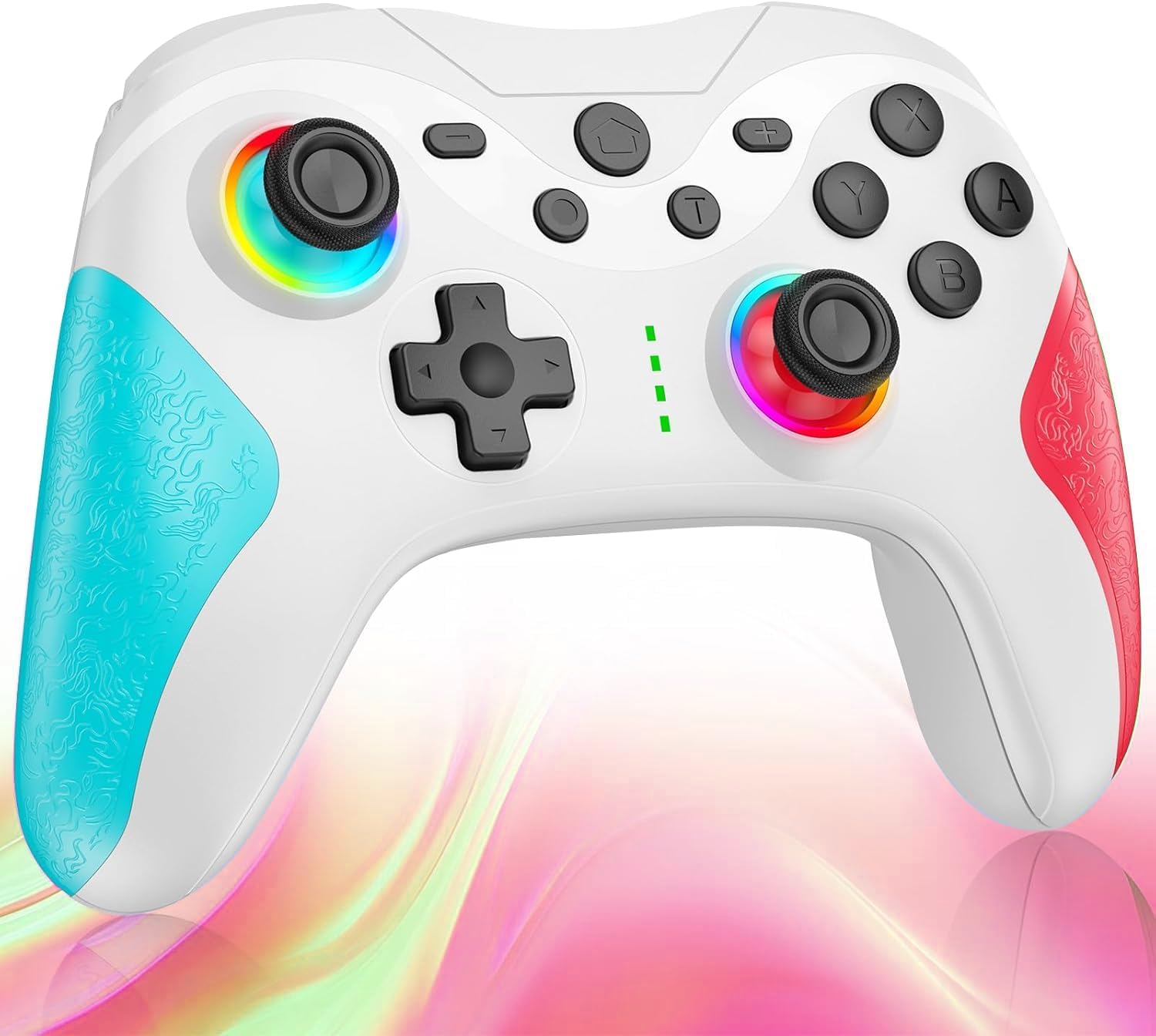
Gambar: Hareupeun view of the Matbip Multi-Platform Wireless Gaming Controller. It features a white body with blue textured grips on the left and red textured grips on the right. The joysticks are illuminated with a rainbow RGB light. Standard buttons (A, B, X, Y), a D-pad, and central function buttons (Home, Plus, Minus, T) are visible.
Komponén konci:
- Joystick Kénca/Katuhu: For directional control, with customizable RGB lighting.
- D-Pad: Pikeun input arah tepat.
- Tombol Aksi (A/B/X/Y): Tombol input kaulinan standar.
- Shoulder Buttons (L/R/ZL/ZR): Top-mounted trigger and bumper buttons.
- Back Buttons: Additional programmable buttons on the rear for strategic gameplay.
- Tombol imah: Balik deui ka layar utama sistem.
- Tombol Plus (+) / Minus (-) : System-specific function buttons.
- T Button (TURBO): Activates and manages the TURBO burst function.
- Port ngecas: Port USB-C pikeun ngecas.
- Lampu Indikator: Témbongkeun status sambungan sareng tingkat batré.
Disetél
1. Ngecas Controller
Before first use, fully charge the controller. Connect the provided USB-C cable to the controller's charging port and the other end to a USB power source (e.g., console, PC, or USB wall adapter). The indicator lights will show charging status and turn off when fully charged.
2. Nyapasangkeun jeung Alat
The controller supports Bluetooth wireless connection across multiple platforms.
Pikeun Nintendo Switch:
- On the Switch HOME Menu, select Controllers > Robah Pakem / Orde.
- Pencét jeung tahan tombol Tombol imah on the Matbip controller for 3-5 seconds until the indicator lights flash rapidly.
- Once paired, the indicator light(s) on the controller will remain solid.
For Android/iOS Devices:
- Aktipkeun Bluetooth dina alat Android atawa ios Anjeun.
- Pencét jeung tahan tombol Tombol imah on the Matbip controller for 3-5 seconds until the indicator lights flash rapidly.
- On your device's Bluetooth settings, select the controller (e.g., "Matbip Controller") from the list of available devices to pair.
Pikeun PC (Windows):
- Ensure your PC has Bluetooth enabled. Go to Setélan > Paranti > Bluetooth & alat sejenna.
- Pencét Tambahkeun Bluetooth atawa alat sejen > Bluetooth.
- Pencét jeung tahan tombol Tombol imah on the Matbip controller for 3-5 seconds until the indicator lights flash rapidly.
- Select the controller from the list of devices to pair.
Parentah Operasi
TURBO Burst Function:
The TURBO function allows for rapid, automatic button presses, ideal for combat games.
- Pikeun ngaktipkeun TURBO: Pencét jeung tahan tombol Tombol T, then press the desired action button (e.g., A, B, X, Y, L, R, ZL, ZR). The button will now continuously activate when held down.
- Pikeun nyaluyukeun laju TURBO: Bari nyekelan Tombol T, pindahkeun right joystick up or down to cycle through 3 different burst speeds.
- Pikeun nganonaktipkeun TURBO: Pencét jeung tahan tombol Tombol T, teras pencét deui tombol tindakan anu sami.
Fungsi Makro:
Program a sequence of button presses to a single back button for complex actions.
- Specific instructions for macro programming will be detailed in the full manual. Generally, this involves entering a programming mode, pressing the sequence, and assigning it to a back button.
Lampu RGB anu tiasa disaluyukeun:
The joysticks feature 9-color RGB lighting to enhance your gaming atmosphere.
- To change RGB color/mode: Press a specific button combination (e.g., T + Left Joystick click) to cycle through different colors and lighting effects.
HD Vibration Adjustment:
Adjust the intensity of the HD vibration feedback to your preference (4 levels).
- Pikeun nyaluyukeun geteran: Press a specific button combination (e.g., T + D-Pad Up/Down) to cycle through the 4 vibration levels.
Sénsor Gyro:
The high-precision gyro sensor enables intuitive motion control in supported games.
- The gyro sensor is automatically active when connected to a compatible device (e.g., Nintendo Switch) and used in games that support motion controls.
Sleep Wake-up Function:
The controller supports waking up your Nintendo Switch console from sleep mode.
- When the Switch is in sleep mode, simply press the Tombol imah on the controller to wake it up and reconnect.
Pangropéa
pangropéa ditangtoskeun ensures umur panjang tur kinerja optimal controller Anjeun.
- beberesih: Paké kaen lemes, garing pikeun ngusap controller. Keur kokotor bandel, rada dampen lawon jeung cai. Ulah make bahan kimia kasar atawa cleaners abrasive.
- Panyimpenan: Simpen controller di tempat anu tiis sareng garing, jauh tina sinar panonpoé langsung, suhu anu ekstrim, sareng kalembaban.
- Perawatan batré: Avoid fully discharging the battery frequently. If storing for a long period, charge the controller to about 50% every few months.
- Hindarkeun tetes: Nangtayungan controller tina tetes jeung dampak, nu bisa ngaruksak komponén internal.
Pamérésan masalah
Upami anjeun ngalaman masalah sareng controller anjeun, mangga tingal solusi umum ieu:
| Masalah | Solusi anu mungkin |
|---|---|
| Controller teu hurung. | Ensure the controller is charged. Connect it to a power source using the USB-C cable. |
| Controller does not pair. | Ensure Bluetooth is enabled on your device. Make sure the controller is in pairing mode (flashing lights). Try restarting both the controller and the device. |
| Input lag atanapi pegat sambungan. | Ensure there are no strong wireless interferences nearby. Move closer to the device. Re-pair the controller. |
| Tombol atawa joysticks teu responsif. | Try resetting the controller (refer to the full manual for reset instructions, usually a small pinhole button). Ensure no debris is obstructing the buttons. |
| Geter teu jalan. | Check if vibration is enabled in the game or system settings. Adjust the vibration intensity on the controller. |
spésifikasi
| Fitur | Rincian |
|---|---|
| Dimensi produk | 10 x 15 x 6.5 cm |
| Beurat | 300 g |
| Konektipitas | Nirkabel Bluetooth |
| Kasaluyuan | Nintendo Switch, Android, iOS, PC (Windows) |
| Fitur husus | TURBO Burst, Macro Function, 9-Color RGB Lighting, 4-Level HD Vibration, Gyro Sensor, Back Buttons, Sleep Wake-up |
| ASIN | B0FHWRK7CQ |
| Tanggal paleupasan | 16 Juli 2025 |
Garansi sareng Rojongan
Matbip is committed to providing high-quality products and customer satisfaction. This product comes with a standard manufacturer's warranty. For detailed warranty information, please refer to the documentation included with your purchase or contact Matbip customer support.
If you require further assistance, have questions, or encounter issues not covered in this manual, please contact our customer support team. A Japanese instruction manual is included with the product to ensure ease of use for first-time users.
Inpormasi kontak: Please refer to the packaging or the official Matbip websitus kanggo kéngingkeun detil kontak dukungan palanggan anu pangénggalna.