1. Parentah Kasalametan penting
Mangga baca sagala parentah taliti saméméh ngagunakeun alat ieu. Simpen manual ieu pikeun rujukan ka hareup.
- Pastikeun voltage specified on the rating label matches your mains voltage.
- Ulah neuleumkeun kipas, colokan, atawa ari dina cai atawa cairan séjén.
- Unplug the fan from the outlet when not in use, before cleaning, or before moving.
- Do not operate the fan with a damaged cord or plug. Contact authorized service personnel for repair.
- Jauhkeun ramo jeung barang-barang séjénna tina bilah jeung liang kipas.
- Do not use the fan near windows, in bathrooms, or in wet environments.
- Alat ieu henteu dimaksudkeun pikeun dianggo ku jalma (kaasup murangkalih) anu kakurangan kamampuan fisik, indrawi, atanapi mental, atanapi kirang pangalaman sareng pangaweruh, kecuali aranjeunna dipasihan pangawasan atanapi petunjuk ngeunaan panggunaan alat ku jalma anu tanggung jawab kasalametanana. .
- Barudak kedah diawaskeun pikeun mastikeun yén aranjeunna henteu maén sareng alatna.
2. Produk Langkungview
The Mistral MFD4389DRW is a 43-inch DC Turbo Tower Fan designed for efficient air circulation. It features a DC brushless motor, 12 speed settings, and multiple operating modes. Control options include a full touch screen, remote control, and Wi-Fi with online voice control capabilities. The fan also offers a unique height conversion feature and 60-degree left-right oscillation.

Gambar 2.1: Hareupeun view of the Mistral MFD4389DRW DC Turbo Tower Fan, showcasing its sleek design and touch control panel.

Gambar 2.2: Sisi view of the Mistral MFD4389DRW DC Turbo Tower Fan, highlighting its slim profile.

Gambar 2.3: Balik view of the Mistral MFD4389DRW DC Turbo Tower Fan, showing the air intake grille.
3. Eusi Paket
Pastikeun yén sadaya komponén aya dina bungkusan:
- Mistral MFD4389DRW DC Turbo Tower Fan Unit
- Kadali jauh
- Manual pangguna (dokumén ieu)
- Base components (if not pre-assembled)
- Height extension component (for convertible height models)
4. Majelis
The Mistral MFD4389DRW fan features simple assembly. Typically, this involves attaching the base to the main fan unit. For models with height conversion, an additional extension piece may need to be secured.
- Sacara saksama miceun sadaya komponén tina bungkusan.
- Teundeun unit kipas utama tibalik ka handap dina permukaan datar lemes pikeun nyegah scratching.
- Sejajarkeun dasarna sareng handapeun unit kipas. Pastikeun kabel daya ngaliwat liang anu ditunjuk dina dasarna.
- Secure the base to the fan unit using the provided screws (if applicable).
- For height conversion, insert the extension component between the base and the main unit, ensuring it clicks securely into place or is fastened as per instructions.
- Tempatkeun kipas tegak dina permukaan anu stabil sareng rata.
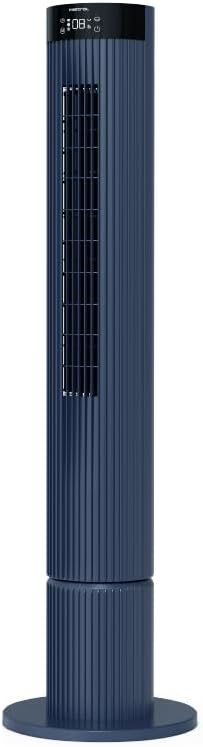
Figure 4.1: The fan demonstrating its convertible height feature, allowing adjustment between two different heights.
5. Setup jeung Pamakéan Awal
After assembly, position the fan in your desired location. Ensure it is on a stable, flat surface and away from curtains or objects that could obstruct airflow.
- Plug the power cord into a suitable electrical outlet (220-240V~, 50-60Hz).
- The fan will enter standby mode. The touch screen display may illuminate briefly.
- To power on, touch the power icon on the control panel or press the power button on the remote control.
6. Parentah Operasi
The fan can be operated via the full touch screen control panel on the unit or the included remote control.
6.1 Fungsi Panel Control
The touch screen control panel provides access to all fan functions:
- Tombol Daya: Hurungkeun atawa Pareum kipas.
- Pangaluyuan Kacepetan: Cycles through 12 fan speeds.
- Pilihan Mode: Switches between Turbo, One-key Cycle, and Baby modes.
- Osilasi: Activates or deactivates 60-degree left-right oscillation.
- Timer: Sets the pre-set On/Off timer for up to 12 hours.
- Indikator Wi-Fi: Nembongkeun status sambungan Wi-Fi.
6.2 Jauh Jauh
The remote control duplicates all functions available on the touch screen panel for convenient operation from a distance.
- Pastikeun kadali jauh gaduh batré anu tiasa dianggo.
- Point the remote control towards the fan's control panel for optimal signal reception.
6.3 Modeu operasi
- Modeu Turbo: Nyadiakeun aliran hawa maksimum pikeun cooling gancang.
- One-key Cycle Mode: Automatically cycles through different fan speeds to simulate natural breeze.
- Mode Orok: Operates at a gentle, quiet speed suitable for nurseries or light sleeping.
7. Wi-Fi and Online Voice Control
The Mistral MFD4389DRW fan can be connected to your home Wi-Fi network for smart control via a mobile application and online voice commands.
7.1 Sambungan Wi-Fi
- Download the official Mistral smart home application from your device's app store.
- Ngadaptar atanapi log in kana akun anjeun dina aplikasi.
- Pastikeun alat sélulér anjeun disambungkeun ka jaringan Wi-Fi 2.4GHz.
- Follow the in-app instructions to add a new device. This typically involves putting the fan into pairing mode (refer to the app or fan display for specific instructions, often by holding a Wi-Fi button).
- Once connected, the Wi-Fi indicator on the fan's control panel will illuminate steadily.
7.2 Online Voice Control
After successful Wi-Fi connection, you can link your fan to compatible smart home voice assistants (e.g., Google Assistant, Amazon Alexa) through the Mistral app settings.
- Open the Mistral app and navigate to the 'Integrations' or 'Voice Control' section.
- Select your preferred voice assistant and follow the prompts to link your Mistral account.
- Sakali dihubungkeun, anjeun tiasa nganggo paréntah sora sapertos:
- "Turn on the fan."
- "Set fan speed to 5."
- "Turn off oscillation."
- "Change fan mode to Baby."
8. Pangropéa
Pembersihan rutin ngabantosan ngajaga kinerja kipas sareng manjangkeun umurna.
8.1 beberesih
- Sok cabut kipas tina stop kontak sateuacan beberesih.
- Ngagunakeun lemes, damp lawon pikeun ngusap surfaces exterior kipas. Ulah make cleaners abrasive atawa pangleyur.
- Anggo panyedot debu anu nganggo sikat pikeun miceun lebu tina kisi-kisi asupan sareng outlet hawa.
- Pastikeun kipasna garing pisan sateuacan dipasang deui sareng dianggo.
8.2 Panyimpenan
If storing the fan for an extended period, unplug it, clean it thoroughly, and store it in its original packaging or a dust-free environment.
9. Cara ngungkulan
Upami anjeun mendakan masalah sareng kipas anjeun, tingali masalah sareng solusi umum ieu:
| Masalah | Mungkin Cukang lantaranana | Solusi |
|---|---|---|
| Kipas angin teu hurung. | Taya catu daya. | Pariksa naha kabel listrik dicolokkeun sacara aman kana stop kontak anu tiasa dianggo. |
| Aliran hawa lemah. | Air intake/outlet blocked; Fan speed too low. | Clean grilles to remove dust. Increase fan speed. |
| Kipas nyieun sora anu teu biasa. | Obstruction; Loose parts. | Unplug and check for any foreign objects. Ensure base is securely attached. |
| Kadali jauh teu jalan. | Dead batteries; Obstruction. | Ganti batré kadali jauh. Pastikeun teu aya objék anu ngahalangan jalur sinyal. |
| Sambungan Wi-Fi gagal. | Incorrect Wi-Fi password; Router issues; Fan too far from router. | Verify Wi-Fi password. Ensure fan is within range of a 2.4GHz Wi-Fi network. Restart router and fan. |
Lamun masalah persists sanggeus nyobian solusi ieu, mangga ngahubungan rojongan customer.
10. Spésifikasi
| Fitur | Spésifikasi |
|---|---|
| Modél | MFD4389DRW |
| Voltage | 220-240V~, 50-60Hz 1.3A |
| Wattage | 40W |
| Volume hawa | 29.54 m³ / mnt |
| Aliran hawa Max | 4.26 m / s |
| Noise Level (Lowest Speed) | 33.2dB |
| Noise Level (Highest Speed) | 68.3dB |
| Ukuran produk (L * W * H) | 168 * 300 * 900 OR 1104 mm |
| Beurat bersih | 4.46 KGS |
| Tanda Kasalametan | 250467-11 |
| Fitur husus | Remote Controlled, Timer, Wi-Fi Enabled |
| Jumlah Speeds | 12 |
11. Garansi jeung Rojongan
This Mistral MFD4389DRW DC Turbo Tower Fan comes with a comprehensive warranty:
- Garansi Umum: 1 Taun ti tanggal pameseran.
- Garansi Motor: An additional 3 Years for the motor only, totaling 4 years for the motor.
For warranty claims, technical support, or service inquiries, please contact your local Mistral authorized service center or refer to the contact information provided on the official Mistral websitus.


