1. Bubuka
The Sony RX1R III is a full-frame premium compact camera designed for photographers seeking exceptional image quality in a portable form factor. It features a 61 MP CMOS sensor, a high-quality ZEISS Sonnar T* 35mm F2 lens, the advanced BIONZ XR™ processor, and AI-based subject recognition for precise autofocus and tracking. This manual provides essential information for setting up, operating, and maintaining your camera.
2. Setélan
2.1. Ngabongkar sareng Inspeksi Awal
Sacara saksama miceun sadaya komponén tina bungkusan. Pastikeun aya item di handap ieu:
- Sony RX1R III Camera Body
- Pakét Batré anu Tiasa Dicas Ulang (NP-FW50)
- Adaptor AC
- Kabel Tipe-C USB
- Tali taktak
- Cap Lénsa
- Cap sapatu
- Cangkir panon
- Manual Pitunjuk (dokumén ieu)
Inspect the camera and accessories for any signs of damage. If any items are missing or damaged, contact your retailer.
2.2. Ngagantelkeun Tali Taktak
Attach the provided shoulder strap to the camera's strap lugs for secure handling.

Image: User attaching a wrist strap to the camera, demonstrating how to secure it for carrying.
2.3. Ngecas Batré
Insert the NP-FW50 rechargeable battery pack into the camera. Connect the camera to the AC adaptor using the USB Type-C cable, then plug the AC adaptor into a wall outlet. The charging indicator will light up during charging and turn off when complete. A full charge takes approximately 150 minutes.
Note: The camera is compatible with NP-FW50 rechargeable battery packs, offering up to 300 images on a single charge (CIPA standard, using LCD monitor). Fast charging via USB Power Delivery (PD) is supported with an 18 W (9 V/2 A) or higher output capacity USB Type-C cable.
2.4. Nyelapkeun Kartu Mémori
Open the memory card/battery cover. Insert a compatible SD card (sold separately) into the memory card slot with the label facing the front of the camera until it clicks into place. Close the cover securely.
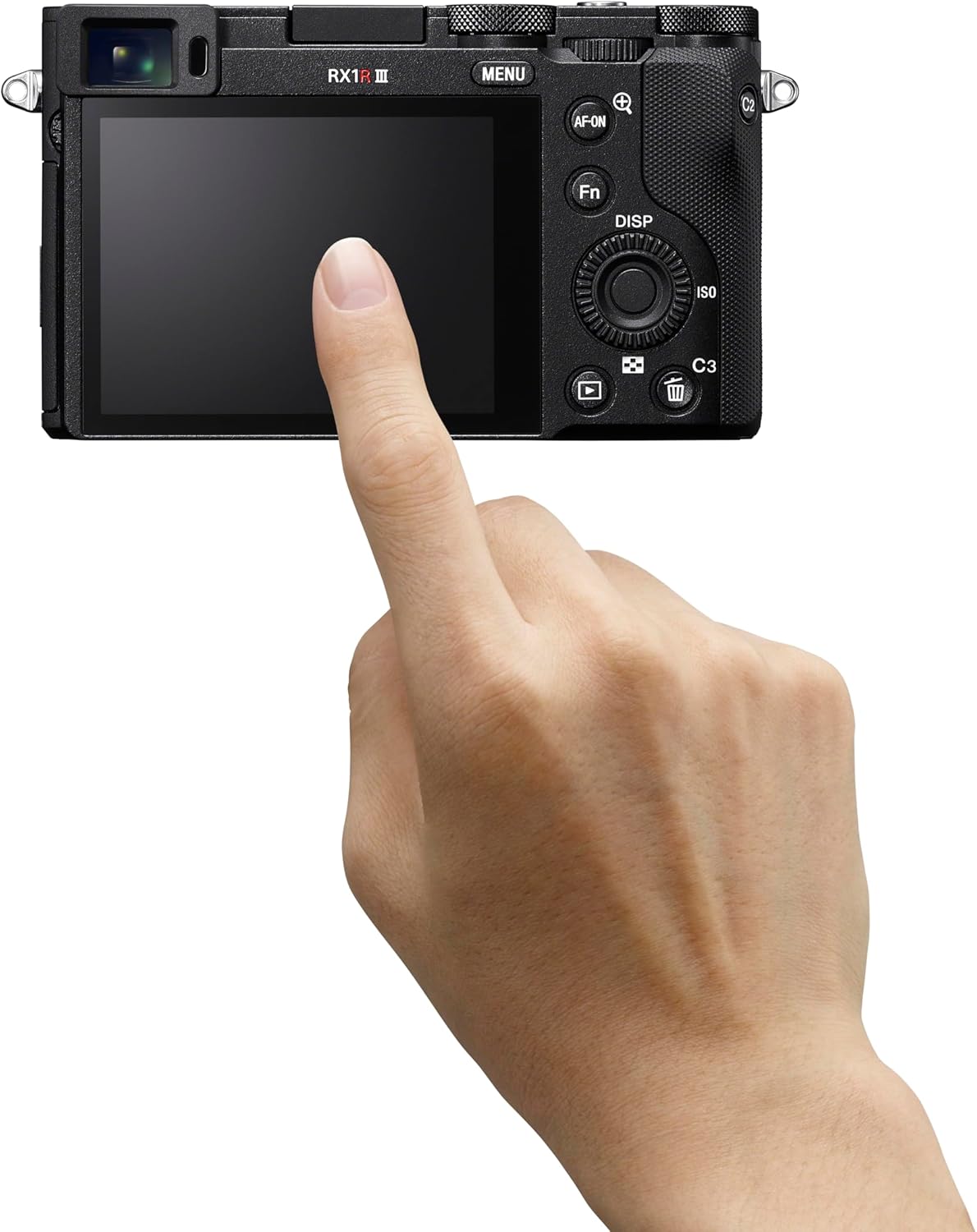
Gambar: Tukangeun view of the Sony RX1R III, showing the LCD screen and control buttons. The memory card slot is typically located near the battery compartment on the bottom or side.
2.5. Daya Awal Hurung sareng Setélan
Turn the camera on using the ON/OFF switch. Follow the on-screen prompts to set the language, date, time, and time zone. These settings are crucial for proper image metadata.
3. Ngoperasikeun kaméra
3.1. Modeu Fotografi Dasar
The RX1R III offers various shooting modes accessible via the mode dial on the top of the camera:
- Program Otomatis (P): Kaméra sacara otomatis nyetel aperture sareng kecepatan rana pikeun paparan anu optimal.
- Prioritas aperture (A): Anjeun nyetél aperture, sareng kaméra nyaluyukeun laju jepret. Idéal pikeun ngadalikeun jero lapangan.
- Prioritas jepret (S): Anjeun nyetel laju jepret, sarta kaméra nyaluyukeun aperture. Idéal pikeun ngadalikeun blur gerak.
- Paparan Manual (M): Anjeun ngadalikeun duanana aperture jeung speed jepret.
- Auto (AUTO): Fully automatic mode for quick shooting.
- Pilihan Adegan: Pre-set modes for specific scenes like Portrait, Landscape, Sports.
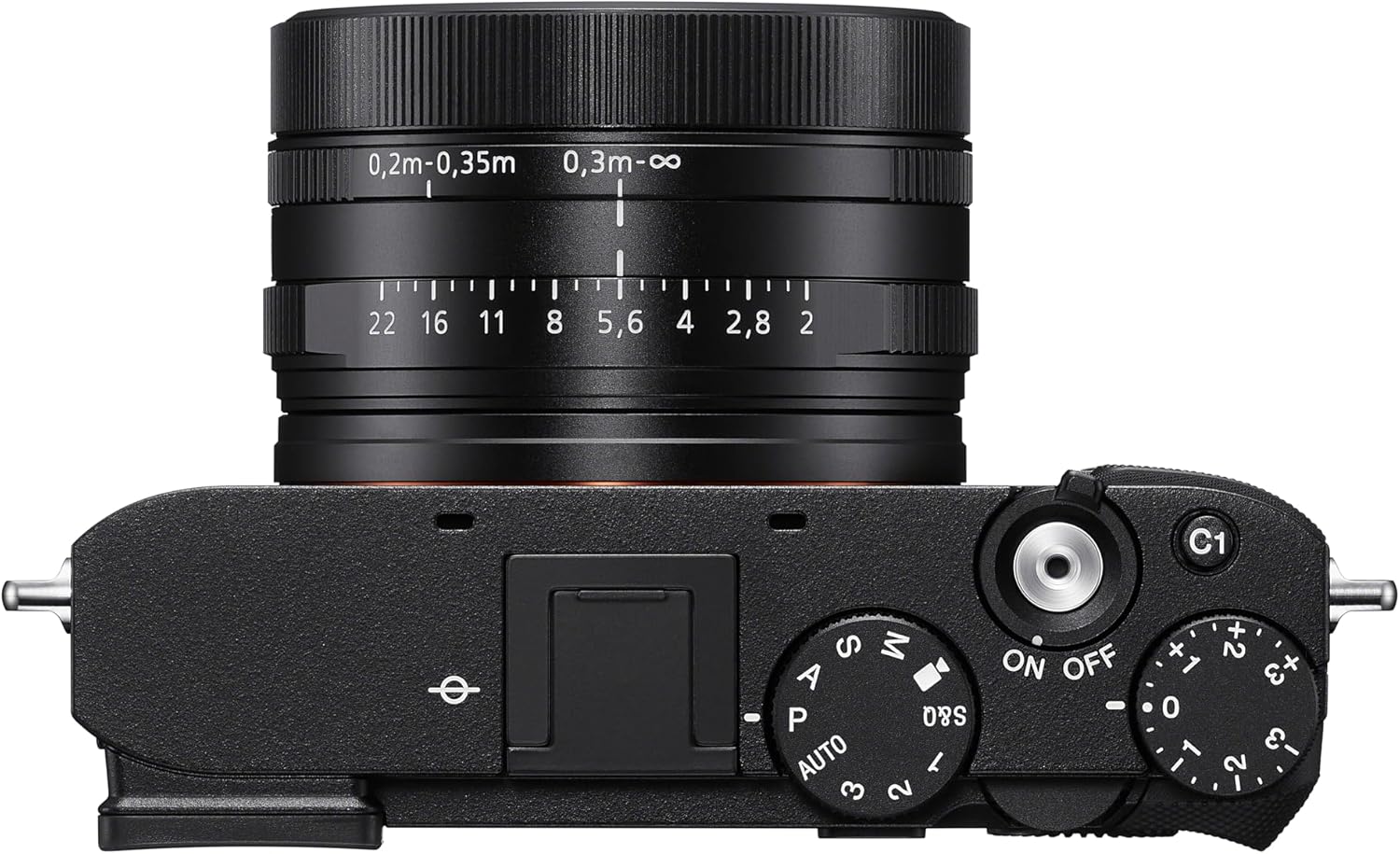
Gambar: Top view of the Sony RX1R III, highlighting the mode dial, shutter button, and exposure compensation dial.
3.2. Autofocus (AF) System
The camera features an advanced 693-point phase-detection AF system with AI-based subject recognition and real-time tracking. This allows for fast and precise focusing on a wide range of subjects, including humans, animals, and birds.
- Nyukcruk real-time: The camera recognizes color, pattern, and spatial data to track subjects accurately.
- Subject Recognition: Automatically detects and focuses on human eyes/faces, animal eyes/bodies, and bird eyes/bodies.
- Tombol AF-ON: Use the dedicated AF-ON button to activate autofocus independently from the shutter button.
Video: Official Sony RX1R III Product Feature Video. This video demonstrates the camera's key features, including its advanced autofocus system and image quality.
3.3. Step Crop Shooting
Leverage the camera's 61 MP sensor with Step Crop Shooting to achieve different focal lengths without changing lenses. This feature allows you to crop images to 50mm equivalent (29 MP) or 70mm equivalent (15 MP) from the native 35mm lens, providing flexibility in composition. This function is not available for movies.
3.4. Creative Look Modes
The RX1R III includes Creative Look modes for expanded in-camera expression. These modes allow you to apply various stylistic effects to your photos directly, such as Standard, Portrait, Neutral, Vivid, Film, Instant, Soft Highkey, Black & White, and Sepia.
3.5. Ngarekam Pidéo
Kaméra ngadukung ngarékam pidéo kualitas luhur:
- Video 4K: Record stunning 4K video at 30 frames per second (4K/30p).
- Video HD lengkep: Capture smooth Full HD video at up to 120 frames per second (1080p/120fps) for slow-motion effects.
- XAVC Format: Videos are recorded in the XAVC format for high quality.
3.6. Konektipitas
The RX1R III offers versatile connectivity options:
- Wi-Fi & Bluetooth: Connect wirelessly to your smartphone for remote control, image transfer, and direct upload to Creators' App or Creators' Cloud Web.
- USB Tipe-C: For fast data transfer and charging.
- Kaluaran HDMI: Connect to an external display for video playback.
4. Pangropéa
4.1. Ngabersihan Kaméra
- Awak kaméra: Ngusap awak kaméra ku kaén anu lembut sareng garing. Pikeun kokotor bandel, make kaen hampang dampdikumbah ku cai atawa solusi beberesih hampang.
- Lensa: Anggo sikat lénsa pikeun miceun lebu, teras usap lalaunan nganggo lawon pembersih lénsa sareng cairan pembersih lénsa. Ulah nyabak permukaan lénsa ku ramo anjeun.
- Sénsor: Cleaning the image sensor should only be performed by authorized service personnel to prevent damage.
4.2. Kaperawatan batré
To prolong battery life, avoid exposing the battery to extreme temperatures. Store batteries in a cool, dry place when not in use. Fully charge the battery before extended shooting sessions.
4.3. Panyimpenan
When storing the camera for extended periods, remove the battery and memory card. Store the camera in a dry, well-ventilated area, preferably in a camera bag with desiccant to prevent mold and mildew.
5. Cara ngungkulan
If you encounter issues with your Sony RX1R III, refer to the following common troubleshooting tips:
- Kaméra teu hurung: Pastikeun batre tos dicas pinuh sareng diselapkeun leres.
- Gambar kabur: Check your focus mode and ensure the subject is within the camera's focusing range. Verify shutter speed is fast enough to prevent motion blur.
- Kasalahan kartu mémori: Pastikeun kartu memori diselapkeun leres tur teu pinuh atawa ruksak. Coba pormat kartu (ieu bakal mupus sadaya data).
- Masalah konektipitas: Check Wi-Fi/Bluetooth settings on both the camera and your smart device. Ensure the Creators' App is up to date.
For more detailed troubleshooting, please visit the official Sony support websitus atanapi tingali manual online anu lengkep.
6. Spésifikasi
| Fitur | Rincian |
|---|---|
| Ngaran modél | DSCRX1RM3B |
| Resolusi Sénsor Poto | 61 MP (Effective Still Resolution: 60 MP) |
| Ukuran Sénsor Poto | Pigura Pinuh (35mm) |
| Tipe Lénsa | ZEISS Sonnar T* 35mm F2 lens (Fixed Focal Length) |
| Aperture maksimum | F2 |
| Stabilisasi Gambar | Digital |
| Prosesor | BIONZ XR™ |
| Pokus otomatis | 693 (Deteksi Fase) |
| Resolusi Video | 4K (30p), 1080p (120fps) |
| Ukuran layar | 3 inci |
| Konektipitas | Bluetooth, Wi-Fi, USB Type-C, HDMI |
| Batré | NP-FW50 Rechargeable Battery Pack |
| Item Beurat | 1 pon |
7. Garansi jeung Rojongan
7.1. Émbaran jaminan
This Sony RX1R III camera comes with a 1-taun jaminan kawates ti tanggal beuli. Garansi ieu nyertakeun cacad dina bahan sareng pagawean dina panggunaan normal. Punten tahan bukti pameseran anjeun pikeun klaim garansi.
7.2. Rojongan Palanggan
For further assistance, technical support, or service inquiries, please visit the official Sony Support websitus:
You can also find additional resources, FAQs, and software updates on the support page.