
LongPlus G02
LongPlus Hummingbird Feeder with Camera (Model G02) Instruction Manual
Brand: LongPlus | Model: G02
Bubuka
This manual provides comprehensive instructions for the setup, operation, and maintenance of your LongPlus Hummingbird Feeder with Camera, Model G02. This smart feeder allows you to observe hummingbirds up close, receive instant notifications, and record their visits. Please read this manual thoroughly before using the product to ensure proper function and longevity.
Naon dina Box
- 1x LongPlus Hummingbird Feeder with Camera
- 1x 32GB Storage Memory Card
- 1x Large Cleaning Brush
- 1x Sikat Pembersih Leutik
- 1x Metal Ant Moat
- 9x Flower Feeding Ports (3 pre-installed, 6 spares)
- 1x Hanging Hook
Fitur produk
The LongPlus Hummingbird Feeder with Camera is designed with several key features to enhance your bird-watching experience:
- Kaméra 2K Terpadu: Captures high-resolution video and images of visiting hummingbirds.
- Bewara instan: Receive real-time alerts on your smartphone via the Vicohome app when motion is detected at the feeder.
- AI Bird Recognition: Advanced AI algorithm identifies up to 95% of hummingbird species, providing educational insights through the app (basic cloud service subscription required after a one-month free trial).
- Ant Moat: A built-in ant moat prevents ants from reaching the nectar. Fill with water or any liquid.
- Bee-Proof Design: The feeder's structure and feeding port design deter bees from accessing the nectar, ensuring it's primarily for hummingbirds.
- Desain anti bocor: Features a thicker gasket ring to prevent nectar leakage.
- User-Friendly & Easy to Clean: Made from BPA-free plastic, with a transparent container for easy nectar level checks. The camera slides out for convenient recharging, and the double-opening nectar tank allows for easy cleaning. Dishwasher friendly.
- Hirup batré anu panjang: 5200mAh capacity provides approximately 30 days of usage per charge.
- Panyimpenan awan: Records videos and stores them in the cloud for up to 3 days for free (subscription available for extended storage).
Parentah Setup
1. Initial Assembly and Placement
Before filling, ensure all components are securely assembled. The feeder is designed for hanging mount. Choose a location that offers a clear view for the camera and is easily accessible for maintenance.

Image: The LongPlus Hummingbird Feeder with Camera, illustrating its AI capture and instant notification features on a smartphone.
2. Filling the Nectar Tank
To prevent leaks, fill the nectar tank while the feeder is inverted. Once filled, carefully flip it back to its upright position. This method utilizes liquid pressure and sealing principles to ensure a leak-proof seal.

Image: A close-up of the hummingbird feeder, demonstrating the inverted filling method to prevent leaks.
3. Ngecas kaméra
The camera unit is detachable for charging. Press the latch behind the camera to slide it out. Connect the camera to a power source using the provided cable. A full charge provides approximately 30 days of operation. Reinsert the camera securely after charging.

Image: Visual guide showing how to detach the camera for charging and how to clean the feeder components.
4. Installing the Ant Moat
Attach the metal ant moat above the feeder using the hanging hook. Fill the ant moat with water to create a barrier that prevents ants from reaching the nectar.
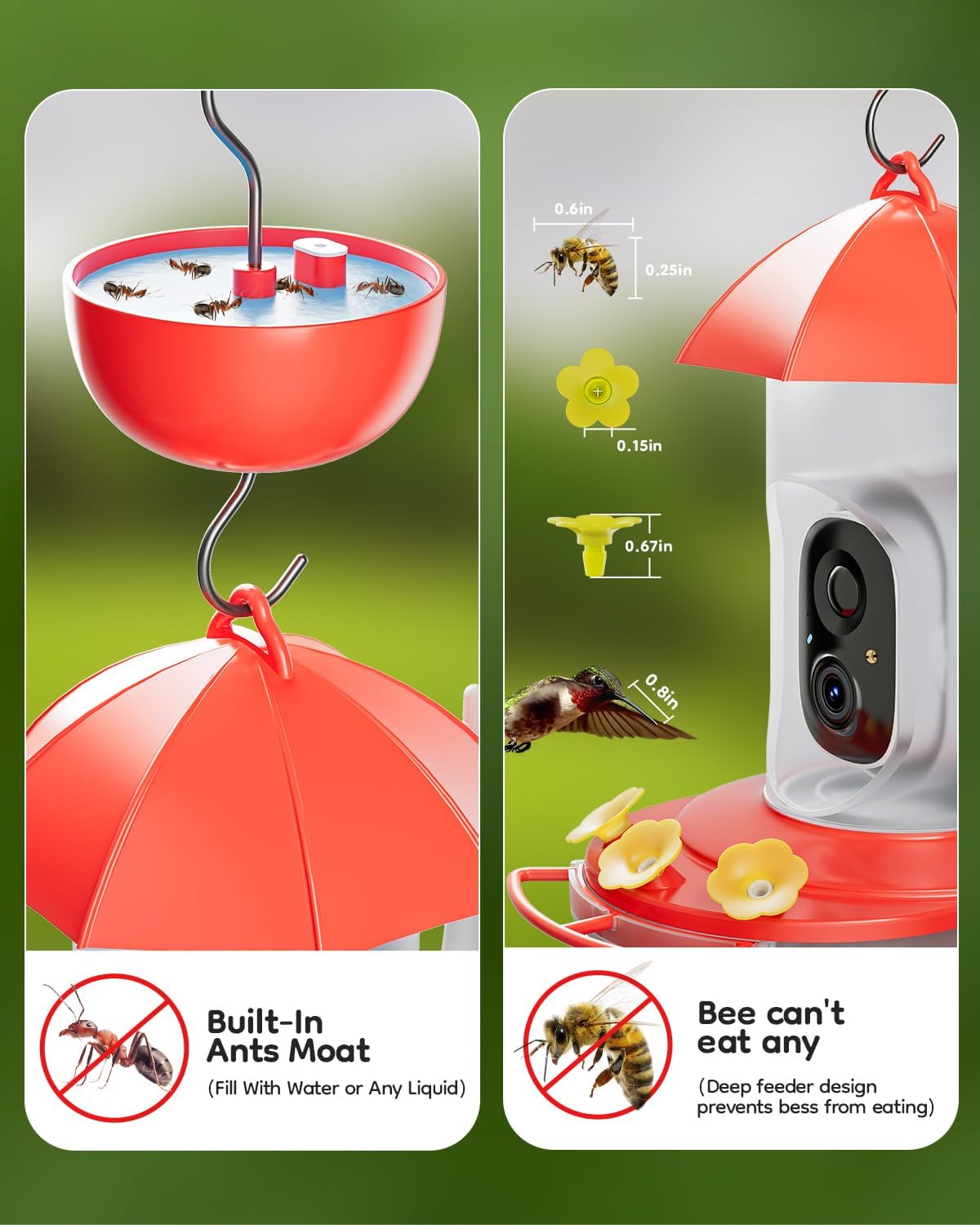
Image: Close-up illustrating the ant moat filled with water and the bee-proof design of the feeding ports.
5. Instalasi App sarta Sambungan
Download the Vicohome app from your smartphone's app store. Follow the in-app instructions to connect your LongPlus Hummingbird Feeder camera to your Wi-Fi network and complete the setup process. This will enable instant notifications and access to live feed and recordings.
Parentah Operasi
1. Monitoring Hummingbirds
Once set up, the camera will automatically detect motion and begin recording when hummingbirds approach the feeder. You will receive instant notifications on your Vicohome app, allowing you to view hirup footage or recorded clips.

Image: A hummingbird actively feeding at the feeder, demonstrating the camera's ability to capture detailed moments.
2. Pangakuan Manuk AI
The advanced AI algorithm in the Vicohome app can identify various hummingbird species. After a bird visit, check the app for details on the identified species. A basic cloud service subscription is required for this feature after the initial one-month free trial.

Image: The AI bird recognition feature in action, identifying a Ruby-Throated Hummingbird at the feeder.
3. Cloud Storage and Sharing
Recorded videos are stored in the cloud for up to 3 days for free. You can access these recordings anytime, anywhere through the app. An optional subscription is available for extended storage. The app also allows you to share captured moments with friends and family.
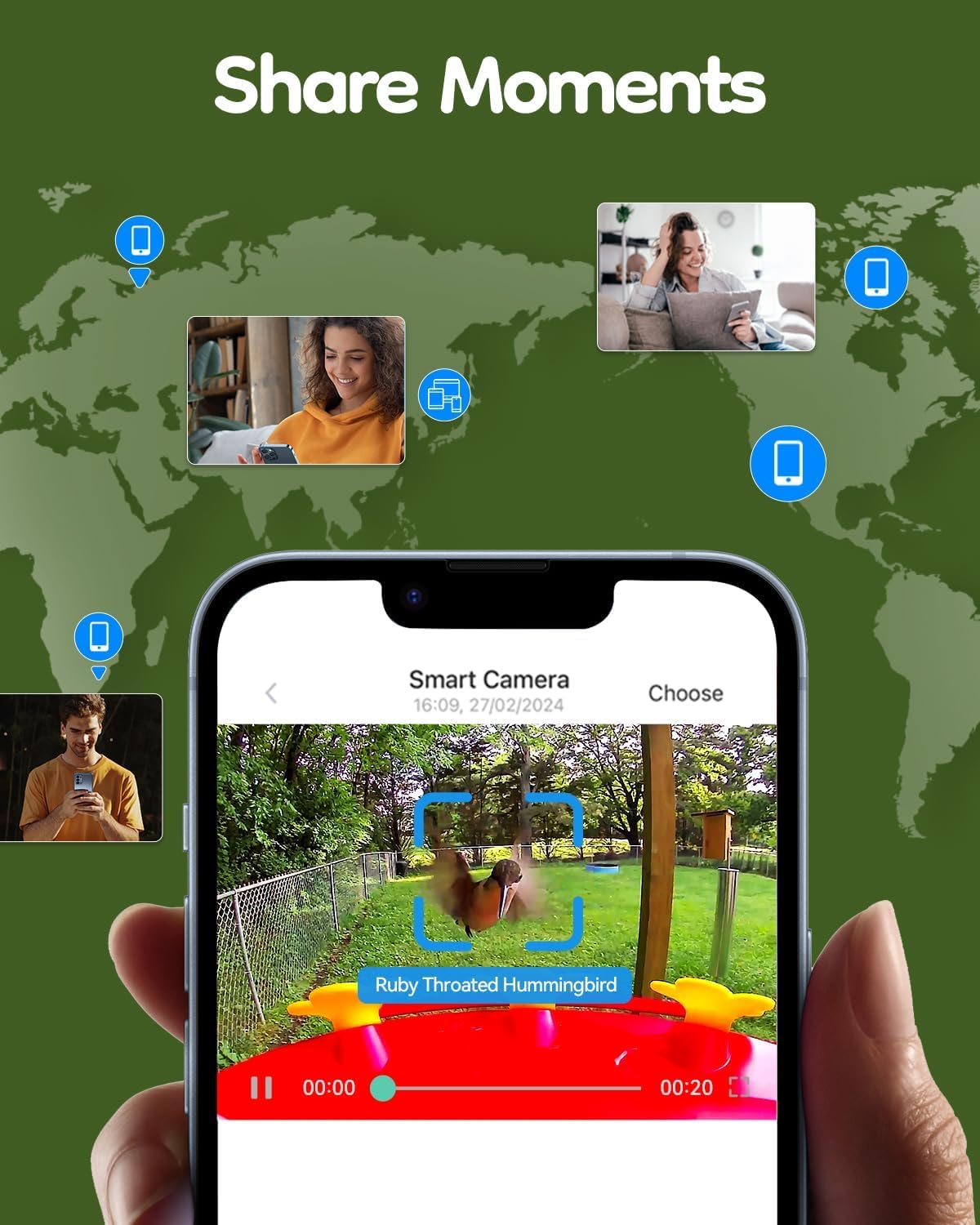
Image: A smartphone displaying a video captured by the feeder camera, highlighting the sharing feature.
Video: A demonstration of the 2K video quality captured by the LongPlus Hummingbird Feeder camera, showing a hummingbird in detail.
Pangropéa
1. Ngabersihkeun Feeder
Regular cleaning is crucial for the health of hummingbirds. The feeder features an upper and lower double-opening nectar tank structure, making it easy to disassemble and clean. Use the provided large and small brushes to thoroughly clean all parts. The feeder is also dishwasher friendly.

Image: Illustration of the easy cleaning and refilling process for the hummingbird feeder.
2. Nectar Replacement
Replace nectar regularly, especially in warm weather, to prevent spoilage and mold growth. Refer to standard hummingbird nectar guidelines for frequency.
3. Camera Battery Maintenance
Monitor the camera's battery level via the Vicohome app. Recharge the camera when the battery is low to ensure continuous monitoring. Consider a solar panel accessory (sold separately) for extended outdoor use without frequent manual recharging.
Pamérésan masalah
| Masalah | Mungkin Cukang lantaranana | Solusi |
|---|---|---|
| Nectar Leakage | Improper filling technique; damaged gasket. | Ensure feeder is filled while inverted. Check the gasket ring for damage and replace if necessary. |
| Ants in Nectar | Ant moat is dry or not properly installed. | Fill the ant moat with water. Ensure the ant moat is positioned correctly above the feeder. |
| No Camera Recording/Notifications | Low battery; Wi-Fi disconnection; app settings. | Recharge the camera battery. Check Wi-Fi connection. Verify notification settings in the Vicohome app. Ensure cloud service subscription is active if applicable. |
| Bees at Feeder | Feeding ports not deterring bees effectively. | Ensure feeding ports are correctly installed. The design is intended to be bee-proof, but persistent bees may require repositioning the feeder or using additional deterrents. |
spésifikasi
| Fitur | Rincian |
|---|---|
| merek | LongPlus |
| Modél | G02 |
| Spésiés sasaran | Kolibri |
| Bahan | BPA-Free Plastik |
| Tipe Pamasangan | Gunung Gantung |
| Sumber Daya | Rechargeable Battery (5200mAh) / Solar Powered (with optional accessory) |
| Ukuran barang (L x W x H) | 8 "L x 6" W x 11" H |
| Item Beurat | 1.62 kg |
| Kaasup Panyimpenan | Kartu Mémori 32GB |
| Resolusi Video | 2K |
Garansi sareng Rojongan
LongPlus offers a worry-free return and exchange policy within 30 days of receiving your product. For further assistance, technical support, or warranty claims, please refer to the contact information provided with your purchase or visit the official LongPlus websitus. Simpen resi pameseran anjeun pikeun validasi jaminan.
Ask a question about this manual
Ask about setup, troubleshooting, compatibility, parts, safety, or missing instructions. Manuals+ will review the question and use this page’s manual context to help answer it.