1. Bubuka
Welcome to the GardePro X60 Pro Max Cellular Trail Camera. This manual provides detailed instructions for setting up, operating, and maintaining your camera to ensure optimal performance for wildlife monitoring and security applications. Please read this manual thoroughly before using your camera.
2. Eusi Paket
Pastikeun yén sadaya item anu didaptarkeun di handap kalebet kana pakét anjeun:
- GardePro X60 Pro Max Cellular Trail Camera
- 8000mAh Rechargeable Lithium-ion Battery Pack
- Kabel Ngecas USB
- Tali Pamasangan
- Kartu SIM (tos dipasang sateuacanna atanapi kalebet misah)
- Manual pangguna (dokumén ieu)

Image: GardePro X60 Pro Max camera, 4G LTE SIM card, rechargeable battery pack, USB cable, and mounting strap.
3. Produk Langkungview
Familiarize yourself with the main components of your GardePro X60 Pro Max camera:
- anteneu: For cellular signal reception.
- Sénsor gerak PIR: Detect movement to trigger recordings.
- LEDs Infrabeureum: Provide no-glow illumination for night vision.
- Lensa kaméra: Nangkep gambar sareng video.
- Layar LCD: Pikeun navigasi menu sareng viewsetélan.
- Tombol kontrol: Menu, OK, Navigation (Up/Down/Left/Right), Start, On/Off.
- Kompartemen batré: Houses the rechargeable battery pack.
- Slot Kartu SIM: For cellular network connectivity.
- Port USB: Pikeun ngecas sareng mindahkeun data.
- Slot Kartu SD: For additional storage (though 32GB is built-in).

Image: The GardePro X60 Pro Max camera with its front panel open, revealing the 2.4-inch LCD screen and control buttons.
4. Setup Guide
4.1. Pamasangan Batré sareng Ngecas
- Open the camera's main latch and then the battery compartment cover.
- Insert the provided 8000mAh rechargeable lithium-ion battery pack, ensuring correct polarity.
- Close the battery compartment cover and the main latch securely.
- Connect the camera to a power source using the USB charging cable to fully charge the battery before first use. A full charge ensures maximum operational time.
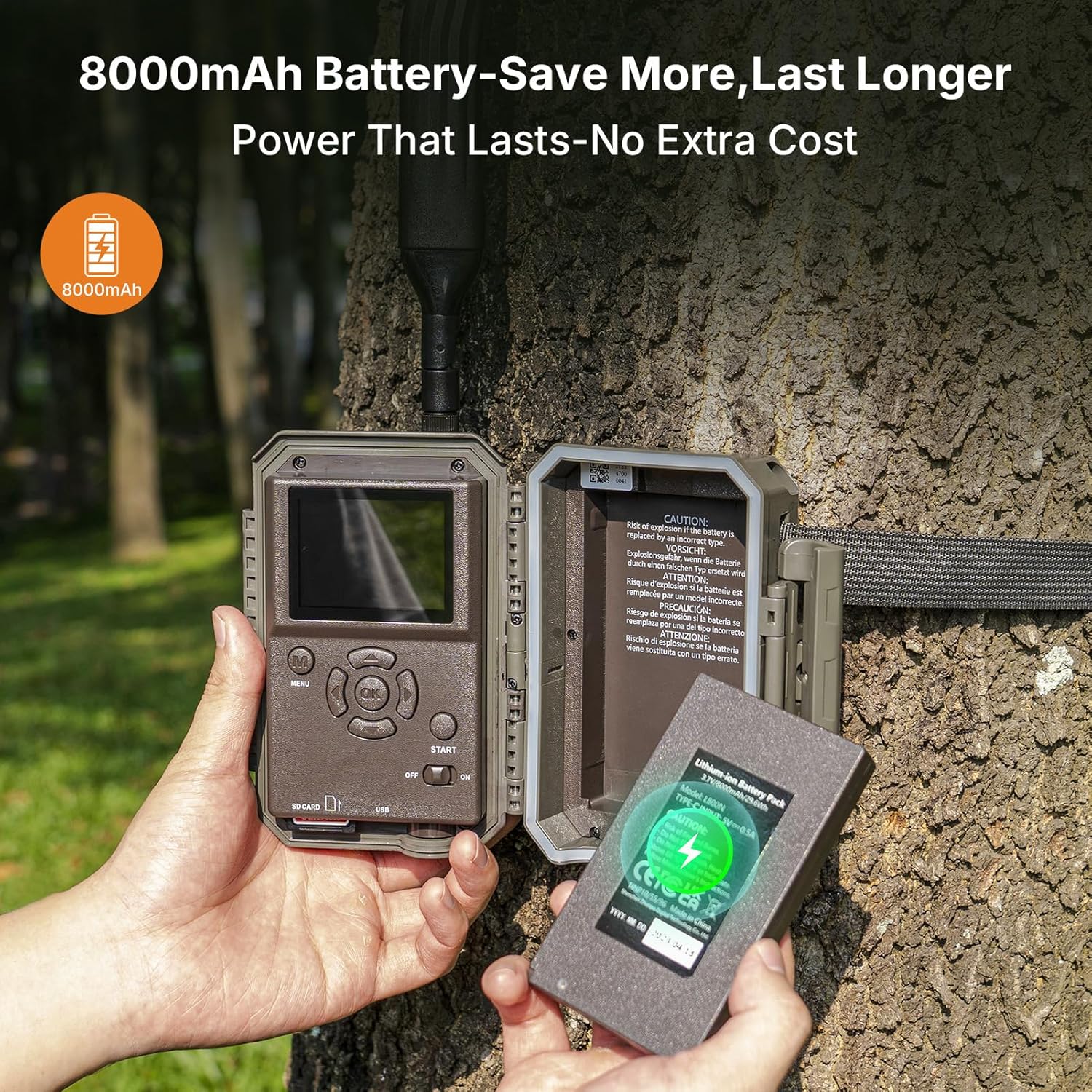
Image: A hand inserting the 8000mAh rechargeable battery pack into the open battery compartment of the GardePro X60 Pro Max camera.
4.2. Aktivasina sareng Pamasangan Kartu SIM
The GardePro X60 Pro Max is compatible with Verizon, AT&T, and T-Mobile networks. A SIM card is required for cellular functionality.
- If your SIM card is not pre-installed, locate the SIM card slot inside the camera.
- Insert the activated SIM card into the designated slot until it clicks into place.
- Ensure your cellular data plan is active and sufficient for your usage needs.
4.3. App Download and Camera Pairing
- Download the official GardePro app from your smartphone's app store (iOS or Android).
- Jieun akun atawa asup.
- Follow the in-app instructions to add and pair your X60 Pro Max camera. This typically involves scanning a QR code on the camera or entering its serial number.
4.4. Masang kaméra
For optimal performance, consider the following when mounting:
- Jangkungna: Mount the camera approximately 3-6 feet (1-2 meters) from the ground.
- Orientasi: Aim the camera slightly downward to capture subjects effectively.
- Clearance: Ensure no branches or tall grass obstruct the camera's view or motion sensors.
- Kaamanan: Use the provided mounting strap to secure the camera firmly to a tree or post.

Image: The GardePro X60 Pro Max camera securely mounted to a tree trunk using its strap, illustrating its cellular connectivity.
5. Parentah Operasi
5.1. Powering on / Pareum
Locate the power switch inside the camera's main compartment. Switch it to 'ON' to activate the camera. Switch to 'OFF' to power down.
5.2. Basic Settings via Camera Screen
Use the internal LCD screen and control buttons to configure initial settings such as:
- Tanggal jeung Waktos
- Operating Mode (Photo, Video, Photo+Video)
- Resolution (48MP photos, 1296P videos)
- Trigger Interval and Sensitivity
- Basa
5.3. Ngagunakeun Mobile App
The GardePro app provides advanced control and monitoring capabilities:
5.3.1. Hirup View
Access real-time video streaming from your camera directly on your smartphone. This feature requires an active data plan.

Image: A smartphone screen showing a live video feed from the GardePro X60 Pro Max camera, capturing deer in their natural habitat.
5.3.2. On-Demand Requests
Request instant photos or short video clips from your camera at any time. This feature also requires an active data plan.

Image: A smartphone displaying the GardePro app interface, with an option to 'Take a Photo' on demand, showing a captured image of deer.
5.3.3. Photo and Video Previews
Receive motion-triggered photo alerts and video previews (3-300 seconds) directly to your app, allowing for quick review of events. The camera sends 960x540 resolution video previews and 540P photo previews.

Gambar: Hiji jalma viewing a video preview of deer captured by the GardePro X60 Pro Max camera on their smartphone.

Image: A smartphone displaying a clear 540P photo preview of deer, sent from the GardePro X60 Pro Max camera.
5.3.4. Shared Data Plans
The GardePro X60 Pro Max supports shared data plans, allowing multiple cameras to utilize a single data pool. This can optimize data usage and reduce overall costs for users with multiple devices.

Image: A smartphone screen displaying the GardePro app's 'Plans' section, showing a shared data plan across multiple cameras with usage details.
5.3.5. Camera Sharing
The app allows you to share access to your camera's feed and captured media with friends or team members without additional fees.

Image: An illustration showing multiple individuals viewing the same GardePro camera feed on their smartphones, demonstrating the camera sharing feature.
5.4. Wawasan Peuting
The camera features 940nm no-glow infrared LEDs, providing illumination up to 100 feet for clear 48MP photos and 1296P videos in complete darkness. These LEDs are undetectable to animals and intruders.
6. Pangropéa
6.1. Kaperawatan batré
- Regularly charge the 8000mAh battery pack to maintain optimal performance.
- For extended outdoor use, consider pairing with a GardePro SP350 or SP1000 solar panel (sold separately) for continuous power.
6.2. beberesih
- Gently clean the camera lens and PIR sensors with a soft, dry cloth to ensure clear images and accurate motion detection.
- Lap kaméra casing jeung iklanamp lawon sakumaha diperyogikeun. Hindarkeun bahan kimia anu keras.
6.3. Panyimpenan
When not in use for extended periods, store the camera in a cool, dry place with the battery partially charged.
6.4. Panangtayungan Cuaca
The GardePro X60 Pro Max is designed with an IP66 waterproof rating, making it resistant to dust and strong jets of water. While durable, avoid submerging the camera in water.

Image: The GardePro X60 Pro Max camera mounted on a tree during rainfall, demonstrating its IP66 waterproof and weather-resistant design.
7. Cara ngungkulan
If you encounter issues with your GardePro X60 Pro Max, refer to the following common problems and solutions:
- Kaméra teu hurung:
Ensure the battery is fully charged and correctly inserted. Check the power switch position. - No cellular signal or connectivity:
Verify the SIM card is active and has a sufficient data plan. Check the camera's location for network coverage. Try restarting the camera. - Teu aya poto/video anu dicandak:
Check motion sensor sensitivity settings. Ensure the camera is in the correct operating mode (Photo, Video, or Photo+Video). Verify there are no obstructions in front of the PIR sensors. - Blurry images or videos:
Clean the camera lens. Ensure the camera is stable and not vibrating. Check focus settings if applicable (though most trail cameras are fixed focus). - Masalah konektipitas aplikasi:
Ensure your smartphone has a stable internet connection. Restart the app and the camera. Re-pair the camera if necessary.
8. Spésifikasi
| Fitur | Spésifikasi |
|---|---|
| Ngaran modél | X60PLMB |
| Resolusi Masih Éféktif | 48 MP |
| Resolusi Capture Video | 1296 p |
| Format Capture Video | MP4, MOV |
| Wengi Sawangan Sawangan | 100 suku |
| Viewdina Angle | 70 darajat |
| Protokol konektipitas | sélular |
| Jaringan anu cocog | Verizon, AT&T, T-Mobile |
| Sumber Daya | Battery Powered (8000mAh included) |
| Diwangun-di Mémori | 32GB |
| Tingkat Résistansi Cai | Waterproof (IP66) |
| Métode kontrol | App |
| Item Beurat | 1.72 pon |
| Ukuran Paket | 8.43 x 5.51 x 3.31 inci |
9. Garansi jeung Rojongan
GardePro products are designed for reliability and performance. For specific warranty details, please refer to the warranty card included with your product or visit the official GardePro website. For technical assistance, troubleshooting, or customer service inquiries, please contact GardePro customer support through their official channels.
Anjeun tiasa mendakan langkung seueur inpormasi sareng sumber dukungan ku nganjang ka GardePro Store on Amazon.


