
Bubuka
This manual provides essential information for the proper use and care of your Nokia C200 N151DL smartphone. Please read these instructions carefully before using your device to ensure optimal performance and longevity.
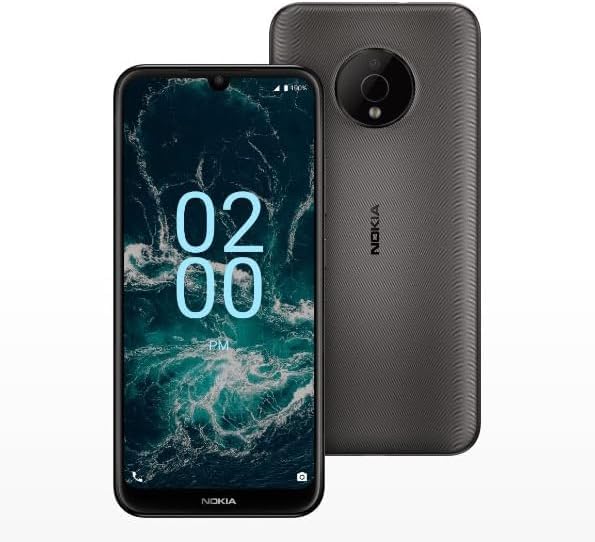
Image: The Nokia C200 N151DL smartphone, featuring its 6.1-inch HD+ display and Space Gray finish.
Naon dina Box
Upon unboxing your Nokia C200 N151DL, verify that all the following items are included:
- Nokia C200 N151DL Smartphone
- Kabel USB-C
- Alat Ejector SIM
Disetél
1. Nyelapkeun Kartu SIM
- Tangtukeun lokasi baki kartu SIM di sisi telepon Anjeun.
- Selapkeun alat ejector SIM kana liang leutik dina baki pikeun mukakeunana.
- Teundeun kartu Nano-SIM anjeun kana baki kalayan kontak emas nyanghareup ka handap.
- Taliti nyorong baki deui kana telepon nepi ka ngaklik kana tempatna.
2. Ngecas Alat
Before initial use, it is recommended to fully charge your Nokia C200 N151DL.
- Sambungkeun kabel USB-C ka port ngecas di handapeun telepon.
- Connect the other end of the USB-C cable to a compatible USB wall adapter (not included) and plug it into a power outlet.
- Indikator batré dina layar bakal nunjukkeun kamajuan ngecas.
3. Powering On jeung Konfigurasi Awal
- Press and hold the power button (usually on the right side) until the Nokia logo appears.
- Turutan pituduh dina layar pikeun milih basa anjeun, nyambung ka Wi-Fi, sareng nyetél akun Google anjeun.
- Your phone runs on Android 12.0, providing a clean and intuitive user experience.
Ngoperasikeun
Napigasi Dasar
The Nokia C200 N151DL features a 6.1-inch HD+ touchscreen display. Navigate by tapping, swiping, and pinching gestures. The Android 12.0 operating system offers a user-friendly interface for accessing apps, settings, and notifications.
Manajemén batré
Your device is equipped with a 5000 mAh battery designed for extended daily use. To optimize battery life:
- Saluyukeun kacaangan layar.
- Tutup aplikasi anu henteu dianggo jalan di latar tukang.
- Pareuman Wi-Fi, Bluetooth, atanapi GPS upami teu dianggo.
Panyimpenan sareng Kinerja
With 32GB of internal storage and 3GB of RAM, the Nokia C200 N151DL provides reliable multitasking capabilities and space for your applications and media. For additional storage, consider using a microSD card (sold separately).
Pangropéa
Ngabersihan Alat Anjeun
To clean your phone, use a soft, lint-free cloth. Avoid using abrasive materials, alcohol, or chemical cleaners, as these can damage the screen and finish.
Software Apdet
Periodically check for software updates to ensure your device has the latest features and security enhancements. Navigate to Setélan > Sistem > Apdet sistem pikeun mariksa tur masang apdet sadia.
Pamérésan masalah
If you encounter issues with your Nokia C200 N151DL, try the following common solutions:
- Telepon teu hurung: Pastikeun batréna geus dieusian. Sambungkeun telepon ka carjer salila sahenteuna 30 menit, teras cobian hurungkeun deui.
- Aplikasi nabrak atanapi katirisan: Tutup aplikasi anu bermasalah teras buka deui. Upami masalahna masih aya, hurungkeun deui telepon anjeun.
- Sinyal jaringan goréng: Pariksa sisipan kartu SIM anjeun. Pindah ka daérah anu gaduh jangkauan jaringan anu langkung saé.
- Masalah ngecas: Verify the USB-C cable and charger are working correctly. Try a different cable or power source.
- kinerja slow: Clear cache for frequently used apps. Consider uninstalling unused applications to free up storage.
For more complex issues, refer to Nokia's official support websitus atanapi ngahubungan layanan palanggan.
spésifikasi
Key technical specifications for the Nokia C200 N151DL:
| Fitur | Spésifikasi |
|---|---|
| merek | Nokia |
| Ngaran modél | Nokia C200 |
| Sistem operasi | Android 12.0 |
| RAM Mémori Dipasang Ukuran | 3 GB |
| Kapasitas Panyimpenan Mémori | 32 GB |
| Modél CPU | Qualcomm Snapdragon S1 QSD8650 |
| Laju CPU | 1.8 GHz |
| Ukuran layar | 6.1 inci |
| Tipe tampilan | LCD |
| Téhnologi sélular | 4G |
| Pamawa nirkabel | Obrolan lempeng |
| Daya Batré | 5000 mAh |
| Tipe Panyambung | USB Tipe C |
| Warna | Angkasa Gray |
| Produsén | HMD Global |
| UPC | 617230227802 |
| ASIN | B0FGG1Y47Z |
Garansi sareng Rojongan
Émbaran jaminan
Produk ieu katutupan ku a Kawijakan mulang 30 dinten for a full refund or exchange from the date of purchase. Please retain your proof of purchase for warranty claims.
Rojongan Palanggan
For further assistance, technical support, or warranty inquiries, please visit the official Nokia support website or contact your retailer. Ensure you have your device model number (N151DL) and proof of purchase available when seeking support.