1. Bubuka
This manual provides detailed instructions for the Loutoc SRC4526 Universal Remote Control, designed for seamless compatibility with Philips Ambilight Smart TVs. Please read this guide thoroughly to ensure optimal use and longevity of your remote control.
1.1 Produk Leuwihview
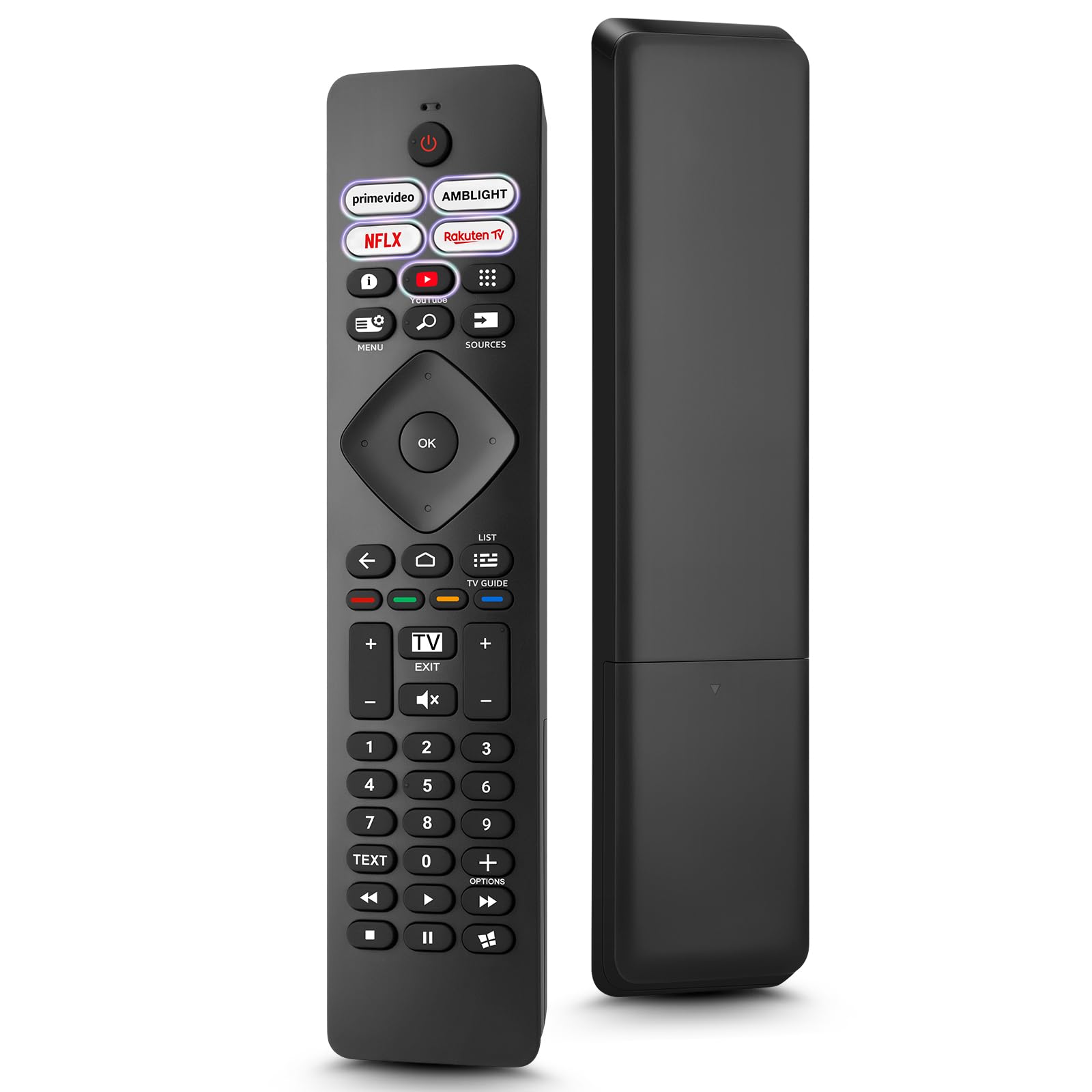
Image: The Loutoc SRC4526 Universal Remote Control, showcasing desain ergonomis na perenah tombol.
1.2 Fitur konci
- Convenient Plug-and-Play: No complex setup or programming required. Simply insert batteries and the remote is ready for use.
- Kompatibilitas TV anu Lega: Fully compatible with Philips Ambilight TVs, including 4K Ambilight LED, OLED, FHD, and Full Ultra HD models.
- Tombol Pintasan Khusus: Features 5 direct access buttons for popular streaming platforms: Ambilight, Video, NFLX (Netflix), Rakuten TV, and YouTube.
- Kinerja anu dipercaya: Offers an effective operating range of 8 meters (26 feet) and an ultra-fast response time of 0.2 seconds.
2. Setélan
2.1 Pamasangan batré
The Loutoc SRC4526 remote control requires two AAA batteries (not included) for operation.
- Panggihan kompartemen batré dina tonggong kadali jauh.
- Geser muka kompartemen batréna.
- Selapkeun dua batré AAA, mastikeun terminal positif (+) jeung négatip (-) align bener jeung indikator di jero kompartemen.
- Tutup panutup kompartemen batré aman.
2.2 Pamakéan awal
This remote control is designed for immediate use with compatible Philips Ambilight TVs. No programming or pairing is required. Once batteries are installed, point the remote at your TV and begin operation.
3. Parentah Operasi
3.1 Tombol Fungsi Leuwihview
Refer to the image below for a visual guide to the remote control's buttons and their corresponding functions.

Image: Detailed diagram of the Loutoc SRC4526 remote control, illustrating each button and its primary function.
| Tombol | Fungsi |
|---|---|
| Kakuatan | Switches the TV on or off (Standby mode). |
| Prime Video, Ambilight, Netflix, Rakuten TV | Quickly launches the corresponding application. |
| ménu | Opens the Quick Menu with typical TV functions. Hold to show Gaming control bar. |
| neangan | Opens the Search tab on the Home screen. |
| Sumber | Opens or closes the TV's input sources menu. |
| OK | Ngonfirmasi pilihan atanapi setélan. |
| Arrow/Navigation Keys | Navigates up, down, left, or right through menus and options. |
| Balik deui | Mulih ka layar atawa saluran saméméhna. |
| Imah | Opens the TV's Home menu. |
| Pituduh TV | Opens or closes the TV Guide. Long press to open the channel list. |
| Color Keys (Red, Green, Yellow, Blue) | Provides direct selection of on-screen options. The blue key typically opens Help. |
| Volume (+/-) | Nyaluyukeun tingkat volume TV. |
| Saluran (+/-) | Switches to the next or previous channel. |
| Kaluar | Exits current menu/application or returns to live TV. From standby, goes to last viewsumber ed. |
| Ngajempékeun | Ngajempékeun atanapi nganonaktipkeun sora TV. |
| Konci Nomer (0-9) | Langsung milih saluran TV. |
| TEKS | Opens or closes Text/Teletext. |
| Kadali Playback | Controls media playback: Play, Pause, Stop, Rewind, Fast Forward. |
| Aplikasi | Opens the Apps tab on the Home screen. |
3.2 Ambilight Functionality
For Philips TVs equipped with Ambilight functionality, the dedicated Ambilight button on your remote allows you to control the lighting effects.
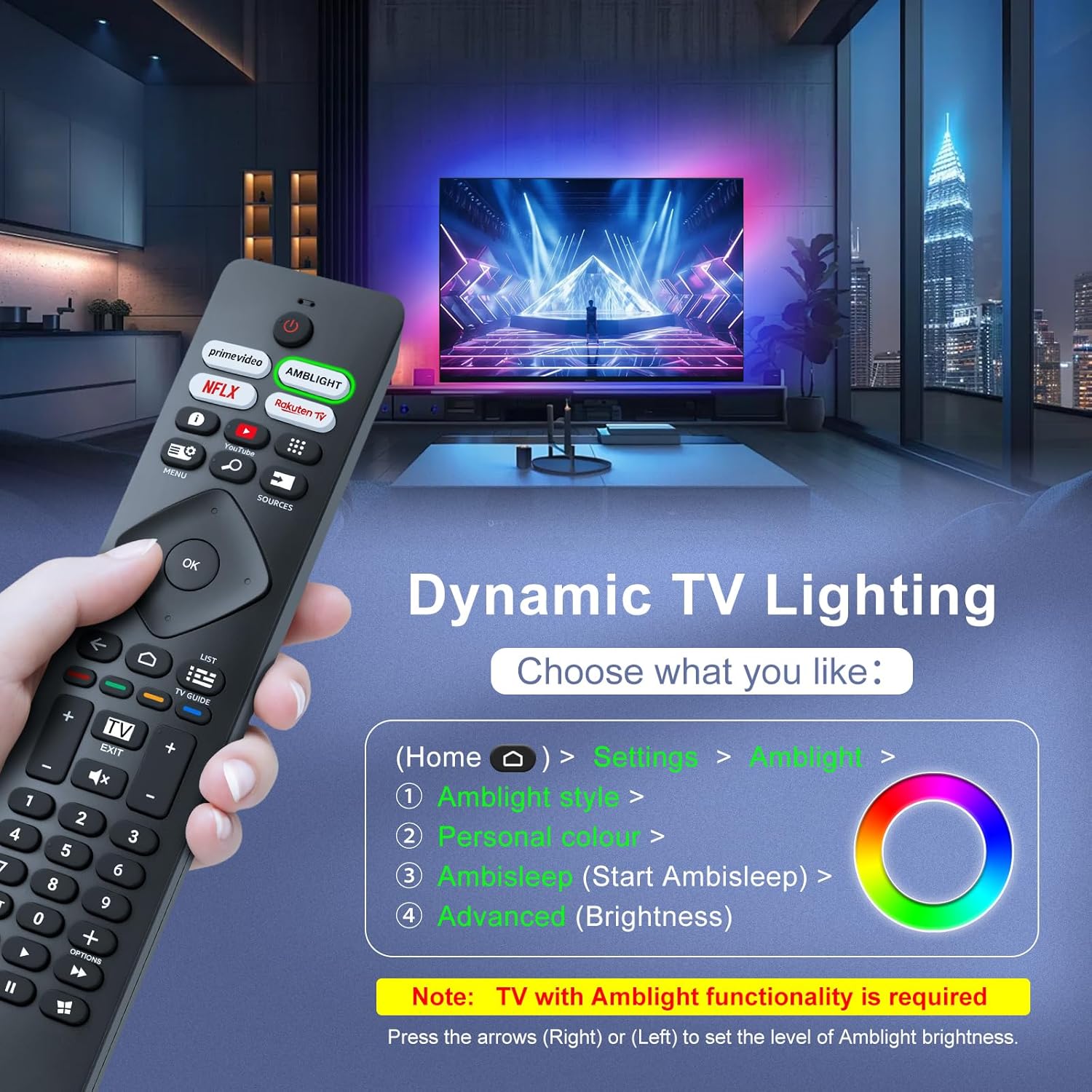
Image: A hand holding the remote control, with an overlay showing Ambilight settings on a TV screen.
After pressing the Ambilight button, you can navigate through the TV's menu to:
- Select different Ambilight display styles.
- Adjust personal color preferences.
- Initiate AmbiSleep mode.
- Adjust Ambilight brightness levels (using the right or left arrow keys).
Note: This feature requires a Philips TV with built-in Ambilight functionality.
4. Pangropéa
4.1 beberesih
To clean your remote control, gently wipe it with a soft, dry cloth. Avoid using liquid cleaners, aerosols, or harsh chemicals, as these can damage the remote's surface or internal components.
4.2 Panyimpenan
Simpen remot kontrol di tempat anu tiis, garing, sareng jauh tina sinar panonpoé langsung sareng suhu anu ekstrim. Upami remot henteu dianggo kanggo waktos anu lami, disarankeun pikeun nyabut batréna pikeun nyegah bocor.
4.3 Perawatan Batré
- Ngaganti sadaya batré dina waktos anu sareng; ulah campur aki heubeul jeung anyar.
- Ulah nyampur rupa-rupa jinis batré (contona, alkali sareng anu tiasa dicas ulang).
- Buang batré anu dipaké sacara tanggung jawab nurutkeun peraturan lokal.
5. Cara ngungkulan
5.1 Isu umum jeung Solusi
- Jauh teu ngabales:
- Pariksa naha batréna diselapkeun leres kalayan polaritasna anu leres.
- Ganti batréna ku batré AAA anyar.
- Pastikeun teu aya halangan antara remot kontrol sareng panarima infrabeureum TV.
- Pastikeun anjeun aya dina jarak operasi efektif (dugi ka 8 méter).
- Tombol husus teu jalan:
- Clean the remote control, especially around the non-functioning buttons, to remove any dirt or debris.
- If only Ambilight functions are not working, ensure your Philips TV model supports Ambilight.
5.2 Rojongan kontak
If you encounter persistent issues that cannot be resolved with the troubleshooting steps above, please contact Loutoc customer support directly. We aim to respond to all inquiries within 12 working hours.
6. Spésifikasi
| Fitur | Rincian |
|---|---|
| merek | Loutoc |
| Ngaran modél | SRC4526-FBA |
| Nomer Modél Item | SRC4526 |
| Warna | Hideung |
| Téhnologi konektipitas | Infrabeureum |
| Fitur husus | No programming required, Ergonomic, Lightweight |
| Alat nu cocog | Television (Philips Ambilight TVs) |
| Jumlah Maksimum Alat anu Dirojong | 1 |
| Tipe Controller | Tombol Control |
| Rentang maksimum | 8 Méter (26 Suku) |
| Katerangan batré | AAA (2 required, not included) |
| Produsén | Loutoc |
| Negara asal | Cina |
| Tanggal Kahiji Sadia dina Amazon.com.be | 31 Agustus 2025 |
7. Garansi jeung Rojongan
7.1 Émbaran jaminan
This Loutoc remote control comes with a manufacturer's warranty of 30 days from the date of purchase. Please retain your proof of purchase for any warranty claims.
7.2 Rojongan Palanggan
For any questions, technical assistance, or warranty inquiries, please contact Loutoc customer support. We are committed to providing timely assistance and will respond to your queries within 12 working hours.