Bubuka
This manual provides essential instructions for the safe and efficient use of your Uniwa Doov R17 Pro Smartphone. Please read this manual thoroughly before operating your device to ensure proper functionality and to avoid damage.

The Uniwa Doov R17 Pro Smartphone features a compact design with a physical keypad on the front and a camera module on the rear. The display shows the time and date.
1. Ngamimitian
1.1. Ngabuka Kotak Alat Anjeun
Carefully unpack your Uniwa Doov R17 Pro Smartphone and verify that all components are present.

The retail package typically includes the Uniwa Doov R17 Pro Smartphone, a SIM ejector pin, a TPU protective case, a Type-C charging cable, and a basic instruction manual (which may be in Chinese).
Eusi pakét:
- Uniwa Doov R17 Pro Smartphone
- Pin SIM
- Kasus TPU
- Kabel Tipe-C
- Instruction Manual (Note: This document serves as an English guide)
1.2. Masang Kartu SIM sareng SD
The Uniwa Doov R17 Pro supports dual SIM cards and a microSD card for expandable storage. Follow these steps to install them:
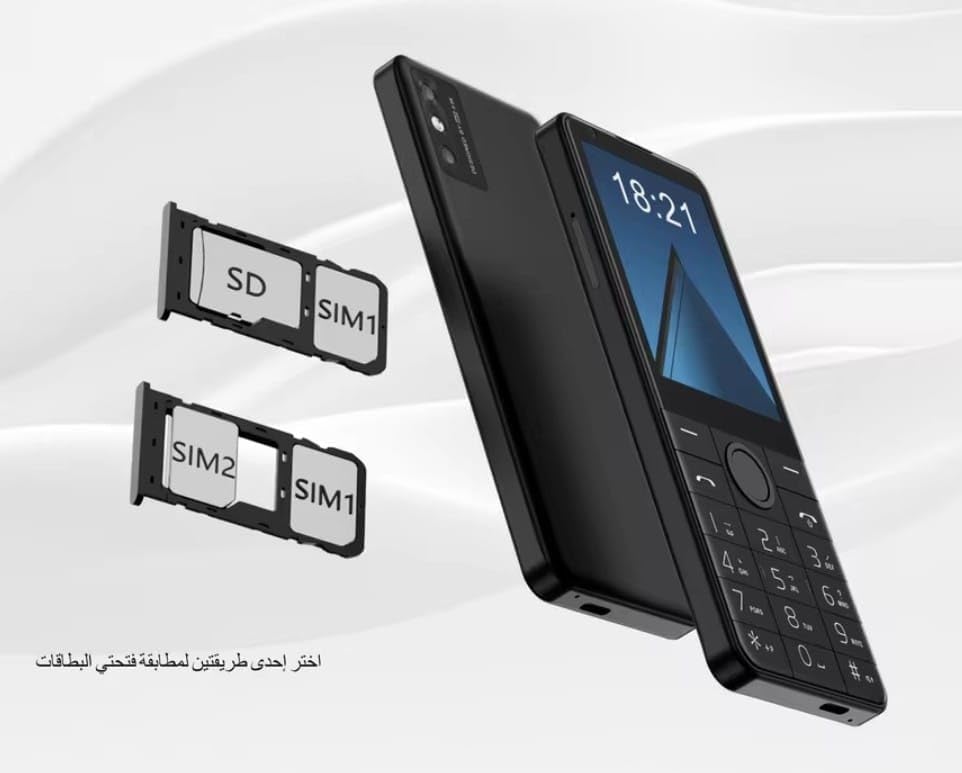
The image shows two card trays. One tray accommodates a SIM1 card and an SD card. The second tray accommodates a SIM1 card and a SIM2 card. The device supports flexible configurations for dual SIM or single SIM with expandable storage.
- Locate the SIM card tray slot on the side of your phone.
- Selapkeun pin ejector SIM kana liang leutik gigireun baki terus pencét gently nepi baki pops kaluar.
- Taliti tarik kaluar baki.
- Teundeun kartu Nano-SIM anjeun jeung/atawa kartu microSD kana slot nu ditunjuk dina baki. Pastikeun kontak emas nyanghareup ka handap.
- Gently dorong baki deui kana slot nepi ka siram jeung awak telepon.
1.3. Ngecas Batré
Saméméh dipaké munggaran, eusian pinuh batré alat.
- Connect the Type-C cable to the charging port on your phone.
- Sambungkeun tungtung kabel anu sanés ka adaptor kakuatan USB anu cocog (teu kalebet) atanapi port USB komputer.
- Indikator ngecas dina layar bakal némbongkeun status ngecas.
1.4. Powering on / Pareum
Pikeun ngahurungkeun, pencét jeung tahan kenop Kakuatan tombol nepi ka layar hurung. Pikeun mareuman, pencét jeung tahan tombol Kakuatan tombol, teras pilih "Pareuman" tina pilihan dina layar.
2. Operasi dasar
2.1. Layar sareng Navigasi
The Uniwa Doov R17 Pro features a 3.54-inch touch screen and a physical keypad for navigation and input.
- Layar cabak: Ketok pikeun milih, gesek pikeun ngagulung, ciwit pikeun ngazum.
- Papan tombol fisik: Use the directional keys for menu navigation and the numeric keys for dialing and text input.
- Tombol imah: Mulih ka layar utama.
- Tombol Balik: Mulih ka layar saméméhna.
2.2. Nyieun jeung Nampa Telepon
To make a call, open the Phone application, dial the number using the keypad, and press the call button. To answer an incoming call, swipe the answer icon on the screen or press the designated call button.
2.3. Ngirim Pesen
Open the Messaging application, select "New Message," enter the recipient's number or select from contacts, type your message using the keypad or on-screen keyboard, and send.
2.4. Nyambungkeun ka Jaringan
Your device supports 4G LTE, Wi-Fi, and Bluetooth connectivity.
Sambungan Wi-Fi:
- Pindah ka Setélan > Jaringan & internét > Wifi.
- Hurungkeun Wi-Fi.
- Pilih jaringan anu dipikahoyong sareng lebetkeun kecap akses upami dipenta.
Sambungan Bluetooth:
- Pindah ka Setélan > Alat disambungkeun > Bluetooth.
- Hurungkeun Bluetooth.
- Pilih alat tina daptar anu bade dipasangkeun.
3. Pangropéa Alat
3.1. Ngabersihan Alat Anjeun
Anggo lawon anu lemes sareng henteu aya bulu pikeun ngabersihkeun layar sareng awak telepon. Hindarkeun nganggo bahan kimia anu keras atanapi bahan abrasif anu tiasa ngaruksak alat.
3.2. Kaperawatan batré
To prolong battery life, avoid exposing the device to extreme temperatures (hot or cold). Do not leave the device charging for extended periods after it is fully charged.
3.3. Apdet parangkat lunak
Pariksa sacara berkala apdet parangkat lunak dina Setélan > Sistim > Pembaruan sistem to ensure your device has the latest features and security patches. It is recommended to perform updates over a Wi-Fi connection.
4. Ngungkulan Masalah Umum
- Alat teu hurung: Pastikeun batréna geus dieusian. Pencét jeung tahan tombol Daya sahenteuna 10 detik.
- Henteu aya sinyal jaringan: Check if SIM cards are correctly inserted. Verify network settings in Setélan > Jaringan & internét.
- Aplikasi nabrak: Try restarting the app or the phone. Clear app cache in Setélan > Aplikasi.
- kinerja slow: Close unnecessary background apps. Free up storage space by deleting unused files atawa aktip.
- Layar rampa teu ngaréspon: Restart the device. If the issue persists, contact support.
5. Spésifikasi produk
The Uniwa Doov R17 Pro Smartphone offers the following technical specifications:

This image highlights key features: Android 13 System, 3.54 Inch Touch Screen, Support WiFi & BT, Support 4G Video Calling, 2300mAh Battery, and support for customization of keyboards for Russian, English, Arabic, and Hebrew. It also notes that the device is 'Not working in USA'.
| Fitur | Rincian |
|---|---|
| Ngaran modél | Doov R17 Pro |
| merek | Uniwa (Generic) |
| Sistem operasi | Android 13.0 |
| Ukuran layar | 3.54 inci |
| Resolusi | 854 x 480 |
| Installed RAM Memory | 4 GB |
| Kapasitas Panyimpenan Mémori | 64 GB ROM (Internal) |
| Modél CPU | MediaTek MT8125 |
| Laju CPU | 3.4 GHz |
| Pamawa nirkabel | Henteu dikonci pikeun Sadaya operator |
| Dimensi produk | 14.3 x 6 x 1 cm; 122 g |
| Kapasitas batré | 2300 mah |
| Konektipitas | 4G LTE, Wi-Fi, Bluetooth |
6. Garansi jeung Rojongan
6.1. Garansi produk
Your Uniwa Doov R17 Pro Smartphone is covered by a standard manufacturer's warranty. Please refer to the warranty card included in your package for specific terms and conditions, or contact your retailer for details.
Extended warranty and accidental damage protection plans may be available for purchase separately. Examples include 1-Year Extended Warranty Plan, 2-Years Extended Warranty Plan, and 1-Year Accidental Damage Protection Plan.
6.2. Rojongan Palanggan
For technical assistance or support, please contact your point of purchase or visit the official Uniwa support website (if available). Keep your purchase receipt and product serial number handy when seeking support.


