1. Bubuka
Thank you for choosing the Olvy A10 Cordless Stick Vacuum Cleaner with Mop Function. This appliance is designed for efficient cleaning of various floor types, offering both vacuuming and mopping capabilities. Please read this manual thoroughly before use to ensure proper operation, maintenance, and safety.
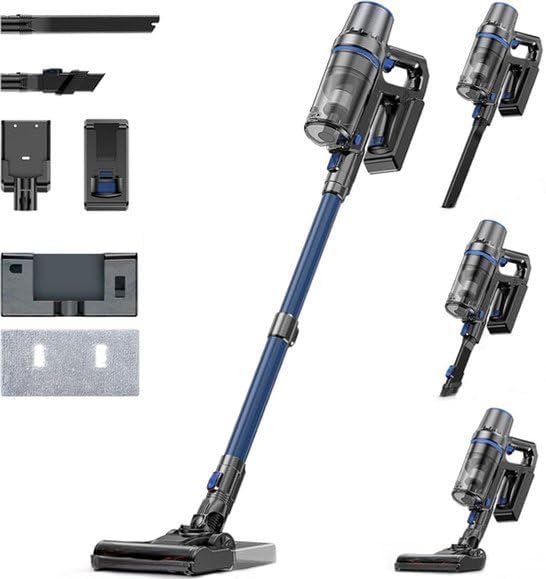
Image: The Olvy A10 Cordless Stick Vacuum Cleaner in its full assembly, alongside various attachments and the wall mount.
2. Parentah Kasalametan
Pikeun ngurangan résiko kahuruan, kejutan listrik, atawa tatu, salawasna turutan pancegahan kaamanan dasar nalika ngagunakeun alat listrik.
- Baca sadaya parentah sateuacan nganggo alat.
- Ulah make di luar atawa dina surfaces baseuh.
- Ulah ngantep dipaké salaku cocooan. Perhatian caket diperyogikeun nalika dianggo ku atanapi caket barudak.
- Anggo ngan sakumaha anu dijelaskeun dina manual ieu. Paké ngan kantétan dianjurkeun produsén urang.
- Ulah make jeung ari ruksak atawa colokan. Upami alat henteu jalan sakumaha sakuduna, parantos diturunkeun, ruksak, ditinggalkeun di luar, atanapi murag kana cai, balikkeun deui ka pusat layanan.
- Ulah narik atawa mawa ku ari, make ari salaku cecekelan, nutup panto dina ari, atawa narik ari sabudeureun ujung seukeut atawa juru. Ulah ngajalankeun alat ngaliwatan kabel. Tetep ari jauh ti surfaces dipanaskeun.
- Ulah cabut colokan ku cara narik kana kabel. Pikeun cabut colokan, keupeul colokan, teu ari.
- Ulah nanganan colokan atawa alat ku leungeun baseuh.
- Ulah nempatkeun obyék nanaon kana bukaan. Entong nganggo sareng bukaan anu diblokir; tetep bébas tina lebu, serat, rambut, sareng naon waé anu tiasa ngirangan aliran hawa.
- Jauhkeun buuk, pakean longgar, ramo, sareng sadaya bagian awak tina bukaan sareng bagian anu obah.
- Pareuman sadaya kadali sateuacan cabut colokan.
- Paké perawatan tambahan nalika meresihan dina tangga.
- Entong dianggo pikeun nyandak cairan anu gampang kaduruk atanapi kaduruk, sapertos béngsin, atanapi dianggo di daérah anu aya.
- Ulah nyokot naon bae anu kaduruk atawa ngaroko, kayaning roko, korek api, atawa lebu panas.
- Ulah make tanpa cangkir lebu jeung/atawa saringan di tempat.
- Nyegah ngamimitian teu dihaja. Pastikeun saklar dina posisi pareum samemeh nyambung ka pak batré, nyokot atawa mawa alat.
- Ngecas ukur nganggo carjer anu ditunjuk ku produsén. Pangecas anu cocog pikeun hiji jinis pak batré tiasa nyababkeun résiko seuneu nalika dianggo sareng pak batré anu sanés.
- Dina kaayaan kasar, cairan bisa ejected tina batréna; nyingkahan kontak. Upami kontak teu kahaja, siram ku cai. Lamun cairan kontak panon, tambahan neangan pitulung médis. Cairan anu dikaluarkeun tina batré tiasa nyababkeun iritasi atanapi kaduruk.
3. Eusi Paket
Pastikeun yén sadaya komponén aya dina bungkusan:
- Unit Utama (Vakum Genggam)
- Tube Extension adjustable
- Sikat Sikat Lantai
- Batré anu tiasa dicabut
- Tangki cai (pikeun ngepel)
- Pel Pal
- Alat Sikat 2-in-1
- Alat celah
- Tembok Gunung Bracket
- Adaptor kakuatan
- Replacement HEPA Filter (2x)
- Manual pamaké

Image: A visual representation of all components included with the Olvy A10 Cordless Stick Vacuum Cleaner.
4. Produk Langkungview
The Olvy A10 features a powerful 350W motor providing up to 35,000 Pa suction, an integrated mop function, and a multi-stage HEPA filtration system. It includes an intelligent LED display for monitoring status and an auto-mode for adaptive cleaning.
Fitur konci:
- Nyeuseup kuat: 350W motor with 35,000 Pa for deep cleaning on various surfaces.
- Fungsi 2-in-1: Seamlessly switch between vacuuming and mopping.
- Témbongkeun LED calakan: Provides real-time information on battery level, suction mode, and dust concentration.
- Modeu Otomatis: Otomatis nyaluyukeun kakuatan nyeuseup dumasar kana tingkat kokotor nu dideteksi.
- HEPA 13 Filtration: Captures 99.99% of fine particles, suitable for allergy sufferers.
- Waktos ngajalankeun panjang: Up to 60 minutes on a single charge with a 2200 mAh removable battery.
- Lightweight and Versatile: Easy to maneuver and convert into a handheld vacuum for various cleaning tasks.

Image: Close-up of the intelligent LED display showing battery indicator, low power warning, auto mode, dust concentration, and control panel.

Image: The LED display indicating 'Auto-mode' and the current power level during operation.
5. Setup jeung Majelis
5.1 Ngecas Awal
Before first use, fully charge the battery. The battery takes approximately 4-5 hours to fully charge.
- Cabut batré tina unit utama ku mencét tombol pelepas.
- Sambungkeun adaptor daya kana port ngecas dina batréna.
- Plug the adapter into a power outlet. The battery indicator on the LED display will show charging status.
- Saatos dicas pinuh, pegatkeun sambungan adaptor.

Image: The removable battery unit, highlighting its 2200 mAh capacity, 4-5 hour charging time, and up to 60 minutes run time.
5.2 Ngarakit vakum cleaner
- Pasang Batré: Slide the charged battery into the main unit until it clicks into place.
- Ngagantelkeun Tabung Extension: Connect the adjustable extension tube to the main unit. Ensure it clicks securely.
- Pasang Sikat Lantai: Connect the floor brush head to the other end of the extension tube.
- Pasang Wall Mount (Opsional): Choose a suitable location for the wall mount. Secure it to the wall using the provided screws and anchors. This allows for convenient storage and charging.
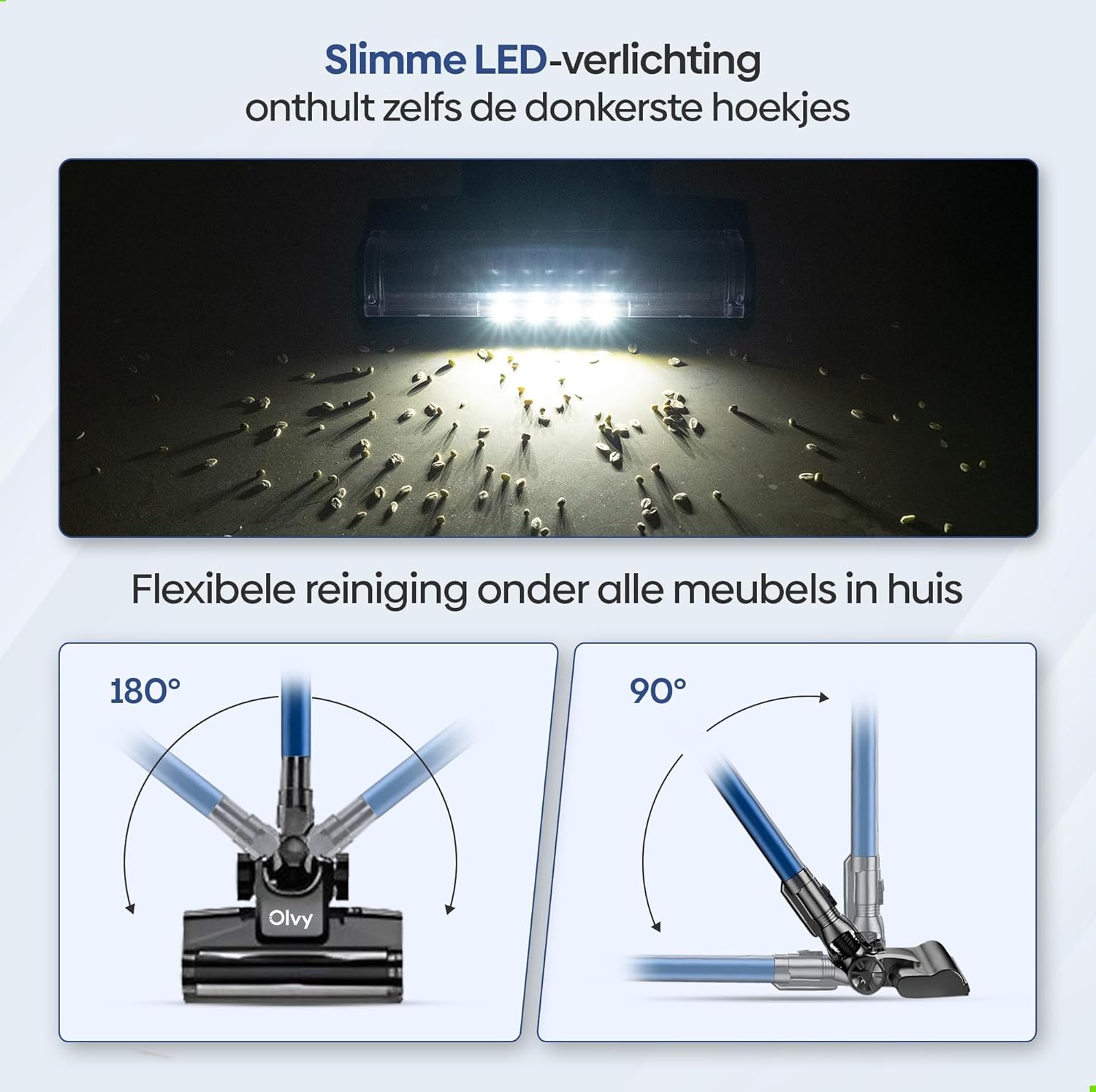
Image: The vacuum cleaner demonstrating both wall-mounted storage and self-standing capability.
6. Parentah Operasi
6.1 Operasi Dasar
- Hurungkeun/Pareuman: Pencét tombol daya dina unit utama pikeun ngaktipkeun atanapi mareuman vacuum cleaner.
- Saluyukeun Daya Nyeuseup: The vacuum offers 5 suction levels. Use the control panel on the LED display to cycle through the power modes (Low, Normal, High, Turbo).
- Modeu Otomatis: Activate the intelligent auto mode for automatic suction adjustment based on dirt detection. The LED display will show 'Auto' when this mode is active.
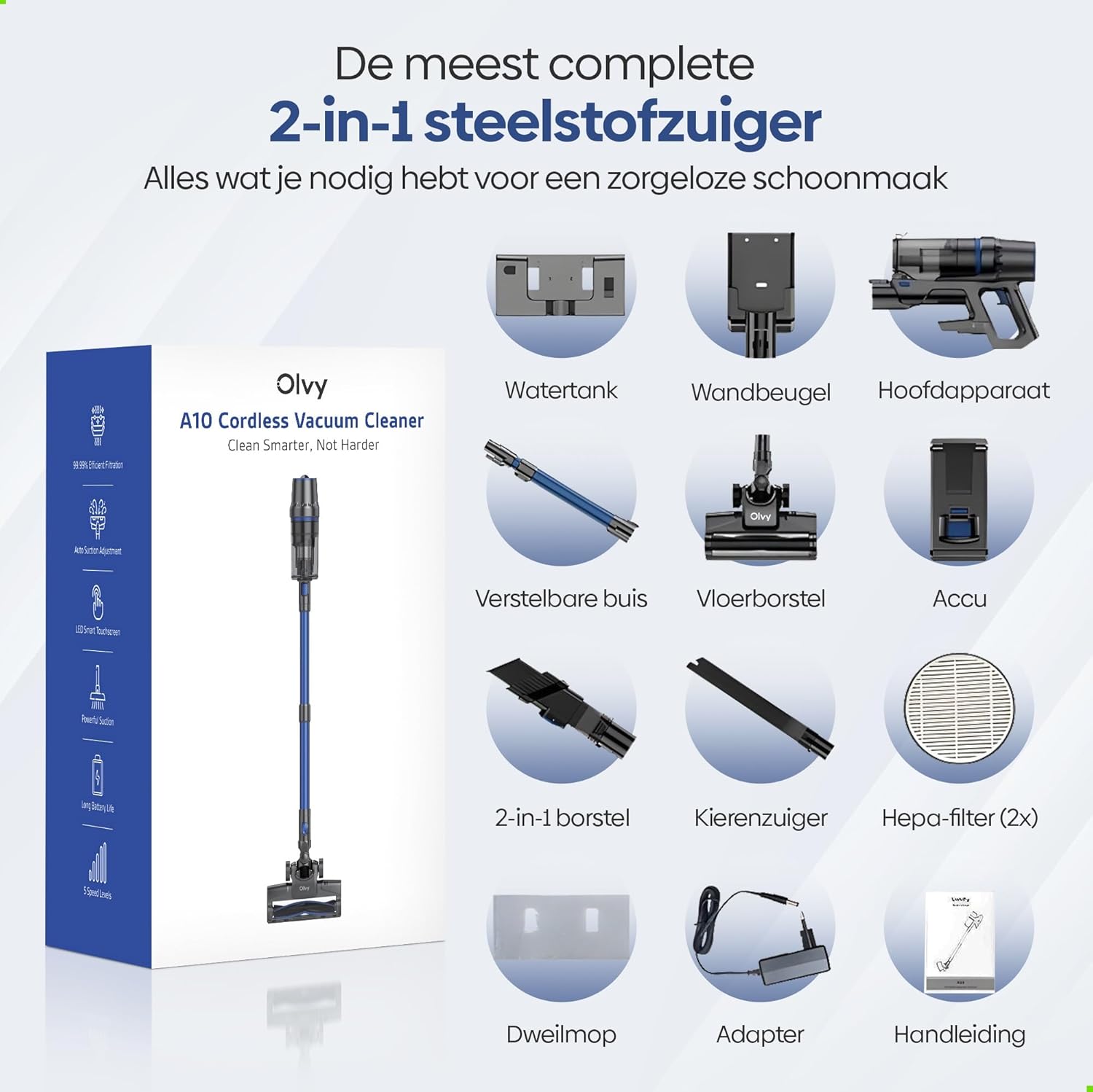
Image: The vacuum cleaner demonstrating its 4 suction levels (Low, Normal, High, Turbo) and intelligent auto mode, which adapts to dirt levels.
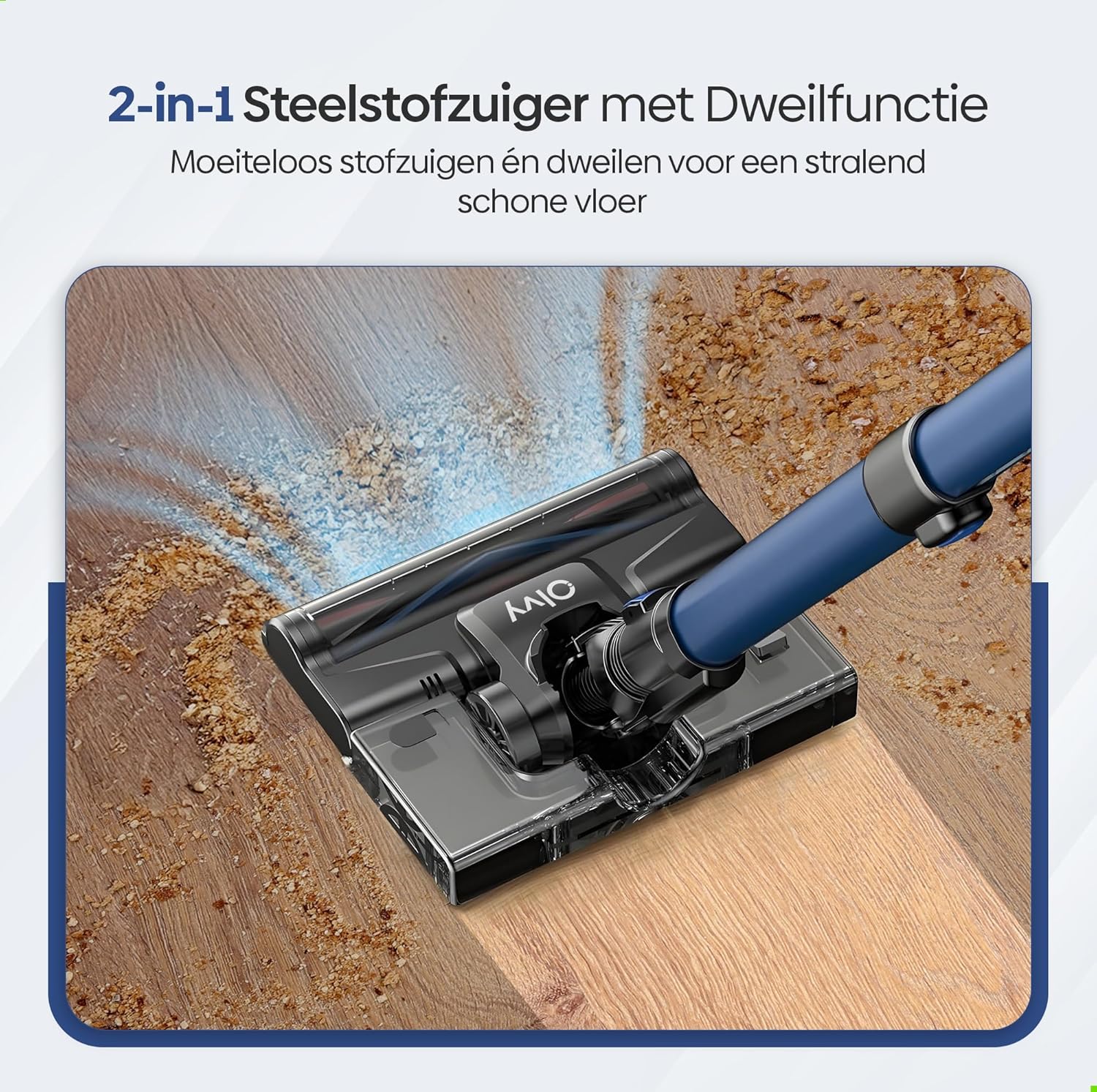
Image: A user operating the Olvy A10, showcasing its powerful 350W motor and 35,000 Pa suction for effective cleaning of various debris like hair, dust, crumbs, and sand.
6.2 Ngagunakeun Fungsi Pel
The integrated mop function allows for simultaneous vacuuming and wet cleaning of hard floors.
- Tangki cai ngeusian: Detach the water tank from the floor brush head. Fill it with clean water. Do not use corrosive liquids or detergents that may damage the tank or floor.
- Attach Mop Pad: Securely attach the mop pad to the bottom of the water tank.
- Pasangkeun deui Tangki Cai: Reinstall the filled water tank onto the floor brush head.
- Mimitian Mopping: Operate the vacuum cleaner as usual. The mop pad will dampen the floor as you vacuum, providing a streak-free clean.

Gambar: A lengkep view of the 2-in-1 stick vacuum with mop function, showing water being dispensed for simultaneous vacuuming and mopping on a hard floor.

Image: The mop function of the Olvy A10 actively cleaning a hard floor, demonstrating its effectiveness in removing dirt and leaving a clean surface.
6.3 Ngagunakeun Kantétan
- Pakakas Sikat 2-in-1: Ideal for cleaning upholstery, curtains, and delicate surfaces.
- Alat celah: Sampurna pikeun ngahontal rohangan anu ketat, sudut sareng ujung.
- To use, detach the extension tube and connect the desired attachment directly to the main unit.

Image: The Olvy A10 being used in different configurations, including as a stick vacuum for floors, a handheld for high areas, and for cleaning under furniture.

Image: The vacuum's LED lighting revealing hidden dust particles on the floor, and diagrams illustrating its 180° and 90° flexible head rotation for cleaning under furniture.
7. Pangropéa
Regular maintenance ensures optimal performance and extends the lifespan of your Olvy A10 vacuum cleaner.
7.1 Ngosongkeun tong sampah
Empty the dustbin regularly, especially when the 'Dust Concn' indicator on the LED display shows high concentration.
- Pastikeun vakum dipareuman.
- Pencét tombol sékrési tong sampah pikeun ngaleupaskeun tina unit utama.
- Hold the dustbin over a trash can and press the bottom release latch to open the lid and empty the contents.
- Tutupkeun deui wadah runtah kana unit utama.

Image: The dustbin being emptied with a single click, demonstrating its large 0.8L capacity.

Image: A user washing the dustbin under running water, illustrating the washable components for easy cleaning.
7.2 Ngabersihan Saringan
The Olvy A10 uses a multi-stage filtration system, including an HEPA filter, which should be cleaned regularly.
- Cabut tong sampah.
- Twist and pull out the filter assembly (HEPA filter, dust filter, stainless steel filter).
- Tap off loose dirt from each filter component.
- Rinse the filters under cold running water. Do not use hot water or detergents.
- Ngidinan sadaya komponén saringan ka hawa garing lengkep sahenteuna sahenteuna 24 jam sateuacan dipasang deui. Ulah make vakum kalawan saringan baseuh.
- Reassemble the filters and place them back into the dustbin, then reattach the dustbin to the main unit.

Gambar: Diagram cutaway anu ngagambarkeun multi-stage HEPA filtration system, including the dustbin filter, stainless steel filter, dust filter, HEPA air filter, and air outlet filter.
7.3 Ngabersihan Sikat Roll
Périodik pariksa gulungan sikat pikeun bulu kusut atawa lebu.
- Pareuman penyedot debu.
- Press the release tab on the side of the floor brush head to remove the brush roll cover.
- Angkat gulungan sikat.
- Anggo gunting atanapi alat beberesih pikeun motong sareng ngahapus rambut atanapi serat anu kusut.
- Selapkeun deui gulungan sikat sareng amankeun panutupna.
7.4 Cleaning the Mop Pad
After each use of the mop function, remove and clean the mop pad.
- Detach the mop pad from the water tank.
- Rinse the mop pad under running water or machine wash it with mild detergent.
- Allow the mop pad to air dry completely before storing or reusing.
8. Cara ngungkulan
If you encounter any issues with your Olvy A10, refer to the following common problems and solutions:
| Masalah | Mungkin Cukang lantaranana | Solusi |
|---|---|---|
| Vakum henteu hurung | Batré henteu dieusi atanapi henteu dipasang leres. | Charge the battery fully. Ensure the battery is securely clicked into the main unit. |
| kakuatan nyeuseup low | Dustbin is full. Filters are clogged. Brush roll is tangled. Obstruction in the nozzle or tube. | Empty the dustbin. Clean all filters thoroughly and ensure they are dry. Remove any hair or debris from the brush roll. Check for and remove any blockages. |
| Sikat gulung teu spinning | Brush roll is tangled or jammed. | Turn off the vacuum. Remove the brush roll and clear any obstructions. |
| Mop function not working | Water tank is empty or not properly installed. Mop pad is dry. | Fill the water tank. Ensure the water tank is securely attached to the floor brush. Dampen the mop pad slightly before use if needed. |
| Waktos ngajalankeun pondok | Battery not fully charged. Using high suction mode continuously. Battery degradation. | Ensure battery is fully charged. Use lower suction modes for longer run time. If battery life significantly decreases, consider replacing the battery. |
9. Spésifikasi
| Fitur | Spésifikasi |
|---|---|
| merek | Olvy |
| Nomer modél | A10 |
| Warna | Hideung |
| Dimensi produk | 32 x 19 x 32 cm |
| Beurat | 5 kg |
| Daya Motor | 350W |
| Daya nyeuseup | Nepi ka 35,000 Pa |
| Jumlah Speeds | 5 (including Auto Mode) |
| Tingkat Noise | 55 desibel |
| Ngajalankeun Time | Nepi ka 1 jam (60 menit) |
| Kapasitas batré | 2200 mAh |
| Waktu Ngecas | 4-5 jam |
| Jenis Filter | HEPA 13 (Washable) |
| Kapasitas tong sampah | 0.8L |
| Sumber Daya | Batré |
| Disarankeun Surfaces | All floors (carpets, hard floors) |
| Fitur husus | 2-in-1 Vacuum & Mop, LED Display, Auto Mode, Pet-friendly, Lightweight |
10. Garansi jeung Rojongan
Olvy products are manufactured to high-quality standards. For warranty information, technical support, or service inquiries, please refer to the contact information provided with your purchase documentation or visit the official Olvy websitus. Punten tahan bukti pameseran anjeun pikeun klaim garansi.


