1. Bubuka
The Flashpoint Zoom Li-Ion V480C is a high-performance on-camera flash designed for Canon cameras, offering advanced features for professional and enthusiast photographers. This flash integrates with the Flashpoint R2 wireless system, providing versatile lighting control. Key features include a Guide Number of GN50, rapid 1.7-second recycle time, TTL auto flash, manual flash modes, and 2.4GHz wireless control.

Image 1.1: Flashpoint Zoom Li-Ion V480C with an overview of its main features.
2. Komponén Kaasup
Pastikeun yén sadaya item di handap ieu kalebet dina pakét anjeun:
- Flashpoint Zoom Li-on Compact V480 Flash
- VB22 7.2 V / 2200 mAh Rechargeable Li-ion Battery Pack
- Carjer batré
- Mini Stand
- Kasus pelindung
3. Produk Langkungview
Familiarize yourself with the various parts of your Flashpoint V480C flash unit.

Gambar 3.1: Hareup jeung sisi view of the Flashpoint V480C with numbered components.
- Catchlight Panel (White)
- Built-in Wide Angle Diffuser
- Flash Kepala
- Modél LED Lamp
- Sensor Photocell
- Cingcin konci
- Sapatu Panas
- Nyingkronkeun ari Jack
- Layar cabak
- Port ningkatkeun firmware USB-C
- Tombol Pindah Daya
- Tombol Atur
- Pilih Dial
- Tombol Test / Indikator Daur Ulang
- Hot Shoe Ngalereskeun Buckle
4. Setélan
4.1. Pamasangan Batré sareng Ngecas
The Flashpoint V480C uses a VB22 7.2V / 2200mAh rechargeable Li-ion battery pack. Ensure the battery is fully charged before first use.
- To install the battery, slide open the battery compartment cover located on the side of the flash unit.
- Insert the VB22 Li-ion battery pack, ensuring the contacts align correctly.
- Tutupkeun panutup kompartemen batré dugi ka ngaklik pageuh kana tempatna.
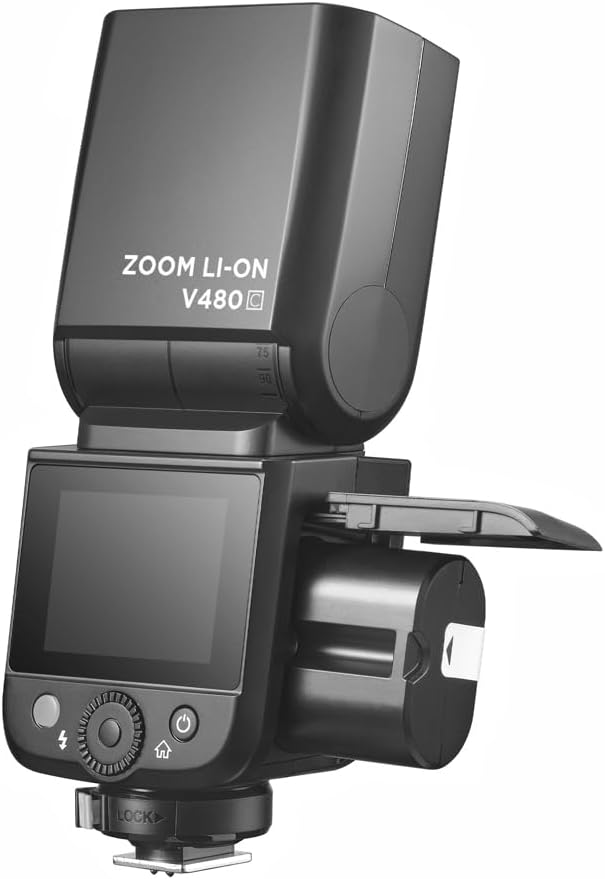
Image 4.1: Battery compartment open for installation.
To charge the battery, use the provided battery charger. Connect the battery to the charger and plug the charger into a power outlet. The indicator light on the charger will show the charging status.
4.2. Masang Lampu Kilat kana Kaméra Anjeun
The V480C is designed to mount onto a camera's hot shoe.
- Pastikeun kaméra anjeun pareum.
- Slide the flash's hot shoe (7) into your camera's hot shoe mount.
- Rotate the Hot Shoe Fixing Buckle (15) clockwise to secure the flash firmly in place. Do not overtighten.
5. Ngoperasikeun Lampu Kilat
5.1. Powering On/Off and Basic Controls
To power on the flash, press and hold the Power Switch Button (11) until the screen illuminates. To power off, press and hold the same button.
The V480C features a crisp color touchscreen (9) and tactile buttons for intuitive control.

Image 5.1: Touchscreen and button interface for adjusting flash settings.
- Set Button (12): Dianggo pikeun mastikeun pilihan atanapi ngalebetkeun pilihan menu.
- Select Dial (13): Rotate to navigate menus and adjust values.
- Test Button / Recycle Indicator (14): Press to fire a test flash. The indicator light shows when the flash is ready to fire.
5.2. Modeu Flash
V480C ngadukung rupa-rupa mode lampu kilat:
- Lampu Kilat Otomatis TTL: Otomatis nyaluyukeun kaluaran lampu kilat pikeun paparan anu leres.
- Flash Manual: Allows manual control over flash power output (1/1 to 1/256 in 1/3 stop increments).
- Multi Flash (Stroboskopik): Fires a series of rapid flashes during a single exposure to capture multiple movements.
5.3. Wireless Operation (R2 System)
The V480C features built-in 2.4GHz R2 wireless functionality, allowing it to act as a master or slave unit within the Flashpoint R2 system. It supports 4 groups and 32 channels with a transmission range of up to 100m.

Gambar 5.2: Example of 2.4GHz R2 wireless integration in a studio environment.
Refer to the on-screen menu for setting master/slave modes, group assignments, and channel selection.
5.4. Sinkronisasi Gancang-Luhur (HSS)
High-Speed Sync allows the flash to synchronize with shutter speeds up to 1/8000s, enabling you to use flash with wide apertures in bright conditions or to freeze fast motion.

Image 5.3: Demonstration of High-Speed Sync (HSS) capability.
Activate HSS through the flash's menu or your camera's flash control settings.
5.5. Modél LED Lamp
The built-in LED Modeling Lamp (4) provides continuous light for focusing in low-light conditions or for previewing lighting effects. Adjust its brightness through the flash's menu.
5.6. Update firmware
The Flashpoint V480C supports firmware updates via its USB-C Firmware Upgrade Port (10). Visit the Flashpoint websitus pikeun firmware panganyarna na parentah.
6. Pangropéa
6.1. beberesih
Pikeun ngabersihkeun unit lampu kilat, anggo lawon anu lemes sareng garing. Pikeun kokotor anu bandel, anggo lawon anu radaamp lawon bisa dipaké, dituturkeun ku lawon garing. Ulah maké deterjen atawa pangleyur nu kuat.
6.2. Panyimpenan
When not in use for extended periods, remove the battery from the flash unit. Store the flash in a cool, dry place, away from direct sunlight and extreme temperatures. Use the provided protective case for storage and transport.
7. Cara ngungkulan
If you encounter issues with your Flashpoint V480C, refer to the following common problems and solutions:
- Flash henteu hurung:
- Ensure the flash is powered on and securely mounted to the camera's hot shoe.
- Pariksa tingkat batré; ngecas deui upami diperyogikeun.
- Verify camera and flash settings are compatible (e.g., flash enabled in camera menu).
- If using wireless, ensure master and slave units are on the same channel and group.
- Incorrect exposure (too dark/too bright):
- In TTL mode, check for Flash Exposure Compensation (FEC) settings on both flash and camera.
- In Manual mode, adjust flash power output.
- Ensure flash head zoom matches lens focal length or is set to auto.
- Flash recycle time is slow:
- Battery may be low; recharge or replace.
- High power settings naturally result in longer recycle times.
- Masalah sambungan nirkabel:
- Ensure all units are within range (100m).
- Pariksa gangguan ti alat 2.4GHz séjén.
- Verify channel and group settings are identical on all units.
If problems persist, consult the Flashpoint support websitus atanapi ngahubungan layanan palanggan.
8. Spésifikasi
| Modél | V480C |
| Nomer Panungtun | GN50 (ISO 100, dina méter) |
| Daur ulang Waktos | Kira-kira. 1.7 detik |
| Modeu Flash | TTL, Manual, Multi |
| Fungsi nirkabel | Juragan, Budak, Pareuman |
| Range nirkabel | Kira-kira. 100m |
| Saluran | 32 (1-32) |
| Grup | 4 (A, B, C, D) |
| Sync-Speed luhur | Nepi ka 1/8000s |
| Sumber Daya | VB22 Li-ion Battery (7.2V / 2200mAh) |
| Diménsi | 6.54" x 2.8" x 1.93" (16.6 x 7.1 x 4.9 cm) |
| Beurat (kalayan batré) | 12.7 oz (360g) |
| Mountings cocog | Canon |
9. Garansi jeung Rojongan
For warranty information, technical support, or service inquiries, please refer to the documentation provided with your purchase or visit the official Flashpoint websitus. Simpen bukti pameseran anjeun pikeun klaim garansi.


