1. Bubuka
Thank you for choosing the GAOMON Full Size Bed Frame. This bed frame is designed for comfort and convenience, featuring an ergonomic upholstered headboard, an integrated charging station, and ample storage options. This manual provides essential information for safe assembly, operation, and maintenance of your new bed frame.
2. Émbaran Kasalametan
Mangga baca sagala parentah taliti saméméh assembly sarta pamakéan. Simpen manual ieu pikeun rujukan ka hareup.
- Awas: This bed frame contains metal components with potentially sharp edges. Exercise care during assembly and handling to prevent injury.
- Ensure all bolts and screws are securely tightened before use. Periodically check and retighten as necessary.
- Ulah ngaleuwihan kapasitas beurat anu disarankeun nyaéta 1000 lbs.
- Jauhkeun barudak tina tempat kumpul. Bagian-bagian leutik tiasa nyababkeun kaselek.
- Anggo ngan ukur perangkat keras anu disayogikeun pikeun perakitan.
- Tempatkeun rangka ranjang dina permukaan anu datar sareng rata.
- For the integrated charging station, ensure it is connected to a properly grounded electrical outlet. Do not overload the outlets.
3. Eusi Paket
Pariksa yén sadaya komponén aya sateuacan ngamimitian assembly. Lamun aya bagian nu leungit atawa ruksak, kontak rojongan customer.
| Bagian | Katerangan | kuantitas |
|---|---|---|
| A | Headboard Panel (Upholstered) | 1 |
| B | Headboard Frame (Left) | 1 |
| C | Headboard Frame (Right) | 1 |
| D | Papan tilas | 1 |
| E | Rel samping | 2 |
| F | Ranjang Slats | (variasi) |
| G | Center Support Legs | (variasi) |
| H | Charging Station Unit | 1 |
| I | Hardware Pack (Bolts, Screws, Allen Key) | 1 |
4. Setup jeung Parentah Majelis
Assembly typically requires one person and takes approximately 30 minutes. Follow the numbered steps and diagrams provided in your physical instruction manual. A single Allen key is included for most assembly steps.
Hambalan 1: Nyiapkeun Area
Unpack all components and lay them out on a clean, soft surface to prevent scratches. Identify all parts using the package contents list.

Gambar: Leuwihview of the GAOMON Full Size Bed Frame with key dimensions (75.2"L x 53.9"W x 43.3"H) and a recommended mattress thickness of 10"-12". The frame has a weight capacity of 1000 lbs.
Step 2: Assemble the Headboard
Attach the upholstered headboard panel (A) to the headboard frame components (B and C) using the designated bolts. Ensure the ergonomic angle is facing the correct direction for comfort.

Gambar: Deukeut view of the ergonomic headboard, showing its cushioned design and the integrated storage shelf behind it. The headboard is angled at 95 degrees for comfortable support.
Step 3: Install the Charging Station
Secure the charging station unit (H) into the designated slot on the headboard. Connect any internal wiring as instructed in the detailed manual.

Image: Detail of the built-in charging station located on the headboard, featuring 1 Type-C port (5V/2A), 1 USB port (5V/2A), and 2 AC outlets (120V/12A).
Step 4: Attach Side Rails and Footboard
Connect the side rails (E) to the assembled headboard and the footboard (D) using the provided hardware. Ensure all connections are firm.
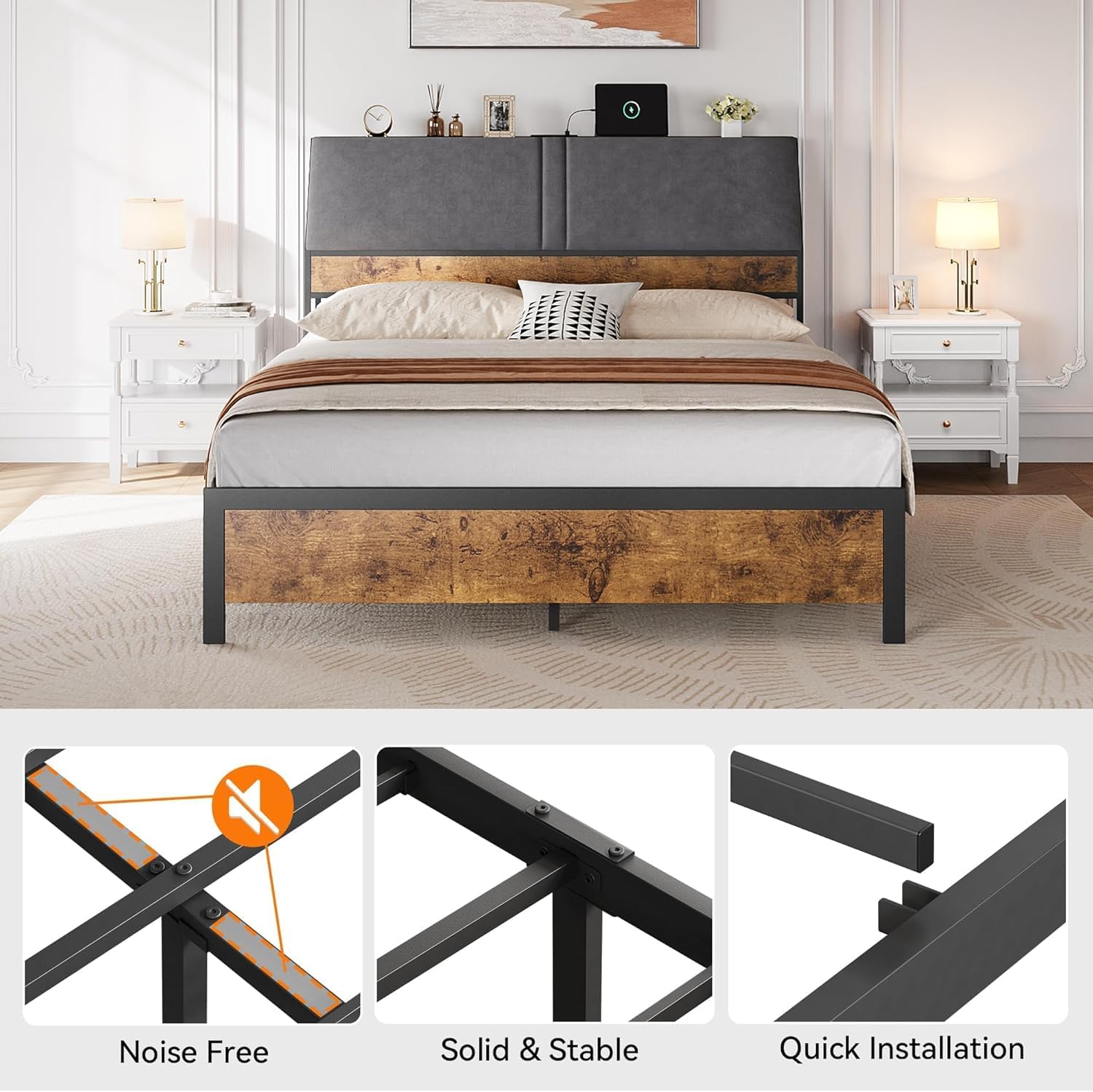
Image: Illustrates key features of the bed frame's construction, including noise-free design with stabilizers, solid and stable connections, and quick installation mechanism.
Step 5: Install Bed Slats and Support Legs
Place the bed slats (F) across the side rails and secure them according to the instructions. Attach the center support legs (G) to the frame for added stability.

Image: Close-up showing the quick installation mechanism where frame components slide and lock into place.

Image: Close-up illustrating the solid and stable connection points of the bed frame, secured with screws.
Lengkah 6: Cék Final
Ensure all bolts are tightened and the frame is stable. Place your mattress on the slats. The bed frame provides 10.2 inches of under-bed clearance for storage.

Image: Shows the 10.2-inch under-bed clearance, suitable for storing items in bins or boxes.
5. Operating Instructions (Charging Station)
Stasion ngecas anu terintegrasi nyayogikeun aksés daya anu merenah pikeun alat éléktronik anjeun.
- Sambungan Daya: Plug the power cord from the charging station into a standard, grounded 120V AC wall outlet.
- USB/Type-C Charging: Use the 5V/2A USB and Type-C ports to charge compatible smartphones, tablets, and other USB-powered devices.
- Outlet AC: The two 120V/12A AC outlets can power small appliances or charge laptops. Do not exceed the maximum wattage for the outlets.
- Kasalametan: Avoid spilling liquids on the charging station. Disconnect from power when not in use or during electrical storms.
6. Pangropéa
- beberesih: Lap permukaan logam ku kaén nu lemes,amp cloth. For the upholstered headboard, use a fabric cleaner suitable for the material, testing on an inconspicuous area first.
- Pariksa Hardware: Periodically (e.g., every 3-6 months) inspect all bolts and screws to ensure they remain tight. Retighten as needed to maintain stability and prevent squeaking.
- Tempat ngecas: Keep the charging ports free of dust and debris. Do not attempt to disassemble the charging unit.
7. Cara ngungkulan
| Masalah | Mungkin Cukang lantaranana | Solusi |
|---|---|---|
| Rangka ranjang oyag atanapi nyiprat-nyiprat. | hardware leupas. | Pariksa sareng kencengkeun sadaya baut sareng sekrup. Pastikeun ranjangna aya dina permukaan anu rata. |
| Stasion ngecas teu jalan. | Teu plugged di; kakuatan outage; alat anu rusak. | Ensure the power cord is securely plugged into a working wall outlet. Test with a different device. Check household circuit breaker. |
| Bagian henteu pas nalika dirakit. | Incorrect orientation; wrong parts. | Review the assembly diagrams carefully. Ensure parts are oriented correctly. Verify part numbers against the package contents. |
8. Spésifikasi
- Jumlah modél: ZMS0623ya87
- ukuran: Pinuh
- Ukuran produk: 75.2 "L x 53.9" W x 43.3" H
- Bahan: Metal frame, Fabric-covered Headboard
- warna: Coklat Rustic
- Kapasitas beurat: 1000 pon
- Jarak handapeun ranjang: 10.2 inci
- Tempat ngecas: 1x USB (5V/2A), 1x Type-C (5V/2A), 2x AC Outlets (120V/12A)
- Majelis Diperlukeun: Yes (One-tool assembly)
- Beurat barang: 71.4 pon
9. Garansi jeung Rojongan
GAOMON provides a limited warranty for this product. For detailed warranty information, please refer to the warranty card included with your purchase or visit the official GAOMON website. For technical support, missing parts, or any other inquiries, please contact GAOMON customer service through the retailer where the product was purchased or via the contact information provided on the GAOMON websitus.
Rojongan Palanggan: Mangga tingal dokuméntasi pameseran anjeun kanggo detil kontak anu khusus.


