Bubuka
Hatur nuhun pikeun meuliasing the Mistral MHV9812DRW-SB 12-inch DC High Velocity Stand Fan. This manual provides important information for the safe operation, installation, and maintenance of your fan. Please read it thoroughly before use and retain it for future reference.
Émbaran Kasalametan penting
Pikeun ngirangan résiko kahuruan, kejutan listrik, atanapi tatu, perhatikeun pancegahan kaamanan ieu:
- Pastikeun kipas disimpen dina permukaan anu stabil sareng rata pikeun nyegah tibalik.
- Ulah nyelapkeun ramo atawa objék naon baé ngaliwatan grille nalika kipas keur beroperasi.
- Cabut kipas tina stop kontak sateuacan ngabersihkeun, mindahkeun, atanapi ngalaksanakeun pangropéa naon waé.
- Ulah ngoperasikeun kipas upami kabel atanapi colokanna rusak. Upami kabel atanapi colokanna rusak, hubungi petugas servis anu mumpuni.
- Jauhkeun kipas tina cai sareng Uap. Ulah make di kamar mandi atawa lingkungan baseuh lianna.
- Alat ieu henteu dimaksudkeun pikeun dianggo ku jalma (kalebet murangkalih) anu ngirangan kamampuan fisik, indrawi atanapi mental, atanapi kirang pangalaman sareng pangaweruh, kecuali aranjeunna dipasihan pangawasan atanapi petunjuk ngeunaan panggunaan alat ku jalma anu tanggung jawab kana kasalametanana.
- Barudak kedah diawaskeun pikeun mastikeun yén aranjeunna henteu maén sareng alatna.
- Do not cover the fan or restrict airflow during operation.
- Paké ngan adaptor kakuatan disadiakeun.
Eusi pakét
Pariksa yén sadaya komponén aya sareng dina kaayaan anu saé:
- Majelis Kepala kipas
- Tiang Panyangga anu Bisa Disaluyukeun
- Dasar
- Kadali jauh
- Adaptor AC
- Manual pangguna (dokumén ieu)
Setup sareng Majelis
Follow these steps to assemble your stand fan:
- Pasangkeun Tiang Stand kana Dasar: Carefully insert the adjustable stand pole into the base. Ensure it is securely fastened according to the markings or locking mechanism.
- Attach the Fan Head: Connect the fan head assembly to the top of the stand pole. Ensure it clicks into place or is tightened securely.
- Saluyukeun Jangkungna: Loosen the height adjustment knob/collar on the stand pole, extend or retract the pole to your desired height, and then securely tighten the knob/collar. The fan is height adjustable from approximately 860mm to 1050mm.
- Posisi kipas: Place the assembled fan on a firm, level surface, ensuring there is adequate space around it for proper airflow.
- Sambungkeun Kakuatan: Plug the AC adapter into the fan's power input, then plug the adapter into a standard 220-240V~, 50/60Hz electrical outlet.
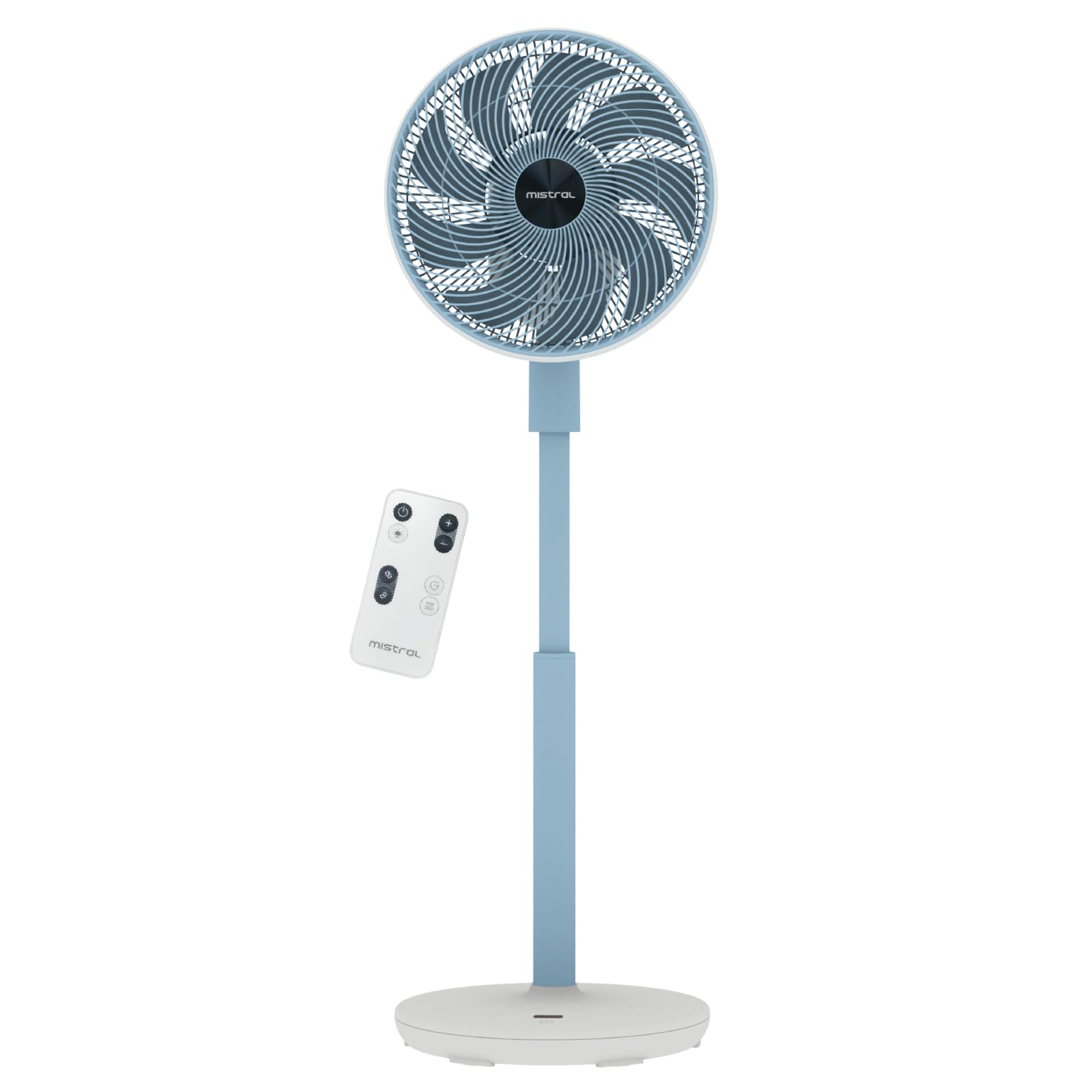
Image: The Mistral MHV9812DRW-SB stand fan in Sky Blue, illustrating its assembled form with the fan head tilted upwards, adjustable pole, and stable base. The image also shows icons for Wi-Fi and voice control features.
Parentah Operasi
Your Mistral fan can be operated using the touch control panel on the unit, the included remote control, or via Wi-Fi voice control.
Control Panel sareng LED Display
The fan features an LED display and touch control panel on its base for direct operation. Refer to the specific icons on the panel for power, speed, mode, oscillation, and timer functions.
Kadali jauh
The remote control provides convenient access to all fan functions from a distance. Ensure batteries are correctly inserted (not included, typically AAA). Point the remote control towards the fan's receiver.
Wi-Fi sareng Kontrol Sora
This fan supports Wi-Fi connectivity and voice control for smart home integration. Download the "Mayer Home" application (or specified app) from your device's app store and follow the in-app instructions to connect your fan to your home Wi-Fi network. Once connected, you can control the fan using the app or compatible voice assistants.
Fungsi kipas
- Hurungkeun/Pareuman: Pencét tombol daya dina panel kontrol atanapi jauh.
- Setélan laju: The fan offers 12 speed settings. Adjust using the speed control buttons.
- Modeu Operasi: Select from 4 distinct modes:
- Alami: Simulasi angin alami ku cara ngarobah-robah kecepatan kipas.
- Saré: Beroperasi dina kecepatan anu langkung handap sareng langkung sepi pikeun bobo anu teu kaganggu.
- Gema: Adjusts fan speed based on ambient temperature for energy efficiency.
- Siklus: Provides a continuous, consistent airflow.
- Osilasi:
- Left-Right Oscillation: Choose between 45° or 90° horizontal oscillation.
- Up-Down Oscillation: Choose between 45° or 90° vertical oscillation.
- Timer: Setel kipas supados otomatis pareum saatos jangka waktu anu ditangtukeun, dugi ka 12 jam.
- Moodlight: The fan includes a moodlight feature with 2 settings. Activate and adjust via the control panel or remote.
Pangropéa jeung beberesih
Pembersihan rutin ngabantosan ngajaga kinerja kipas sareng manjangkeun umurna.
- Pegatkeun Daya: Sok cabut kipas tina stop kontak sateuacan beberesih.
- Bersihan Permukaan Luar: Ngusap permukaan luar kipas kalayan lemes, damp lawon. Ulah make cleaners abrasive atawa pangleyur.
- Clean Fan Grilles and Blades: Use a vacuum cleaner with a brush attachment or a soft cloth to remove dust from the front and rear grilles and fan blades. For thorough cleaning, the front grille may be removable (refer to specific assembly instructions if applicable, not detailed here).
- Panyimpenan: Upami nyimpen kipas kanggo waktos anu lami, tutupna supados ngajaga tina lebu sareng simpen di tempat anu tiis sareng garing.
Pamérésan masalah
Upami anjeun mendakan masalah sareng kipas anjeun, tingali masalah sareng solusi umum ieu:
| Masalah | Mungkin Cukang lantaranana | Solusi |
|---|---|---|
| Kipas angin teu hurung. | No power supply; Power button not pressed; Remote control batteries depleted. | Ensure the power cord is securely plugged into a working outlet. Press the power button on the unit or remote. Replace remote control batteries. |
| Aliran hawa lemah. | Fan speed too low; Grilles are blocked by dust. | Increase the fan speed setting. Clean the fan grilles and blades as per maintenance instructions. |
| Kipas nyieun sora anu teu biasa. | Fan not on a level surface; Loose parts; Obstruction. | Place the fan on a stable, level surface. Check for any loose components or foreign objects near the blades. Unplug and inspect. |
| Kadali jauh teu jalan. | Batteries depleted or incorrectly inserted; Obstruction between remote and fan. | Replace batteries, ensuring correct polarity. Remove any obstructions and ensure the remote is pointed at the fan's receiver. |
| Masalah sambungan Wi-Fi. | Incorrect Wi-Fi password; Fan too far from router; Router issues. | Verify Wi-Fi password. Move the fan closer to the Wi-Fi router. Restart your router. Follow the app's troubleshooting guide for connection. |
Lamun masalah persists sanggeus nyobian solusi ieu, mangga ngahubungan rojongan customer.
spésifikasi
| Fitur | Rincian |
|---|---|
| Modél | MHV9812DRW-SB |
| Voltage | 220-240V~, 50/60Hz |
| Wattage | 30W |
| Volume hawa | 38.12 m³ / mnt |
| Aliran hawa Max | 6.9 m / s |
| Tingkat Noise | 23dBA (Lowest Speed) | 45dBA (Highest Speed) |
| Ukuran produk (L * W * H) | 350 * 350 * 860-1050 mm |
| Beurat bersih | 3.7 KGS |
| Input adaptor AC | 100-240V~, 50/60Hz |
| Kaluaran adaptor AC | 12.0V 3.0A 36.0W |
| Tipe Kontrol | LED Display Touch Control Panel, Remote Control, Wi-Fi Voice Control |
| Setélan speed | 12 Laju |
| Modeu Operasi | Natural, Sleep, Eco, Cycle |
| Osilasi | Left-Right (45°/90°), Up-Down (45°/90°) |
| Timer | 12 Jam |
| Fitur husus | Moodlight (2 settings) |
| Tanda Kasalametan | 240788-11 |
Garansi sareng Rojongan
Émbaran jaminan
This Mistral MHV9812DRW-SB fan comes with a garansi 1 taun on the entire unit and an extended garansi 3 taun specifically for the motor. This warranty covers manufacturing defects under normal use. Please retain your proof of purchase for warranty claims.
The warranty does not cover damage resulting from misuse, accident, unauthorized modification, or failure to follow the instructions in this manual.
Rojongan Palanggan
For technical assistance, warranty claims, or general inquiries, please contact Mistral customer support through their official website or the retailer where the product was purchased. Please have your model number (MHV9812DRW-SB) and proof of purchase ready when contacting support.
Note: Contact information for specific regions may vary. Refer to the official Mistral websitus pikeun detil rojongan paling up-to-date.


