1. Bubuka
This manual provides comprehensive instructions for the safe and effective use of the AMPBANK H128 Handheld Thermal Camera. The H128 is designed for precise temperature measurement and thermal imaging, suitable for various applications including electrical inspections, HVAC diagnostics, building energy audits, and automotive maintenance. Please read this manual thoroughly before operating the device and retain it for future reference.

Gambar 1.1: The AMPBANK H128 Handheld Thermal Camera, showcasing its ergonomic design and integrated display.
2. Émbaran Kasalametan
Always observe the following safety precautions to prevent injury and damage to the device.
- Do not point the camera directly at extremely high-intensity energy sources, such as the sun or lasers, as this may damage the infrared detector.
- Avoid dropping the device or subjecting it to severe impact, despite its robust design.
- Do not immerse the device in water or other liquids. While it has an IP65 rating for dust and water jet protection, it is not designed for submersion.
- Use only the specified charging cable (USB-C) and power adapter to charge the device.
- Ulah nyobian ngabongkar atanapi ngarobih kaméra. Perbaikan ngan ukur kedah dilakukeun ku petugas servis anu diidinan.
- Keep the lens clean and free from dust and debris. Use a soft, lint-free cloth for cleaning.
- Operate the device within the specified environmental conditions (temperature and humidity).
3. Produk Langkungview
3.1. komponén
The AMPBANK H128 thermal camera includes the following main components:
- Lensa Infrabeureum: Nangkep radiasi termal.
- Layar tampilan: Shows thermal images, temperature readings, and menu options.
- Tombol kontrol: For navigation and selection (OK, Up, Down, Return/Power).
- Tombol pemicu: To capture images.
- Palabuhan USB-C: Pikeun ngecas sareng mindahkeun data.
- Tripod Gunung: Standard 1/4-inch thread for stable positioning.
3.2. Fitur konci
The H128 thermal camera offers a range of advanced features for efficient and accurate thermal inspections:
- Enhanced Clarity with TISR Resolution: The camera utilizes TISR (Thermal Image Super Resolution) technology to achieve an effective display resolution of 240x240 pixels from a 128x128 infrared sensor, providing clearer thermal images.
- Manjangkeun Umur Batré 24 Jam: Equipped with a built-in 2900mAh rechargeable battery, the H128 provides up to 24 hours of continuous operation, minimizing downtime during extended inspections.
- Pangukuran Suhu anu Tepat: The device offers high accuracy with a temperature resolution of 0.1°C and readings within ±3%, covering a wide temperature range from -4°F to 842°F (-20°C to 450°C). Users can adjust emissivity for various materials to improve accuracy.
- Temperature Alarm for Anomaly Detection: A built-in alarm system quickly identifies abnormal heat sources, automatically tracking and displaying maximum, minimum, and center temperatures on the screen.
- Durable and Robust Design: The H128 is built to withstand demanding environments, featuring a 6.56-foot (2-meter) drop protection and an IP65 ingress protection rating against dust and water jets.
- Laju Pigura Tinggi: A 25Hz frame rate ensures smooth, real-time thermal imagery, crucial for dynamic inspections.
- Multiple Thermal Palettes: Choose from 5 different color palettes (Iron Red, Black Hot, Rainbow, White Hot, Red Hot) to best visualize temperature differences for specific applications.

Figure 3.1: Comparison of thermal image clarity with and without TISR technology, demonstrating the enhanced 240x240 resolution.

Figure 3.2: Illustration of the H128's long-lasting 24-hour battery life and Type-C charging port.

Figure 3.3: The H128 in use, demonstrating its capability for accurate temperature measurement in an electrical panel.

Figure 3.4: The H128 display highlighting hot, center, and cold spots with an integrated high/low temperature alarm.
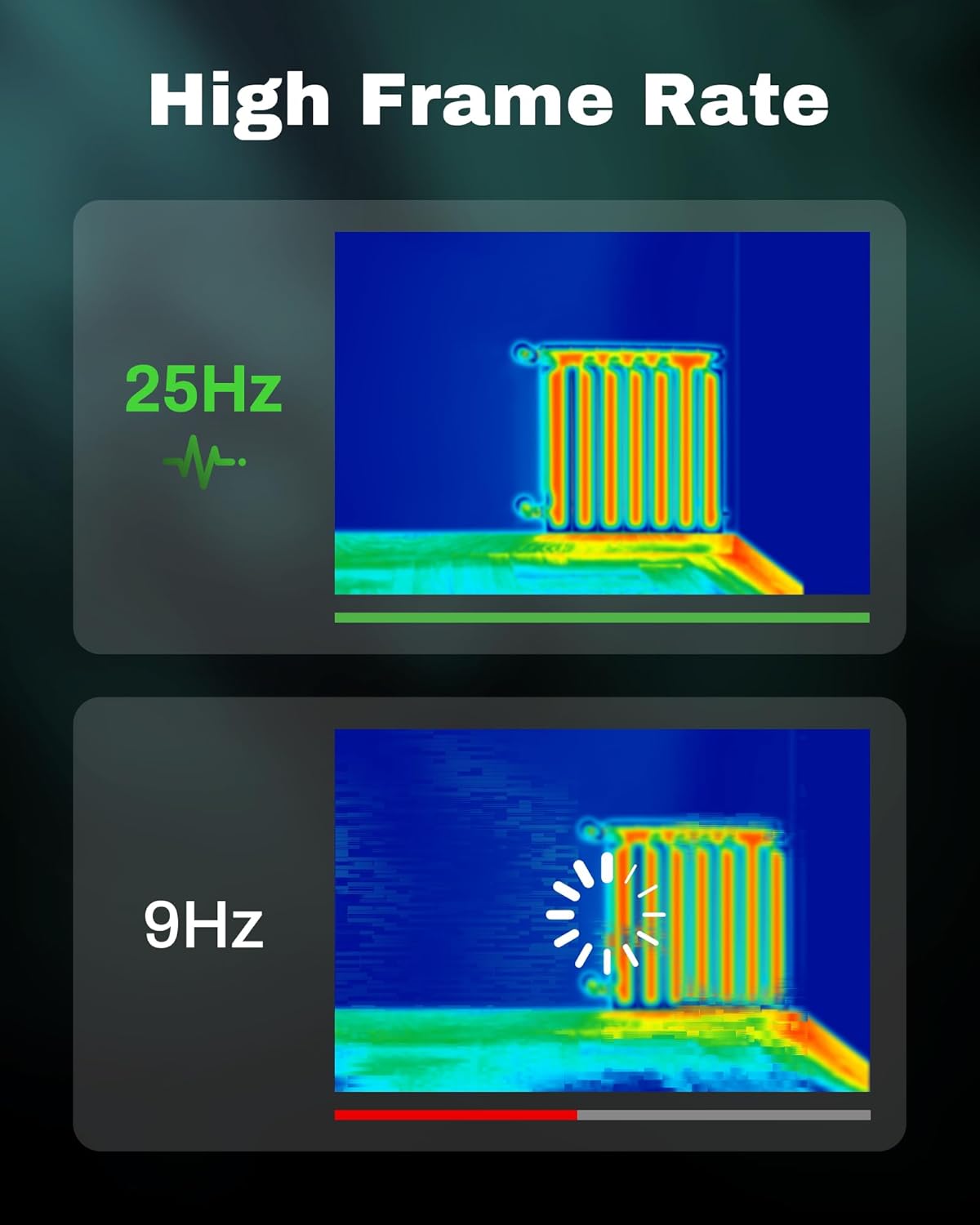
Figure 3.5: Visual comparison of thermal image fluidity at 25Hz versus 9Hz frame rates.

Figure 3.6: Display of the five available thermal color palettes for varied visualization of heat signatures.
4. Setélan
4.1. Ngabongkar bungkusan
Carefully remove all items from the packaging. The box should contain:
- AMPBANK H128 Thermal Imaging Camera
- Kabel USB-C
Inspect the camera for any signs of damage. If any components are missing or damaged, contact customer support immediately.
4.2. Ngecas Batré
Before first use, fully charge the camera's built-in battery.
- Connect the supplied USB-C cable to the USB-C port on the top of the camera.
- Sambungkeun tungtung kabel USB-C anu sanés ka adaptor kakuatan USB anu cocog (teu kalebet) atanapi port USB komputer.
- The charging indicator on the screen will show the charging status. A full charge typically takes several hours.
- Saatos dicas pinuh, pegatkeun sambungan kabel.
4.3. Daya Awal Hurung sareng Setélan Dasar
- Daya Hurung: Press and hold the power button (often integrated with the Return button) for approximately 8 seconds until the screen illuminates.
- Pilihan Basa: Upon first power-on, you may be prompted to select your preferred language. Use the Up/Down buttons to navigate and the OK button to confirm.
- Tanggal sareng Waktos: Setel tanggal sareng waktos anu leres pikeun waktos anu akuratamping of captured images. Navigate to the settings menu using the OK button, then find the Date/Time option.
5. Operasi
5.1. Operasi dasar
- Hurungkeun/Pareuman: Press and hold the power button for 8 seconds to turn on. Press and release the power button to turn off or enter sleep mode.
- Napigasi Menu: Ngagunakeun éta OK button to enter the menu. Use the Up jeung Turun arrow buttons to scroll through options. Press OK to select an option. Press the Balik deui button to exit a menu or go back.
- Nyokot Gambar: Aim the camera at the target. Press the trigger button (located on the handle) to capture a thermal image. Images are saved internally.
5.2. Measurement Modes and Settings
- Temperature Spot Measurement: The H128 automatically displays the maximum, minimum, and center temperatures on the screen.
- Penyesuaian Emisivitas: For accurate temperature readings, adjust the emissivity setting based on the material being inspected. Access this setting through the menu. Common emissivity values can be found in reference tables.
- Setélan Jarak: Inputting the approximate distance to the target can further refine temperature accuracy.
- Thermal Palettes: Change the color scheme of the thermal image to highlight temperature differences more effectively. Navigate to the palette settings in the menu and choose from Iron Red, Black Hot, Rainbow, White Hot, or Red Hot.
5.3. Manajemén Data
The H128 can store over 8000 images internally. To transfer images to a computer:
- Connect the camera to your computer using the supplied USB-C cable.
- Kaméra bakal némbongan salaku alat panyimpen anu tiasa dicabut.
- Browse to the image folder and copy the desired files kana komputer Anjeun.

Figure 5.1: Connecting the H128 thermal camera to a laptop via USB-C for image transfer.
6. Pangropéa
6.1. beberesih
- Awak kaméra: Usap awak kaméra ku kaén nu lemes,amp lawon. Ulah make cleaners abrasive atawa pangleyur.
- Lensa Infrabeureum: The infrared lens is a delicate optical component. Use a lens cleaning cloth or a soft, lint-free cloth specifically designed for optics. Gently wipe the lens to remove dust or smudges. Do not apply excessive pressure or use harsh chemicals.
6.2. Panyimpenan
When not in use, store the H128 in a cool, dry place, away from direct sunlight and extreme temperatures. Ensure the battery is partially charged (around 50%) before long-term storage to preserve battery health.
6.3. Kaperawatan batré
Pikeun maksimalkeun umur batre:
- Hindarkeun sering-sering ngeusi batre.
- Hindarkeun batréna dicas pinuh kanggo sababaraha waktos.
- Ngecas batré dina suhu kamar.
7. Cara ngungkulan
| Masalah | Mungkin Cukang lantaranana | Solusi |
|---|---|---|
| Kaméra teu hurung. | Batré béak. | Cas batréna nganggo kabel USB-C. |
| Gambar kabur atanapi teu jelas. | Lens is dirty. / Incorrect focus (if applicable). | Clean the infrared lens with a soft, lint-free cloth. The H128 has fixed focus, ensure you are within the optimal measurement distance. |
| Bacaan suhu sigana teu akurat. | Incorrect emissivity setting. / Distance to target is too far. | Adjust the emissivity setting in the menu to match the material being measured. Ensure you are within the recommended measurement distance. |
| Teu tiasa mindahkeun gambar ka komputer. | Loose USB-C connection. / Driver issue. | Ensure the USB-C cable is securely connected to both the camera and the computer. Try a different USB port or cable. Restart both devices. |
| Umur batre langkung pondok tibatan anu disangka. | Frequent use of high-brightness settings. / Battery degradation over time. | Reduce screen brightness if possible. Ensure proper charging and storage practices. If battery life significantly degrades, contact support. |
If the problem persists after attempting these solutions, please contact AMPBANK customer support.
8. Spésifikasi
| Parameter | Nilai |
|---|---|
| Modél | H128 |
| Resolusi Infrabeureum | 128 x 128 piksel |
| TISR Display Resolution | 240 x 240 piksel |
| Rentang Suhu | -4°F nepi ka 842°F (-20°C nepi ka 450°C) |
| Akurasi | ±3% or ±3°C (whichever is greater) |
| Sensitipitas Termal (NETD) | 40mk |
| Laju pigura | 25Hz |
| Jenis Batré | Built-in Rechargeable Lithium Ion (2900mAh) |
| Kahirupan batré | Nepi ka 24 jam pamakéan kontinyu |
| Port ngecas | USB-C |
| Serelek Protection | 6.56 suku (2 méter) |
| Peunteun IP | IP65 |
| Kapasitas Panyimpenan | 8000+ images |
| Diménsi | 9.33 x 4.76 x 3.86 inci (kira-kira) |
| Beurat | 1.06 pon (kira-kira) |
9. Jaminan & Dukungan
Kanggo inpormasi garansi anu lengkep, mangga tingali kartu garansi anu kalebet dina produk anjeun atanapi kunjungi kantor cabang resmi AMPBANK websitus. Sarat jeung kaayaan jaminan bisa rupa-rupa dumasar wewengkon jeung produk.
If you require technical assistance, have questions about your product, or need to initiate a warranty claim, please contact AMPBANK customer support through their official channels:
- Pabrikan: AMPBANK
- Toko Online: Nganjang ka AMPBANK Store on Amazon
- Mangga tingal resmi AMPBANK website or product packaging for the most current contact information (email, phone, service centers).


