1. Bubuka
Thank you for choosing the Nillkin Foldable Bluetooth Keyboard. This compact and versatile keyboard is designed to enhance your productivity across multiple devices and operating systems. Please read this manual carefully to ensure proper setup and operation.

Image 1.1: The Nillkin Foldable Bluetooth Keyboard in its fully unfolded state, ready for use.
2. Produk Langkungview
2.1 Fitur konci
- Kompak & Portabel: Three-fold design, lightweight (approx. 238g), easily fits into bags.
- Integrated Touchpad & Numeric Keypad: High-precision touchpad (59x64mm) with multi-gesture support and a switchable numeric keypad.
- Ngetik anu Nyaman: Laptop-like feel with full-size keys, pantograph structure, 19mm key pitch, and 1.2mm key travel.
- Manajemén Daya Éfisién: Type-C fast charging, long battery life (1 week+ continuous use, 150 days standby), auto-sleep, and auto power on/off.
- Multi-Device & Multi-OS Support: Bluetooth 5.0 for stable connection up to 10m. Connects up to 3 devices simultaneously, compatible with iOS, Android, Mac, and Windows.
- Desain awét: High-quality hinge tested for over 50,000 folds, magnetic closure.
2.2 Eusi pakét
- Nillkin Foldable Bluetooth Keyboard x 1
- Kabel Ngecas USB-C x 1
- Kantong Panyimpen x 1
- Buku Panduan x 1

Image 2.1: Contents of the Nillkin Foldable Bluetooth Keyboard package.
3. Parentah Setup
3.1 Daya Hurung/Pareuman
- Daya Hurung: Unfold the keyboard. The keyboard will automatically power on.
- Pareum listrik: Fold the keyboard. The keyboard will automatically power off.
- Alternatively, use the dedicated ON/OFF switch located on the side of the keyboard.

Image 3.1: The keyboard's compact folded size (18.2 x 10.8 x 1.6cm) and extended dimensions (34.2 x 10.8 x 0.95cm).
3.2 Nyapasangkeun Bluetooth
Ensure your device has Bluetooth functionality enabled before proceeding. If your device lacks Bluetooth, a separate Bluetooth dongle may be required.
- Aktipkeun Mode Papasangan:
a. Turn on the keyboard by unfolding it or using the power switch.
b. Pencét Fn + A (BT1) briefly to select Bluetooth channel 1.
c. Pencét jeung tahan Fn + C (Pairing) for approximately 3 seconds. The blue indicator light for Bluetooth connection 1 will flash, indicating the keyboard is in pairing mode. - On Your Device:
a. Go to your device's Bluetooth settings (e.g., Setelan > Bluetooth on iOS/Android, or Préferénsi Sistem > Bluetooth on Mac, or Setelan > Alat > Bluetooth & alat sejenna on Windows).
b. Ensure Bluetooth is turned on. Your device will begin searching for nearby Bluetooth devices. - Nyambung:
a. Locate "Nillkin Foldable Keyboard" (or similar name) in the list of available devices.
b. Tap or click on the device name to initiate pairing.
c. If prompted for a PIN code, enter the code displayed on your device's screen using the Nillkin keyboard, then press Lebetkeun. - Once connected, the keyboard is ready for use. The blue indicator light will turn solid or extinguish, depending on the device.
Video 3.1: Detailed usage instructions for the Nillkin Foldable Bluetooth Keyboard, including pairing steps.
3.3 Multi-Device Pairing & Switching
The keyboard supports simultaneous connection to up to three devices. After pairing each device, you can switch between them with a single touch.
- Masangkeun Alat Tambahan: Follow the Bluetooth pairing steps (Section 3.2) for each device, using Fn + S (BT2) for the second device and Fn + D (BT3) for the third device.
- Ngalihkeun Alat: Once paired, press Fn + A (BT1), Fn + S (BT2), atawa Fn + D (BT3) to instantly switch between your connected devices.

Image 3.2: Connect up to three devices simultaneously and switch between them easily.
Video 3.2: Operation video demonstrating Bluetooth connection and switching between devices.
4. Parentah Operasi
4.1 Keyboard Layout & Typing
The keyboard features a standard layout with a comfortable 19mm key pitch and a responsive pantograph key structure for a quiet and efficient typing experience.

Image 4.1: The full keyboard layout, including function keys and the integrated numeric keypad/touchpad.
4.2 Touchpad & Numeric Keypad Functions
The right side of the keyboard integrates a high-precision touchpad and a numeric keypad. You can switch between these modes for enhanced functionality.
- Ngalihkeun Modeu: Pencét Fn + Right Command key to toggle between touchpad mode and numeric keypad mode.
- Sapuan touchpad: Supports various multi-touch gestures for smooth scrolling and navigation.
- Klik Kénca/Katuhu: Dedicated left and right click buttons are available below the touchpad area.
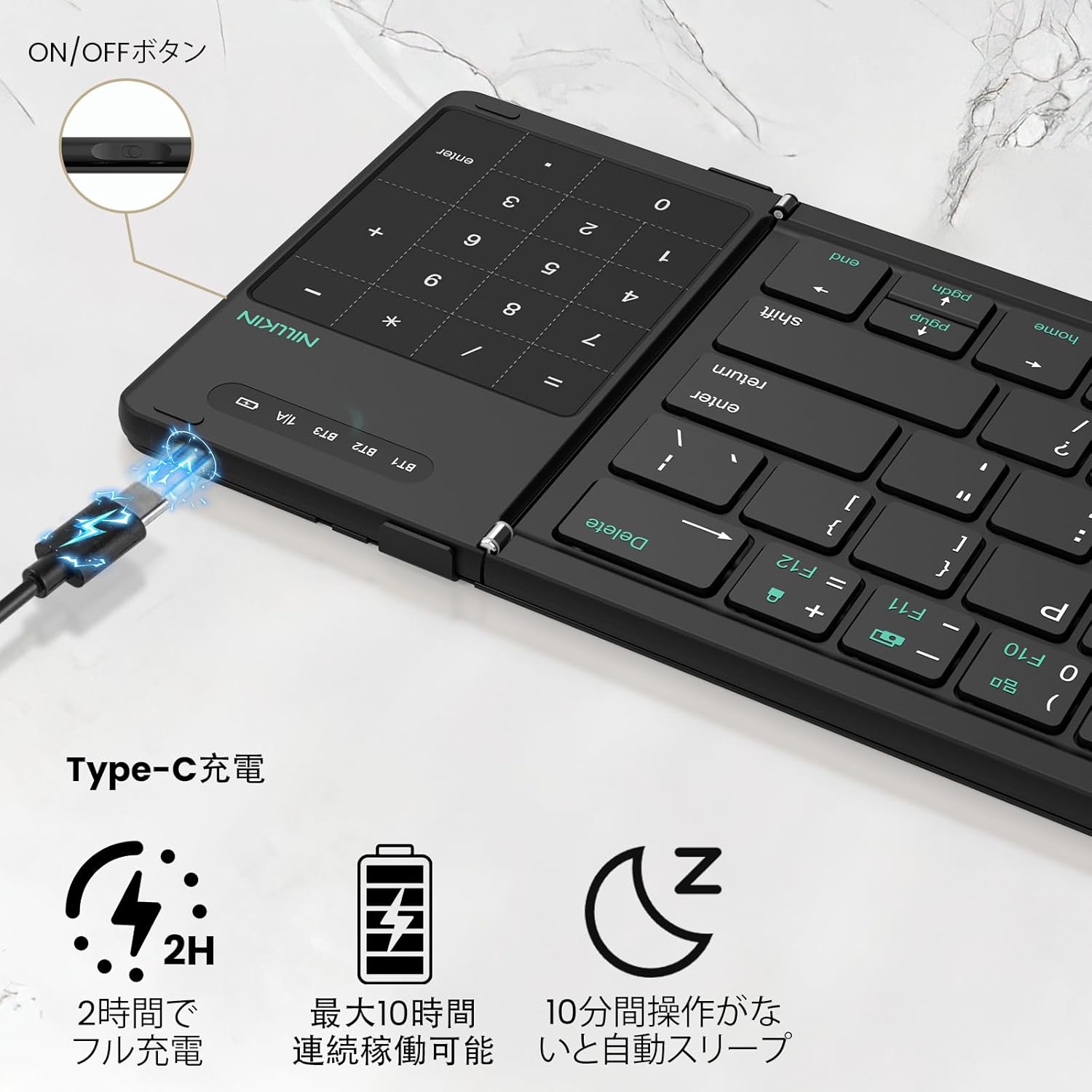
Image 4.2: The 2-in-1 design of the numeric keypad and touchpad, highlighting its functions.
4.3 Tombol potong kompas
The keyboard includes 14 types of shortcut keys to improve work efficiency. These are typically accessed by pressing the Fn konci digabungkeun sareng konci fungsi anu saluyu (F1-F12).
- Fn + F1/F2: adjustment kacaangan
- Fn+F3: neangan
- Fn+F4: Balik deui
- Fn+F5: Skip
- Fn+F6: Teras
- Fn+F7: Ngajempékeun
- Fn+F8: Volume handap
- Fn+F9: Volume naék
- Fn+F10: Show task window
- Fn+F11: Potret layar
- Fn+F12: Konci layar
Video 4.1: Product demonstration highlighting the keyboard's features and functionality.
4.4 Alih Basa
- iOS / Mac: Pencét Ctrl + Spasi.
- Android: Pencét Ctrl + Spasi or Shift + Spacebar.
- Windows: Pencét Alt + Shift.
5. Ngecas
The keyboard features a large-capacity battery and Type-C fast charging. A full charge provides over a week of continuous use and up to 150 days of standby time.
- Port ngecas: Connect the provided USB-C cable to the charging port on the keyboard and to a suitable USB power source.
- Indikator ngecas: The red indicator light will stay on during charging and turn off when fully charged.
- Pariksa Tingkat Batré: Pencét Fn + Left Command key to check the current battery level via the LED indicators.

Image 5.1: Type-C charging port and battery status indicators.
6. Pangropéa
- Jaga keyboard tetep bersih ku cara ngusap ku kaén anu garing sareng lemes.
- Ulah nepi ka keyboard kakeunaan suhu anu ekstrim, kalembaban, atanapi sinar panonpoé langsung.
- Do not disassemble the keyboard, as this will void the warranty.
- The keyboard features a magnetic design for secure closure. Avoid placing it near strong magnetic fields.

Image 6.1: Cleaning the keyboard with a soft cloth.
7. Cara ngungkulan
If you encounter issues with your Nillkin Foldable Bluetooth Keyboard, please refer to the following common solutions:
- Keyboard henteu dipasangkeun:
a. Ensure the keyboard is fully charged.
b. Confirm the keyboard is in pairing mode (blue indicator light flashing).
c. Check that Bluetooth is enabled on your device.
d. Move the keyboard closer to your device and ensure no obstructions are between them.
e. Try restarting both the keyboard and your device. - Konci henteu ngabales:
a. Check the battery level.
b. Ensure the keyboard is properly connected to your device.
c. If using the numeric keypad, ensure it is not in touchpad mode. - Touchpad teu jalan:
a. Ensure the keyboard is in touchpad mode (not numeric keypad mode).
b. For iPad users, ensure "AssistiveTouch" is enabled in your iPad settings.
c. Some gestures may not be supported depending on the OS or application. - Sambungan sering turun:
a. Ensure the keyboard is within the 10m Bluetooth range.
b. Minimize interference from other wireless devices.
c. Ensure the keyboard is fully charged.
8. Spésifikasi
| Fitur | Rincian |
|---|---|
| merek | Nillkin |
| Modél | B0FDGDH8CG |
| Ukuran produk (dilipat) | 34.2 x 10.8 x 0.95 cm |
| Diménsi Produk (Melu) | 18.2 x 10.8 x 1.6 cm |
| Item Beurat | 490 g (approx. 238g for main body) |
| Téhnologi konektipitas | Bluetooth 5.0 |
| Alat nu cocog | iPad OS, Windows 10+, Mac OS X 10.10+, Android 4.3+, Smartphones, Tablets, Laptops, PCs |
| Sumber Daya | Ditenagakeun Batré (Bisa dieusi deui) |
| Kandungan Énergi Batré Litium | 2.6 Watt-jam |
| Jumlah Sél Ion Litium | 4 |
| Bahan | ABS, silikon, polikarbonat |
9. Garansi jeung Rojongan
Nillkin products come with a comprehensive warranty and dedicated customer support:
- Garansi Pabrikan: 2 taun ti tanggal pameseran.
- Jaminan kualitas: 30-day quality guarantee for returns/exchanges of defective products.
- Palayanan palanggan: 24/365 customer service is available. For any issues, please contact us via your Amazon account: Account Service > Order History > Contact Seller. Kami tujuanana pikeun ngabales dina 24 jam.

Image 9.1: Nillkin's commitment to quality, warranty, and customer support.