1. Bubuka
Thank you for choosing the BLUETTI Elite 100 V2 Portable Power Station. This manual provides essential information for the safe and efficient operation of your device. The Elite 100 V2 is a compact yet powerful 1024Wh LiFePO4 battery backup system, offering 1800W AC output (2700W Lifting Power) and multiple charging options, ideal for outdoor activities, remote work, and emergency home backup.
2. Naon dina Box
Upon unboxing your BLUETTI Elite 100 V2, please ensure all the following items are present:
- BLUETTI Elite 100 V2 Power Station portabel
- Charger 1 Alternator Charger Set (shipped separately)
- Kabel Ngecas AC
- Kabel Ngecas Solar
- Screw Grounding
- Manual pamaké
Video: BLUETTI Elite 100 V2 Unboxing & Overview. This video provides a visual guide to the contents of the product packaging and an initial look at the power station.
3. Produk Langkungview
The BLUETTI Elite 100 V2 is engineered for versatility and reliability, featuring a compact design with robust power delivery.
Fitur konci:
- Kapasitas & Kaluaran Luhur: 1024Wh LiFePO4 battery with 1800W AC output (2700W Lifting Power) to power up to 11 devices simultaneously.
- Kompak & Portabel: 35% smaller and 30% lighter than previous models, weighing 25 lbs, with a hidden handle for easy transport.
- Ngecas gancang: Achieve 0-80% charge in 45 minutes via 1200W AC input, or full charge in under 1.8 hours via 560W DC-DC car charging with Charger 1.
- Seamless UPS Functionality: Instantly switches to battery power in under 10ms during outages, ngajagi éléktronik anu sénsitip.
- Operasi hampang-tepi: Operates at library-level 30dB noise for undisturbed use.
- Batré LiFePO4 Awét: Offers 4000+ life cycles to 80% capacity, ensuring a long lifespan.

Image: The BLUETTI Elite 100 V2 powering various essential devices simultaneously, demonstrating its 1800W AC output and 2700W Lifting Power for outdoor use.

Gambar: A lengkep view of the BLUETTI Elite 100 V2's front panel, highlighting its 11 versatile ports for connecting various devices.
4. Setélan
Setup Awal:
- Ngabongkar: Sacara saksama miceun sadaya komponén tina bungkusan.
- mariksa: Check for any visible damage to the power station or accessories.
- Muatan Awal: For optimal performance, fully charge the Elite 100 V2 using the AC charging cable before first use.
Charger 1 Installation (for Car Charging):
The Charger 1 alternator charger set is designed for fast in-vehicle charging. Follow these steps for installation:
- Siapkeun: Gather all components, including the 6AWG DC input cable, tools, power station, and solar charging cable.
- Connect to Charger 1: Switch off the circuit breaker on the 6AWG DC input cable. Connect the 6AWG input cable and the MC4 output cable to Charger 1. Connect the output cable to your power station via a solar charging cable.
- Nyambung ka Batré Mobil: Run the input cable through your car to the car battery. Attach the cable to the car battery terminals (red to positive, black to negative).
- Mimitian Ngecas: Switch on the circuit breaker. Set the proper voltage before turning on Charger 1 via the BLUETTI app. Securely mount Charger 1.

Image: Step 1 of Charger 1 installation, showing the necessary cables, grounding screw, and tools for preparation.

Image: Step 2 of Charger 1 installation, illustrating the connection of the 6AWG DC input cable and MC4 output cable to the Charger 1 unit.

Image: Step 3 of Charger 1 installation, showing the connection of the Charger 1 cables to the positive and negative terminals of a car battery.

Image: Step 4 of Charger 1 installation, demonstrating how to switch on the circuit breaker and use the BLUETTI app to set the correct voltage keur ngecas.
5. Parentah Operasi
Hurungkeun/Pareuman:
- Pikeun Ngahurungkeun: Pencét terus tahan tombol daya utama salami sababaraha detik dugi ka layar tampilan hurung.
- Pikeun mareuman: Press and hold the main power button again until the display screen turns off.
Alat Nyambungkeun:
- Kaluaran AC: Press the 'AC' button to enable the AC outlets. Plug your AC-powered devices into the available ports.
- Kaluaran DC: Press the 'DC' button to enable the DC outlets (USB-A, USB-C, DC5521, Car Port). Plug your DC-powered devices into the respective ports.
- Ngawaskeun: The display screen provides real-time information on input/output wattage, persén batrétage, and estimated run/charge time.

Image: The BLUETTI Elite 100 V2's illuminated display screen, showing current input and output wattage, along with the battery charge level.
6. Métode Ngecas
The BLUETTI Elite 100 V2 offers multiple flexible charging options:
- AC témbok ngecas: Connect the AC charging cable to a standard wall outlet. The unit supports up to 1200W AC input, allowing 0-80% charge in 45 minutes.
- Ngecas Surya: Connect compatible solar panels (up to 1000W max PV input) using the solar charging cable. Full charge can be achieved in approximately 70 minutes under ideal conditions.
- Ngecas mobil: Utilize the Charger 1 alternator charger set (shipped separately) to charge from your vehicle's alternator. This method provides 560W DC-DC charging, fully charging the unit in under 1.8 hours.
- Dual ngecas: Combine solar and AC input for even faster charging, reaching full charge in 70 minutes.

Image: The BLUETTI Elite 100 V2 connected to multiple solar panels, illustrating its 1000W maximum solar input for rapid charging.

Image: The BLUETTI Elite 100 V2 charging from a standard wall outlet, showcasing its 1200W AC input for fast home charging.

Image: The BLUETTI Elite 100 V2 being charged inside a vehicle using the Charger 1, highlighting its 6X faster car charging capability.

Image: The BLUETTI Elite 100 V2 simultaneously charging via solar panels and an AC wall outlet, demonstrating its 1200W Max AC+DC dual charging for rapid power replenishment.
7. Émbaran Kasalametan
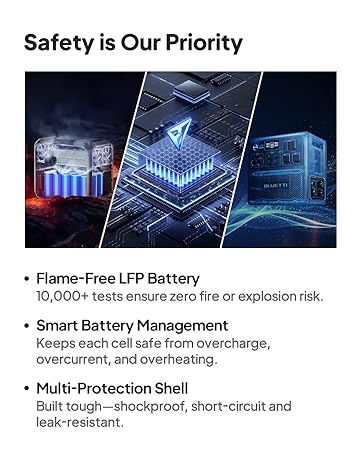
The BLUETTI Elite 100 V2 is built with comprehensive safety features to protect both the device and its users.
- Batré LiFePO4: Flame-free LiFePO4 battery with 10,000+ tests ensuring zero fire or explosion risk.
- Smart Battery Management System (BMS): Protects against overcharge, overdischarge, overcurrent, and overheating.
- Multi-Protection Shell: Built tough with shockproof, short-circuit, and leak-resistant properties.
- Intelligent Algorithm: Monitors alternator status during car charging to prevent car battery drain.
- Pamutus Sirkuit: Integrated 20A circuit protector for enhanced safety.
Gambar: Témbongkeun diagramcasing the comprehensive protection features of the BLUETTI Elite 100 V2 and Charger 1, including short-circuit, reverse polarity, undervoltage, sarta panyalindungan over-suhu.
8. App Control
Manage your BLUETTI Elite 100 V2 conveniently with the dedicated smartphone app, offering enhanced control and monitoring capabilities.
- Pangimeutan sacara real-time: View battery alerts, real-time status, and energy statistics.
- Custom Charging Modes: Adjust charging current for optimal efficiency and battery health.
- Kadali jauh: Turn AC/DC outputs on/off, enable/disable UPS mode, and manage other settings remotely.
- Bewara: Receive alerts for full battery, low battery (at 20%, 10%, and 5% SoC), and other important status changes.
- Pamulihan Pindah Sistem: Enable or disable the system to restore its last output on/off status upon restart.

Image: The BLUETTI app interface displaying energy statistics, working modes, and battery alerts for the Elite 100 V2, enabling smart control and monitoring.
9. Spésifikasi
| Fitur | Spésifikasi |
|---|---|
| Ngaran modél | Élit 100 V2 |
| Jenis Batré | LiFePO4 |
| Kapasitas batré | 1024Wh |
| Kaluaran AC | 1800W (Continuous), 2700W (Lifting Power), 3600W (Surge) |
| Total outlet kakuatan | 11 |
| Input AC | 1200W Max |
| Solar Input (PV) | 1000W Max (12V-60V/20A) |
| Ngecas Mobil | 560W DC-DC (with Charger 1) |
| Waktos Pindah UPS | ≤10ms |
| Tingkat Noise | ≤30dB (under 600W) |
| Ukuran (L x W x H) | 12.6 "L x 8.5" W x 9.8" H |
| Item Beurat | 25 pon |
| Suhu Operasi | -20°C nepi ka 40°C (-4°F nepi ka 104°F) |
| Siklus Kahirupan | Kapasitas 4000+ dugi ka 80% |
10. Cara ngungkulan
If you encounter issues with your BLUETTI Elite 100 V2, please refer to the following common solutions:
- Alat Teu Dihurungkeun: Pastikeun batréna geus dieusian. Lamun henteu, sambungkeun ka stop kontak AC pikeun ngecas.
- No Output from AC/DC Ports: Verify that the respective AC or DC output button is pressed and illuminated. Check the display for any error codes.
- Ngecas Lambat: Ensure all charging cables are securely connected. For solar charging, confirm panels are in direct sunlight and free from obstructions. Check the input wattage dina tampilan.
- Perlindungan Overload: If an overload occurs, the unit may shut down. Disconnect the overloaded device, restart the power station, and try again with a lower power device.
- Masalah Konektipitas Aplikasi: Ensure Bluetooth or Wi-Fi is enabled on your smartphone and the power station. Restart both devices and try reconnecting.
For more detailed troubleshooting, please consult the full user manual or contact BLUETTI customer support.
11. Pangropéa
Proper maintenance ensures the longevity and optimal performance of your BLUETTI Elite 100 V2.
- Panyimpenan: Store the power station in a cool, dry place away from direct sunlight and extreme temperatures. For long-term storage, charge the unit to 50-80% every 3-6 months.
- beberesih: Anggo lawon anu garing sareng lemes pikeun ngabersihkeun bagian luar unit. Entong nganggo pembersih cair atanapi ngalelepkeun unit kana cai.
- Ventilasi: Ensure the ventilation openings are clear and free from dust or debris to prevent overheating.
- Kaséhatan batré: Avoid fully discharging the battery frequently. Regular partial discharges and recharges are healthier for LiFePO4 batteries.
12. Jaminan & Dukungan
Your BLUETTI Elite 100 V2 Portable Power Station comes with a 5-taun jaminan kawates. Garansi ieu nyertakeun cacad dina bahan sareng pagawean dina panggunaan normal.
For warranty claims, technical support, or any questions regarding your product, please contact BLUETTI customer service through their official websitus atawa inpo kontak disadiakeun dina kartu jaminan Anjeun.


