Buku Panduan Pangguna Laptop Kaulinan Thunderobot Storm 17
Model: Storm 17
1. Bubuka
This manual provides essential information for setting up, operating, maintaining, and troubleshooting your Thunderobot Storm 17 Gaming Laptop. Please read this manual thoroughly to ensure proper usage and to maximize the performance and lifespan of your device.
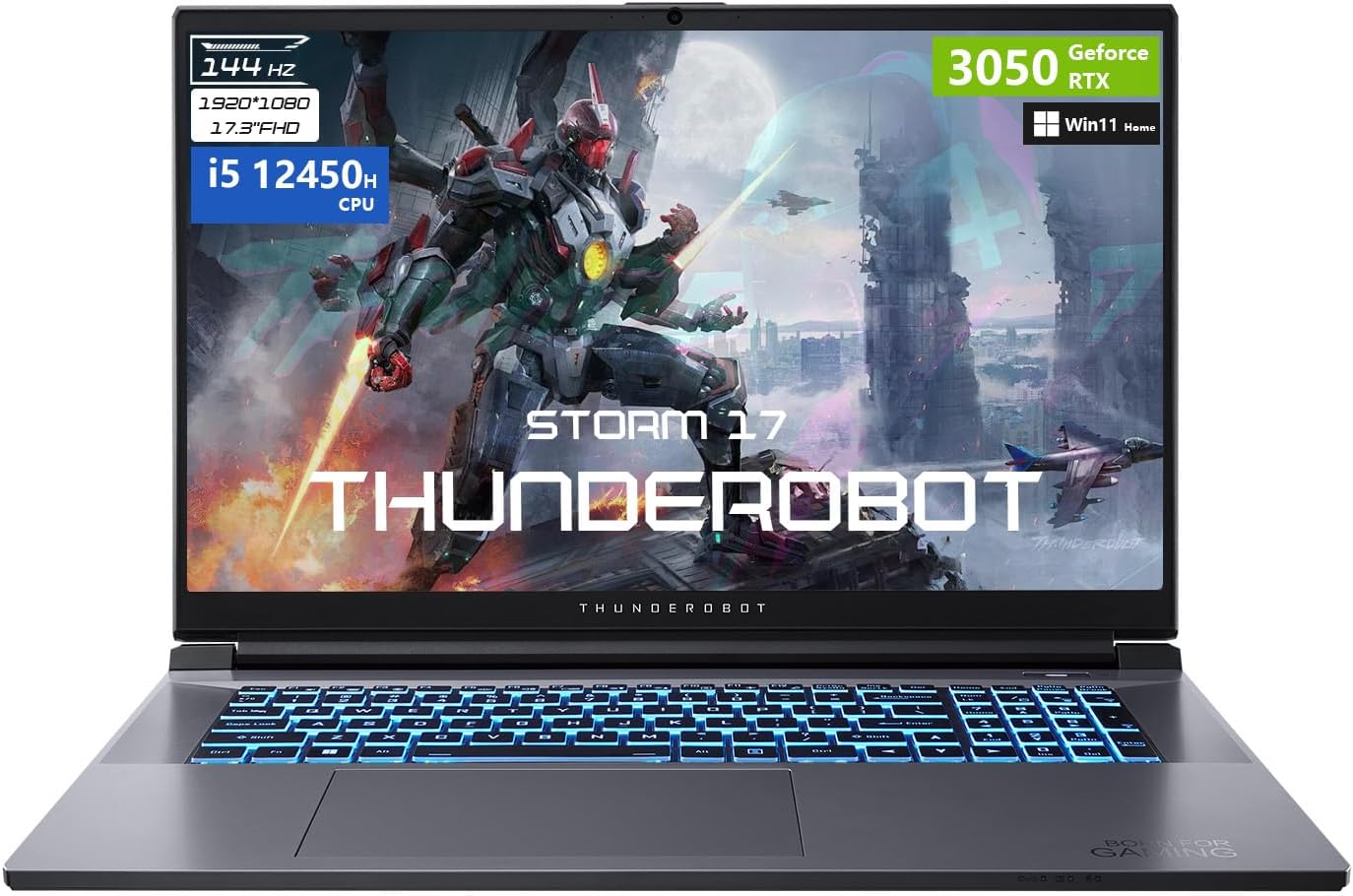
Gambar 1: Hareupeun view of the Thunderobot Storm 17 Gaming Laptop.
2. Naon dina Box
Pastikeun yén sadaya barang aya dina bungkusan:
- Thunderobot Storm 17 Laptop
- Adaptor Daya sareng Kabel
- Manual pangguna (dokumén ieu)
- Kartu Garansi (upami aya)
3. Ngamimitian (Setup)
3.1. Ngabongkar sareng Inspeksi Awal
Carefully remove the laptop and all accessories from the packaging. Inspect the laptop for any signs of physical damage. If any damage is found, contact your retailer immediately.
3.2. Nyambungkeun Adaptor Daya
- Sambungkeun kabel kakuatan ka adaptor kakuatan.
- Colokkeun adaptor kakuatan kana stop kontak listrik grounded.
- Insert the DC output plug of the power adapter into the DC-IN port on the side of your laptop.
Disarankeun ngeusi batre sapinuhna saméméh pamakéan munggaran.
3.3. Boot-up Awal sareng Setelan Windows
- Buka tutup léptop.
- Pencét tombol daya pikeun ngahurungkeun laptop.
- Follow the on-screen instructions to complete the Windows 11 Home operating system setup. This typically involves selecting your region, language, creating a user account, and accepting license agreements.
3.4. Nyambungkeun périferal
Your laptop supports various external devices. Refer to the 'Ports and Connectors' section for port locations.
- Alat USB: Connect USB mice, keyboards, external drives, or other peripherals to the available USB Type-A or USB Type-C ports.
- Tampilan éksternal: Use the HDMI or Mini DisplayPort to connect an external monitor or projector.
- Ethernet: For a wired network connection, plug an Ethernet cable into the RJ-45 port.
3.5. Sambungan Jaringan (Wi-Fi)
Pikeun nyambung ka jaringan nirkabel:
- Click the Wi-Fi icon in the Windows taskbar.
- Pilih jaringan Wi-Fi anu dipikahoyong tina daptar.
- Enter the network security key (password) if prompted, then click 'Connect'.
4. Ngoperasikeun Laptop Anjeun
4.1. Fungsi kibor
The Thunderobot Storm 17 features an RGB backlit keyboard with a numeric keypad. Function keys (F1-F12) can be accessed by pressing the Fn konci dina kombinasi jeung kenop fungsi nu dipikahoyong.
- Kontrol lampu latar: Adjust keyboard backlight brightness and effects using dedicated function key combinations.
- Papan tombol angka: Provides a full set of number keys for data entry.
- Kadali Media: Function keys allow control over volume, playback, and screen brightness.

Figure 2: RGB Backlit Keyboard layout.
4.2. Touchpad Usage
The integrated touchpad supports multi-touch gestures for navigation. Refer to Windows settings for customizing touchpad sensitivity and gestures.
4.3. Setélan tampilan
Your laptop features a 17.3-inch Full HD (1920x1080) display with a 144Hz refresh rate. To adjust display settings:
- Klik katuhu dina desktop tur pilih 'Setélan tampilan'.
- Under 'Scale & layout', you can adjust text size.
- Under 'Multiple displays', you can configure external monitors.
- For refresh rate, navigate to 'Advanced display settings' and select '144Hz' for optimal performance.
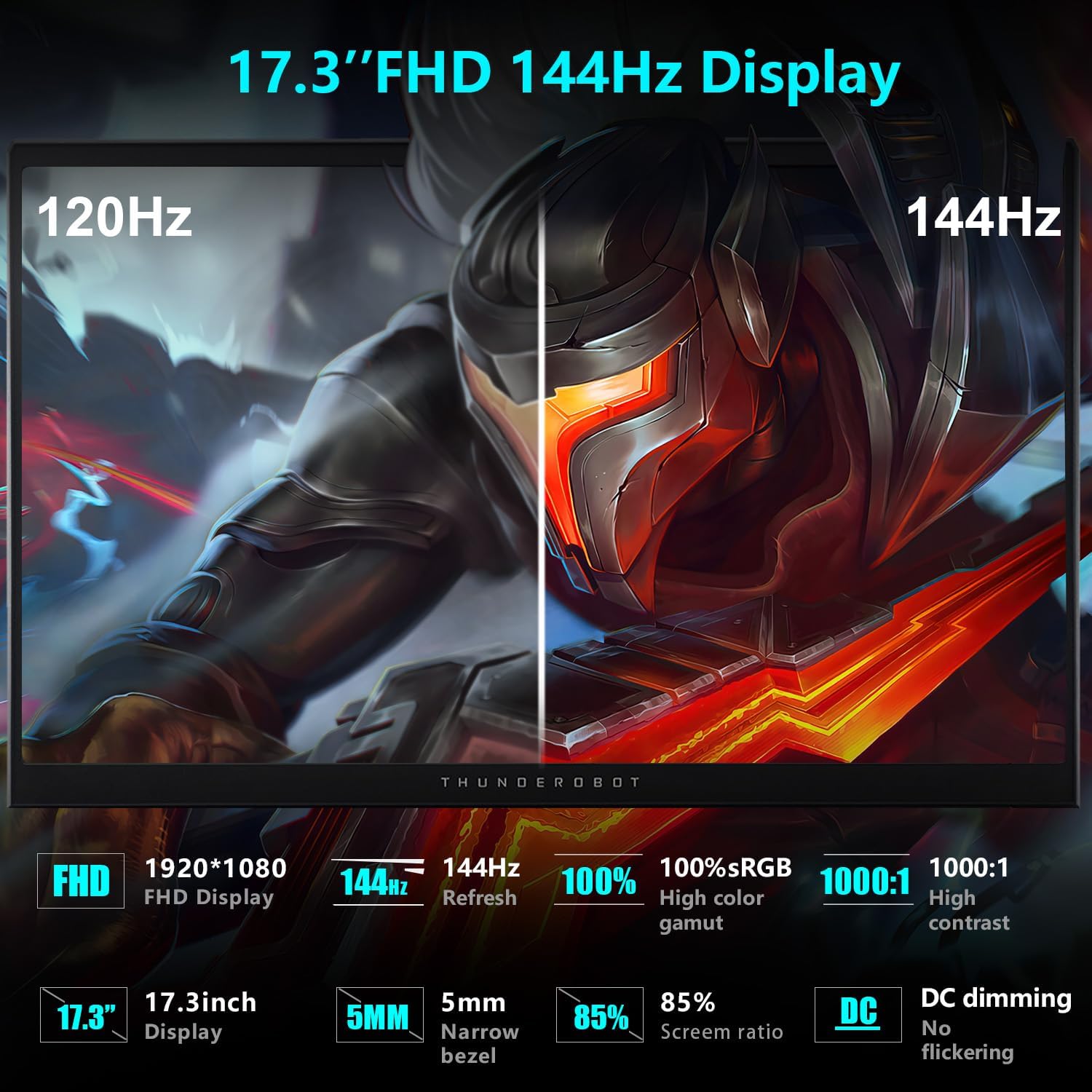
Figure 3: Display specifications highlighting 144Hz refresh rate.
4.4. Konfigurasi Audio
The laptop's audio system provides a wide range of sound. You can adjust volume using the function keys or through the Windows sound settings. Connect headphones or external speakers to the 3.5mm audio jack for private listening or enhanced sound output.

Figure 4: Illustration of the laptop's audio capabilities.
4.5. Thunderobot Control Center
The Thunderobot Control Center software allows you to customize various aspects of your laptop's performance, cooling, and lighting. This application provides access to:
- Modeu kinerja: Switch between modes like 'Berserk' (full performance), 'Game' (balanced), and 'Audio and Video Office' (power-saving).
- Penyesuaian kipas: Manually control fan speeds for optimal cooling.
- Setélan cahaya: Customize the RGB keyboard backlight effects and colors.
To access the Control Center, search for 'Control Center' in the Windows search bar. Note that system mode switching in Control Center requires the device to be connected to a power source.

Figure 5: Thunderobot Control Center interface.
4.6. Palabuhan sarta Panyambungna
Familiarize yourself with the various ports on your laptop for connecting external devices:
- USB 3.2 Gen 1 Tipe-A: Port USB-speed tinggi pikeun périferal.
- USB 2.0 Tipe-A: port USB baku.
- USB Tipe-C: Versatile port for data transfer and display output.
- Port HDMI: Pikeun nyambungkeun ka tampilan éksternal.
- Mini DisplayPort: Another option for external display connections.
- Port Ethernet RJ-45: Pikeun konektipitas jaringan kabel.
- 3.5mm Combo Jack: For connecting headphones with a microphone.
- Jack-IN Jack: Pikeun nyambungkeun adaptor kakuatan.
- Slot konci Kensington: For securing your laptop with a compatible lock.
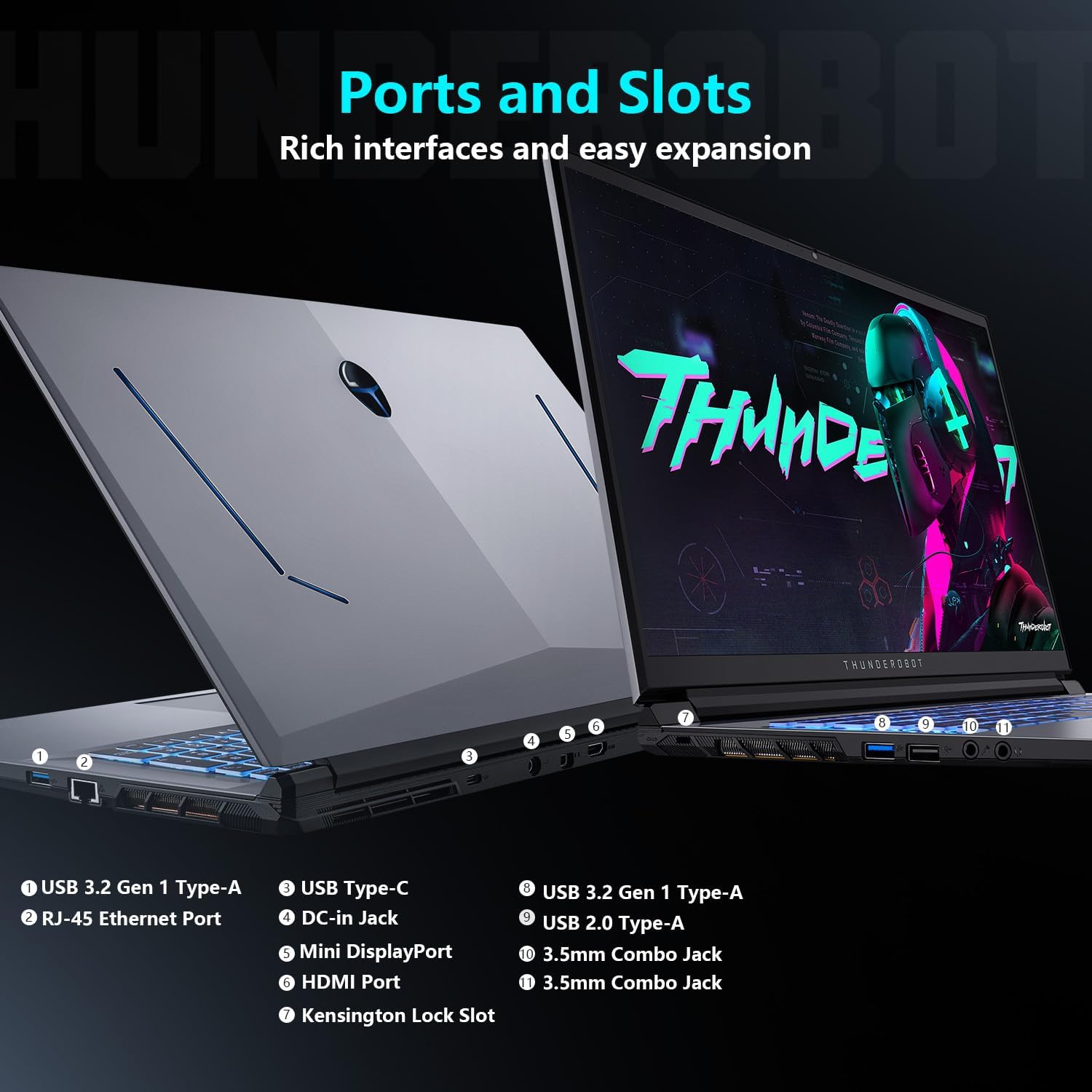
Gambar 6: Leuwihview of laptop ports and connectors.
5. Pangropéa sarta perawatan
5.1. Pedoman beberesih
- layar: Anggo kaén anu lemes sareng teu aya serat anu hampang dampdikumbah ku cai atawa pembersih layar. Hindarkeun bahan kimia anu kasar.
- kibor: Use compressed air to remove dust and debris between keys. Wipe keycaps with a soft, damp lawon.
- Sasis: Wipe the laptop's exterior with a soft, damp lawon.
- Pareuman heula laptop jeung cabut heula adaptor dayana samemeh diberesihan.
5.2. Manajemén termal
The Storm 17 features an efficient cooling system with dual turbofans and copper heat pipes. To maintain optimal cooling performance:
- Ensure that the air vents are not obstructed. Avoid placing the laptop on soft surfaces like beds or carpets.
- Periodically clean dust from the air vents using compressed air.
- Utilize the Thunderobot Control Center to adjust fan speeds, especially during demanding tasks.

Figure 7: Direct-Flow Cooling Technology diagram.
5.3. Optimasi batré
- Ulah sering ngosongkeun batréna sagemblengna.
- Simpen laptop di tempat anu tiis sareng garing upami henteu dianggo kanggo waktos anu lami.
- Disconnect the power adapter once the battery is fully charged if you plan to use it on battery power.
5.4. Software and Driver Updates
Regularly update your operating system and device drivers to ensure optimal performance and security. Check the Thunderobot support website for the latest drivers for your Storm 17 laptop.
5.5. Manajemén gudang
Périodik ngabersihan anu teu perlu files and applications to maintain sufficient free space on your 1TB SSD. This helps ensure smooth system operation.
6. Cara ngungkulan
6.1. Isu umum jeung Solusi
- Henteu aya kakuatan:
- Pastikeun adaptor daya disambungkeun pageuh kana laptop sareng stop kontak anu tiasa dianggo.
- Pariksa naha stop kontak listrik fungsina.
- Coba pencét terus tombol daya salami 15 detik pikeun ngalakukeun reset keras.
- Masalah tampilan:
- If the screen is blank, try connecting an external monitor to check if the laptop is functioning.
- Atur kacaangan layar nganggo tombol fungsi.
- Ensure display drivers are up to date.
- Masalah Konektipitas Jaringan:
- For Wi-Fi, ensure Wi-Fi is enabled and you are connected to the correct network. Restart your router.
- For wired connection, check the Ethernet cable and router connection.
- Update network drivers.
- Masalah Audio:
- Check volume levels in Windows and ensure speakers/headphones are properly connected.
- Verify that audio drivers are installed and up to date.
- Lag kinerja:
- Tutup aplikasi anu teu perlu jalan di latar tukang.
- Ensure the laptop's cooling system is not obstructed and fans are operating correctly.
- Pariksa rohangan panyimpenan kosong anu cekap.
- Apdet supir grafik.
- Switch to a higher performance mode in the Thunderobot Control Center.
6.2. Mulangkeun Sistem
Windows 11 provides options for system recovery, including resetting the PC while keeping your files or performing a clean reinstallation. Access these options via 'Settings > System > Recovery'.
6.3. Ngahubungan Rojongan
If you encounter issues that cannot be resolved using this manual, please visit the official Thunderobot support websitus atanapi ngahubungan layanan palanggan maranéhna pikeun pitulung.
7. Spésifikasi produk
| Fitur | Spésifikasi |
|---|---|
| Ngaran modél | Badai 17 |
| Ukuran tampilan | 17.3 inci |
| Resolusi layar Max | 1920x1080 Piksel (FHD) |
| Refresh Laju | 144Hz |
| Prosesor | Intel Core i5-12450H (8 Core, 12 Thread, nepi ka 4.4 GHz) |
| Ram | 16 GB DDR4 (3200 MHz) |
| Panyimpenan | 1 TB PCIe M.2 SSD |
| Grafik Coprocessor | NVIDIA GeForce RTX 3050 (6 GB GDDR6 Dedicated) |
| Sistem operasi | Windows 11 Imah |
| Konéktipitas Wireless | Wi-Fi 802.11ac, Bluetooth |
| Palabuhan | 3x USB 3.0, 1x USB 2.0, 1x USB Type-C, 1x HDMI, 1x RJ-45, 1x Audio Port, 1x Mini DisplayPort, 1x Kensington Lock Slot |
| kibor | Kibor RGB Backlit, Keypad Numerik |
| Item Beurat | 11 pon |
| Dimensi produk | 15.62 x 10.35 x 1.01 inci |
8. Garansi jeung Rojongan
8.1. Garansi produk
Every Thunderobot laptop includes a 12-garansi sasih from the date of purchase. This warranty covers manufacturing defects and provides expert support, thorough diagnostics, and genuine parts for necessary repairs. Additionally, a garansi 90 poé is provided on all warranty replacement parts, ensuring hassle-free repairs.
8.2. Plans Protection ngalegaan
Optional extended protection plans may be available for purchase to extend coverage beyond the standard warranty period. These plans typically offer additional years of coverage for peace of mind.
8.3. Rojongan Palanggan
For technical support, warranty claims, or service inquiries, please visit the official Thunderobot website or contact their authorized service centers. Have your product model and serial number ready when contacting support.


