1. Bubuka
This manual provides essential information for the setup, operation, and maintenance of your Thunderobot Zero 18 Pro 5080 Gaming Laptop. Please read this manual thoroughly before using the device to ensure proper functionality and to maximize your user experience. Keep this manual for future reference.
2. Fitur konci
2.1. Performance Hardware
The Thunderobot Zero 18 Pro is equipped with high-performance components designed for demanding applications and gaming.
- Prosesor: Intel Core Ultra 9 275HX (24 Cores, 24 Threads, up to 5.40GHz)
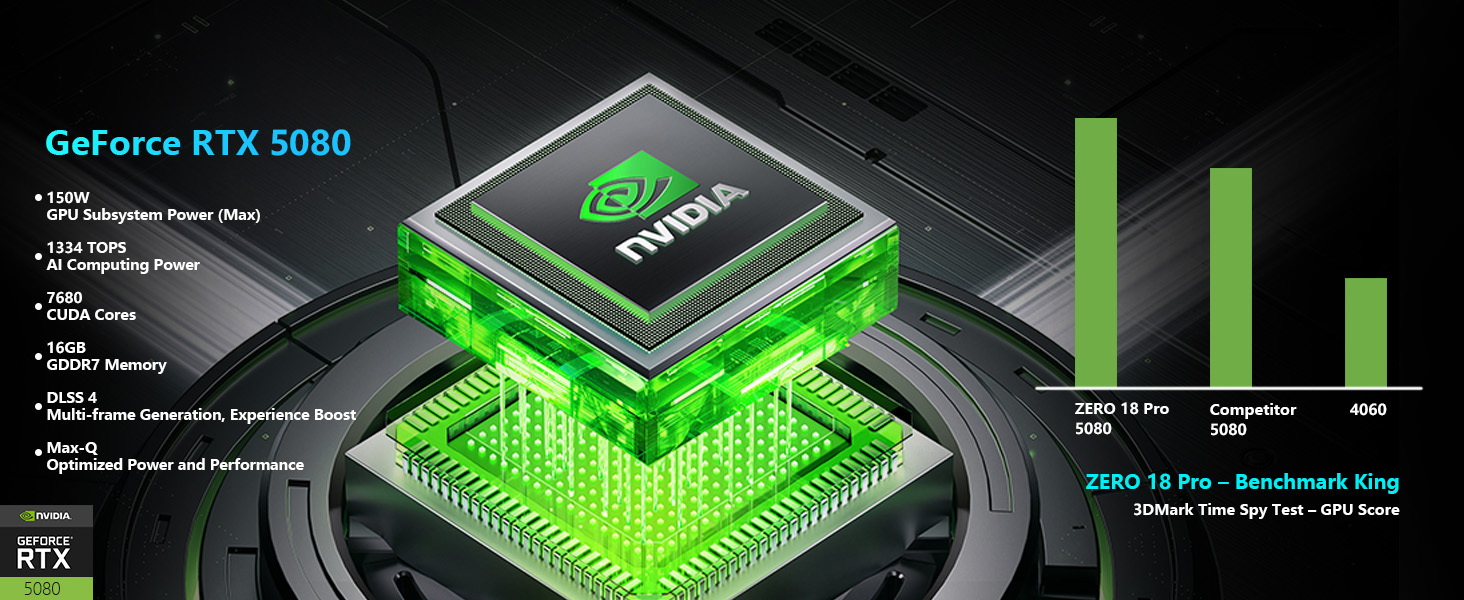
- Grafik: NVIDIA GeForce RTX 5080
- Mémori: 32 GB DDR5 RAM
- Panyimpenan: SSD PCIe M.1 2TB
Gambar: Detil view of the Intel Core Ultra 9 275HX processor and NVIDIA GeForce RTX 5080 graphics card, highlighting their specifications and capabilities.
2.2. Téhnologi Tampilan
The laptop features an advanced display for clear and fluid visuals.
- ukuran: 18-inch QHD+ (2560x1600)
- Laju Refresh: 240Hz
- Téknologi: Bionic Hummingbird Eye-Care Display with Anti-Glare and Anti-Reflection properties.
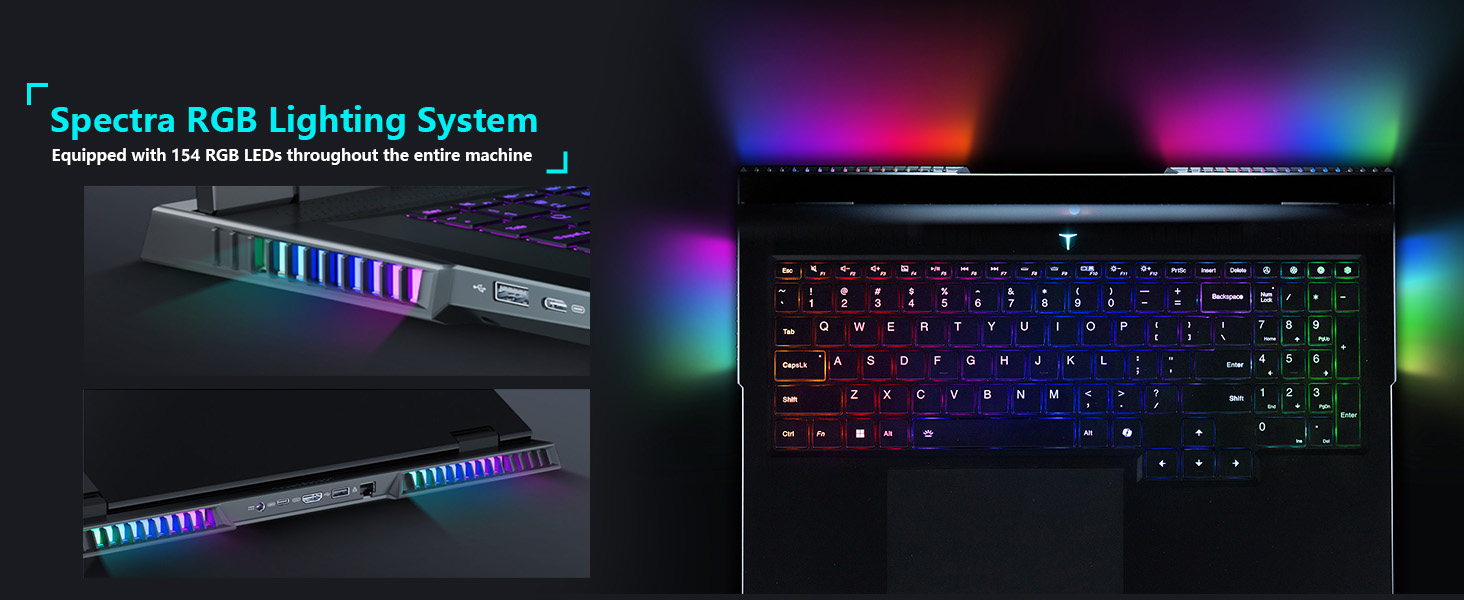
Image: The 18-inch Bionic Hummingbird Eye-Care Display showcasing its QHD+ resolution, 240Hz refresh rate, and anti-glare features.
Video: Leuwihview of the THUNDEROBOT Series Display features, including refresh rate and resolution.
2.3. Sistim cooling
The laptop incorporates an advanced cooling system to maintain optimal performance during intensive use.
- Fans: 3 Night Owl fans with high air volume.
- Pipa Panas: 7 high-efficiency heat pipes.
- Sirip: 338 pieces of 0.075mm ultra-thin copper fins.
- Power Release: Up to 270W total power release.
Gambar: Hiji internal view illustrating the laptop's heat dissipation architecture, including fans and heat pipes.
2.4. Keyboard and Lighting
The laptop features a customizable keyboard and integrated lighting.
- kibor: Per-Key RGB Backlit Keyboard with numeric keypad.
- Sistim cahaya: "Spectra" RGB Lighting System with 154 RGB light beads.
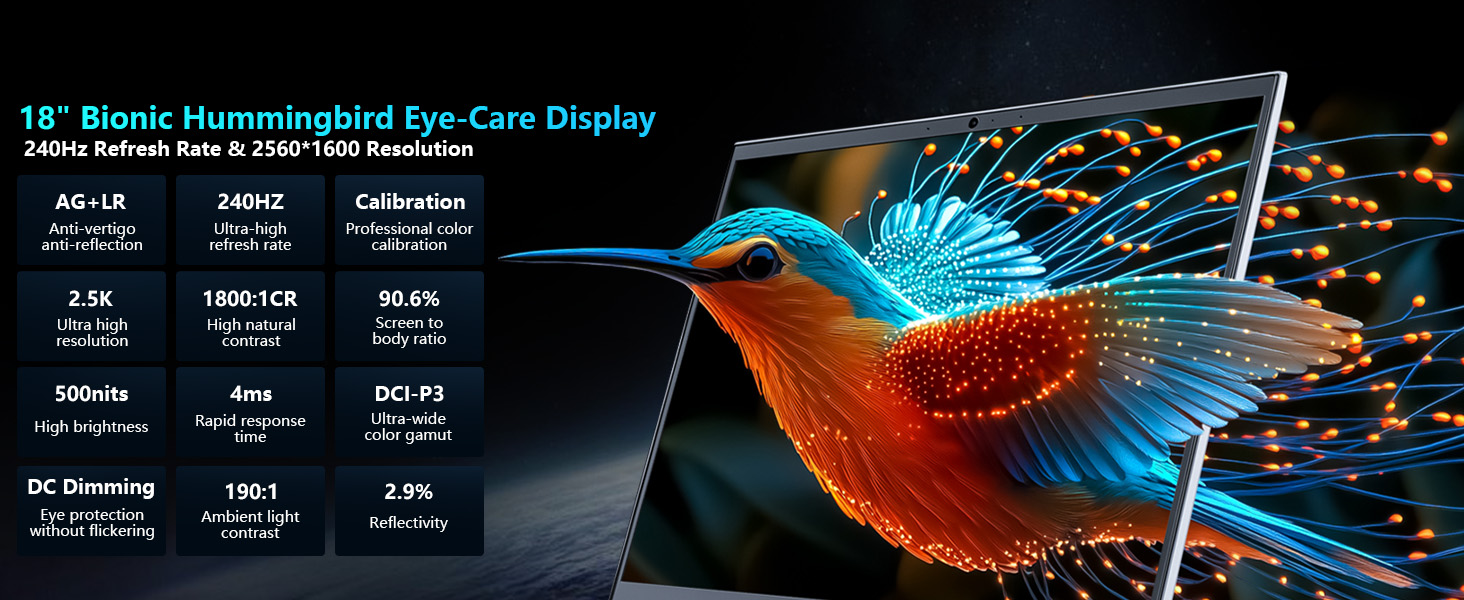
Image: Close-up of the laptop keyboard, highlighting the Per-Key RGB backlighting and dedicated mode switching keys.
Video: Demonstration of the Thunderobot RGB lighting features and customization options.
2.5. Konektipitas
The Zero 18 Pro offers a range of ports for external devices and network connectivity.
- Port USB: 3 x Superspeed USB Type-A, 2 x Superspeed USB Type-C (Thunderbolt 5 compatible).
- Kaluaran Video: 1 x HDMI 2.1.
- Jaringan: 1 x RJ-45 (Ethernet), Wi-Fi 6E.
- Audio: 1 x Audio Port.
- Nirkabel: Bluetooth.
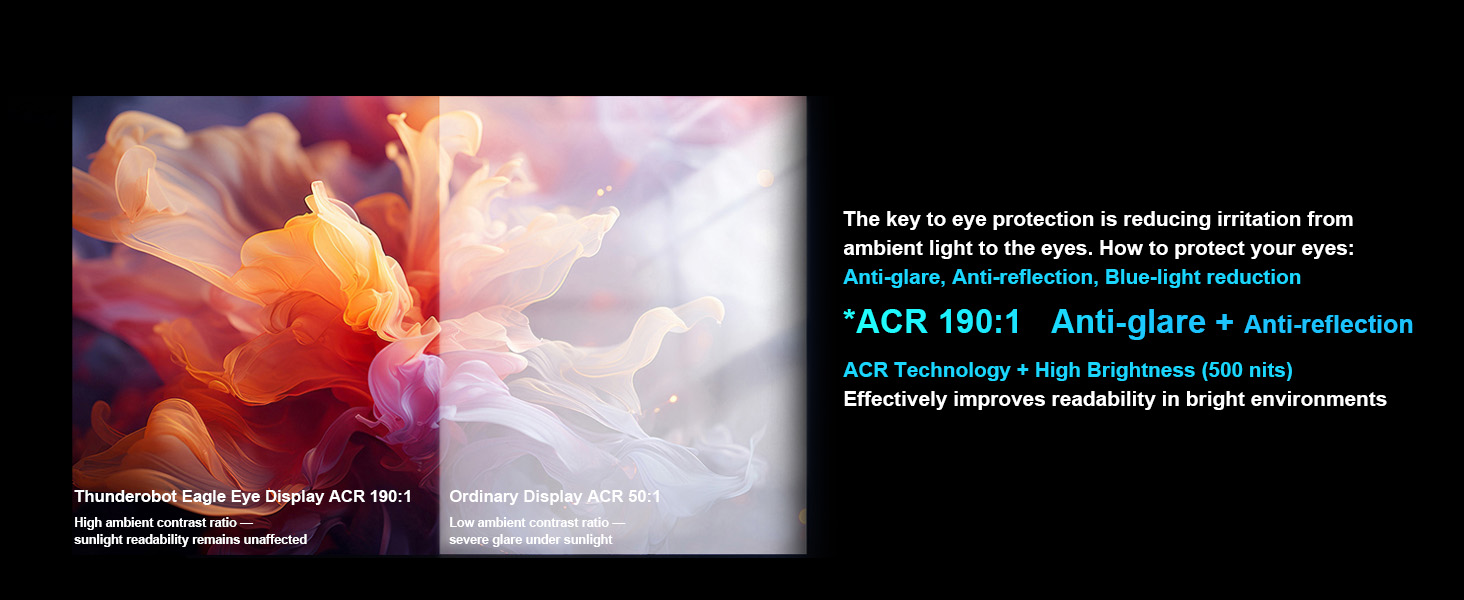
Image: Diagram illustrating the location and types of ports available on the Thunderobot Zero 18 Pro laptop.
3. Setup Guide
3.1. Unboxing sareng Inspeksi Awal
- Cabut laptop sareng sadaya asesoris sacara saksama tina bungkusan.
- Verify that all components listed in the 'What's in the Box' section are present.
- Inspect the laptop for any physical damage. If damage is found, contact customer support immediately.
3.2. Nyambungkeun Power
- Connect the AC adapter to the power port on the laptop.
- Colokkeun kabel listrik kana stop kontak listrik grounded.
- Disarankeun pikeun ngecas batréna pinuh sateuacan dianggo mimiti.
3.3. Mimiti boot jeung Operating System Setup
- Buka tutup laptop teras pencét tombol daya.
- Follow the on-screen instructions to complete the Windows 11 Home setup process. This includes selecting your region, language, and setting up user accounts.
- Connect to a Wi-Fi network when prompted to ensure the operating system can download necessary updates.
4. Parentah Operasi
4.1. Daya Hurung / Pareum
- Daya Hurung: Pencét tombol daya anu aya dina dek kibor.
- Pareum listrik: Pencét tombol Mimitian dina Windows, teras pilih Daya> Pareuman.
- Modeu Bobo: Tutupkeun panutup laptop atanapi klik tombol Start, teras pilih Power > Sleep.
4.2. Fungsi kibor
The keyboard features Per-Key RGB backlighting and dedicated function keys.
- Tombol Fungsi (Fn): Tahan éta Fn key and press the corresponding F-key (F1-F12) for special functions like volume control, brightness adjustment, or toggling Wi-Fi.
- Kustomisasi RGB: Use the pre-installed control software to customize the Per-Key RGB lighting effects and colors.
- Performance Mode Switching: Dedicated keys (Fn+Space) allow quick switching between performance profiles (e.g., Quiet, Balance, Turbo).
4.3. AI Intelligent Control Center
The AI Intelligent Control Center software provides comprehensive control over your laptop's performance, lighting, and system settings.
- Performance Tuning: Adjust CPU/GPU power limits and fan speeds.
- Intelligent Light Adjustment: Customize RGB lighting zones (keyboard, strip, logo) with various effects.
- Comprehensive Adjustment: Access system monitoring, power plans, and other advanced settings.
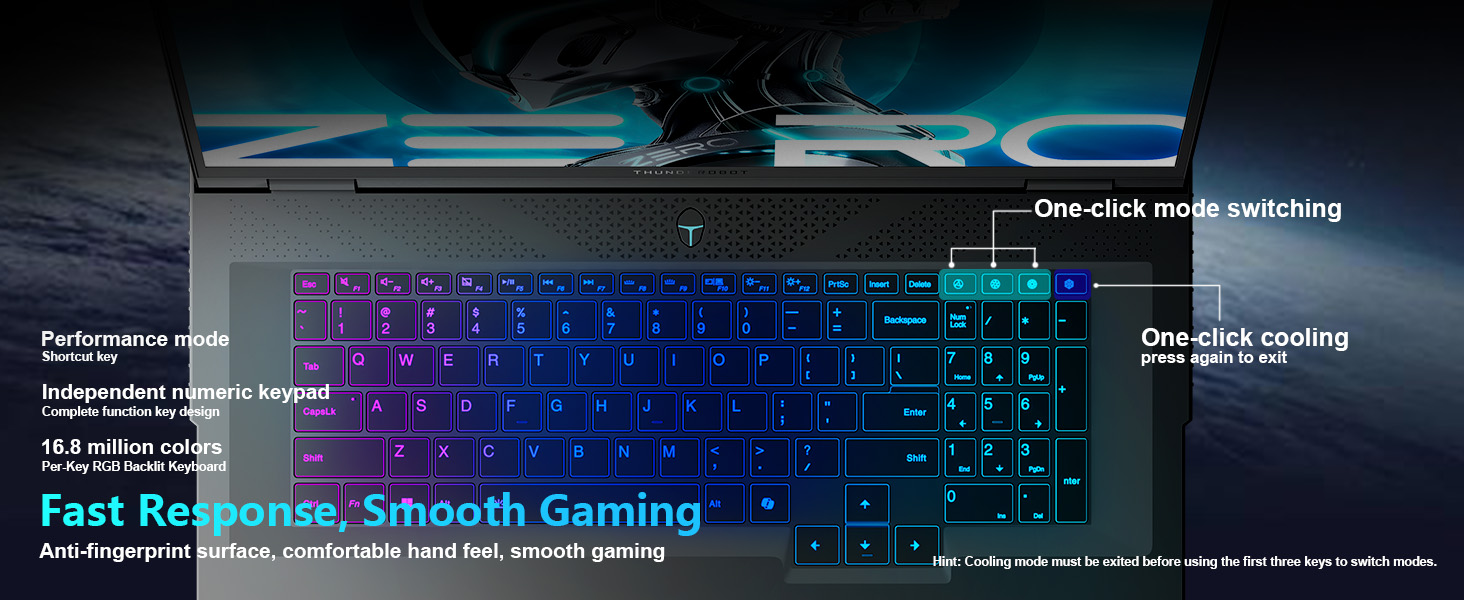
Image: Screenshot of the AI Intelligent Control Center, showing options for system, lighting, and settings adjustments.
Video: Langkung lengkepnaview of the THUNDEROBOT Zero 18 Pro, showcasing its design, features, and the AI Intelligent Control Center.
5. Pangropéa
5.1. beberesih
- layar: Anggo kaén anu lemes sareng teu aya serat anu hampang dampdikumbah ku cai atawa pembersih layar. Hindarkeun bahan kimia anu kasar.
- Keyboard sareng Chassis: Use a soft cloth to wipe surfaces. A can of compressed air can remove dust from between keys and vents.
- ventilasi: Regularly check and clean the cooling vents to prevent dust buildup, which can hinder airflow and lead to overheating.
5.2. Apdet parangkat lunak
- Rutin pariksa sareng pasang apdet Windows pikeun mastikeun stabilitas sareng kaamanan sistem.
- Update graphics drivers (NVIDIA GeForce) and other device drivers through the manufacturer's website or dedicated software.
- Keep the AI Intelligent Control Center software updated for new features and performance optimizations.
5.3. Kaperawatan batré
- Ulah sering ngosongkeun batréna sagemblengna.
- If storing the laptop for an extended period, charge the battery to about 50-60% and store it in a cool, dry place.
- Use only the original AC adapter provided with the laptop.
6. Cara ngungkulan
6.1. Laptop Teu Bisa Dihurungkeun
- Pastikeun adaptor AC disambungkeun sacara aman ka laptop sareng stop kontak listrik anu tiasa dianggo.
- Pariksa naha stop kontak listrik berpungsi ku cara nyolokkeun alat sejen.
- Upami batre tos lemes, beunang ngecas sahenteuna 30 menit sateuacan nyobian hurung.
6.2. Display Issues (No Image, Flickering)
- Pastikeun laptopna hurung sareng henteu dina modeu sare.
- Adjust screen brightness using the function keys (Fn + F-keys).
- If an external monitor is connected, try disconnecting it or switching display modes (Fn + F-key, usually F7 or F8).
- Apdet supir grafik.
6.3. Overheating
- Pastikeun ventilasi pendingin teu katutup.
- Bersihkeun lebu tina ventilasi nganggo udara anu dikomprés.
- Use the AI Intelligent Control Center to set the cooling mode to a higher fan speed (e.g., Turbo mode).
- Ensure the laptop is used on a hard, flat surface to allow proper airflow.
6.4. Masalah Konéktivitas Wi-Fi
- Ensure Wi-Fi is enabled (check function keys or Windows settings).
- Balikan deui router sareng modem anjeun.
- Update your Wi-Fi adapter drivers.
- Coba sambungkeun ka jaringan Wi-Fi anu béda pikeun ngaidentipikasi masalahna.
7. Spésifikasi
| Fitur | Rincian |
|---|---|
| merek | Gunturbot |
| Ngaran modél | NOL 18 Pro |
| Ukuran layar | 18 inci |
| Resolusi layar | 2560 x 1600 piksel (QHD+) |
| Prosesor | Intel Core Ultra 9 275HX (dugi ka 5.4 GHz) |
| Ram | 32 GB DDR5 |
| Laju mémori | 4800 MHz |
| Hard Drive | 1 TB SSD (PCIe x 4) |
| Grafik Coprocessor | GeForce RTX 5080 (Dedicated) |
| Sistem operasi | Windows 11 Imah |
| Tipe Wireless | 802.11ax (Wi-Fi 6E) |
| USB 3.0 palabuhan | 3 |
| Item Beurat | 15 pon |
| Dimensi produk | 16.04 x 11.78 x 1.41 inci |
| Warna | Hideung |
| Sumber Daya | AC & Batré |
| Fitur husus | Keypad Angka |
8. Garansi jeung Rojongan
Every Thunderobot laptop includes a 12-month warranty. This warranty offers expert support, thorough diagnostics, and genuine parts if a repair is needed. Additionally, a 90-day warranty is provided on all warranty replacement parts, ensuring hassle-free repairs. Your satisfaction is our commitment.
Image: Graphic detailing Thunderobot's warranty and service policy, including 12-month laptop warranty and 90-day replacement parts warranty.
8.1. Ngahubungan Rojongan
For technical assistance, warranty claims, or service inquiries, please refer to the contact information provided in your product packaging or visit the official Thunderobot support websitus.


