1. Produk Langkungview
The Electro-Voice Evolve 70 Column Loudspeaker System is a powerful and portable audio solution designed for professional users. It delivers impeccable audio quality and high output, suitable for larger events and venues. The system features advanced materials and ergonomic design for maximum portability and rapid deployment.
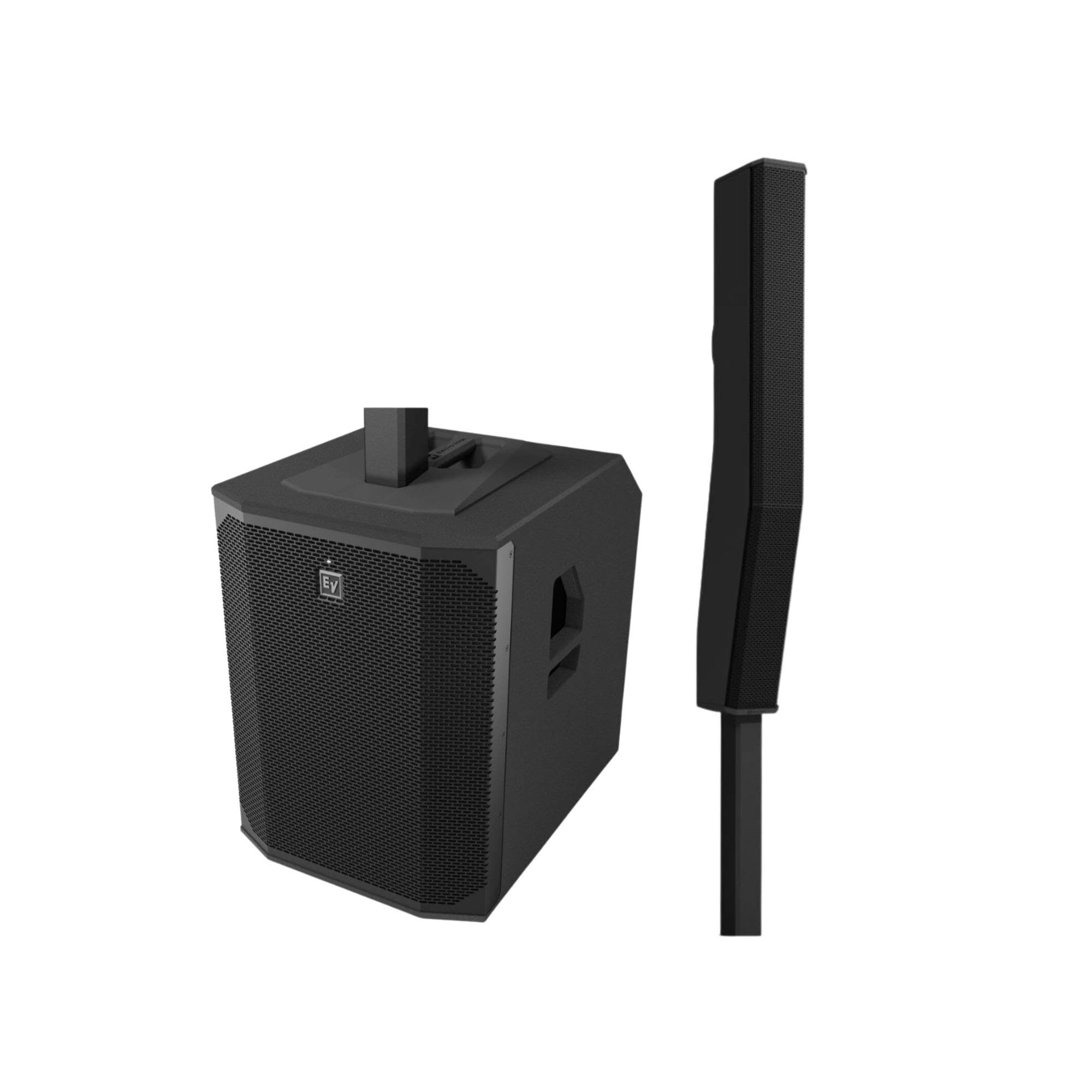
Gambar 1: Hareupeun view of the Electro-Voice Evolve 70 Column Speaker System.
Fitur konci:
- Impactful sonic performance for larger, high-energy events.
- 120° wide, waveguide-formed consistent coverage for crystal-clear audio.
- 15-inch subwoofer with laminar-flow vent design for powerful bass down to 35 Hz.
- Lightweight construction from advanced materials for unbeatable portability.
- Rapid deployment with the EVOLVE 3-2-1 assembly approach.
- QuickSmart Link and Bluetooth Stereo for ultimate connectivity.
- Iconic design, available in black or white.
2. Naon dina Box
Upon unboxing your Electro-Voice Evolve 70 system, ensure all components are present and in good condition. The standard package includes:
- EVOLVE70-SB-US Subwoofer
- Kabel listrik
- Column Array (top speaker section)
- Distance Pole (for connecting subwoofer and column array)
- Carrying Case for the array and distance pole

Figure 2: Visual representation of the Electro-Voice Evolve 70 system components.

Figure 3: Included carrying case for the column array and distance pole, ensuring easy transport.
3. Setélan
The EVOLVE 70 system is designed for quick and easy assembly, following a 3-2-1 approach: three pieces fit together in two clicks to form one system.
3.1 Majelis fisik
- Place the EVOLVE70-SB-US Subwoofer on a stable, flat surface.
- Insert the aluminum distance pole into the top receptacle of the subwoofer. The magnetic locking mechanism will secure it.
- Attach the column array (top speaker section) onto the top of the distance pole. Ensure it clicks securely into place.

Figure 4: Assembled column array and distance pole, ready for connection.
3.2 Sambungan
The rear panel of the subwoofer features various input and output options:
- XLR/TRS Combo Mic-Line Inputs: For microphones or line-level audio sources.
- Input Tingkat Jalur RCA: Pikeun alat audio konsumen.
- Digital AES/EBU Input: For professional digital audio signals.
- XLR Mix Out: To send the mixed audio signal to another speaker or mixer.
- Kabel listrik: Connect the included power cord to the AC input and a power outlet.

Figure 5: Rear panel of the Evolve 70 subwoofer, showing all connection options.
3.3 Video Guide: General PA System Setup
Video 1: This video demonstrates the general setup process for a 15-inch subwoofer PA system, including connecting cables and powering on. While not specific to the Evolve 70, the principles of connection and power are similar.
Video 2: This video provides a presentation of a StagePro 12 system, showing how to connect multiple line array speakers and a subwoofer. This can be helpful for understanding multi-speaker configurations.
4. Parentah Operasi
The Evolve 70 offers intuitive controls and advanced features for optimal audio performance.
4.1 Daya Hurung/Pareuman
- Pastikeun sadaya sambungan aman sateuacan diaktipkeun.
- Flip the POWER switch on the rear panel of the subwoofer to the 'ON' position.
- To power off, flip the POWER switch to the 'OFF' position.
4.2 Input Level Adjustment
- Each input channel (Input 1, Input 2, Input 3) has a dedicated level control knob.
- Adjust these knobs to achieve the desired volume for each connected audio source.
- The Master Volume knob controls the overall output level of the system.
4.3 Konektipitas Bluetooth
- Activate Bluetooth on your compatible device.
- On the Evolve 70 control panel, press the Bluetooth pairing button. The Bluetooth indicator light will flash.
- Select 'EVOLVE70' from your device's Bluetooth menu. The indicator light will turn solid when paired.
- For stereo operation, use the QuickSmart Mobile App to link two Evolve 70 systems via Bluetooth Stereo.
4.4 Aplikasi Mobile QuickSmart
The Evolve 70 is integrated into the QuickSmart Mobile App ecosystem. Download the app to control your speaker system remotely, including:
- Adjusting all audio functions.
- Configuring DSP presets.
- Monitoring system status.
- Linking multiple Bluetooth-enabled EV portable speakers.
4.5 DSP Modes
The Digital Signal Processing (DSP) modes optimize the system's sound for different applications. Use the DSP Mode selector on the control panel or via the QuickSmart App to choose from:
- Normal: Standard full-range sound.
- Monitor: Dioptimalkeun pikeun stage ngawaskeun.
- Playback/DJ: Enhanced bass and treble for music playback and DJ sets.
- Biantara: Dioptimalkeun pikeun kajelasan vokal.
5. Pangropéa
Pangropéa anu leres mastikeun umur panjang sareng kinerja optimal sistem Evolve 70 anjeun.
5.1 beberesih
- Ngusap permukaan luar ku kaén anu lembut sareng garing.
- Ulah make cleaners abrasive, pangleyur, atawa bahan kimia kasar.
- Keep grilles free of dust and debris to maintain airflow and sound quality.
5.2 Panyimpenan jeung Angkutan
- Always disassemble the system and store the column array and distance pole in their dedicated carrying case.
- Store the subwoofer in a dry, temperature-controlled environment.
- When transporting, ensure all components are securely packed to prevent damage.
6. Cara ngungkulan
If you encounter issues with your Evolve 70 system, refer to the following common troubleshooting steps:
- Henteu aya kakuatan: Ensure the power cord is securely connected to both the subwoofer and a working power outlet. Check the power switch position.
- Henteu aya sora: Verify all audio cables are correctly connected to the appropriate inputs and outputs. Check input level knobs and master volume. Ensure the correct DSP mode is selected.
- Sora distort: Reduce input levels or master volume to prevent clipping. Check cable integrity.
- Masalah Sambungan Bluetooth: Ensure the speaker is in pairing mode (flashing indicator). Forget the device on your Bluetooth source and try pairing again. Ensure no other devices are interfering.
- System Link Issues: For QuickSmart Link, ensure both speakers are within range and correctly configured via the app.
For persistent issues, consult the full Electro-Voice Evolve 70 technical manual or contact customer support.
7. Spésifikasi
| Fitur | Spésifikasi |
|---|---|
| Ngaran modél | EVOLVE70-KB-US |
| Tipe Speaker | Column Loudspeaker System with Subwoofer |
| Diaméter Subwoofer | 15 inci |
| Audio Driver Size (Column) | 8 x 4.7 Inches Neodymium Drivers |
| Speaker Maksimum Kaluaran Power | 2000 Watt |
| Réspon Frékuénsi | 35 Hz - 40 KHz |
| Coverage (Horizontal) | 120° |
| Coverage (Vertical) | Array-formed asymmetrical 25° |
| Téhnologi konektipitas | Bluetooth, Kabel |
| Métode kontrol | Aplikasi, Toél |
| Dimensi produk | 24.5"D x 23.9"W x 17.7"H (Subwoofer) |
| Item Beurat | 78.3 pon |
| Bahan | alumunium |
| Pamakéan jero rohangan / outdoor | jero rohangan |
8. Garansi jeung Rojongan
8.1 Émbaran jaminan
The Electro-Voice Evolve 70 Column Speaker System comes with a Limited Warranty. Please refer to the warranty card included with your product for specific terms, conditions, and duration of coverage.
8.2 Rojongan Palanggan
For technical assistance, service, or warranty claims, please contact Electro-Voice customer support. Visit the official Electro-Voice websitus kanggo inpormasi kontak sareng sumber daya tambahan.


