1. Bubuka
The KGUSS TOPPING DX5II is a high-performance fully balanced DAC and headphone amplifier combo designed for superior audio reproduction. This manual provides essential information for setting up, operating, and maintaining your device.
Naon dina Box
- TOPPING DX5 II x 1
- Kadali jauh x 1
- Kabel USB x 1
- Kabel AC x 1
- 6.35mm nepi ka 3.5mm Adaptor x 1
- anteneu Bluetooth x 1
- Kartu Inpormasi Produk x 1

2. Produk Langkungview jeung Fitur Key
The DX5II is a new generation fully balanced DAC and headphone amplifier combo, offering significant upgrades and advanced functionalities for an enhanced audio experience.
Fitur konci:
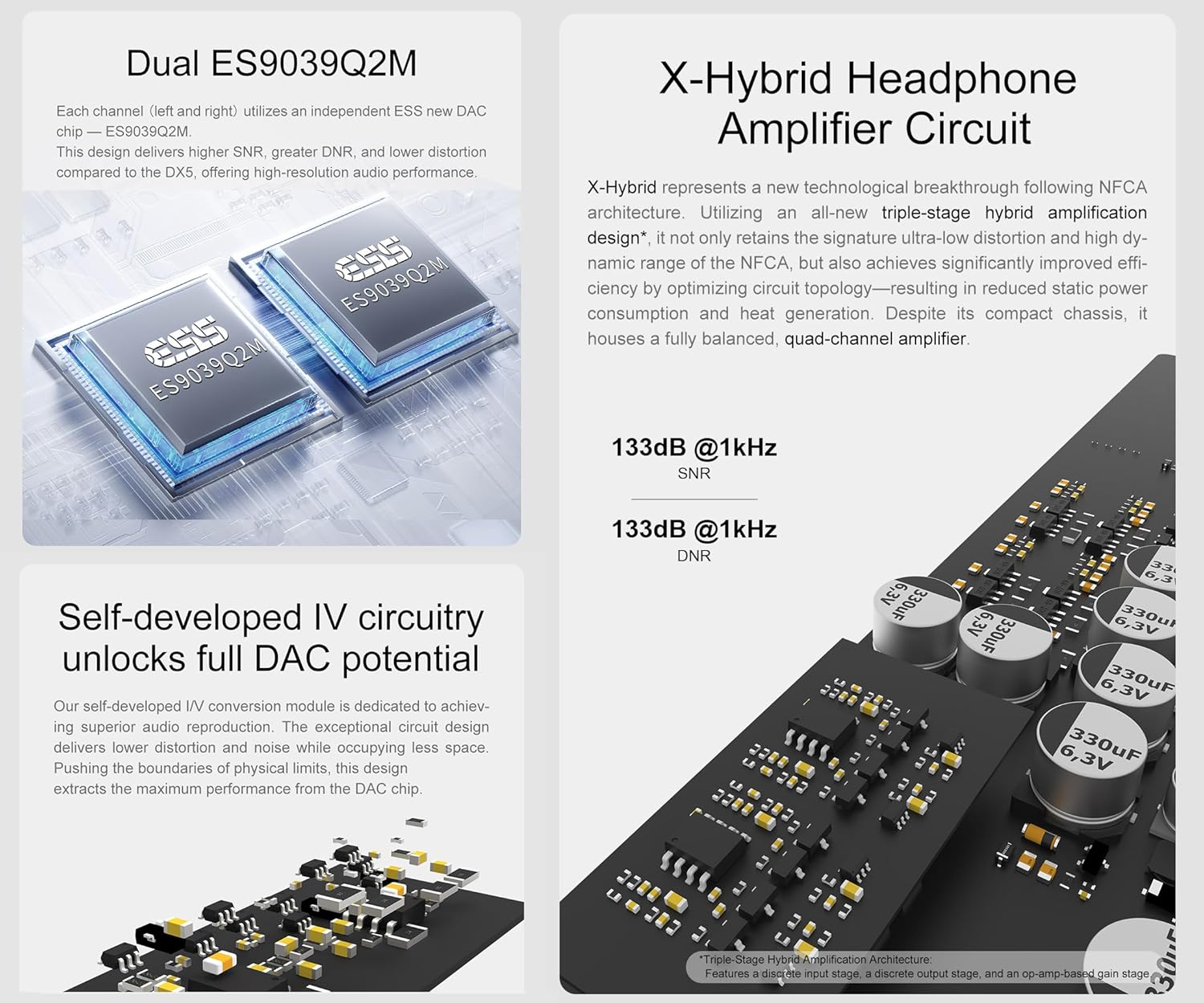
- Dual ES9039Q2M DAC Chips: Each channel utilizes an independent ESS ES9039Q2M DAC chip for lower crosstalk, improved imaging, 133dB SNR, 133dB dynamic range, and distortion as low as 0.00006%.
- X-Hybrid Headphone AmpSirkuit panguat: Features an original triple-stage hibrida amp circuit (discrete input, op-amp gain, discrete output) for high efficiency, improved thermals, and precise delivery. Power output peaks at 7600mW x2 into 16Ω.
- Wide Headphone Compatibility: Equipped with 6.35mm single-ended, 4.4mm balanced, and 4-pin XLR headphone jacks, suitable for low-sensitivity headphones to high-sensitive IEMs with a low noise floor of 1.8uVrms.
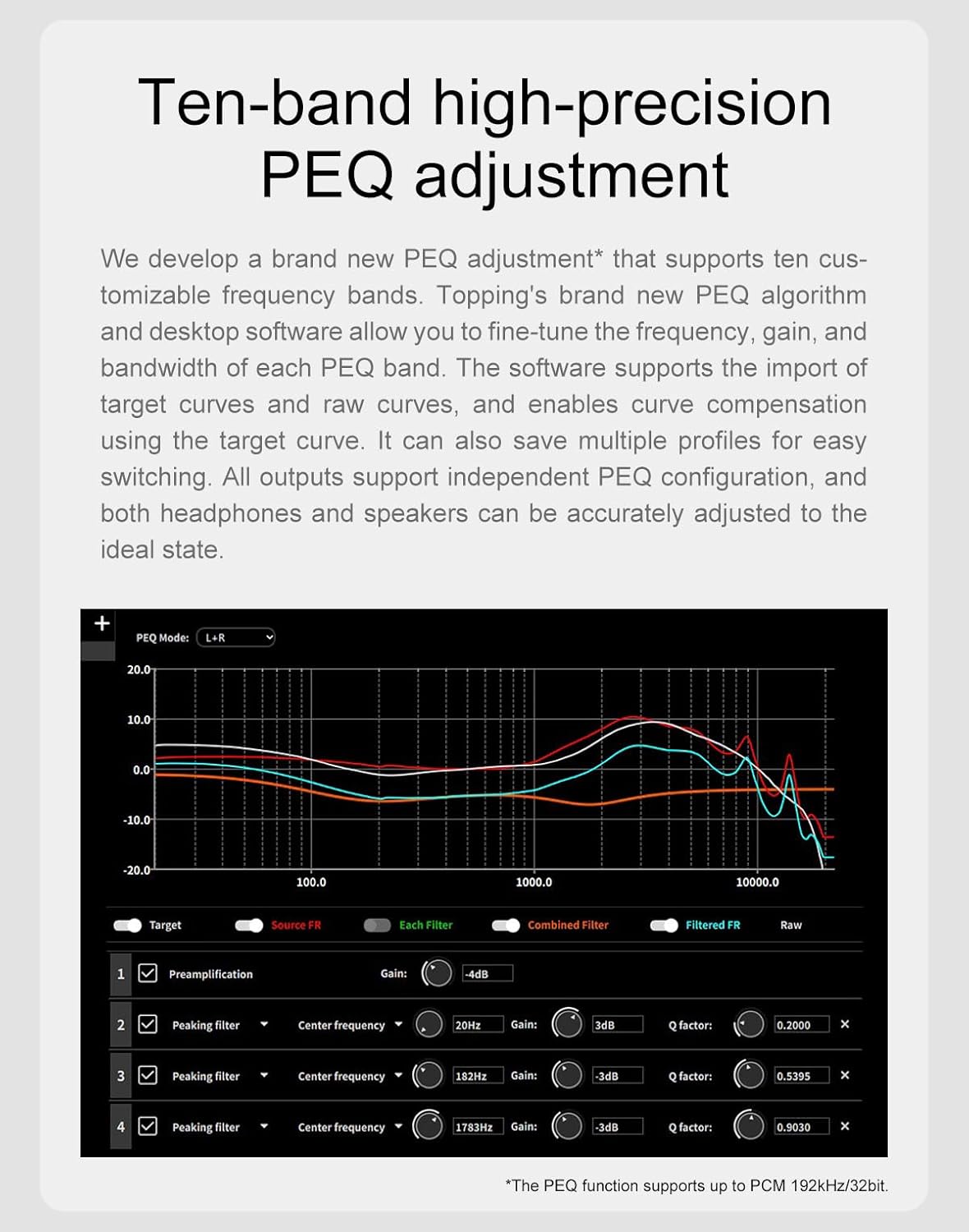
- 10-Band High-Precision PEQ: Desktop software allows tweaking 10 independent frequency bands (frequency, gain, Q-factor adjustment). Multiple profiles can be saved, and EQ can be applied independently to speakers and headphones.
- LDAC Wireless Connectivity: Equipped with QCC5125 chip, supporting Bluetooth 5.1 and up to 96kHz/24bit. Fully supports LDAC, aptX-Adaptive, aptX HD, AAC, and SBC audio encodings for high-quality wireless audio.



Video Produk Resmi: Leuwihview
3. Connections and Setup
Proper connection of your DX5II is crucial for optimal performance. Follow these steps to set up your device.
Hareup Panel Langkungview
- 4-pin XLR Headphone Output Jack: Pikeun sambungan headphone anu saimbang.
- 6.35mm Headphone Output Jack: For single-ended headphone connections.
- 4.4mm Balanced Headphone Output Jack: Pikeun sambungan headphone anu saimbang.
- layar: Displays current status, settings, and UI.
- Panarima Remote Control: For infrared remote commands.
- Tombol Menu: Accesses the setup menu.
- Tombol Input: Switches input channels.
- Tombol imah: Switches home page display modes.
- Volume Knob & User-defined Button: Rotates to adjust volume; press for user-defined functions.
Panel Rear Leuwihview
- Kaluaran XLR saimbang: For balanced line output to amplifeers atanapi speaker aktif.
- Single-ended RCA Output: For single-ended line output to amplifeers atanapi speaker aktif.
- Input USB: Connects to a computer or other USB audio source.
- Optical SPDIF Input: Connects to optical audio sources.
- Coaxial SPDIF Input: Connects to coaxial audio sources.
- Input Bluetooth: Pikeun streaming audio nirkabel.
- 12V Trigger IN/OUT (3.5mm jack): For synchronized power control with other devices.
- Power Input (AC 100-277V 50/60Hz): Nyambung ka catu daya AC.
- Saklar kakuatan: Ngahurungkeun / mareuman alat.

Connecting to Input Sources
The DX5II supports USB, Coaxial, Optical, and Bluetooth inputs. Connect your audio source to the corresponding input port on the rear panel.
Nyambungkeun headphone
Three types of headphone jacks are available on the front panel: 6.35mm single-ended, 4.4mm balanced, and 4-pin XLR balanced. Connect your headphones to the appropriate jack.
Nyambung ka AmpLiifiers atanapi Active Speakers
Use XLR or RCA cables to connect the DX5II to your amplifiers or active speakers. Ensure to turn off all devices before making connections to avoid damage.
12V pemicu Connection
The 12V Trigger IN/OUT allows the DX5II to be activated by other devices or to activate other devices via a 3.5mm AUX cable. This enables synchronized power on/off with compatible equipment.
Official Product Video: User Manual Walkthrough
4. Parentah Operasi
Familiarize yourself with the operational controls and settings of your DX5II.
Power On & Off / Standby Operation
- Daya Hurung: Press the power switch on the rear panel.
- Antosan: Short press the volume knob on the front panel or use the remote control to enter standby. Press again to exit.
Setélan polumeu
- Ngajempékeun/Nganonaktipkeun: Press the mute button on the remote control.
- Nyaluyukeun Volume: Rotate the volume knob on the front panel or use the volume buttons on the remote control.
Setélan Input
The DX5II supports multiple input channels. You can choose between auto-detect or manual selection in the setup menu. Use the Input button on the front panel or remote to switch between active inputs.
Setélan Kaluaran
The device allows preselection of commonly used output channels. Options include All (Headphone Outputs), All (Line Outputs), HPA SE (6.35mm), HPA BAL (4.4mm/4-pin XLR), LO SE (RCA), and LO BAL (XLR).
PCM Filter Setting
The DX5II offers various PCM filter options (F-1 to F-8) to fine-tune the sound characteristics.
PEQ Configuration
The 10-band high-precision PEQ can be configured via desktop software. You can save up to 5 custom configurations and apply them offline.
Aurora UI Display
The 2.0-inch full-color screen offers various display modes (Normal, VU, FFT) and customizable background colors. The pressable knob supports customizable functions.
5. Cara ngungkulan
If you encounter any issues with your DX5II, refer to the following common problems and solutions:
- Henteu aya sora: Check power supply, input selection, cable connections, and upstream devices.
- H/M/L blinks, others are off (Firmware exception): Unplug and re-plug the power cable, then flash the firmware again.
- HML and H/L blinks alternately (Input voltage is high/low): Paké adaptor kakuatan kaasup.
- HML and M blinks alternately (Positive and negative voltage anomalies): Check power supply, disconnect other devices, and reboot.
- Blinks only the current gain LED (Headphone amplifier circuit outputs abnormal DC voltage): Change the song or turn down the volume.
Pikeun pitulung salajengna, mangga ngahubungan rojongan customer.
Official Product Video: Troubleshooting Guide
6. Spésifikasi
General Attributes
| Atribut | Nilai |
|---|---|
| Measured Dimensions | 19.0cm x 15.5cm x 4.4cm (including protruding parts) |
| Beurat | 945g |
| Input kakuatan | 100-277VAC 50Hz / 60Hz |
| Input Sinyal | USB / BT / milih / COAX |
| Output Kaluaran | XLR/RCA |
| Headphone Kaluaran Jack | 6.35mm headphone output jack, 4.4mm headphone output jack, 4-PIN-XLR headphone output jack |
| Panyambung séjén | 12V Trigger In (3.5mm jack), 12V Trigger Out (3.5mm jack) |
| Rentang Bluetooth | > 10M |
| tampilan | LCD 2 inci |
| Kontrol | 3 buttons + multifunction knob + Remote control |
| Konsumsi Daya Sayaga | <1.3W |
| Konsumsi Daya | <6W |
DX5 II DAC Parameters (LineOut/USB In@96kHz)
| Parameter | RCA | XLR |
|---|---|---|
| THD+N @1kHz (A-wt) | <0.00008% | <0.00006% |
| THD @20-20kHz 90kBw | <0.0005% | <0.00015% |
| SNR @1kHz (A-wt) | 128dB | 132dB |
| Rentang Dinamis @1kHz (A-wt) | 128dB | 132dB |
| Réspon Frékuénsi | 20Hz-20kHz (±0.3dB), 20Hz-40kHz (±1.0dB) | 20Hz-20kHz (±0.3dB), 20Hz-40kHz (±1.0dB) |
| Tingkat Kaluaran | 2.5Vrms @0dBFS | 5.0Vrms @0dBFS |
| Sora @A-wt | <1.1uVrms | <1.3uVrms |
| Saluran Crosstalk | -135dB @1kHz | -147dB @1kHz |
| Kasaimbangan Saluran | 0.3 dB | 0.3 dB |
| Impedansi kaluaran | 50Ω | 100Ω |
Catetan: Data di luhur mangrupikeun hasil tés di laboratorium TOPPING dina kaayaan AC220V 50Hz.
Headphone DX5 II Amplifier Specifications (USB In@96kHz)
| Parameter | 6.35mm headphone jack | 4.4mm/4-pin XLR headphone jack |
|---|---|---|
| THD+N @1kHz (A-wt) | <0.00008% @Output=20mW (32Ω), <0.00007% @Output=22mW (300Ω) | <0.00007% @Output=85mW (32Ω), <0.00007% @Output=85mW (300Ω) |
| THD @20-20kHz (90kBw) | <0.0005% @Output=20mW (32Ω), <0.0005% @Output=22mW (300Ω) | <0.0005% @Output=85mW (32Ω), <0.0005% @Output=90mW (300Ω) |
| SNR @MAX OUT 1kHz (A-wt) | 131dB | 133dB |
| Rentang Dinamis @1kHz (A-wt) | 131dB | 133dB |
| Réspon Frékuénsi | 20Hz-20kHz (±0.3dB), 20Hz-40kHz (±1.0dB) | 20Hz-20kHz (±0.3dB), 20Hz-40kHz (±1.0dB) |
| Tingkat Kaluaran | 7.2Vpp @G=L, 24.2Vpp @G=H | 15.0Vpp @G=L, 48.6Vpp @G=H |
| Noise (A-wt) | <2.5uVrms @G=H, <1.1uVrms @G=L | <4.3uVrms @G=H, <1.8uVrms @G=L |
| Saluran Crosstalk | -127dB @1kHz | -143dB @1kHz |
| Keuntungan | G=L 8.6dB (Vrms/FS), G=H 18.7dB (Vrms/FS) | G=L 14.6dB (Vrms/FS), G=H 24.7dB (Vrms/FS) |
| Kasaimbangan Saluran | 0.3 dB | 0.3 dB |
| Impedansi kaluaran | <0.1Ω | <0.1Ω |
| Daya Kaluaran | 3300mW x 2 @16Ω THD+N<1%, 2200mW x 2 @32Ω THD+N<1%, 1160mW x 2 @64Ω THD+N<1%, 250mW x 2 @300Ω THD+N<1%, 120mW x 2 @600Ω THD+N<1% | 7600mW x 2 @16Ω THD+N<1%, 6400mW x 2 @32Ω THD+N<1%, 4300mW x 2 @64Ω THD+N<1%, 990mW x 2 @300Ω THD+N<1%, 490mW x 2 @600Ω THD+N<1% |
| Impedansi beban | > 8Ω | > 8Ω |
Catetan: Data di luhur mangrupikeun hasil tés di laboratorium TOPPING dina kaayaan AC220V 50Hz.
7. Pancegahan Kasalametan
- Ulah nyimpen unit dina panas, lingkungan beueus atawa pencét unit kuat.
- Muka kotakna langsung ngabatalkeun garansi!
- Pamakéan jero rohangan wungkul.
- Topping henteu nanggung tanggung jawab pikeun leungitna atanapi karusakan anu timbul langsung atanapi henteu langsung tina gagalna DX5 II.
- Pikeun tujuan perbaikan, spésifikasi tunduk kana parobahan tanpa aya bewara sateuacanna.
8. Garansi jeung Rojongan
Hificollege aims for 100% customer satisfaction. We offer authoritative certification, ensuring 100% authenticity of all products sold. Our support team is ready to answer any questions 24/7. We provide more than 1 year of quality restoration, covering repair and shipping costs. We also offer a lowest price match within 30 days.