
1. Bubuka
This manual provides detailed instructions for the installation, operation, and maintenance of your Cuifati Triple Lens 2MP Wireless Outdoor Security Camera. Please read this manual thoroughly before using the product to ensure proper functionality and safety. Keep this manual for future reference.
2. Fitur Produk
- Triple Lens Security Camera: Equipped with three 2MP HD lenses, supporting simultaneous recording from three screens for wide coverage in large areas like orchards and farmlands.
- Efficient Video Encoding: Utilizes H.265 video encoding technology, significantly reducing storage space usage. Supports cloud storage and local storage with up to 128GB memory cards (not included), ensuring data security and reliability.
- Sistem Alarm Pinter: Integrated motion detection and human detection functions provide real-time alarm image pushes. Supports two-way voice communication and voice alarms for easy remote communication and emergency handling.
- Pamakéan Indoor sareng Luar: Features external antennas for stronger, more stable signal. Includes a bracket and power supply for easy installation. Excellent water and dustproof performance makes it suitable for both indoor and outdoor environments.
- Sababaraha Pilihan Konektipitas: The WiFi security camera supports 2.4G WiFi, AP Hotspot, and Ethernet connections to suit various network environments. Allows remote viewdina footage via a mobile application, providing control over the situation anytime, anywhere.

Gambar 2.1: Leuwihview of camera features including triple lens, real-time viewing, easy setup, motion detection, two-way audio, and 2.4G WiFi connectivity.

Figure 2.2: The camera's water and dustproof design ensures reliable outdoor performance.
3. Eusi Paket
Sateuacan dipasang, mangga pariksa heula sadaya barang anu didaptarkeun di handap ieu aya dina pakét anjeun:
- Cuifati Triple Lens Security Camera
- Ningkatna Kurung
- Adaptor Daya (Colokkeun EU)
- Pemasangan Screws sareng Colokan Tembok
- Panyambung waterproof
- Manual pangguna (dokumén ieu)
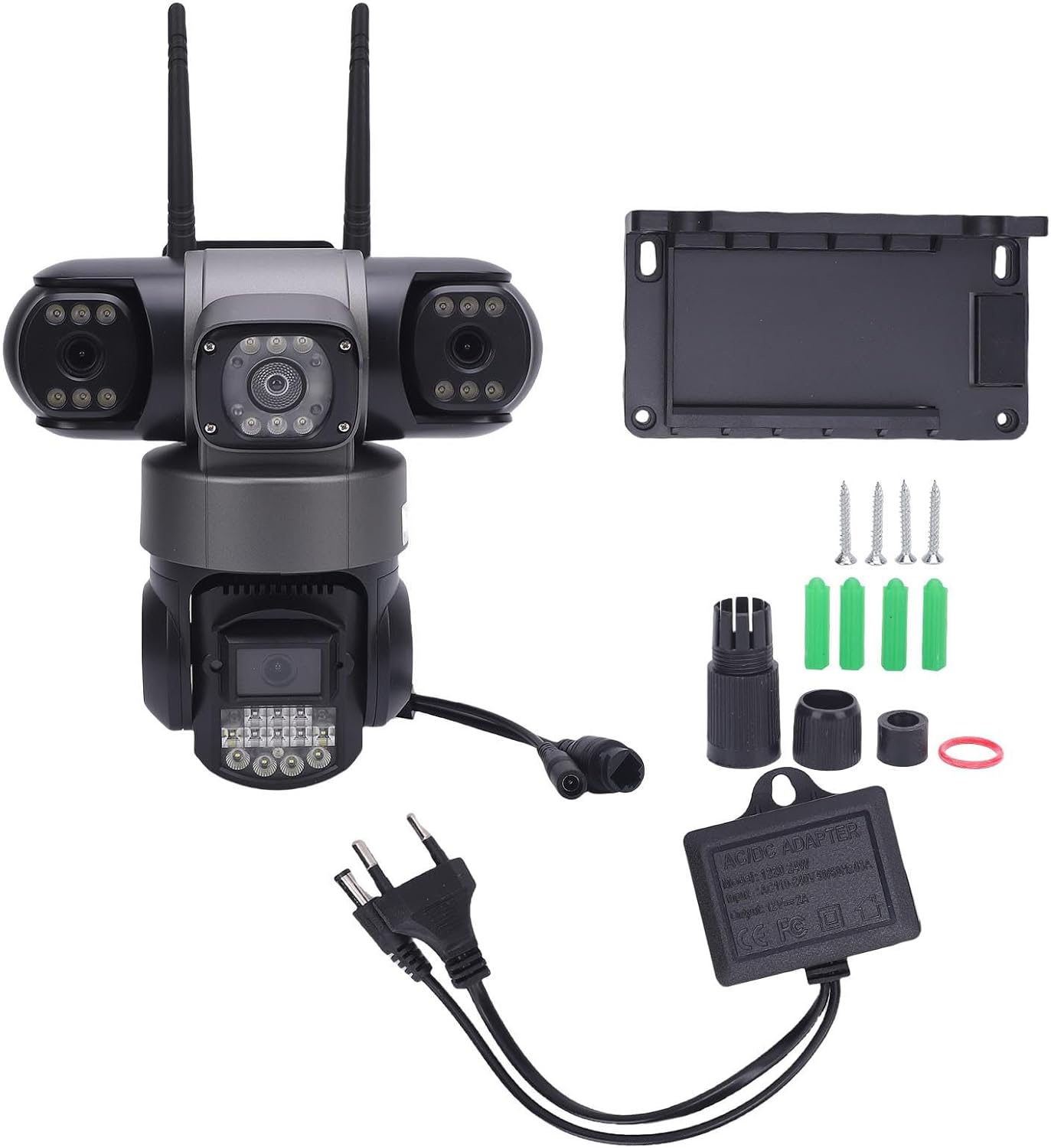
Figure 3.1: Included components in the product package.
4. Setup jeung Instalasi
4.1 Instalasi fisik
- Pilih Lokasi: Select a suitable outdoor or indoor location that provides the desired viewing angle and is within range of your 2.4G WiFi network or Ethernet connection. Ensure the location allows for power access.
- Pasang Bracket: Anggo sekrup sareng colokan témbok anu disayogikeun pikeun masangkeun braket pemasangan kana permukaan anu dipilih kalayan pageuh.
- Pasang kaméra: Securely attach the camera to the mounting bracket. Adjust the camera's angle for optimal coverage.
- Sambungkeun Kakuatan: Connect the power adapter to the camera and plug it into a power outlet. Ensure the connection is secure and waterproof if installed outdoors.
4.2 Sambungan Jaringan
The camera supports 2.4G WiFi, AP Hotspot, and Ethernet connections.
- Unduh Aplikasi: Download the designated mobile application (refer to packaging or quick start guide for app name) from your device's app store.
- Ngadaptar/Log: Create an account or log in to the application.
- Tambahkeun Alat: Turutan parentah dina aplikasi pikeun nambahkeun kaméra anyar anjeun. Ieu biasana ngalibatkeun nyeken kode QR dina kaméra atanapi ngalebetkeun ID na sacara manual.
- Konpigurasikeun jaringan: Select your preferred connection method (WiFi, AP Hotspot, or Ethernet) and follow the prompts to connect the camera to your network. For WiFi, enter your 2.4G WiFi network name and password.
- Setup Awal: Complete any initial setup steps within the app, such as setting a device password or adjusting basic settings.
5. Parentah Operasi
5.1 Real-time Viewing
Open the mobile application and select your camera from the device list to view hirup footage. The triple lens design allows for simultaneous viewing of three distinct areas.

Figure 5.1: The camera's three lenses provide simultaneous monitoring of multiple areas.
5.2 Motion and Human Detection
The camera is equipped with advanced motion and human detection capabilities. When motion or a human figure is detected, the camera can trigger an alarm and send real-time notifications to your mobile device.
- Aktipkeun/Pareuman: Access the camera settings in the app to enable or disable motion and human detection.
- Sensitipitas: Adjust the detection sensitivity to minimize false alarms.
- Setélan Bewara: Configure how you receive alerts (e.g., push notifications, email).

Figure 5.2: The camera's motion and humanoid detection system.

Figure 5.3: Real-time motion detection alerts sent to your mobile device.
5.3 Audio Dua Arah
Utilize the two-way audio feature to communicate with individuals near the camera. This is useful for deterring intruders or communicating with visitors.
- Aktipkeun Mikropon: Dina hirup view interface of the app, tap the microphone icon to speak through the camera's speaker.
- Dengekeun: The camera's built-in microphone allows you to hear audio from the camera's vicinity.
5.4 Puterkeun Pidéo
Dirékam footage bisa diaksés jeung ulangviewed through the mobile application. The camera supports both cloud storage and local storage (via a microSD card, not included).
- Aksés Rékam: Navigate to the 'Playback' or 'Recordings' section within the app.
- Pilih Tanggal/Waktu: Choose the desired date and time to review recorded events.
- Unduh/Bagikeun: Options to download clips or share them may be available within the app.

Gambar 5.4: Review dirékam footage dina alat sélulér Anjeun.
6. Pangropéa
Pangropéa rutin mastikeun kinerja optimal sareng umur panjang kaméra kaamanan anjeun.
- Ngabersihan lensa: Periodically clean the camera lenses with a soft, dry cloth to remove dust, dirt, or water spots that may obstruct the view. Ngahindarkeun cleaners abrasive.
- Inspeksi Perumahan: Check the camera housing and mounting bracket for any signs of damage or loosening. Ensure all connections are secure.
- Apdet parangkat lunak: Check the mobile application regularly for firmware updates for your camera. Keeping the firmware updated can improve performance and security.
- Sasayogian tanaga: Pastikeun adaptor kakuatan sareng kabel bébas tina karusakan.
7. Cara ngungkulan
Upami anjeun mendakan masalah sareng kaméra anjeun, tingal masalah sareng solusi umum ieu:
| Masalah | Mungkin Cukang lantaranana | Solusi |
|---|---|---|
| Camera offline/No video feed | No power; Weak WiFi signal; Network disconnection | Check power connection; Move camera closer to router or use Ethernet; Restart camera and router. |
| Deteksi gerak teu jalan | Detection disabled; Incorrect sensitivity; Obstruction in view | Enable detection in app settings; Adjust sensitivity; Clear any obstructions. |
| Kualitas pidéo goréng | Dirty lens; Low bandwidth; Poor lighting | Clean lenses; Ensure stable internet connection; Check lighting conditions. |
| Teu tiasa nyambung kana WiFi | Incorrect WiFi password; 5G WiFi network; Out of range | Verify 2.4G WiFi password; Ensure router is 2.4G compatible; Move camera closer to router. |
8. Spésifikasi
| merek | Cuifati |
| Nomer modél | Cuifati432dc1swh5-11 |
| Dimensi produk | 22 x 22 x 15.98 cm |
| Beurat | 893 gram |
| Konfigurasi lénsa | Triple 2MP HD Lenses |
| Video Encoding | H.265 |
| Konektipitas | 2.4G WiFi, AP Hotspot, Ethernet |
| Pilihan Panyimpenan | Cloud Storage, Local Storage (up to 128GB microSD card, not included) |
| Fitur husus | Motion Detection, Human Detection, Two-Way Audio, Voice Alarm |
| Peunteun Lingkungan | Cai jeung dustproof |
| Sasayogian tanaga | Included Power Adapter (EU Plug) |

Figure 8.1: Camera dimensions and rotation capabilities.
9. Garansi jeung Rojongan
Specific warranty information for this product is not available in the provided data. Please refer to the product packaging or contact the retailer/manufacturer directly for warranty details and customer support. For technical assistance, consult the mobile application's help section or the manufacturer's official websitus.