1. Bubuka
The AVATTO Smart WiFi Programmable Thermostat is designed to regulate room temperature by controlling water underfloor heating systems with NC (Normally Closed) or NO (Normally Open) actuators. This thermostat features smart WiFi connectivity, allowing remote control via a mobile application and voice commands through smart assistants like Alexa and Google Home. It supports programmable schedules, temperature calibration, adjustable screen brightness, child safety lock, and an antifreeze function to ensure optimal comfort and energy efficiency.

Image 1: AVATTO Smart WiFi Thermostat and its mobile application interface.
2. Naon dina Box
- AVATTO Smart WiFi Thermostat
- Instruksi Manual
- 2 Screws for installation
3. Spésifikasi produk
| Fitur | Spésifikasi |
|---|---|
| Produsén | AVATTO |
| Nomer modél | WT20R-3A-W |
| Item Beurat | 190 g |
| Dimensi produk | 80 x 80 mm (External), 55 x 55 mm (Internal) |
| Warna | Bodas |
| Bahan | palastik |
| Sumber Daya | Kabel Listrik |
| Voltage | 5 volt |
| Wattage | 1200 Watt |
| Gaya tampilan | LED |
| Fitur husus | Amazon Alexa, Smart Life App, Google Assistant, Programmable, 55x55 mm Thermostat |
| Mangpaat husus | Control of NC or NO actuators |
4. Pamasangan
4.1 Diagram Wiring
Ensure power is disconnected before installation. The thermostat is designed for water underfloor heating systems and can be connected to either Normally Open (NO) or Normally Closed (NC) actuators. Refer to the diagram below for correct wiring.
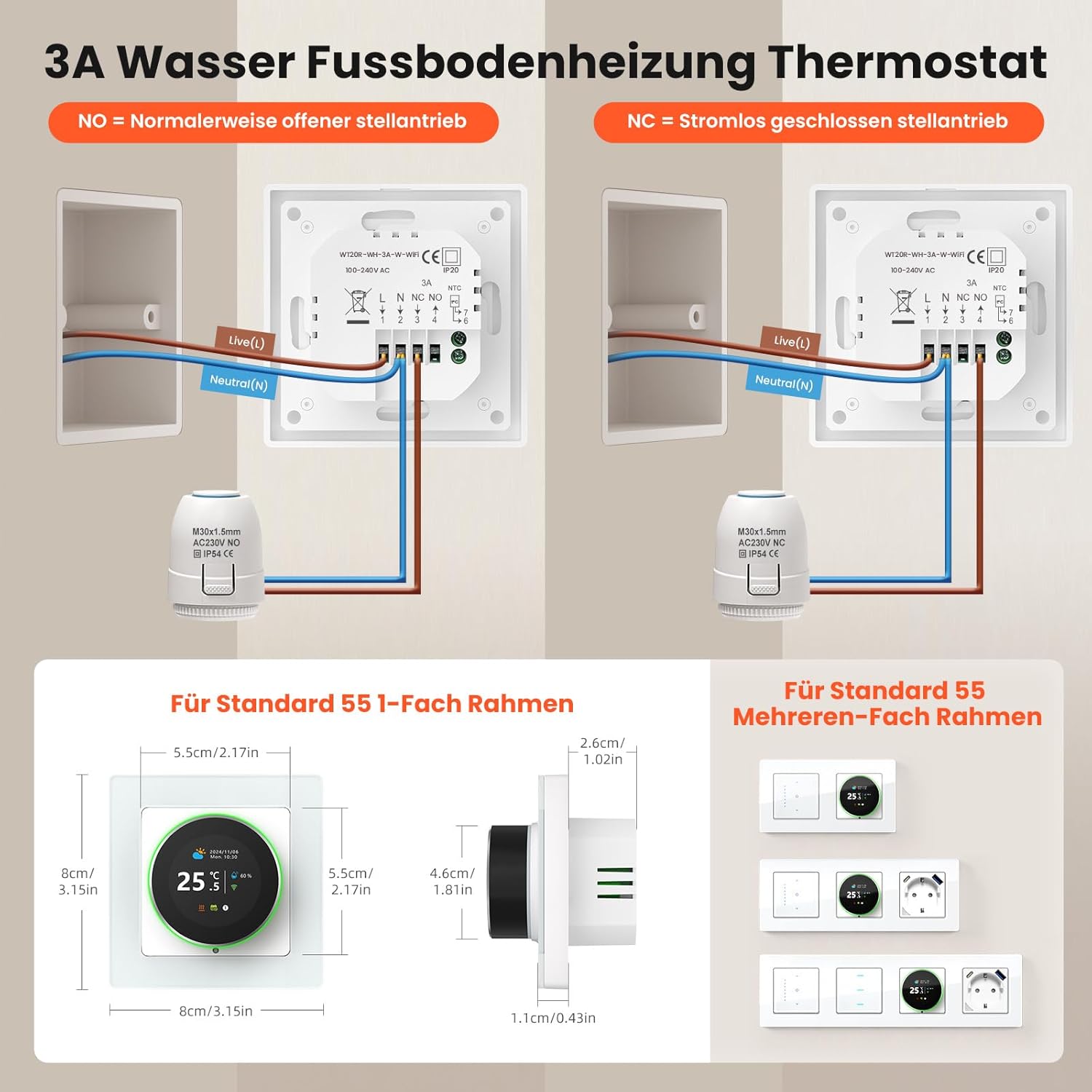
Image 2: Detailed wiring instructions for NO and NC actuators, including external dimensions of the thermostat (80x80mm external, 55x55mm internal).
4.2 Instalasi fisik
The thermostat is designed to fit standard 55x55mm systems and can be installed in multiple cover frames or as a single unit. Mount the thermostat securely to the wall using the provided screws, ensuring all electrical connections are made according to local regulations and the wiring diagram.
5. Connecting to the Smart Life App
To enable smart features, connect your thermostat to the Smart Life mobile application. Follow these steps:
- Pastikeun smartphone Anjeun disambungkeun ka jaringan WiFi 2.4 GHz.
- Aktipkeun Bluetooth dina smartphone Anjeun.
- On the thermostat, press and hold the designated buttons (refer to the manual for specific button combination, usually power and menu) until the WiFi and Cloud icons flash simultaneously.
- Open the Smart Life app, tap 'Add Device', and the device should be automatically discovered.
- Confirm the device and enter your WiFi network password.
- Once connected, the WiFi icon on the thermostat will stop flashing and remain solid.

Image 3: Smart Life app interface for remote control and integration with smart home platforms.
Video 1: Demonstrates the process of connecting the thermostat to the mobile application.
6. Parentah Operasi
6.1 Kontrol Suhu Manual
You can adjust the temperature directly on the thermostat using the physical buttons or through the Smart Life app. The thermostat features a clear display for easy reading of current and set temperatures.
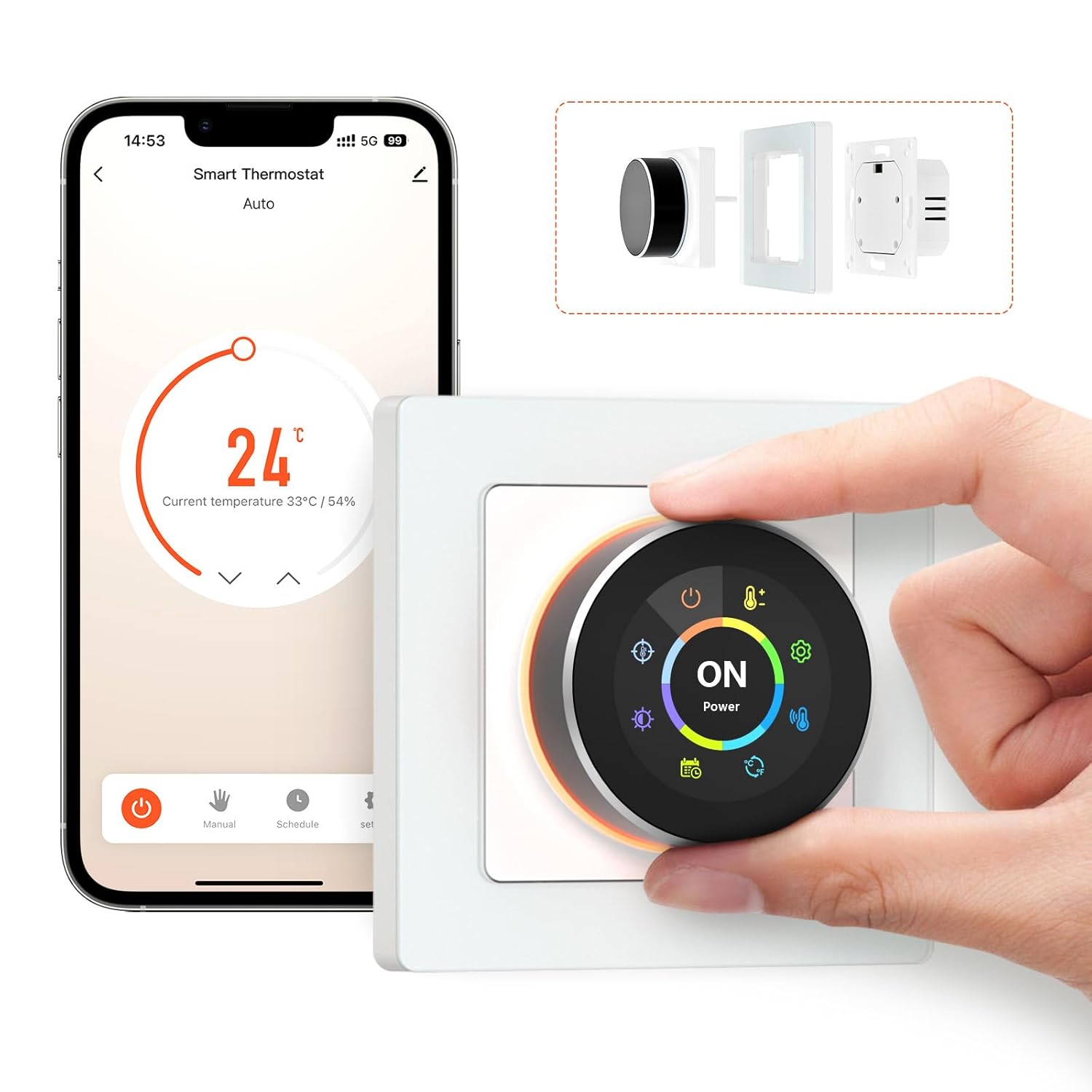
Image 4: Manual temperature adjustment on the thermostat.
6.2 App Remote Control
Control your thermostat from anywhere using the Smart Life app. You can turn it on/off, adjust the temperature, and manage settings remotely.
Video 2: Demonstrates app control features on a similar Beok WiFi Thermostat model, including temperature adjustment and mode selection.
6.3 Programmable Schedules
Set up daily or weekly heating schedules to optimize comfort and energy savings. You can configure up to 6 different temperature intervals for weekdays and 2 for weekends.

Gambar 5: Example of a programmable schedule for the thermostat.
6.4 Kontrol sora
Integrate your AVATTO thermostat with Amazon Alexa or Google Home for convenient voice control. Simply use commands to turn the thermostat on/off or adjust the temperature.
Video 3: Demonstrates voice control with Alexa and Google Home on a similar smart thermostat model.
6.5 adjustment kacaangan layar
Adjust the screen brightness of your thermostat to your preference, or turn it off completely to avoid disturbing sleep. This can be done via the app settings.

Image 6: Adjustable screen brightness settings.
6.6 Konci budak
Activate the child safety lock function to prevent unintended operation by children, ensuring your settings remain secure.
6.7 Calibration Suhu
If there is a discrepancy between the actual room temperature and the temperature displayed on the thermostat, you can calibrate it using the app settings to ensure accurate readings.
6.8 Antifreeze Function
When activated, the antifreeze function automatically maintains the room temperature between 5°C and 7°C to prevent heating devices from freezing.

Image 7: Temperature control features including accuracy and protection ranges.
7. Pangropéa
To ensure optimal performance and longevity of your AVATTO Smart WiFi Thermostat, follow these maintenance guidelines:
- beberesih: Regularly wipe the thermostat's screen and casing with a soft, dry cloth. Avoid using abrasive cleaners or solvents, as these can damage the surface.
- Ngaleungitkeun lebu: Ensure the ventilation slots on the device are free from dust and debris to prevent overheating and maintain accurate temperature readings.
- Apdet parangkat lunak: Keep the Smart Life app updated to the latest version to benefit from new features, improvements, and security patches.
- Sasayogian tanaga: Ensure a stable power supply to the thermostat. Inconsistent power can affect performance and connectivity.
8. Cara ngungkulan
If you encounter issues with your AVATTO Smart WiFi Thermostat, try the following solutions:
- Taya Daya/Tampilan: Check the power supply and wiring connections. Ensure the circuit breaker is not tripped.
- WiFi Disconnection: Verify your home WiFi network is active and operating on a 2.4 GHz frequency. Restart your router and the thermostat. Re-pair the device with the Smart Life app if necessary.
- Bacaan Suhu Lepat: Use the temperature calibration feature in the app to adjust the displayed temperature to match the actual room temperature. Ensure the thermostat is not exposed to direct sunlight or drafts.
- App Control Not Responding: Check your smartphone's internet connection and ensure the Smart Life app is updated. Restart the app.
- Masalah Pemrograman: Double-check your programmed schedules in the app to ensure they are set correctly for each day and time period.
- Kontrol Sora Teu Gawé: Ensure your smart assistant (Alexa/Google Home) is properly linked to your Smart Life account and the thermostat is recognized. Check the internet connection of your smart assistant device.
Lamun masalah persist, kontak rojongan customer pikeun pitulung salajengna.
9. Garansi jeung Rojongan
This AVATTO device is covered by a two-year warranty. During the warranty period, a free replacement will be provided once if any issues arise. For any problems during installation or use, please contact us through Amazon. We offer dedicated technical support to assist you.


