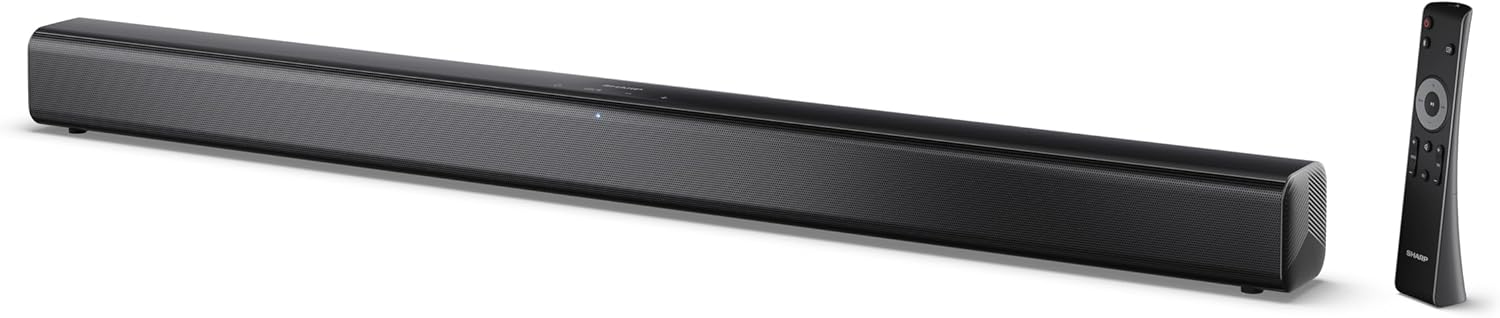
Image 0.1: The SHARP HT-SB145 2.0 Channel Soundbar shown alongside its remote control.
1. Bubuka
This manual provides essential instructions for the safe and efficient operation of your SHARP HT-SB145 2.0 Channel Soundbar. Please read this manual thoroughly before use and retain it for future reference.
2. Émbaran Kasalametan
Perhatikeun pancegahan kaamanan di handap ieu pikeun nyegah kejutan listrik, seuneu, atanapi karusakan unit:
- Ulah ngalaan alat ieu kana netes atanapi cipratan.
- Ulah nempatkeun objék dieusian ku cairan, kayaning vases, dina alat.
- Pastikeun ventilasi nyukupan. Ulah meungpeuk bukaan ventilasi.
- Entong dipasang di deukeut sumber panas sapertos radiator, register panas, kompor, atanapi aparat sanésna (kalebet ampLiifiers) anu ngahasilkeun panas.
- Nangtayungan kabel kakuatan tina keur leumpang dina atawa pinched.
- Ngan anggo kantétan/aksésori anu ditunjuk ku produsén.
- Cabut colokan alat ieu nalika badai kilat atanapi nalika henteu dianggo kanggo waktos anu lami.
- Rujuk sadayana jasa ka tanaga jasa anu mumpuni.
3. Eusi Paket
Pastikeun yén sadaya item anu didaptarkeun di handap kalebet kana pakét anjeun:
- Sharp HT-SB145 Soundbar
- Kadali jauh
- Kabel Daya
- Kurung Gunung Tembok (2)
- Screws and Wall Plugs (for mounting)
- Batré AAA (2)
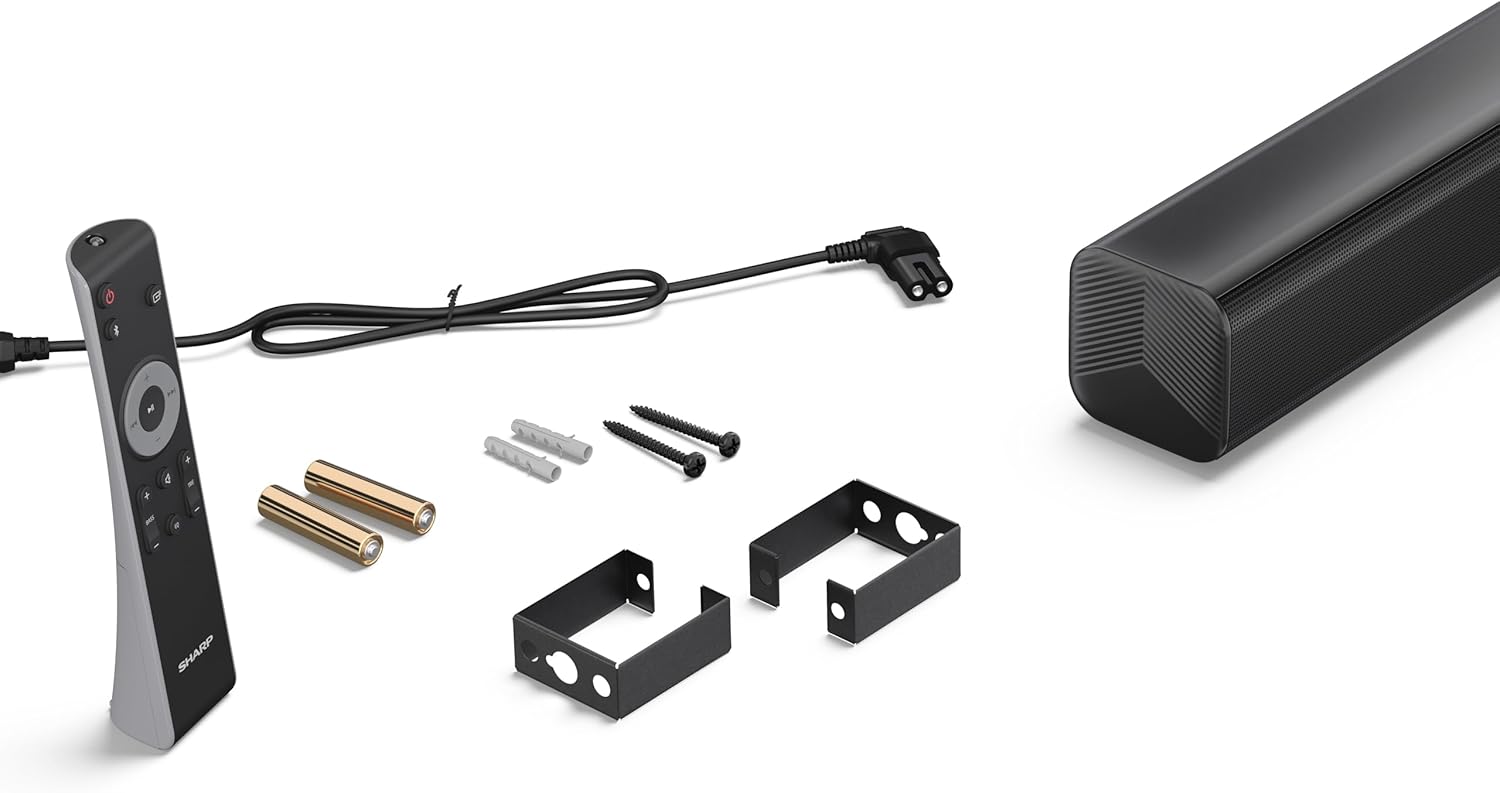
Image 3.1: Contents of the SHARP HT-SB145 Soundbar package, including the soundbar, remote control, power cable, wall mount brackets, screws, and two AAA batteries.
4. Produk Langkungview
4.1 Hareup jeung Luhur View

Gambar 4.1: Hareupeun view of the SHARP HT-SB145 Soundbar, showcasing the speaker grille and the central LED indicator.
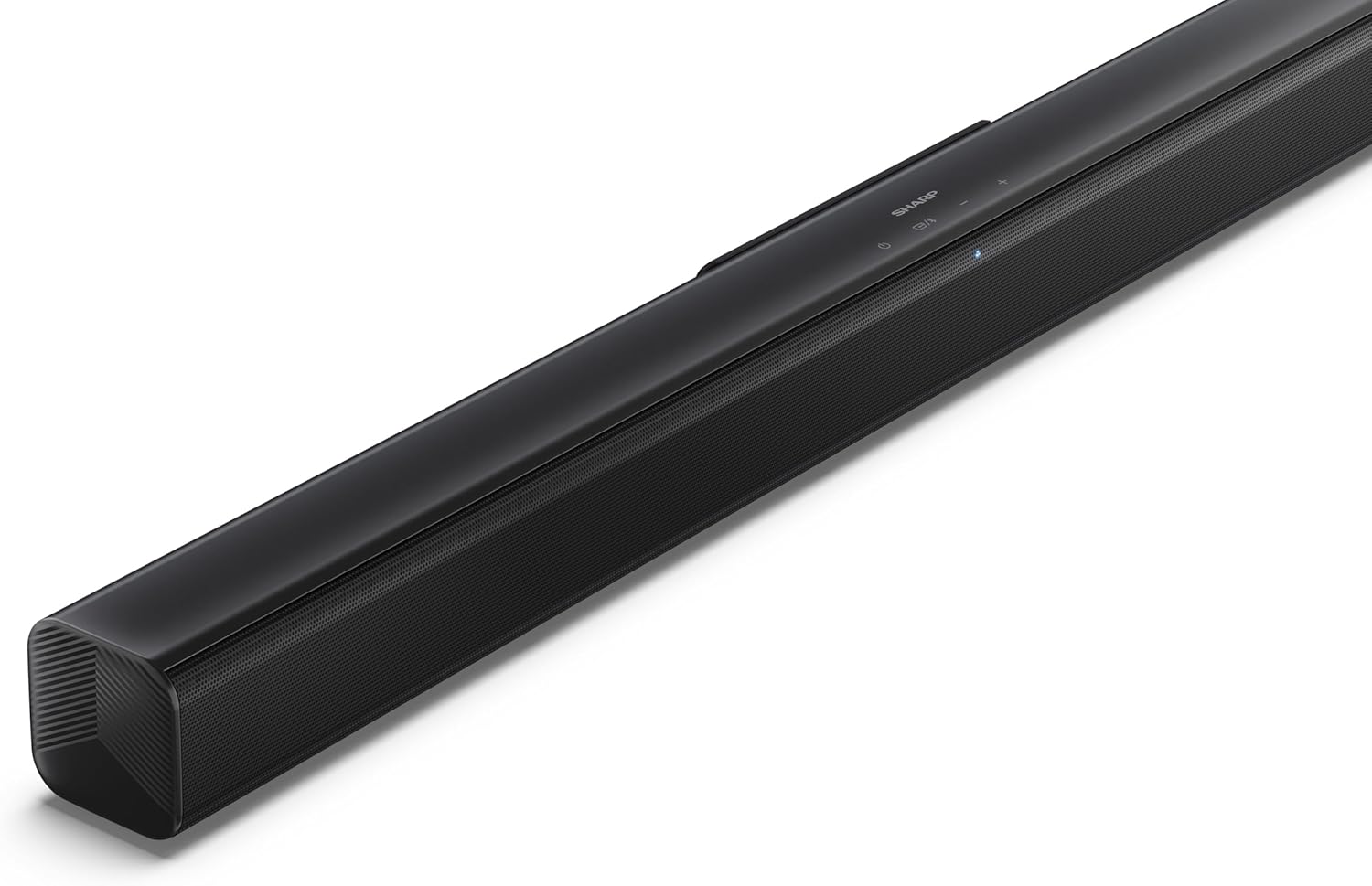
Gambar 4.2: Sudut luhur view of the soundbar, highlighting the integrated control buttons for power, source selection, and volume adjustment, along with the SHARP logo.

Image 4.3: Close-up of the top-mounted control panel, showing the power button, source/Bluetooth button, and volume up/down buttons.
4.2 Sambungan Panel Rear

Gambar 4.4: Tukangeun view of the soundbar, displaying the various input ports and power connection.

Gambar 4.5: Detil view of the rear panel connections, including OPTICAL input, USB port (5V 500mA), AUX input, and HDMI ARC (TV) port.
5. Setélan
5.1 Pilihan panempatan
The SHARP HT-SB145 Soundbar offers flexible placement options:
- Penempatan Tabletop: Place the soundbar on a stable, flat surface in front of your TV. Ensure it does not obstruct the TV's remote sensor.
- Pamasangan témbok: Use the provided wall mount brackets to attach the soundbar to a wall below your TV. Refer to section 5.4 for detailed wall mounting instructions.

Image 5.1: The soundbar positioned on a media console beneath a television, demonstrating a typical tabletop setup.
5.2 Nyambung kana Kakuatan
- Connect the power cable to the AC IN port on the rear of the soundbar.
- Colokkeun tungtung kabel daya anu sanés ka stop kontak témbok.
5.3 Panyambung Audio
Pilih salah sahiji metodeu ieu pikeun nyambungkeun bar sora ka TV anjeun atanapi sumber audio anu sanés:
- HDMI ARC/CEC (Recommended):
Connect an HDMI cable (not included) from the HDMI ARC port on the soundbar to the HDMI ARC port on your TV. This connection allows for audio return and control via your TV remote.
- Optik:
Connect an optical cable (not included) from the OPTICAL port on the soundbar to the optical digital output on your TV or audio source.
- AUX:
Connect a 3.5mm audio cable (not included) from the AUX port on the soundbar to the headphone jack or audio output on your TV or audio source.
5.4 Pamasangan témbok
Turutan léngkah-léngkah ieu pikeun masang témbok anu aman:
- Tangtukeun lokasi pamasangan anu dipikahoyong dina témbok, pastikeun rata sareng dina jangkauan kabel listrik sareng audio.
- Mark the positions for the two wall mount brackets using a pencil. The distance between the brackets should match the mounting points on the soundbar.
- Drill pilot holes at the marked positions. Insert the wall plugs if mounting into drywall or plaster.
- Secure the wall mount brackets to the wall using the provided screws.
- Carefully attach the soundbar to the mounted brackets. Ensure it is securely seated.
6. Parentah Operasi
6.1 Daya Hurung/Pareuman
- Pencét éta Kakuatan tombol dina soundbar atawa kadali jauh pikeun ngahurungkeun atawa mareuman unit.
6.2 Pamilihan Sumber
Pencét éta Sumber button on the soundbar or remote control repeatedly to cycle through the available input sources:
- HDMI ARC: Pikeun audio tina TV anu disambungkeun via HDMI ARC.
- OPTIKAL: Pikeun audio tina alat anu disambungkeun via kabel optik.
- AUX: For audio from a device connected via 3.5mm audio cable.
- BLUETOOTH: Pikeun streaming audio nirkabel.
- USB: For audio playback from a USB drive.
6.3 Volume Control
- Pencét éta Jilid + tombol pikeun ngaronjatkeun polumeu.
- Pencét éta Volume - tombol pikeun ngurangan polumeu.
6.4 Nyapasangkeun Bluetooth
- Turn on the soundbar and select the Bluetooth source. The LED indicator will flash, indicating pairing mode.
- Aktipkeun Bluetooth dina smartphone Anjeun, tablet, atawa alat sejenna.
- Milarian pikeun "SHARP HT-SB145" in your device's Bluetooth list and select it to pair.
- Once paired, the LED indicator on the soundbar will glow steadily. You can now stream audio wirelessly.
6.5 Playback USB
The soundbar supports MP3/WAV audio playback from a USB drive.
- Insert a USB drive containing MP3/WAV audio files into the USB port on the rear of the soundbar.
- Select the USB source using the Source button.
- Playback will begin automatically. Use the remote control to navigate tracks (if supported).
The USB port also provides 5V 500mA for charging compatible devices.
7. Pangropéa
- beberesih: Anggo lawon anu lembut sareng garing pikeun ngabersihan permukaan soundbar. Ulah make cleaners cair atawa bahan abrasive.
- Panyimpenan: Upami nyimpen unit kanggo waktos anu lami, cabut colokan tina stop kontak listrik teras simpen di tempat anu tiis sareng garing.
8. Cara ngungkulan
| Masalah | Mungkin Cukang lantaranana | Solusi |
|---|---|---|
| Taya kakuatan | Kabel listrik teu nyambung atanapi stop kontak teu aktip. | Pastikeun kabel kakuatan disambungkeun aman tur stop kontak geus fungsi. |
| Taya sora | Incorrect input source selected, volume too low, or cable connection issue. | Pilih sumber input anu leres. Naékkeun volume. Pariksa sambungan kabel audio. |
| Nyapasangkeun Bluetooth gagal | Soundbar teu dina modeu pairing, atanapi alatna jauh teuing. | Ensure soundbar is in Bluetooth pairing mode (flashing LED). Move device closer. Try re-pairing. |
| Kadali jauh teu jalan | Batré béak atawa sinyal kahambat. | Ganti batré. Pastikeun teu aya halangan antara jarak jauh sareng soundbar. |
9. Spésifikasi
| Fitur | Rincian |
|---|---|
| Ngaran modél | HT-SB145 |
| Tipe Speaker | Soundbar |
| Saluran | 2.0 Saluran |
| Daya Kaluaran Max | 150 Watt |
| Vérsi Bluetooth | 5.3 |
| Konektipitas | HDMI ARC/CEC, Optical, AUX, Bluetooth, USB |
| USB Playback | MP3 / WAV |
| USB Ngecas Kaluaran | 5V 500mA |
| Ukuran produk (L x W x H) | 80 cm x 6.2 cm x 6.3 cm (31.5 inci x 2.4 inci x 2.5 inci) |
| Item Beurat | 1.4 Kilogram (3.1 lbs) |
| Komponén Kaasup | Remote Control, Power Cable, Wall Mount Brackets, AAA Batteries |

Image 9.1: Diagram illustrating the dimensions of the SHARP HT-SB145 Soundbar: 800mm length, 63mm height, and 63mm depth.
10. Garansi jeung Rojongan
Kanggo inpormasi garansi sareng dukungan téknis, mangga tingal kartu garansi anu kalebet dina produk anjeun atanapi kunjungan ka Sharp resmi websitus. Simpen bukti pameseran anjeun pikeun klaim garansi.
For further assistance, contact Sharp customer service.


