1. Bubuka
Hatur nuhun pikeun meuliasing the SIMREX RC Helicopter Model Z16. This manual provides essential information for safe operation, setup, and maintenance of your new remote control helicopter. Please read it thoroughly before use and retain it for future reference.
Émbaran Kasalametan
WARNING: Choking Hazard - Small Parts. Not for children under 3 years.
For optimal safety, this helicopter should only be played indoors, or in an open and windless outdoor environment with an appropriate remote control distance. It features anti-jamming and low-voltage panyalindungan pikeun kaamanan anu langkung saé.
2. Eusi Paket
Pastikeun sadaya item anu didaptarkeun di handap aya dina pakét anjeun:
- Remote Control Helicopter (with built-in battery) x 1
- 2.4GHz Remote Control x 1
- Rechargeable Modular Batteries x 2
- Kabel Ngecas USB x 1
- Spare Trail Blade x 2
- Manual Produk x 1

Image: The SIMREX RC Helicopter, its remote control, two modular batteries, a USB charging cable, and spare blades are displayed on a flat surface.
3. Produk Langkungview
The SIMREX RC Helicopter Model Z16 is designed for ease of use and stable flight, making it suitable for beginners. Key features include:
- Hiji konci lepas landas/pendaratan: Simplifies initial flight and landing procedures.
- Ketinggian Tahan: Maintains a stable hovering height automatically.
- 2 laju: Offers both slow and fast flight modes for varying skill levels.
- Gyroscope Technology: Provides enhanced stability and control.
- 2.4GHz Remote Control System: Ensures stable signal and prevents interference.

Image: A SIMREX RC Helicopter in flight, with a child and an adult observing, highlighting its remote control capabilities.
4. Setélan
4.1 Ngecas Batré Helikopter
- Ensure the helicopter is powered OFF.
- Connect the USB charging cable to the helicopter's charging port.
- Colokkeun tungtung kabel USB anu sanésna kana adaptor daya USB (henteu kalebet) atanapi kana port USB komputer.
- The indicator light on the USB cable will illuminate during charging and turn off when fully charged.
- A full charge typically takes approximately 60-90 minutes and provides up to 15 minutes of flight time per battery. Two batteries are included for extended play.

Image: A SIMREX RC Helicopter connected to a laptop via a USB cable for charging, illustrating the charging process.
4.2 Masang Batré Kadali Jarak Jauh
- Buka kompartemen batré dina tonggong kadali jauh.
- Insert 2 AA batteries (included) into the compartment, ensuring correct polarity.
- Tutup kompartemen batré anu aman.
5. Parentah Operasi
5.1 Pairing the Helicopter with the Remote Control
- Ensure both the helicopter and the remote control are fully charged.
- Teundeun helikopter dina datar, permukaan datar.
- Hurungkeun switch kakuatan helikopter urang. Lampu helikopter bakal hurung.
- Hurungkeun saklar daya remot kontrol. Lampu indikator remot bakal kedip-kedip.
- Push the left joystick (throttle) all the way up, then all the way down. The remote control will beep, and the helicopter's lights will become solid, indicating successful pairing.
5.2 Kontrol hiber dasar
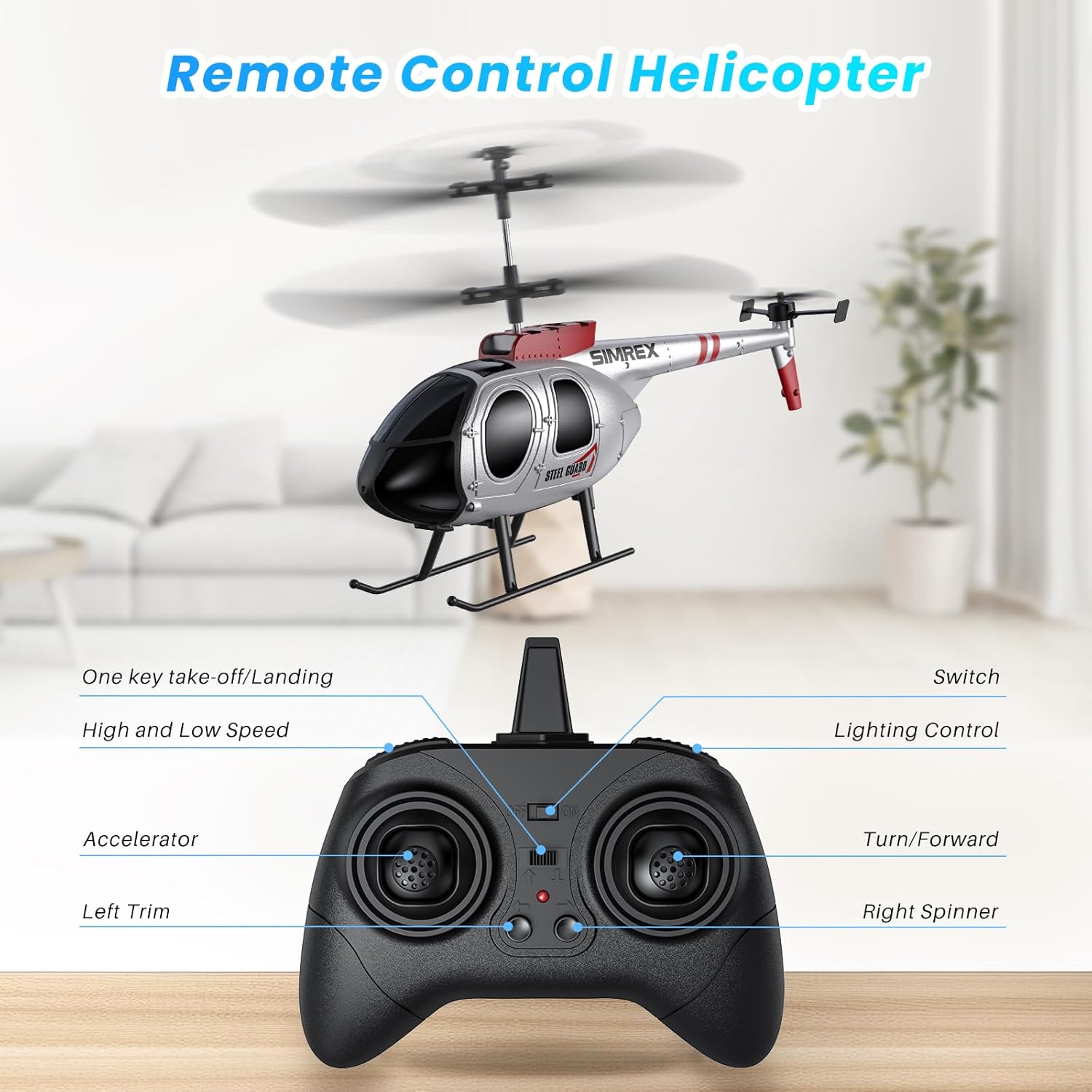
Image: A detailed diagram of the remote control, labeling the accelerator, left trim, one-key take-off/landing, high/low speed, lighting control, and turn/forward/right spinner functions.
- Hiji konci lepas landas/pendaratan: Pencét tombol khusus pikeun lepas landas atanapi badarat otomatis.
- Ketinggian Tahan: The helicopter will automatically maintain its current altitude after take-off, allowing for easier control.
- Throttle (Joystick Kénca): Dorong ka luhur pikeun naék, tarik ka handap pikeun turun.
- Kontrol Arah (Joystick Katuhu): Push forward to fly forward, pull back to fly backward, push left to turn left, push right to turn right.
- Modeu Laju: Use the speed button to switch between low and high-speed settings. Low speed is recommended for beginners.
- Kontrol motong: If the helicopter drifts, use the trim buttons on the remote to adjust its stability.

Image: A SIMREX RC Helicopter hovering steadily indoors, illustrating its altitude hold feature.
5.3 Lingkungan hiber
This helicopter is primarily designed for indoor use. When flying outdoors, choose a calm, windless environment to ensure stable flight and prevent loss of control.
6. Pangropéa
- Clean the helicopter with a soft, dry cloth after each use.
- Inspect propellers for any damage before and after each flight. Replace damaged blades using the provided spare parts.
- Store the helicopter and remote control in a cool, dry place away from direct sunlight.
- Remove batteries from the remote control if not used for an extended period.
7. Cara ngungkulan
| Masalah | Mungkin Cukang lantaranana | Solusi |
|---|---|---|
| Helikopter teu ngabales jauh. | Not paired; low battery on helicopter or remote. | Re-pair the devices (Section 5.1); charge helicopter battery; replace remote batteries. |
| Helikopter drifts salila hiber. | Needs trim adjustment; windy conditions. | Use trim buttons on remote; fly in a calm environment. |
| waktos hiber pondok. | Batré teu dicas pinuh; batré heubeul. | Pastikeun batréna pinuh; pertimbangkeun pikeun ngaganti batré upami kinerjana turun sacara signifikan. |
8. Spésifikasi
- Jumlah modél: Z16
- Ukuran produk: 9.6 x 5.3 x 1.77 inci
- Beurat barang: 8 ons
- Umur Disarankeun: 14 taun ka luhur
- Batré Helikopter: Built-in rechargeable (2 included)
- Batré Remote Control: 2 batré AA (kaasup)
- Waktos hiber: Nepi ka 15 menit per batré
- Waktu Ngecas: 60-90 menit
9. Video Produk Resmi
Product Presentation Video
Video: An official product presentation showcasing the SIMREX RC Helicopter's features and flight capabilities.
Remote Control Helicopter for Kids (Preview)
Video: Pra pondokview video demonstrating the SIMREX RC Helicopter in action, suitable for children.
10. Garansi jeung Rojongan
For warranty information and customer support, please refer to the contact details provided in the packaging or visit the official SIMREX websitus.


