
Bubuka
Hatur nuhun pikeun meuliasing the Kisonli G103 Wooden Retro Portable Speaker. This speaker combines a classic aesthetic with modern audio technology, offering versatile playback options and powerful sound. Please read this manual carefully before using the product to ensure proper operation and to maximize your listening experience. Keep this manual for future reference.
Émbaran Kasalametan
- Do not expose the speaker to water or excessive moisture. This product is not water-resistant.
- Avoid placing the speaker near heat sources, such as radiators, heat registers, stoves, or other apparatus (including ampLiifiers) anu ngahasilkeun panas.
- Paké ngan kantétan / asesoris dieusian ku produsén.
- Ngabersihan ngan ku kaén garing.
- Ulah meungpeuk sagala bukaan ventilasi. Pasang saluyu sareng parentah produsén.
- Nangtayungan kabel listrik tina leumpang atawa diciwit, utamana dina colokan, wadah merenah, jeung titik dimana aranjeunna kaluar tina aparat.
- Cabut colokan alat ieu nalika badai kilat atanapi nalika henteu dianggo kanggo waktos anu lami.
- Rujuk sadayana jasa ka tanaga jasa anu mumpuni. Diperlukeun ngalayanan nalika aparatur ruksak ku cara naon waé, sapertos kabel catu daya atanapi colokan rusak, cairan tumpah atanapi barang murag kana aparatur, aparatur parantos kakeunaan hujan atanapi lembab, henteu beroperasi normal. , atawa geus turun.
Eusi pakét
Punten parios yén sadaya barang aya:
- Kisonli G103 Wooden Retro Portable Speaker
- Power Cable (for charging)
- Manual Pitunjuk (dokumén ieu)
Produk Leuwihview
The Kisonli G103 speaker features a classic wooden design with a 20W internal speaker for clear and powerful audio. It supports multiple input sources and is designed for portability.
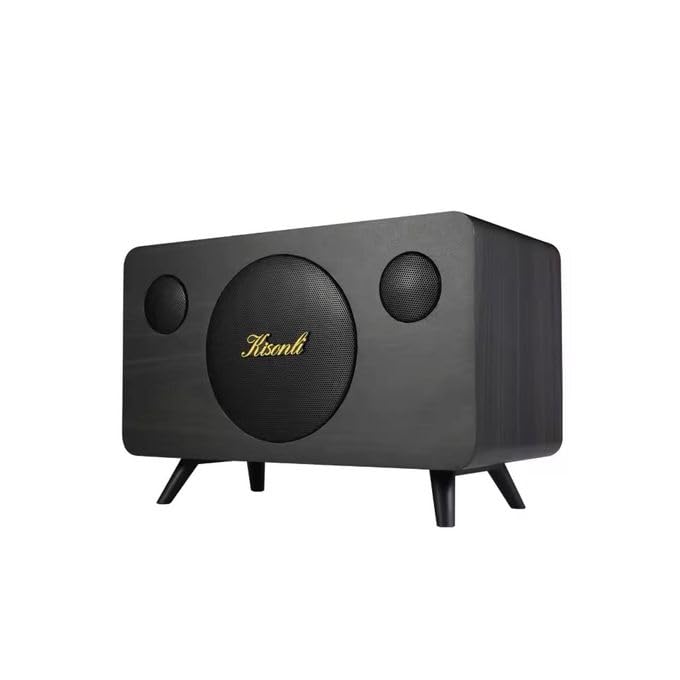
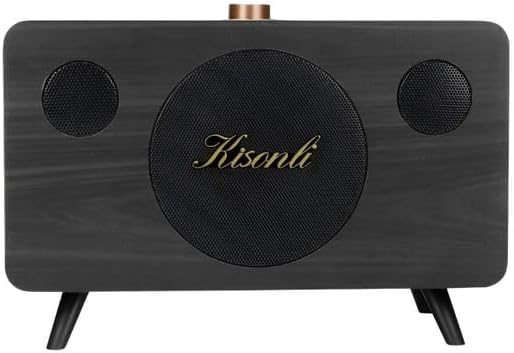
Gambar 1: Hareupeun view of the Kisonli G103 speaker, showcasing its wooden finish and central speaker grille with the Kisonli logo.

Gambar 2: Puncak view of the Kisonli G103 speaker, highlighting the control panel with the rotary volume knob and input ports.
Gambar 3: Angled view of the Kisonli G103 speaker, showing its compact size and retro design with small feet.

Gambar 4: Diagram illustrating the internal 3.5-inch, 20W horn speaker, emphasizing its powerful sound capabilities including super volume, echo sound, and shock bass.
Disetél
1. Ngecas Awal
Before first use, it is recommended to fully charge the speaker. Connect the provided power cable to the charging port on the speaker and plug the other end into a suitable power source (e.g., USB wall adapter, computer USB port). The charging indicator light will illuminate. Once fully charged, the light may change color or turn off.
2. Panempatan
Place the speaker on a stable, flat surface. Its tabletop design ensures optimal sound projection in most environments. Avoid placing it in enclosed spaces that might obstruct sound or ventilation.
Parentah Operasi

Gambar 5: Close-up of the speaker's control panel, showing the rotary volume knob and various function buttons for easy operation.
1. Daya Hurung / Pareum
- To power on: Press and hold the Power button (usually integrated with the Mode button or a dedicated button) for a few seconds until an indicator light illuminates or an audible prompt is heard.
- Pikeun mareuman: Pencét jeung tahan deui tombol Daya pikeun sababaraha detik.
2. Volume Control
The speaker features a prominent rotary knob for volume adjustment. Turn the knob clockwise to increase the volume and counter-clockwise to decrease it.
3. Pilihan Modeu
The Kisonli G103 supports multiple playback modes:
- Modeu USB Flash Drive: Selapkeun USB flash drive nu ngandung audio MP3 files into the USB port. The speaker should automatically switch to USB mode and begin playback.
- Mode Kartu TF: Selapkeun kartu TF (MicroSD) nu ngandung audio MP3 files into the TF card slot. The speaker should automatically switch to TF card mode and begin playback.
- Mode AUX: Connect an external audio device (e.g., smartphone, tablet, laptop) to the 3.5mm AUX input port using a 3.5mm audio cable (not included). Use the Mode button to switch to AUX mode if it doesn't switch automatically.
Press the "M" (Mode) button on the control panel to cycle through available input modes (USB, TF, AUX).

Gambar 6: Rear panel of the Kisonli G103 speaker, showing the USB port, TF card slot, and AUX input for various connectivity options.
4. Kadali Playback
Use the buttons on the control panel for playback management:
- Puter / Reureuh: Press the Play/Pause button (often indicated by a triangle/two vertical bars icon) to start or pause playback.
- Lagu salajengna: Press the "Next" button (often indicated by a double arrow or skip icon) to skip to the next track.
- Lagu Sateuacanna: Press the "Previous" button (often indicated by a double arrow or skip icon) to go back to the beginning of the current track or to the previous track.
Ngecas Batré
The Kisonli G103 speaker has a built-in 1800mAh rechargeable battery, providing approximately 2-8 hours of wireless playback depending on volume levels and usage. To charge the speaker:
- Connect the small end of the provided power cable to the charging port on the speaker.
- Connect the larger USB end of the cable to a USB power adapter (e.g., smartphone charger, computer USB port) or a power bank.
- The charging indicator light will show the charging status. Refer to the speaker's specific indicator behavior (e.g., red light for charging, off/blue for full).
- Ngecas pinuh biasana peryogi sababaraha jam.
The speaker can also be used while connected to a power source via the power cable.
spésifikasi
| Fitur | Katerangan |
|---|---|
| merek | Kisonli |
| Ngaran modél | G103 |
| Max Speaker Kaluaran Power | 20 Watt |
| Téhnologi konektipitas | USB, AUX |
| Mode Kaluaran Audio | Stereo (2.0 Saluran) |
| Tipe Pamasangan | Tabletop |
| Bahan | Kai |
| Tipe Speaker | Portabel |
| Dianjurkeun Mangpaat | Smartphones, Tablets, Computers, TVs, Music Players |
| Alat nu cocog | Tablet, Laptop, MP3 Player, Smartphone |
| Tahan cai | No |
| Métode kontrol | Manual (Rotary Knob, Buttons) |
| Kagunaan Produk Husus | Portable Personal Audio, Home/Office Decor |
| Kahirupan batré | 2-8 jam (gumantung kana panggunaan) |
| Kapasitas batré | 1800 mAh |
| Komponén Kaasup | Kabel Daya |
| Ukuran produk (D x W x H) | 30 cm x 19 cm x 17 cm |
| Item Beurat | 1020 gram |
| Sumber Daya | Corded Electric, Batré Powered |
Pamérésan masalah
- Henteu aya kakuatan:
- Pastikeun speaker tos dicas. Sambungkeun kana sumber daya nganggo kabel anu disayogikeun.
- Press and hold the Power button for a few seconds to ensure it's properly turned on.
- Henteu aya sora:
- Check the volume level on both the speaker and the connected device (if using AUX).
- Ensure the correct input mode (USB, TF, AUX) is selected. Press the "M" button to cycle through modes.
- If using USB or TF card, ensure the audio files are in a compatible format (e.g., MP3) and the storage device is properly inserted.
- If using AUX, ensure the 3.5mm audio cable is securely connected to both the speaker and the external device.
- Sora distort:
- Ngurangan polumeu boh dina spéker sareng alat nu disambungkeun.
- Pastikeun sumber audiona file is not corrupted or of low quality.
- Pamicara Teu Ngawaler:
- Try turning the speaker off and then on again.
- If the issue persists, allow the battery to fully discharge and then recharge it.
Pangropéa
- beberesih: Anggo kaén anu garing sareng lemes pikeun ngabersihan bagian luar spéker. Ulah make cleaners cair atawa bahan abrasive.
- Panyimpenan: Lamun teu dipaké pikeun période nambahan, nyimpen speaker dina tiis, tempat garing jauh ti sinar panonpoé langsung jeung hawa ekstrim.
- Perawatan batré: Pikeun manjangkeun umur batre, ulah miceun batre pinuh. Ngecas deui sacara teratur, sanaos henteu dianggo angger.
- Ngahindarkeun Dampak: Handle the speaker with care to prevent physical damage.
Garansi sareng Rojongan
According to the product specifications, this item is provided without a warranty. For any issues or inquiries, please contact your retailer or the point of purchase for assistance.


