1. Parentah Kasalametan penting
Please read this user manual carefully before using the Bagotte Robot Vacuum and Mop Model A21. Keep this manual for future reference.
- Alat ieu tiasa dianggo ku murangkalih umur 8 taun ka luhur sareng jalma anu kakurangan kamampuan fisik, indrawi atanapi mental atanapi kurang pangalaman sareng pangaweruh upami aranjeunna dipasihan pangawasan atanapi petunjuk ngeunaan panggunaan alat dina cara anu aman sareng ngartos bahaya anu aya. .
- Barudak teu kedah maén sareng alat. Beberesih sareng pangropéa pangguna henteu kedah dilakukeun ku murangkalih tanpa pangawasan.
- Ngan anggo adaptor daya asli anu disayogikeun ku produsén.
- Ulah dianggo robot dina lingkungan anu aya seuneu muka atanapi barang anu gampang rengat.
- Ensure the charging station is placed on a level surface against a wall, with no obstacles within 1 meter on either side and 2 meters in front.
- Before cleaning, remove power cords, small objects, and any items that could entangle the robot.
- Ulah ngalelepkeun robot atanapi komponén éléktronikna kana cai.
- Turn off the robot and unplug the charging station before performing any maintenance or cleaning.
2. Eusi Paket
Pastikeun yén sadaya komponén aya sareng dina kaayaan anu saé nalika dibongkar.

Image: All items included in the Bagotte Robot Vacuum A21 package.
- A21 Robot Vacuum Cleaner * 1
- Charging Station * 1
- Remote Control (2 AAA batteries included) * 1
- Adaptor kakuatan * 1
- 2-in-1 Water Tank * 1
- Sikat samping * 2
- Mop Holder * 1
- Mop Cloth * 2
- Hepa Filters * 1
- Sikat beberesih * 1
- Buku Panduan * 1
3. Produk Langkungview
The Bagotte A21 is a 3-in-1 robot vacuum designed for vacuuming, sweeping, and mopping. It features a slim design, powerful suction, and multiple control options.

Image: Bagotte Robot Vacuum A21 main unit and accessories.
Komponén Unit Utama
- Panutup Top: Power button, Wi-Fi indicator.
- Bemper hareup: Sénsor tabrakan.
- Sikat samping: Pikeun sweeping edges na juru.
- Roda nyetir: Pikeun gerakan.
- Tempat Sampah/Tangki Cai: Unit terpadu pikeun beberesih garing sareng baseuh.
- Ngecas Kontak: For automatic recharging.
- Bottom Sensors: Cliff sensors to prevent falls.
4. Setélan
4.1 Ngecas Station panempatan
Place the charging station against a wall on a hard, level surface. Ensure there are no obstacles within 1 meter (3.3 feet) to the left and right, and 2 meters (6.6 feet) in front of the charging station. This allows the robot to return for charging without obstruction.

Image: Robot vacuum returning to its charging station.
4.2 Ngecas Awal
Connect the power adapter to the charging station and plug it into a wall outlet. Place the robot onto the charging station, ensuring the charging contacts align. For first-time use, charge the robot for at least 6 hours to ensure the battery is fully conditioned.
4.3 Masang Sikat Sikat
Attach the side brushes to the corresponding posts on the bottom of the robot until they click into place. Ensure the brushes are securely fastened.
4.4 Installing the 2-in-1 Water Tank/Dustbin
To use the mopping function, fill the water tank with clean water. Attach the mop cloth to the mop holder, then slide the mop holder onto the water tank. Insert the combined 2-in-1 water tank/dustbin unit into the back of the robot until it clicks securely.

Image: Components for 3-in-1 cleaning functionality.
5. Parentah Operasi
5.1 Daya Hurung/Pareuman
- Daya Hurung: Press and hold the power button on the robot for a few seconds until the indicator light turns on.
- Pareum listrik: Pencét terus tahan tombol daya salami sababaraha detik dugi ka lampu indikator pareum.
5.2 Modeu beberesih
The robot offers four cleaning modes to suit different needs:

Image: Illustration of different cleaning modes.
- beberesih otomatis: The robot automatically cleans in a systematic pattern.
- Beberesihan Tempat: Robot cleans wewengkon husus dina pola spiral pikeun beberesih kentel.
- Bersihan Tepi: Robot cleans sapanjang tembok jeung edges jati.
- Beberesih manual: Kadalikeun arah robot nganggo remot kontrol atanapi aplikasi.
5.3 Kontrol Aplikasi (Tuya Smart App)
Download the Tuya Smart app from your smartphone's app store. Follow the in-app instructions to connect your robot to your home's 2.4GHz Wi-Fi network. The app allows for advanced control and scheduling.
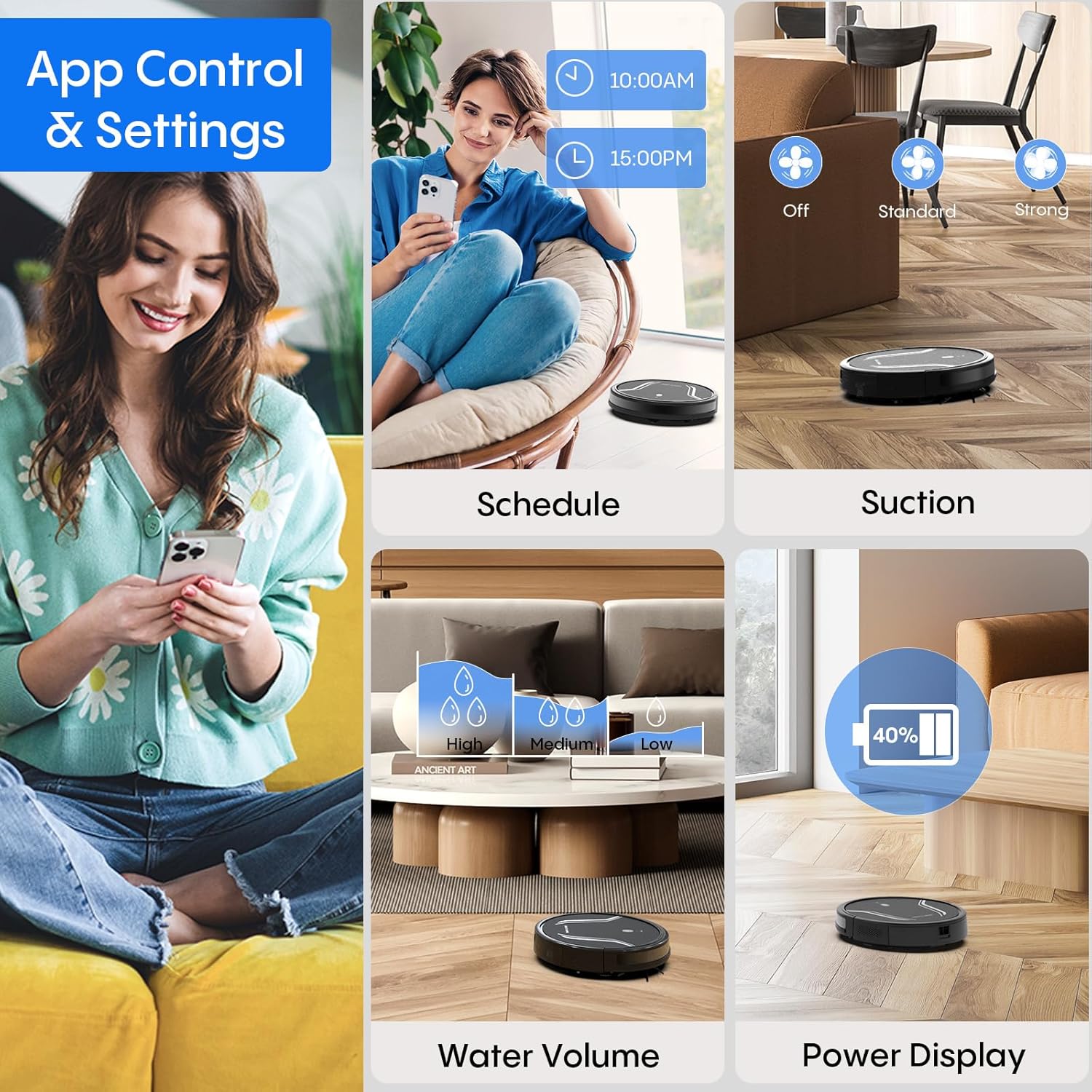
Image: App control interface for the robot vacuum.
- Jadwal: Setel waktos khusus pikeun robot ngabersihan sacara otomatis.
- Modeu Ngabersihan: Select desired cleaning modes.
- Daya nyeuseup: Adjust suction levels (e.g., Standard, Strong).
- Volume cai: Control water flow for mopping (e.g., Low, Medium, High).
- Status batré: Monitor the robot's battery level.
- Find My Robot: Locate the robot if it gets stuck or lost.
5.4 Jauh Jauh
Use the included remote control to manually direct the robot, start/pause cleaning, select cleaning modes, and send it back to the charging station.
5.5 Voice Control (Alexa/Google Assistant)
Once connected to the Tuya Smart app, you can link your robot to Amazon Alexa or Google Assistant for voice commands. For example, pokna "Alexa, hurungkeun robotna."

Image: Robot vacuum controlled via voice command.
5.6 Ngecas Otomatis
When the battery level is low, the robot will automatically return to its charging station to recharge. You can also manually send it back using the app or remote control.
6. Pangropéa
Pangropéa rutin ngajamin kinerja optimal sareng manjangkeun umur vakum robot anjeun.
6.1 Ngosongkeun tong sampah
Press the release button to remove the 2-in-1 water tank/dustbin unit. Open the dustbin cover and empty its contents into a trash bin. It is recommended to empty the dustbin after each cleaning cycle.
6.2 Saringan beberesih
Remove the HEPA filter and sponge filter from the dustbin. Tap them gently to remove dust. The filters are not washable and should be replaced every 3-6 months, depending on usage.
6.3 Ngabersihan Sikat Sisi
Periodically check the side brushes for tangled hair or debris. Carefully remove any obstructions. If brushes are worn or damaged, replace them with new ones.
6.4 Sénsor beberesih
Wipe the cliff sensors (located on the bottom of the robot) and the charging contacts (on both the robot and charging station) with a clean, dry cloth. This ensures proper navigation and charging.
6.5 Cleaning Mop Cloth and Water Tank
After each mopping session, remove the mop cloth and wash it thoroughly. Allow it to air dry completely before reattaching. Empty any remaining water from the water tank and rinse it out. Ensure the water tank is dry before storage.
7. Cara ngungkulan
Upami anjeun ngalaman masalah sareng robot vacuum anjeun, tingali masalah sareng solusi umum ieu:
| Masalah | Mungkin Cukang lantaranana | Solusi |
|---|---|---|
| Robot teu hurung | batré lemah; Tombol daya teu dipencet leres | Charge the robot; Press and hold the power button until the indicator lights up. |
| Robot teu ngecas | Charging contacts are dirty; Charging station not powered | Clean charging contacts on both robot and station; Ensure power adapter is plugged in. |
| Robot sering macét | Too many obstacles; Cliff sensors are dirty | Clear the cleaning area of loose cables and small objects; Clean cliff sensors. |
| Kinerja beberesih goréng | Dustbin full; Filters clogged; Side brushes worn | Empty dustbin; Clean or replace filters; Clean or replace side brushes. |
| Fungsi ngepel teu jalan | Water tank empty; Mop cloth not attached; Water flow setting too low | Fill water tank; Attach mop cloth correctly; Adjust water flow setting in the app. |
| Teu bisa nyambung ka Wi-Fi | Incorrect Wi-Fi password; Not 2.4GHz network; Robot too far from router | Verify password; Ensure router is 2.4GHz; Move robot closer to router during setup. |
8. Spésifikasi
| Fitur | Rincian |
|---|---|
| Nomer modél | A21 |
| Dimensi produk | 15 x 12.5 x 4 inci |
| Item Beurat | 7.24 pon |
| Daya nyeuseup | Nepi ka 5000Pa |
| Debu Box Kamampuh | 250mL (integrated with water tank) |
| Kapasitas Tangki Cai | 200mL (integrated with dust box) |
| Métode kontrol | App, Remote Control, Voice Control (Alexa/Google Assistant) |
| Kasaluyuan Wi-Fi | 2.4GHz wungkul |
| Fitur otomatis | Auto-recharge, Obstacle avoidance, Fall prevention |
9. Garansi jeung Rojongan
Bagotte provides a 12-month service warranty for the Robot Vacuum and Mop Model A21. For technical support, warranty claims, or any questions regarding your product, please contact Bagotte customer service through the official websitus atanapi platform pameseran Anjeun.
Please have your model number (A21) and purchase information ready when contacting support.


