1. Bubuka
This manual provides detailed instructions for the installation, operation, and maintenance of your JENNOV AJ1-A32J-500 Solar Security Camera System. This system includes a 4-megapixel outdoor security camera, a solar panel for power, and a 5-megapixel monitor with a built-in 500 GB hard drive. Please read this manual thoroughly before using the product to ensure proper functionality and safety.
The JENNOV AJ1-A32J-500 is designed for outdoor surveillance, offering a 120° ultra-wide-angle view, IP66 waterproofing, and completely wireless operation. It features AI human detection, night vision capabilities, two-way audio, and remote monitoring via a dedicated application.

Gambar 1.1: Leuwihview of the JENNOV AJ1-A32J-500 Solar Security Camera System components.
2. Eusi Paket
Pastikeun yén sadaya item anu didaptarkeun di handap kalebet kana pakét anjeun. Lamun aya item nu leungit atawa ruksak, mangga ngahubungan rojongan customer.
- 1 x 5-megapixel Monitor (with 500 GB HDD)
- 2 x Kaméra Kaamanan
- 2 x Panel Solar
- 1 x 12V 2A NVR Power Adapter
- 1 x Kabel LAN
- 1 x Kabel HDMI
- 2 x Kabel Tipe-C
- 2 x Waterproof Cap
- 1 x Mouse USB
- 1 x Alarm Sticker
- 1 x Manual Pamaké
- Camera Mounting Screws (quantity as needed for 2 cameras)

Image 2.1: Illustration of all components included in the JENNOV security camera system package.
3. Setup jeung Instalasi
The JENNOV security camera system is designed for easy, wireless installation. No complex wiring for power or LAN cables is required for the cameras.
3.1 Ngecas Awal
Before installation, ensure the cameras are fully charged. While solar panels provide continuous power, an initial charge is recommended for optimal performance, especially for 24-hour continuous recording. Charge each camera via USB for at least 6 hours.
3.2 Camera Placement and Mounting
The cameras are completely wireless, offering flexibility in placement. Choose locations with good solar exposure for the solar panels and an unobstructed view wewengkon nu Anjeun hoyong monitor.
- tanaga surya: Mount the solar panel in a location that receives direct sunlight for several hours daily to ensure continuous power supply to the camera.
- Pilihan Pasang: Cameras can be mounted on walls, placed on flat surfaces, or attached to ceilings. The mounting bracket allows for 360° rotation and 90° tilt adjustment for optimal viewdina sudut.
- Waterproofing: Ensure the waterproof cap is securely installed over the charging port if using USB charging, or if the camera is exposed to the elements.

Image 3.1: Demonstrates flexible camera mounting options (wall, table, ceiling) and 360-degree adjustability.

Image 3.2: Shows the wireless camera powered by a solar panel and an alternative Type-C charging method.
3.3 Sambungan Sistim
The cameras and monitor connect automatically. Follow these steps:
- Place the cameras and the monitor in close proximity during initial setup.
- Connect the 12V 2A NVR power adapter to the monitor and plug it into a power outlet.
- Press and hold the power button on each camera for more than 5 seconds to activate them.
- The cameras will automatically connect to the monitor. Live feeds should appear on the monitor screen.
- Once connected, cameras can be moved to their desired installation locations.

Image 3.3: Illustrates the initial connection process between the cameras and the monitor.
3.4 App Connection (Eseecloud)
For remote monitoring and advanced features, connect the system to your Wi-Fi router and use the Eseecloud application.
- Connect the monitor (recording device) to your Wi-Fi router using the provided LAN cable.
- Download and install the "Eseecloud" app on your smartphone or computer.
- Follow the in-app instructions to add your device. You can monitor live video and recorded footage ti mana waé.
- The system supports up to 64 surveillance cameras on a single smartphone and allows multiple users to view sakaligus.
4. Operasi
4.1 Modeu ngarékam
The system offers various recording options to suit your needs:
- Continuous Recording (24h): Records continuously. This mode requires the camera battery to be above 80% charge. The system defaults to 24-hour continuous recording.
- Ngarekam Deteksi Gerak: Records only when motion is detected. This mode helps reduce false alarms and saves hard drive space. The PIR sensor detects human movement.
- Modeu Hemat Daya: Records for a specified duration (e.g., 5, 10, 20, 30 seconds) after motion detection, followed by a rest period (e.g., 0, 1, 5, 10 minutes).

Image 4.1: Details the three available recording modes: 24-hour continuous, motion-activated, and power-saving with customizable recording and rest intervals.
4.2 Deteksi sareng Peringatan Manusa AI
The system features an AI human body detection function to minimize false alarms. When a suspicious person is detected within the monitoring range:
- A yellow frame will appear on the monitor screen.
- An alert notification will be sent to the Eseecloud app on your smartphone.
- You can define specific detection ranges and warning lines on the monitor to further refine alerts.
- In Smart Mode, the built-in LED light will illuminate upon detection of a suspicious person, acting as a deterrent.

Image 4.2: Illustrates the AI human detection feature, highlighting a detected person and showing a corresponding alert notification on a smartphone.
4.3 Modeu Visi Peuting
Kaméra ieu nyadiakeun panjagaan anu jelas sanajan dina kaayaan cahaya anu handap kalayan sababaraha pilihan visi wengi:
- Infrabeureum Night Vision: Uses 4 powerful infrared LEDs for black and white video up to 20 meters in complete darkness.
- Warna Night Vision: Utilizes the built-in LED light to provide full-color video at night.
- Smart Night Vision: Automatically switches between infrared and color night vision based on detected activity or ambient light.

Image 4.3: Compares the visual output of Smart Night Vision, Color Night Vision, and Infrared Night Vision modes.
4.4 Two-Way Audio and Remote Monitoring
The integrated microphone and speaker enable two-way communication:
- Komunikasi: Speak with visitors, delivery personnel, or deter suspicious individuals directly through the camera via the Eseecloud app.
- Aksés Jauh: Monitor live feeds and review dirékam footage from your smartphone or computer using the Eseecloud app, even when away from home.
- Alexa kasaluyuan: The system is Alexa certified. Enable the "EseecLoud" skill on Alexa to check your camera feed via voice commands.
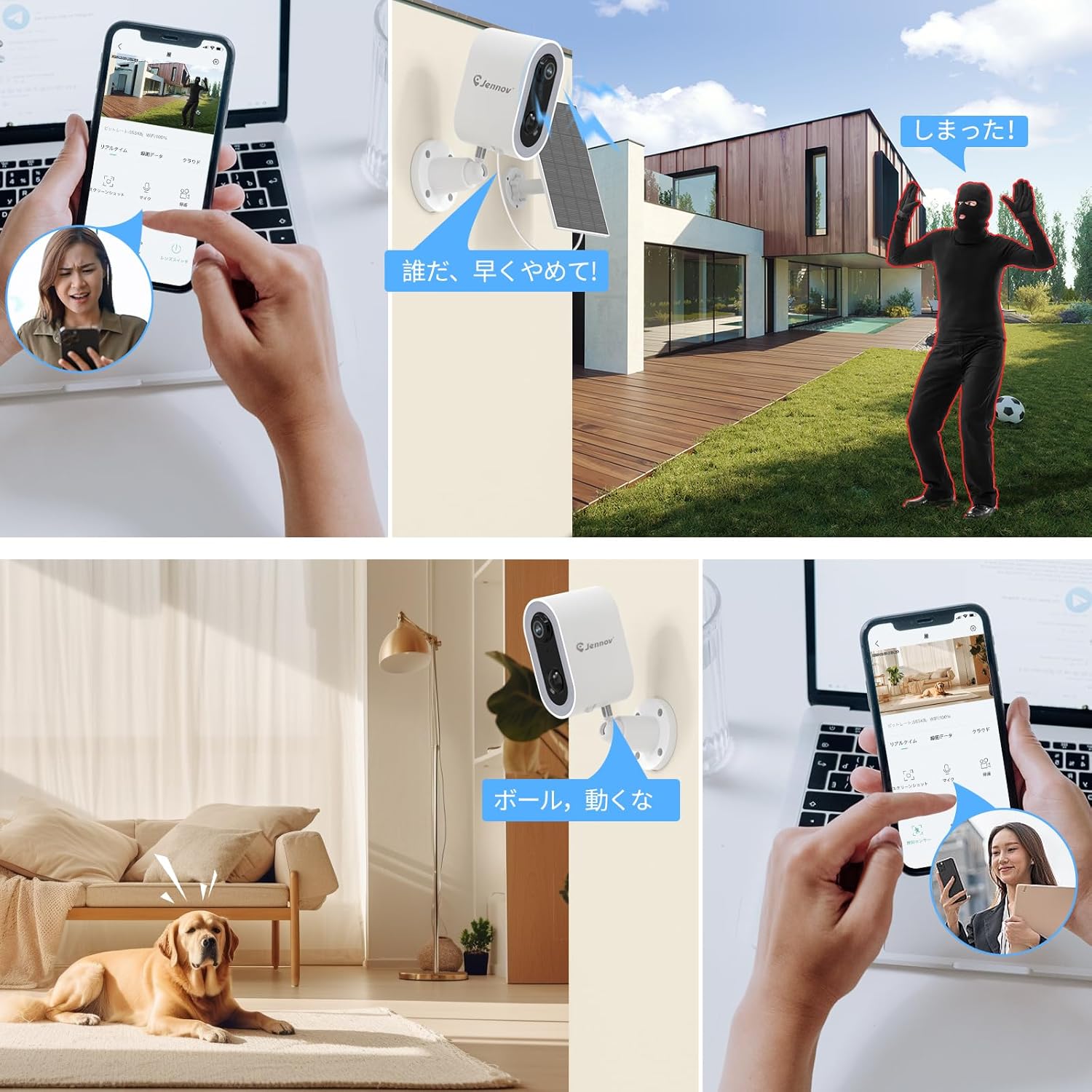
Image 4.4: Depicts scenarios where two-way audio is used to communicate with visitors and deter intruders, alongside remote monitoring via a smartphone app.
5. Pangropéa
Regular maintenance ensures the longevity and optimal performance of your JENNOV security camera system.
- Pembersih Panel Surya: Periodically clean the surface of the solar panels to remove dust, dirt, or debris that may reduce charging efficiency. Use a soft, damp lawon.
- Ngeusi batre: While solar power is the primary source, if prolonged periods of poor weather occur, the camera can be charged via its USB Type-C port. Ensure the waterproof cap is securely in place after charging.
- Ngabersihan lensa: Bersihkeun lénsa kaméra sacara saksama nganggo lawon microfiber pikeun mastikeun kualitas gambar anu jelas. Hindarkeun bahan anu kasar.
- Pembaruan firmware: Check the Eseecloud app regularly for any available firmware updates for your cameras and monitor. Updates can improve performance and add new features.
6. Cara ngungkulan
If you encounter issues with your JENNOV security camera system, refer to the following common problems and solutions:
| Masalah | Mungkin Cukang lantaranana / Solusi |
|---|---|
| Taya gambar dina monitor |
|
| Kaméra teu ngecas ngaliwatan panel surya |
|
| Frequent false alarms (motion detection) |
|
| Cannot connect to Eseecloud app |
|
| Kualitas gambar henteu saé |
|
If these steps do not resolve the issue, please contact JENNOV customer support for further assistance.
7. Spésifikasi
| Fitur | Rincian |
|---|---|
| merek | Jennov |
| Nomer modél | AJ1-A32J-500 |
| Téhnologi konektipitas | Nirkabel, HDMI |
| Resolusi Capture Video | 1920p (4 Megapixels) |
| Fitur husus | Human Detection, Night Vision, Siren Alarm, Two-Way Audio, Video Recording |
| Jumlah Saluran | 10 (bisa dilegakeun) |
| Kapasitas Panyimpenan Mémori | 500 GB (built-in HDD) |
| Sumber Daya | Solar Powered, USB Type-C |
| Item Ukuran (L x W x H) | 15 x 15 x 20 cm |
| Kasaluyuan System Operasi | Android, ios, Windows |
| Dianjurkeun Mangpaat | Outdoor, Indoor, Baby Monitor, Nursing Aged |
| Fitur kaméra séjén | AI human body detection function, Constant recording |
| Téhnologi Lampu Lemah | Color Night Vision Photography |
| Pedaran Panjang fokus | 120-degree wide-angle lens |
| Wengi Sawangan Sawangan | 30 Méter |
| Modeu Rékam | Event (Motion Detection), Continuous |
| Total palabuhan USB | 1 |
| Panganteur Hardware | Multipronged Audio |
| Tipe Lénsa | 2.8 mm |
| Input Video | Masukan HDMI |
| Viewdina Angle | 120 darajat |
| Item Beurat | 2.16 kg |
8. Garansi jeung Rojongan
JENNOV is committed to providing high-quality products and customer satisfaction.
- Kabijakan pamulangan: We offer a 30-day return policy for this product.
- Bantosan Téknis: Free technical support is available for any questions or defects you may encounter.
- Inpormasi kontak:
- Telepon: 05050509046 (Monday-Friday, 10:00-13:30, 14:30-19:00 JST)
- Surélék: jpsupport01@jennov.com (24-hour support)