1. Bubuka
This manual provides essential information for the proper installation, operation, and maintenance of your DIGITUS Cat 8.1 LAN Cable, Model DK-1843-005. Designed for high-speed data transmission, this cable ensures reliable network connectivity for demanding applications. Please read these instructions carefully to ensure optimal performance and longevity of your product.

Figure 1: The DIGITUS Cat 8.1 LAN Cable with RJ45 connectors. This image shows the overall design of the cable, highlighting its robust construction and shielded connectors.
2. Fitur Produk
The DIGITUS Cat 8.1 LAN Cable offers advanced features for superior network performance:
- Pangiriman Data Gancang: Supports data rates up to 25Gbps or 40Gbps, ideal for fiber internet speeds in server rooms and high-bandwidth applications.
- Exceptional Bandwidth: Operates at a maximum bandwidth of 2000 MHz (2 GHz), ensuring excellent connection properties for Gigabit networks in data centers or corporate environments.
- Kasaluyuan lega: Equipped with RJ45 connectors, it is compatible with existing networks using CAT.5e, CAT.6, CAT.6A, and CAT.7 cables.
- Power over Ethernet (PoE++) Support: Supports PoE++ type 4 (IEEE 802.3bt), enabling power delivery up to 100W to compatible devices, backward compatible with PoE and PoE+.
- Enhanced Signal Integrity: Features a Printed Circuit Board (PCB) integrated into the RJ45 connector to minimize electromagnetic interference (EMI) and improve signal quality.
- Konstruksi awét sareng Aman: Features an LSZH (Low Smoke Zero Halogen) outer sheath for flame retardancy and low smoke emission. The inner conductor is made of copper (Cu). Connectors include tensile relief, folding protection, and a snap lever.

Figure 2: Illustrates various applications for the Cat 8.1 cable, including data centers, high-speed gaming, and 4K/8K UHD streaming. This highlights the cable's versatility across different demanding environments.
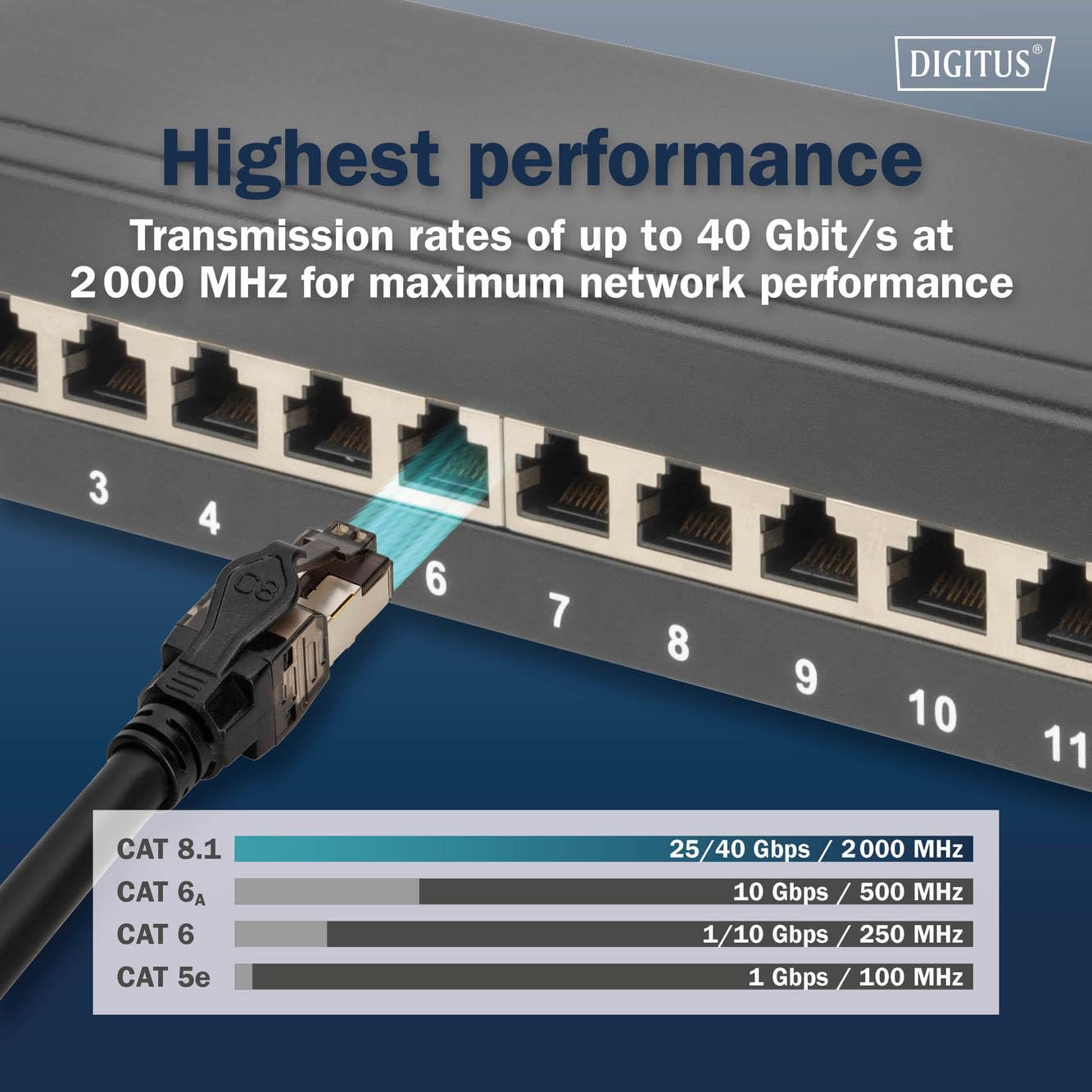
Figure 3: A comparison chart showing the superior transmission rates and bandwidth of Cat 8.1 cables compared to older categories like Cat 6A, Cat 6, and Cat 5e. This visually represents the "Highest Performance" feature.
3. Parentah Setup
Follow these steps to properly connect your DIGITUS Cat 8.1 LAN Cable:
- Identipikasi palabuhan: Locate the Ethernet ports on your network devices (e.g., router, switch, computer, server, gaming console, Smart TV). These are typically RJ45 ports.
- Sambungkeun tungtung kahiji: Gently insert one end of the DIGITUS Cat 8.1 LAN Cable into the Ethernet port of your first device until you hear a click, indicating it is securely latched.
- Sambungkeun tungtung kadua: Insert the other end of the cable into the Ethernet port of your second device. Ensure it also clicks into place.
- Pariksa sambungan: Most network devices have indicator lights next to the Ethernet port. A solid or blinking light typically indicates a successful connection and data activity.
- Routing kabel: Route the cable carefully to avoid sharp bends, kinks, or excessive tension, which can damage the cable and degrade performance.
The cable's RJ45 connectors are designed for secure and reliable connections, featuring a snap lever protection to prevent accidental disconnections.

Figure 4: A detailed close-up of the Cat 8.1 RJ45 connectors, showing the robust shielding and the integrated PCB for improved signal integrity. This image highlights the quality and design of the connection points.
4. Ngoperasikeun Kabel
Once connected, the DIGITUS Cat 8.1 LAN Cable operates passively to facilitate data transfer between your network devices. No specific user interaction is required for its operation beyond proper connection.
4.1. High-Speed Networking
This cable is engineered to support extremely high data transfer rates, making it suitable for:
- Data centers and server rooms requiring 25/40 Gigabit Ethernet.
- High-performance computing and cloud environments.
- Gaming setups where low latency and high bandwidth are critical.
- Streaming 4K/8K UHD content without buffering.
4.2. Power over Ethernet (PoE++)
If your connected devices and network equipment support PoE++ (IEEE 802.3bt), this cable can transmit both data and power up to 100W. This eliminates the need for separate power cables for compatible devices such as IP cameras, VoIP phones, and wireless access points.

Figure 5: Depicts various devices that can benefit from the Cat 8.1 cable's optimal signal stability, including desktops, routers, gaming consoles, switches, Smart TVs, and servers. This illustrates the wide range of compatible applications.
5. Pangropéa
The DIGITUS Cat 8.1 LAN Cable is designed for durability and requires minimal maintenance. Adhering to the following guidelines will help ensure its long-term performance:
- Hindarkeun Stress Fisik: Do not bend the cable sharply, crimp it, or place heavy objects on it. Excessive bending can damage the internal conductors and shielding, leading to performance degradation.
- Penanganan anu leres: When disconnecting, always press the release tab on the RJ45 connector before pulling. Never pull directly on the cable itself, as this can damage the connector or the cable's internal wiring.
- Kabersihan: Keep the connectors free from dust and debris. If necessary, gently clean the metal contacts with a dry, lint-free cloth or compressed air.
- Kaayaan Lingkungan: Store and operate the cable in a dry environment, away from extreme temperatures and direct sunlight. The LSZH jacket provides protection, but proper environmental conditions are still recommended.
- Pamariksaan: Periodically inspect the cable and connectors for any signs of wear, damage, or corrosion. Replace the cable if any damage is observed.

Figure 6: The Cat 8.1 LAN cable coiled, demonstrating its flexibility while emphasizing the importance of proper handling and storage to prevent damage.
6. Cara ngungkulan
Upami anjeun ngalaman masalah sareng sambungan jaringan anjeun, pertimbangkeun léngkah-léngkah ngungkulan masalah ieu:
- Henteu aya sambungan jaringan:
- Pastikeun kadua tungtung kabelna dipasang pageuh kana portna masing-masing. Dengérkeun sora "klik".
- Check the indicator lights on your network devices. If they are off, try a different port or device.
- Test the cable with another known working device or replace it with a different Ethernet cable to rule out a faulty cable.
- Restart your router/modem and the connected device.
- Lambat Jaringan:
- Verify that all network components (router, switch, network adapter) support the desired speed (e.g., 10Gbps or 40Gbps). A Cat 8.1 cable will only perform at the speed of the slowest component in the chain.
- Ensure the cable is not bent, kinked, or damaged. Physical damage can significantly reduce performance.
- Check for sources of electromagnetic interference (EMI) near the cable, although the S/FTP shielding and PCB in the connector are designed to mitigate this.
- Apdet supir adaptor jaringan dina komputer anjeun.
- Sambungan Intermittent:
- Pastikeun konektorna bersih sareng bébas tina kokotor.
- Pariksa sambungan leupas.
- If possible, test with a different cable to determine if the issue is with the cable or other network hardware.
For persistent issues, refer to the documentation for your network devices or contact technical support.
7. Spésifikasi Téknis
| Fitur | Rincian |
|---|---|
| Nomer modél | DK-1843-005 |
| merek | Digitus |
| Tipe Kabel | Cat 8.1 Ethernet (S/FTP) |
| Tipe Panyambung | RJ45 |
| Laju Mindahkeun Data | Nepi ka 40 Gbps |
| Bandwidth | 2000 MHz (2 GHz) |
| Konduktor Gauge | AWG 24/7 |
| Rojongan PoE | PoE++ Type 4 (IEEE 802.3bt) up to 100W |
| Bahan Jaket | LSZH (Haseup Rendah Nol Halogén) |
| Bahan Konduktor Batin | Tambaga (Cu) |
| Fitur husus | Integrated PCB in RJ45 connector for EMI reduction, tensile relief, folding protection, snap lever. |
| Alat nu cocog | Docking Station, Printer, Router, Server, Gaming Consoles, Smart TVs, Switches |
| Kasaluyuan | Backward compatible with Cat 5e, Cat 6, Cat 6A, Cat 7 networks. |
8. Garansi jeung Rojongan
For warranty information, technical support, or further inquiries regarding your DIGITUS Cat 8.1 LAN Cable, please refer to the official Digitus website or contact their customer service department. Details can typically be found on the product packaging or the manufacturer's official online resources.
Ensure you have your product model number (DK-1843-005) available when contacting support for faster assistance.


