1. Bubuka
The Norwii N95s BLE Presentation Clicker is a versatile wireless presenter designed to enhance your presentations. It features both a digital pointer for TV screens and a physical laser pointer for projection screens, along with advanced controls for slide navigation, mouse cursor control, and a countdown timer with vibration alerts. This manual provides detailed instructions for setting up, operating, and maintaining your device.

Figure 1: Norwii N95s Presentation Clicker, USB receiver, and carrying case.
2. Setélan
2.1 Ngecas Alat
The Norwii N95s features a 300mAh rechargeable battery with NTC charging protection. Before first use, ensure the device is fully charged.
- Locate the USB-C charging port on the side of the presenter.
- Connect the provided USB-C cable to the presenter and a power source (e.g., computer USB port, wall adapter).
- The OLED display will indicate charging status and remaining power.

Figure 2: Charging the Norwii N95s Presentation Clicker.
2.2 Pilihan Konektipitas
The N95s offers multiple connection methods to suit various devices and preferences.
- Bluetooth (BLE): Supports auto-reconnection with up to 7 paired devices. Ideal for devices with built-in Bluetooth.
- Panarima USB: Depending on your purchase, your package includes one type of USB receiver (USB-A, USB-C, or USB-A&C combo). Insert the receiver into an available USB port on your computer. The presenter will automatically connect.
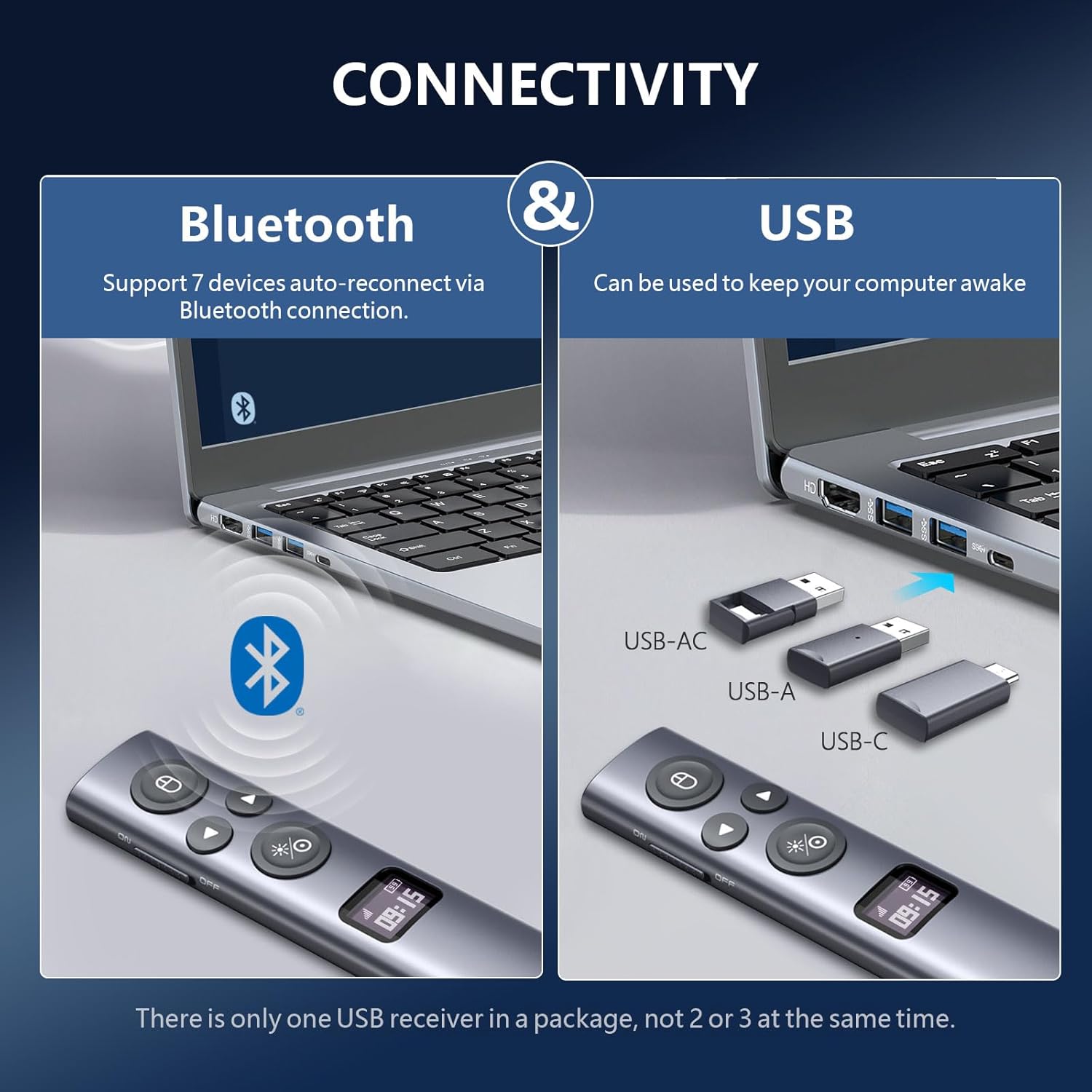
Figure 3: Bluetooth and USB connectivity options.
The USB receiver can also be used to keep your computer awake during presentations.
3. Parentah Operasi
3.1 Alat Leuwihview sareng Kontrol Dasar
The N95s features an OLED high-definition display showing signal strength, remaining power, clock/countdown settings, and pairing status. The device has a modern slim design with soft and silent buttons.

Figure 4: OLED High-Definition Display features.
- Saklar kakuatan: Located on the side of the device. Slide to ON/OFF.
- Halaman luhur/handap: Use the arrow buttons for slide navigation. Long press for full screen/Esc.
- Pointer Key: Activates the laser or digital pointer.
- Tombol Beurit: Long press to move the mouse cursor. Click for left mouse click. Double click for left mouse double click.
- Annotation/Eraser/Volume Control: This button's function can be customized. In mouse mode, it acts as a right mouse click.
3.2 Pointer Functionality
- Digital Pointer: For TV screens and LCD displays. Features include magnify, highlight, and customized icons, which are clearly visible on these screen types.
- Physical Laser Pointer: For traditional projection screens. Class II, output power <1mW.
- PowerPoint Built-in Virtual Pointer: Instant access without installation (Windows, full-screen mode only).

Figure 5: Digital pointer features including highlight, magnify, and on-screen marking.

Figure 6: Using PowerPoint's built-in virtual pointer.
3.3 Advanced Digital Pointer Features
The Norwii N95s supports advanced digital pointer functionalities, especially when enabled via the Norwii Presenter APP.
- Multi-Speaker Support: The device can support up to four speakers simultaneously, each with a different digital pointer color, when enabled through the Norwii Presenter APP.

Figure 7: Multiple presenters using digital pointers on a single screen (requires Norwii Presenter APP).
3.4 Mouse Cursor Control
The presenter offers precise mouse control:
- Long press the mouse button to activate cursor movement.
- Click the mouse button for a left click.
- Double click the mouse button for a left double click.
- In mouse mode, the pointer key acts as a right mouse click.

Figure 8: Upgraded mouse control features.
3.5 Countdown Timer with Vibration Alert
The integrated countdown timer helps you manage your presentation time effectively.
- Set the countdown timer directly on the presentation clicker or via accompanying software (if applicable).
- The presenter will vibrate to alert you at 10, 5, and 0 minutes before the countdown ends.

Figure 9: Countdown timer with vibration alert.
3.6 Kasaluyuan
The Norwii N95s is compatible with:
- Operating Systems: Windows 10 or later, macOS 10.15 or later.
- Presentation Software: PowerPoint, Prezi, Keynote, Propresenter, Mediashout, Google Slides, and more.
- Key functions can be customized via the Norwii Presenter APP.

Figure 10: Device compatibility and customizable key functions.
4. Pangropéa
To ensure the longevity and optimal performance of your Norwii N95s Presentation Clicker, follow these maintenance guidelines:
- beberesih: Anggo kaén anu lemes sareng garing pikeun ngabersihan alat. Ulah make bahan kimia kasar atawa bahan abrasive.
- Panyimpenan: Store the presenter in its provided carrying case when not in use to protect it from dust and damage.
- Perawatan batré: Recharge the device regularly. Avoid fully depleting the battery for extended periods. The NTC charging protection helps prevent overcharging.
- Panarima USB: Keep the USB receiver stored securely within the presenter or its case to prevent loss.
5. Cara ngungkulan
If you encounter issues with your Norwii N95s, refer to the following common solutions:
- Alat Teu Ngabales:
- Pastikeun alat diaktipkeun.
- Pariksa tingkat batré jeung ngecas lamun perlu.
- Verify the USB receiver is securely plugged into your computer, or that Bluetooth is enabled and paired.
- Try restarting your computer and the presenter.
- Laser/Digital Pointer Not Working:
- Ensure the pointer key is pressed.
- For digital pointer, confirm your display is a TV/LCD screen. For physical laser, confirm it's a projection screen.
- If using the PowerPoint built-in virtual pointer, ensure PowerPoint is in full-screen mode on Windows.
- Slide Navigation Issues:
- Check compatibility with your specific presentation software (refer to section 3.6).
- Ensure the correct mode is selected if your software requires specific key mappings (e.g., Up/Down for PowerPoint, Left/Right for Prezi).
- Mouse Cursor Control Problems:
- Ensure you are long-pressing the mouse button to activate cursor movement.
- If the cursor is erratic, ensure the presenter is held steadily.
- Countdown Timer Not Functioning:
- Verify that the timer has been set correctly on the device or through the associated software.
- Ensure the device has sufficient battery power.
6. Spésifikasi
| Dimensi produk | 5.2 x 1.16 x 0.52 inci |
| Item Beurat | 4.1 ons |
| Nomer Modél Item | N95 |
| Batré | 1 Batré Teu Baku (kaasup) |
| merek | Norwii |
| Produsén | Shanghai Norwii Technology Co., LTd. |
| Fitur husus | Annotation/Eraser, Countdown timer and remain power display, Digital pointer for TV screens, Highlight, Magnify and Mouse left click, Key Function Customizable |
| Konektipitas | Bluetooth (BLE) & USB (USB-A, USB-C, or USB-A&C receiver) |
| Alat nu cocog | Windows 10 or macOS 10.15 and later versions. Digital pointer for TV screens, physical pointer for projection screens. |

Figure 11: Modern slim design and dimensions of the Norwii N95s.
7. Video produk
7.1 Upgrade your presentation skills!
This video demonstrates various features of the Norwii N95s, including its use as a laser pointer and a presentation remote for advancing slides. It highlights the ease of use and the benefits for presenters.
7.2 Clicker and LED light for powerful presentations!
This video showcases the clicker's functionality and the LED light feature, emphasizing its utility for engaging presentations. It provides a visual overview of the device in action.
8. Garansi jeung Rojongan
For warranty information or technical support, please contact Norwii customer service. Refer to the product packaging or the official Norwii websitus pikeun wincik kontak nu paling up-to-date.
Manufacturer: Shanghai Norwii Technology Co., LTd.