1. Bubuka
This instruction manual provides essential information for the safe and efficient operation, maintenance, and troubleshooting of your 3i P10 Ultra Robot Vacuum and Mop Combo. Please read this manual thoroughly before using the product and retain it for future reference.
2. Émbaran Kasalametan
Salawasna turutan tindakan pencegahan kaamanan dasar nalika nganggo alat listrik pikeun ngirangan résiko kahuruan, sengatan listrik, atanapi tatu. Alat ieu kanggo dianggo di rumah tangga hungkul.
- Ulah ngantep barudak ngoperasikeun robot. Awasi barudak sareng piaraan nalika robot keur dioperasikeun.
- Pastikeun vol kakuatantage cocog jeung labél rating dina darmaga ngecas.
- Do not use the robot on wet surfaces or in areas with standing water.
- Remove loose cables, small objects, and fragile items from the cleaning path before operation.
- Do not use the robot to pick up large or sharp objects, flammable materials, or liquids.
- Only use manufacturer-specified accessories and replacement parts.
- Upami kabel listrik rusak, éta kedah diganti ku produsén atanapi agén jasa anu mumpuni pikeun ngahindarkeun bahaya.
3. Produk Langkungview
3.1 Komponén Kaasup
pakét ngawengku item handap:
- 1 x Robot vakum
- 1 x Base Station
- 2 x Bantalan Pel
- 2 x Sikat Sisi
- 1 x 800ml Solusi beberesih
- 1 x Base bisa dicabut
- 1 x Kabel Listrik
- 1 x Manual Pamaké
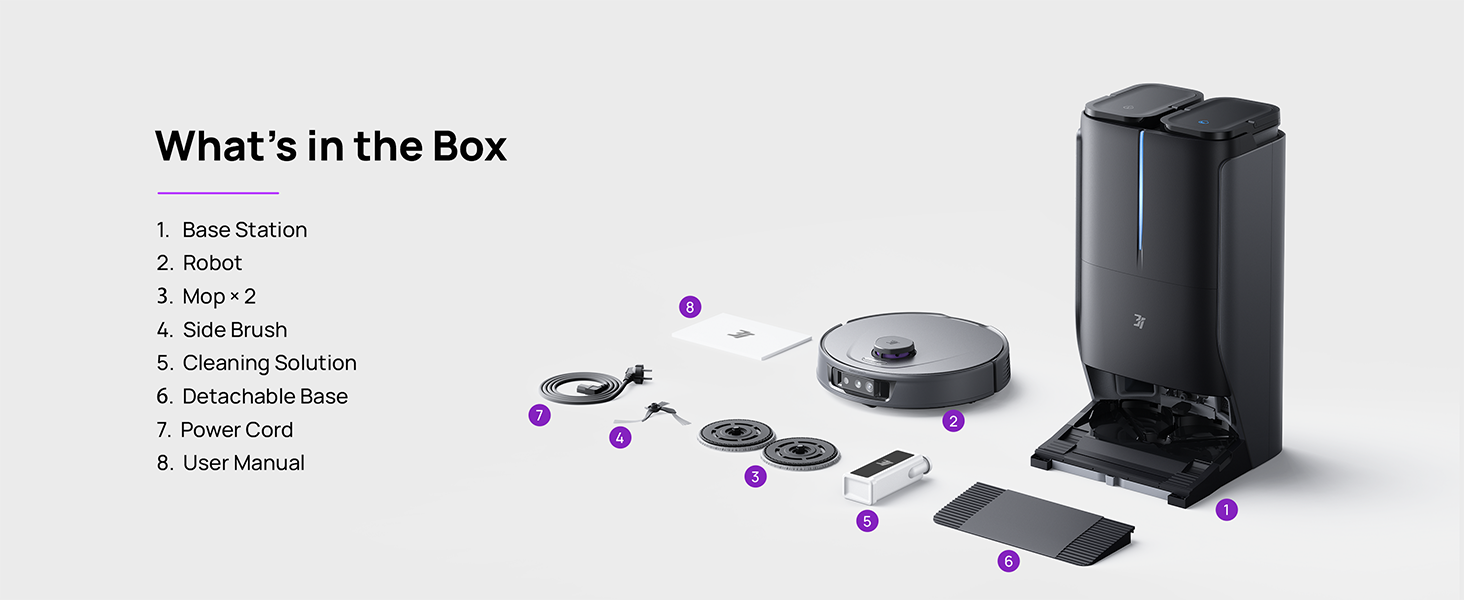
Figure 3.1: Contents of the 3i P10 Ultra package.
3.2 Robot Vacuum Features
- UltraReach Mop: The auto-extending mop system cleans edges and corners thoroughly. Dual mops spin at 220 RPM for effective stain removal.
- 18,000 Pa Suction: Provides powerful suction for deep cleaning on various floor types, including carpets and hard floors. Features smart carpet detection to boost suction and lift mops.
- All-in-One Automated Station: Offers automatic hot-water mop washing, hot air drying, solution adding, and hands-free dust collection for up to 70 days.
- Navigasi Lanjutan: Utilizes LiDAR for 3D mapping, dual 3D structured light, and an AI camera for obstacle avoidance, threshold crossing, and collision resistance.
- AI-Powered DirtScan: Identifies over 100 household objects and messes, adapting cleaning methods for optimal results, even in low light conditions.
- Manajemén Rambut: Equipped with anti-tangle brushes and a TangleCut blade to prevent hair from wrapping around components.
- Smart Route Planning: Learns home layouts for efficient cleaning routes. Supports scheduled cleaning, no-go zones, and app control. Compatible with Alexa and Google Assistant.
- Konektipitas Wi-Fi: Supports both 2.4G and 5G Wi-Fi networks.

Gambar 3.2: Top view of the 3i P10 Ultra Robot Vacuum.

Figure 3.3: The 3i P10 Ultra Base Station.
4. Setélan
4.1 Ngabongkar sareng Nempatkeun
- Sacara saksama miceun sadaya komponén tina bungkusan.
- Choose a suitable location for the base station. Ensure it is placed against a wall, on a hard, level surface, with at least 0.5 meters (1.6 feet) of clear space on both sides and 1.5 meters (4.9 feet) in front. Avoid areas with direct sunlight or strong Wi-Fi interference.
- Connect the power cord to the base station and plug it into a power outlet.
4.2 Persiapan Robot
- Install the side brushes by pressing them into their slots until they click.
- Attach the mop pads to the mop holders on the robot.
- Place the robot onto the base station to charge. Ensure the charging contacts align. The robot will announce its charging status.
4.3 Pamasangan sareng Sambungan Aplikasi
- Download the 3i app from your mobile device's app store (iOS or Android).
- Open the app and follow the on-screen instructions to create an account and add your 3i P10 Ultra robot.
- Ensure your phone is connected to a 2.4GHz or 5GHz Wi-Fi network during the pairing process.
5. Parentah Operasi
5.1 beberesih awal jeung pemetaan
For the first use, allow the robot to complete a full cleaning cycle to create a map of your home. This map is crucial for advanced features.

Figure 5.1: Precision 3D Mapping in the 3i App.
5.2 Ngamimitian siklus beberesih
- Via Robot: Press the power button on the robot once to start or pause cleaning.
- Via Aplikasi: Open the 3i app, select the desired cleaning mode (Vacuum, Mop, Vac & Mop, AI Auto, Custom), and tap 'Start'.
- Ngaliwatan Kontrol Sora: Use compatible voice assistants (Alexa, Google Assistant) with commands like "Hey Google, start vacuuming."

Figure 5.2: Using voice control to operate the 3i P10 Ultra.
5.3 Fitur Aplikasi
The 3i app provides extensive control and customization options:
- Setélan beberesih: Schedule cleaning, select rooms, set no-go zones, customize carpet cleaning.
- Setélan Peta: View 3D maps, quick mapping, multi-floor maps, edit rooms and furniture.
- Station Settings: Customize dust collection, mop washing, auto-drying, and TangleCut.
- Setélan séjén: Do Not Disturb mode, Smart Route Planning, Pet Recognition, Child Lock.
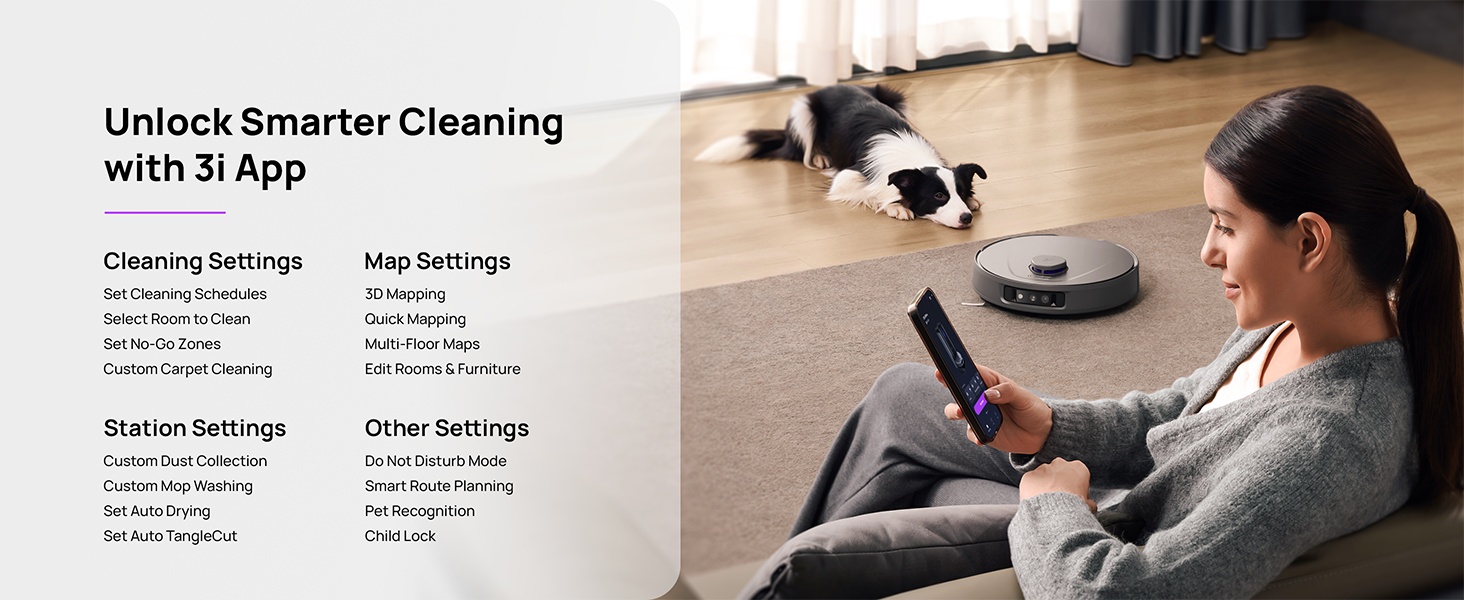
Figure 5.3: The 3i App interface for smart cleaning.
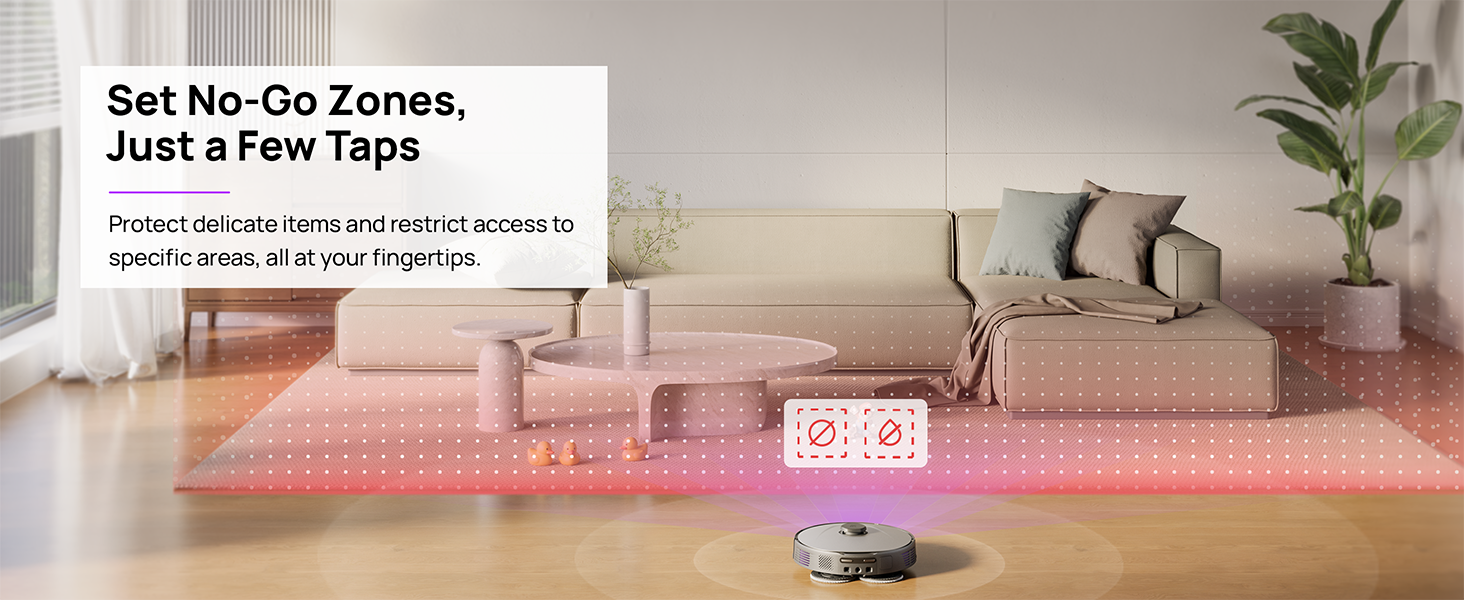
Figure 5.4: Setting No-Go Zones in the 3i App.
6. Pangropéa
Regular maintenance ensures optimal performance and extends the lifespan of your 3i P10 Ultra.
6.1 Pangropéa Stasion Basis
- Ngosongkeun Tempat Sampah: The base station automatically empties the robot's dustbin into a 3L bag. Replace the dust bag approximately every 70 days, or as indicated by the app.
- Nyeuseuh jeung ngeringan pel: The base station automatically washes mop pads with 140°F / 60°C hot water and dries them with hot air (131°F / 55°C) after each cleaning cycle. Ensure the clean and dirty water tanks are properly installed.
- Water Tank Refilling: The extra-large 4L clean water tank automatically refills the robot. Refill the clean water tank as needed. The base station also collects dirty water into a separate wastewater tank. Empty the wastewater tank regularly.
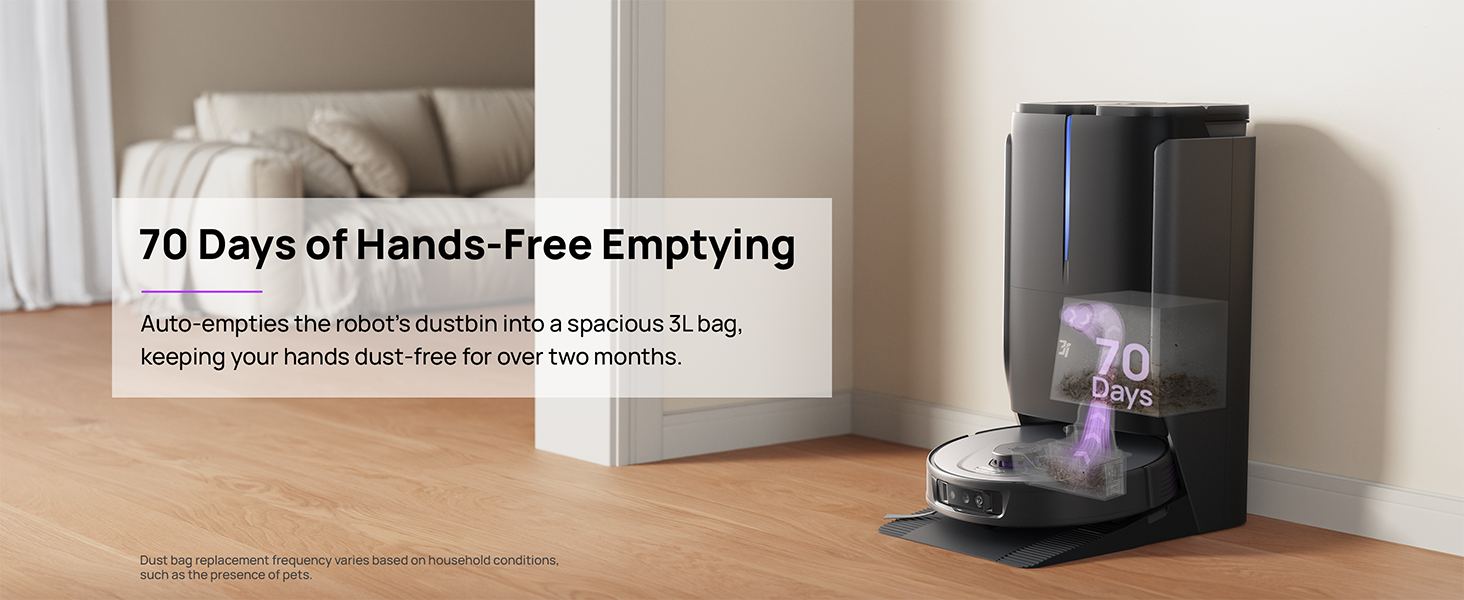
Figure 6.1: Automatic dustbin emptying at the base station.
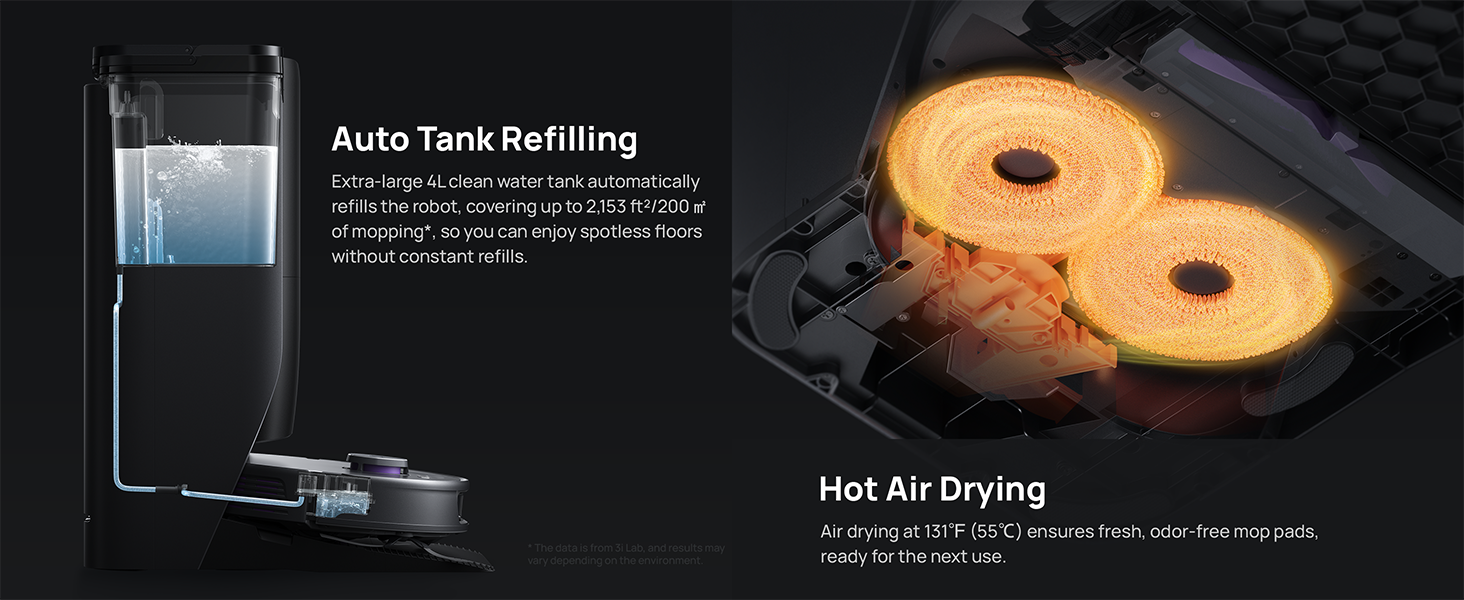
Figure 6.2: Auto tank refilling and hot air drying process.
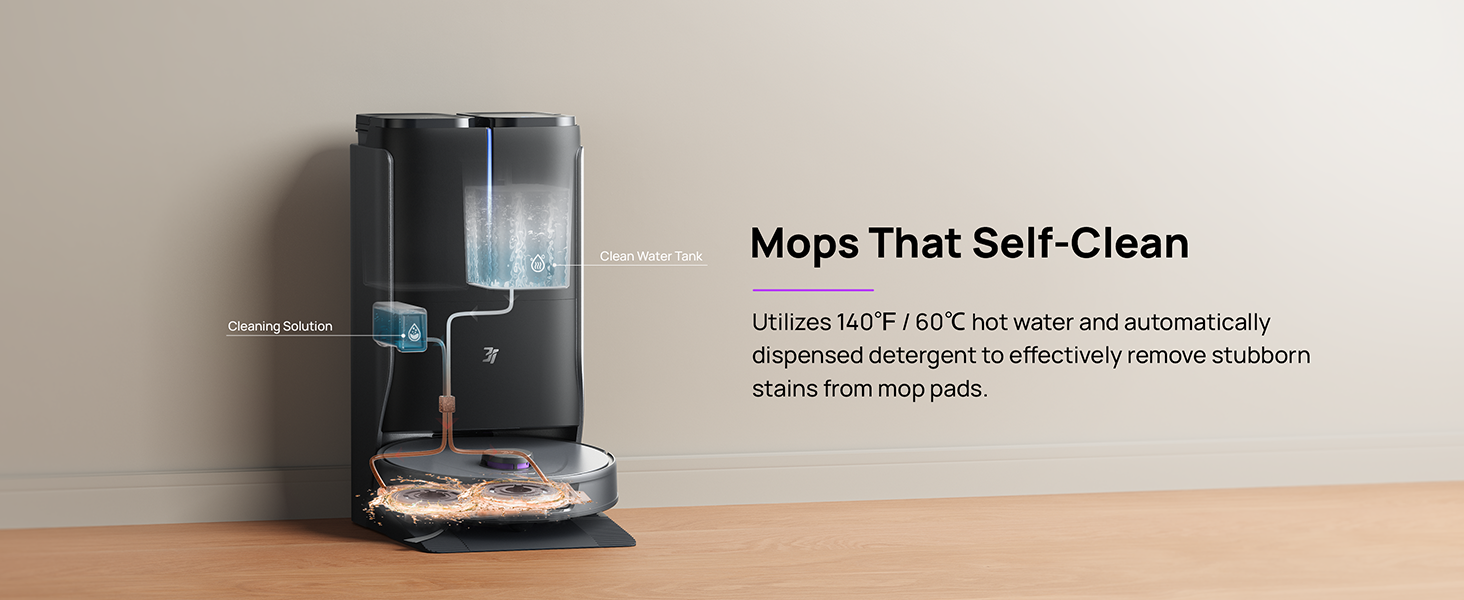
Figure 6.3: Mop self-cleaning function.
6.2 Pangropéa Komponen Robot
- Sikat utama: Regularly check the main brush for tangled hair or debris. Use the cleaning tool provided to remove any obstructions. The TangleCut blade helps prevent excessive tangling.
- Sikat samping: Inspect side brushes for wear or damage. Clean them periodically and replace if necessary.
- Pad pel: Although self-cleaned, inspect mop pads for excessive wear or stubborn stains. Replace them when their cleaning effectiveness diminishes.
- saringan: The filter is washable. Remove and rinse it under running water. Allow it to air dry completely before reinstalling.
- Sénsor: Wipe all sensors (LDS, anti-drop, wall-following, charging contacts) with a clean, dry cloth to ensure proper function.
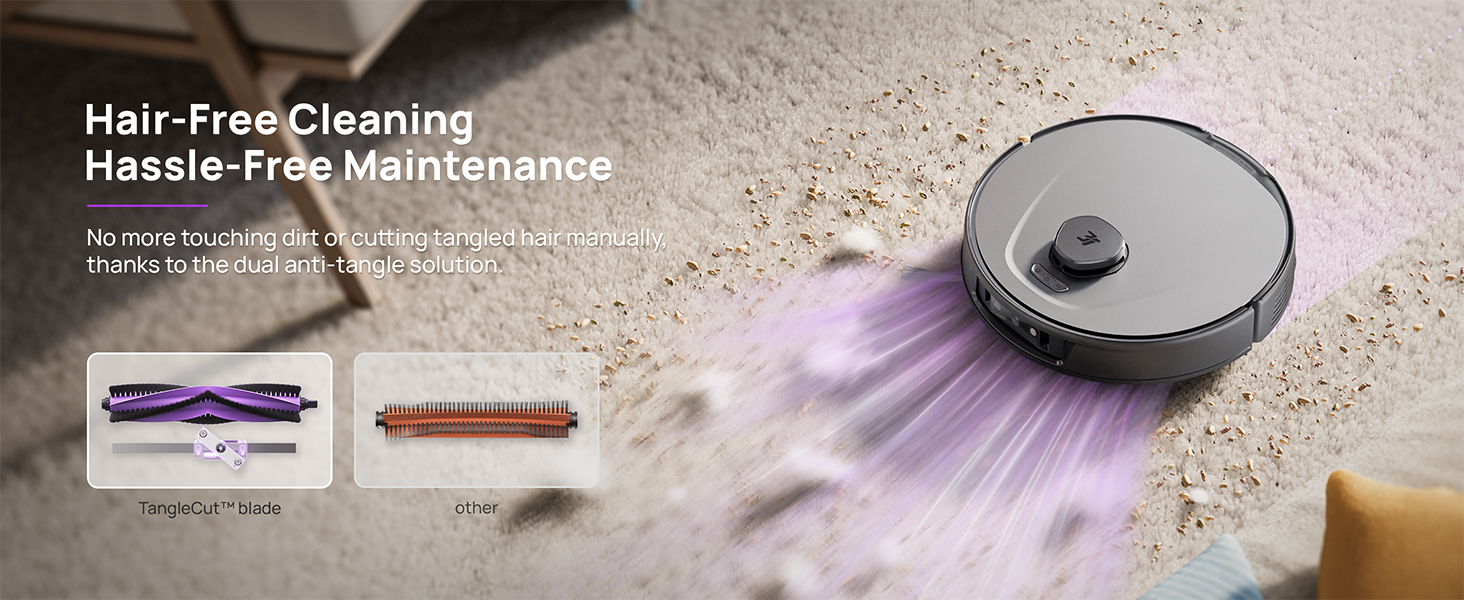
Figure 6.4: Hair-free cleaning with anti-tangle design.
7. Cara ngungkulan
If you encounter issues with your 3i P10 Ultra, refer to the following common problems and solutions:
| Masalah | Mungkin Cukang lantaranana | Solusi |
|---|---|---|
| Robot teu hurung. | batré lemah; Tombol daya teu dipencet leres. | Place robot on charging dock; Press and hold power button for 3 seconds. |
| Robot teu tiasa mendakan dok ngecas. | Dock is obstructed or too far; Poor Wi-Fi signal. | Ensure dock is in an open area; Check Wi-Fi connection. |
| Kinerja beberesih goréng. | Tempat sampah pinuh; Sikat kusut; Filter mampet; Kapas pel kotor. | Empty dustbin; Clean brushes; Clean/replace filter; Clean/replace mop pads. |
| Robot sering macét. | Halangan di lantai; Sensor kotor. | Clear floor of obstacles; Clean all sensors. |
| Masalah sambungan aplikasi. | Sandi Wi-Fi salah; Masalah router; Robot offline. | Verify Wi-Fi password; Restart router; Restart robot; Re-pair device in app. |
For further assistance, please refer to the 3i app's help section or contact customer support.
8. Spésifikasi
| Fitur | Rincian |
|---|---|
| merek | 3i |
| Ngaran modél | 3i P10 Ultra Robot vakum |
| Dimensi Produk (Robot) | 13.78 "L x 13.78" W x 3.94" H |
| Diménsi Produk (Stasion) | 12.2 "L x 18.43" W x 23.39" H |
| Item Beurat | 37.3 pon |
| Kahirupan batré | 180 menit |
| Jenis Filter | Bisa dikumbah |
| Surface Rekomendasi | Carpet, Marble, Wood, Tile |
| Daya nyeuseup | 18,000 Pa |
| System Napigasi | LDS LiDAR, Dual 3D Structured Light, AI Camera |
| Rojongan Wi-Fi | 2.4G sareng 5G |

Figure 8.1: Dimensions of the 3i P10 Ultra Robot and Base Station.
9. Garansi jeung Rojongan
For warranty information, please refer to the warranty card included with your product or visit the official 3i website. For technical support, troubleshooting beyond this manual, or to inquire about replacement parts, please contact 3i customer service through the contact information provided on their official website or within the 3i app.