1. Bubuka
This manual provides essential information for the safe and effective use of your Geokay 16-Inch Rechargeable Doodle Glow LED Note Board. Please read these instructions thoroughly before operating the device and retain them for future reference.

Image: The Geokay 16-Inch Rechargeable Doodle Glow LED Note Board showcasing vibrant, illuminated dinosaur artwork.
2. Naon Kaasup
Pastikeun yén sadaya item anu didaptarkeun di handap aya dina pakét anjeun:
- 1 x Geokay 16-Inch Rechargeable LED Drawing Pad
- 5 x Colorful Liquid Chalk Markers
- 10 x Double-Sided Tracing Papers
- 1 x Kabel Ngecas USB-C
- 1 x Spray Bottle (for cleaning)
- 1 x Kain Pembersih
- 1 x Manual Pamaké
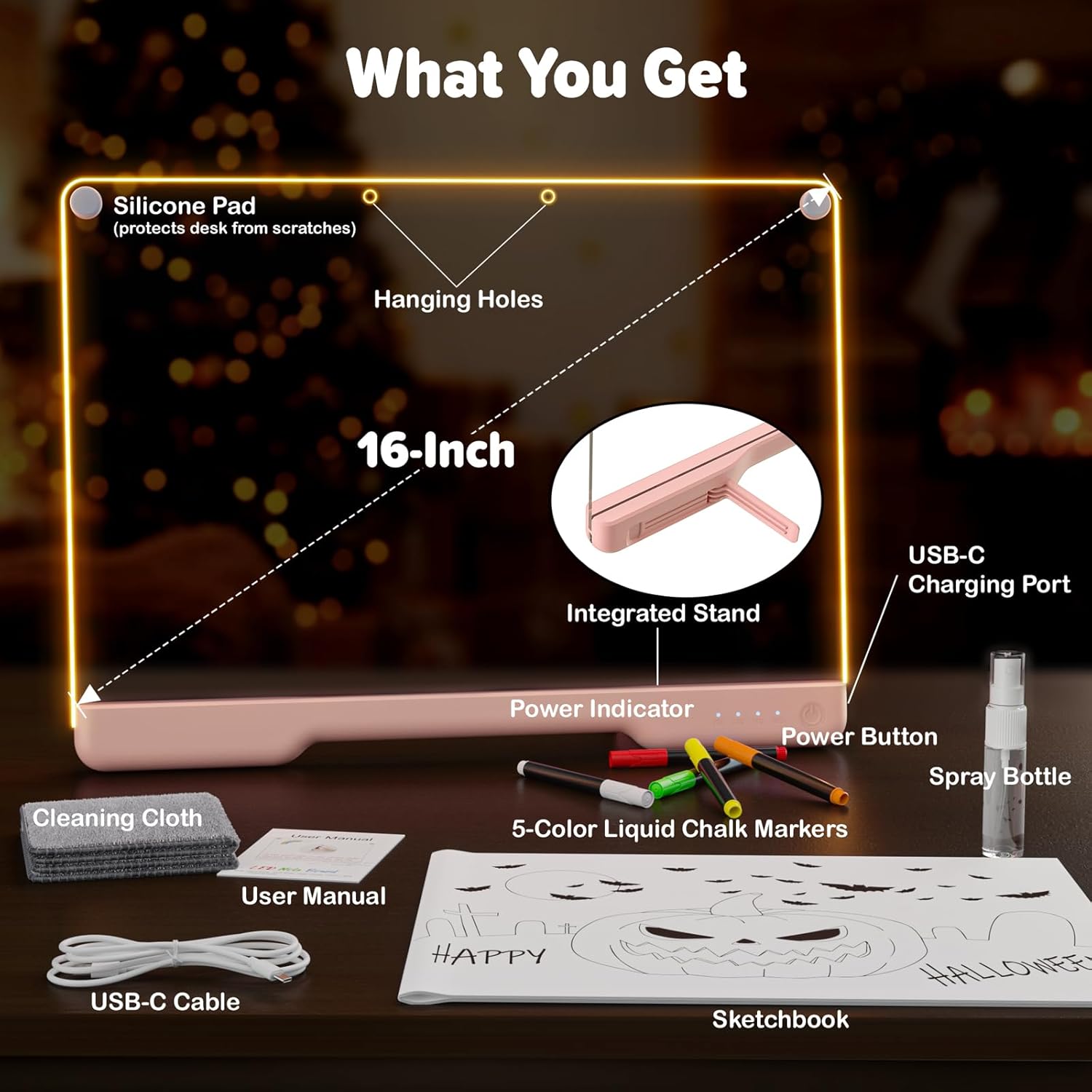
Image: All components included in the Geokay LED Note Board package.
3. Spésifikasi
| Fitur | Rincian |
|---|---|
| Nomer modél | E16 |
| Diménsi | 13.7 x 13.7 x 10 inci |
| Item Beurat | 15 ons |
| Jenis Bahan | Akrilik, Plastik |
| Modeu Lampu | 7-Color (Warm White, Cold White, Red, Purple, Green, Blue, Flashing Mode) |
| Jenis Batré | 1 batré Litium Polimér (kaasup) |
| Battery Life (Unplugged) | Nepi ka 8 jam |
| Input | 5V-1A (supports all phone charge adapters) |
| Tipe Pamasangan | Tabletop Mount and Wall Mount |
4. Setélan
4.1 Ngecas Awal
Before first use, fully charge the LED Note Board using the provided USB-C cable. The battery indicator lights on the base will show the charging progress. The board supports standard 5V-1A phone chargers.
4.2 Preparing Markers
If the liquid chalk markers' color is not vibrant, shake the pen vigorously to help reactivate the ink flow.
4.3 Using the Built-in Stand
The board features a built-in stand for convenient tabletop use. Simply extend the stand from the back of the board to position it upright. For optimal stability when writing or drawing, ensure only the clear acrylic part rests on the surface, not the entire base.
5. Parentah Operasi
5.1 Daya Hurung / Pareum sareng Modeu Lampu
- To turn the board ON or Pareum, pencét jeung tahan tombol daya salila 3 detik.
- To cycle through the 7 available lighting modes (Warm White, Cold White, Red, Purple, Green, Blue, Flashing Mode), single tap the power button.

Image: The LED Note Board demonstrating its 7 different light effects.
5.2 Drawing and Tracing
Use the provided liquid chalk markers to draw directly onto the acrylic surface. The markers' colors will illuminate vibrantly when the board is powered on.
For tracing, place one of the double-sided tracing papers (or your own template) underneath the clear acrylic board. The transparent surface allows you to easily trace the designs. Ensure the clear acrylic board is resting on a flat, stable surface for accurate tracing.

Image: A child using the tracing papers with the LED Note Board.
5.3 Kagunaan Serbaguna
The Geokay LED Note Board can be used as a drawing pad, a message board, a night light, or for decorative purposes. Its rechargeable nature allows for portable use in various settings.
Video: Official product video demonstrating the rechargeable 7-color LED Note Board in various uses.
6. Pangropéa
6.1 Cleaning the Board
To clean the acrylic board and prevent scratches, lightly spray it with water using the included spray bottle, and wipe with the soft cleaning cloth. For drawings left on for over 3 days, a slightly damp cloth or paper towel may be needed for best results.
Important: Do not use alcohol-based cleaning solutions, as they may damage the board's surface.

Image: Demonstrating the effortless cleaning process of the LED Note Board.
7. Cara ngungkulan
7.1 Markers Not Vibrant
If the pen's color is not vibrant, shake the pen to help re-activate the ink.
7.2 Isu séjén
If you encounter any other issues with your product that are not resolved by the above, please refer to the customer service information in Section 8.
8. Émbaran Kasalametan
- Do not use alcohol-based cleaning solutions on the board.
- For optimal stability and accurate tracing, only rest the clear acrylic board on the table when writing/drawing. Do not place the entire base of the board flat on the table.
- Keep the product away from extreme temperatures and direct sunlight.
- Supervise young children during use to prevent accidental ingestion of small parts or markers.
9. Garansi jeung Rojongan
We value your satisfaction. If you encounter any issues with your product, or if it does not meet your expectations, please contact us. We are committed to resolving any problems to your satisfaction.
9.1 Ngahubungan Service Palanggan
Anjeun tiasa ngahubungi kami via email di: donghaixinx@outlook.com. We aim to respond to all inquiries within 24 hours.
9.2 Amazon Returns/Replacements
If you received a product different from what you ordered, or if the product is defective or not functioning as expected, you can initiate a return or replacement through your Amazon account:
- Pindah ka Pesenan Anjeun.
- Choose the item that you want to return or replace.
- Select 'Contact Seller'. You will be directed to the Seller Messaging Assistant.
- Select the appropriate option and start the conversation.


