1. Bubuka jeung Leuwihview
The Edifier G2000 Pro Bluetooth Computer Speakers are designed to deliver an immersive audio experience for gaming, movies, and music. Featuring 7.1 virtual surround sound, customizable RGB lighting, and multiple connectivity options, these speakers are ideal for various desktop setups.
Fitur konci:
- Compact Size, Big Soundstage: 32W RMS, 64W peak power and virtual 7.1 surround sound deliver explosive bass (75Hz) and precise enemy positioning for PC/PS5/Xbox gaming. 3-inch full-range drivers with dual bass reflex boost cinematic immersion. Compact 5.5×4.6×6.3-inch each, ideal for desktop setups.
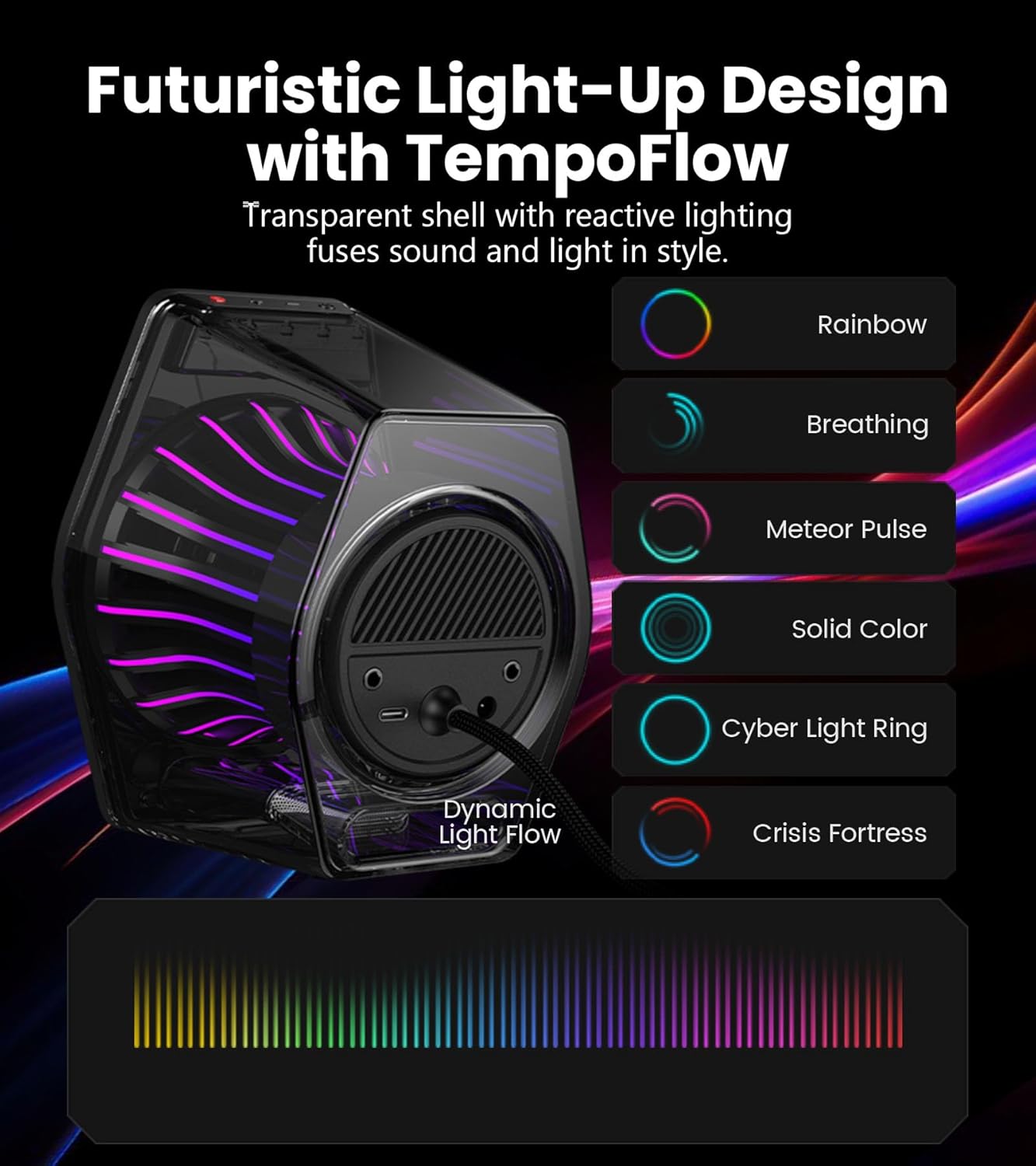
- 270° RGB Light TempoFlow Tech: Unleash the TempoFlow dynamic lighting engine – 20 LED strips + 100 RGB beads sync with gameplay via 7 modes. Control with HECATE software or buttons. Transparent enclosure amplifies 270° dynamic glow, creating a futuristic gaming zone.
- Multi-Device - Bluetooth 5.4/USB/AUX: Bluetooth 5.4 (33ft range) for wireless freedom, USB-C (ultra-low latency) for PC/PS5, 3.5mm AUX for Xbox/Switch. Includes USB-C to USB-A cable, 3.5mm audio cable, and power adapter.
- Pro Acoustic Design & Durability: MDF drivers + DSP chip eliminate distortion. Anti-slip feet isolate vibrations, aluminum caps resist scratches. Tested for 500+ hours in extreme temperatures.
- Game/Movie/Music Modes: Game Mode sharpens footsteps, Movie Mode activates 7.1 surround, Music Mode boosts vocals. Save EQ presets or use tactile buttons for instant switching.

2. Setélan
Follow these steps to set up your Edifier G2000 Pro speakers:
- Bongkarkeun Spikerna: Sacara saksama miceun sadaya komponén tina bungkusan.
- Posisikeun Spiker: Place the speakers on your desktop, ensuring they are angled towards your listening position for optimal sound. The compact size is ideal for various desk setups.
- Connect the Speakers: Use the provided cable to connect the two speakers together.
- Sambungan Daya: Connect the power adapter to the main speaker and then to a power outlet.
- Choose Your Audio Source: Connect your desired device using one of the following methods:
- USB-C: For PC or PS5, use the included USB-C to USB-A cable.
- 3.5mm AUX: For Xbox or Switch, use the included 3.5mm audio cable.
- Bluetooth 5.4: For wireless connection with mobile phones or tablets.

Official unboxing video for the Edifier Hecate G2000 RGB Gaming Speakers, demonstrating the contents and initial setup.
3. Parentah Operasi
The Edifier G2000 Pro speakers offer intuitive controls and multiple audio modes for a tailored listening experience.
Kadali:
- Tombol Daya: Long press to power on/off. Short press to switch between input modes (Bluetooth, USB, AUX).
- Kontrol volume: Adjust volume using the dedicated knob or buttons.
- Tombol Éfék Lampu: Double tap the 'G' button to cycle through 7 RGB lighting modes.
- Ngalihkeun Mode: Use tactile buttons to instantly switch between Game, Movie, and Music modes.
Modeu Audio:
- Modeu Kaulinan: Enhances specific audio cues like footsteps for a competitive gaming advantage.
- Modeu Pilem: Activates 7.1 virtual surround sound for an immersive cinematic experience.
- Modeu Musik: Boosts vocals and optimizes sound for general music listening.

4. RGB Lighting (TempoFlow Tech)
The G2000 Pro speakers feature Edifier's TempoFlow dynamic lighting engine, offering 7 distinct modes with 20 LED strips and 100 RGB beads. The transparent enclosure amplifies the 270° dynamic glow, creating a futuristic gaming atmosphere.
- Aktipkeun: Double tap the 'G' button on the speaker to cycle through the available lighting effects.
- Kustomisasi: Further customization and synchronization with gameplay can be achieved using the HECATE software.
5. Naon dina Box
Your Edifier G2000 Pro speaker package includes:
- Edifier G2000 Pro Speakers (2 units)
- Kabel Daya
- USB-C ka USB-A Cable
- Kabel Audio 3.5mm
- Manual pamaké

6. Spésifikasi
| Fitur | Rincian |
|---|---|
| Ngaran modél | G2000Pro |
| Tipe Speaker | Sakuliling Sora |
| Warna | Bodas |
| Speaker Maksimum Kaluaran Power | 64 Watt (Puncak) / 32W RMS |
| Téhnologi konektipitas | Bluetooth 5.4, USB-C, 3.5mm AUX |
| Ukuran Speaker | 3 Inches (Full-range drivers) |
| Rasio Signal-to-Noise | 96 dB |
| Dimensi produk | 11.69 "D x 9.88" W x 7.08" H |
| Item Beurat | 3.52 pon (1.6 Kilogram) |
| Bahan | MDF |
7. Pangropéa
Pikeun mastikeun umur panjang sareng kinerja optimal tina spéker Edifier G2000 Pro anjeun, turutan tungtunan pangropéa ieu:
- beberesih: Use a soft, dry cloth to wipe the speaker surfaces. Avoid abrasive cleaners or solvents that may damage the finish.
- panempatan: Place speakers on a stable surface to prevent accidental falls. Ensure adequate ventilation around the speakers.
- Suhu: Avoid exposing the speakers to extreme temperatures or high humidity.
- Perlindungan: The aluminum caps are designed to resist scratches, but handle with care to maintain their appearance.
8. Cara ngungkulan
If you encounter issues with your Edifier G2000 Pro speakers, try the following troubleshooting steps:
- Henteu aya sora:
- Ensure the speakers are powered on and the volume is turned up.
- Verify that the correct input mode (Bluetooth, USB, AUX) is selected on the speaker. Short press the power button to cycle through modes.
- Pariksa sadaya kabel audio pikeun sambungan aman.
- Confirm that the audio output on your connected device (PC, console, phone) is not muted and volume is sufficient.
- Masalah Nyapasangkeun Bluetooth:
- Ensure the speakers are in Bluetooth pairing mode (indicated by a flashing light).
- Pareuman sareng aktipkeun deui Bluetooth dina alat anjeun.
- Remove the speakers from your device's paired list and attempt to pair again.
- Sora distort:
- Lower the volume on both the speakers and the connected device.
- Pariksa heula bisi aya sambungan kabel anu kendor.
- Ensure the speakers are not placed too close to other electronic devices that might cause interference.
- Lampu RGB Teu Gawé:
- Double tap the 'G' button to cycle through lighting modes.
- Pastikeun spiker diaktipkeun.
9. Garansi jeung Rojongan
Kanggo inpormasi garansi sareng dukungan téknis, mangga tingal Edifier resmi website or contact Edifier customer service directly. Keep your purchase receipt as proof of purchase for warranty claims.


