
1. Bubuka
Thank you for choosing the LIGE Smartwatch EF12-B. This manual provides essential information for setting up, operating, and maintaining your device. Please read it carefully to ensure optimal performance and longevity of your smartwatch.

Figure 1: LIGE Smartwatch EF12-B, main product view.
2. Fitur konci
The LIGE Smartwatch EF12-B is designed with advanced functionalities to enhance your daily life and fitness routine:
- Telepon Bluetooth: Nelepon sareng nampi telepon langsung tina pigeulang anjeun.
- Bewara pinter: Receive alerts for messages from social media apps like Facebook, WhatsApp, Instagram, jeung Twitter.
- Batré Awét: Equipped with a 1000mAh battery, offering up to 10-15 days of typical use and over 40 days standby.
- Layar AMOLED 1.75 inci: A vibrant and clear display with 360x360 resolution, visible even in direct sunlight.
- Beungeut arloji anu tiasa disaluyukeun: Choose from over 200 watch faces or create your own via the FitCloudPro app.
- 100+ Modeu Olahraga: Track various activities including walking, running, cycling, skipping, badminton, basketball, and football.
- Tahan cai IP68: Designed to withstand hand washing, sudden rain, and extreme sports without damage from sweat.
- Pangimeutan Kaséhatan Komprehensif: Real-time heart rate, blood oxygen, and automatic sleep tracking (deep sleep, light sleep).
- Multifunctional Tools: Includes calculator, weather display, alarm clock, timer, stopwatch, music and camera control, and find phone/watch functions.
- Asistén Sora: Activate your phone's voice assistant for calls, music, weather, and more.
- Senter Diwangun-di: A convenient flashlight function with continuous, warning, and SOS modes.

Figure 2: The smartwatch meets military standards for durability, including IP68 water resistance, shockproof, dustproof, and resistance to extreme temperatures.
3. Setup Awal
3.1 Eusi pakét
Sateuacan ngamimitian, pastikeun sadaya barang parantos aya:
- LIGE Smartwatch EF12-B
- Kabel Ngecas
- Manual pamaké

Figure 3: Package contents and smartwatch dimensions.
3.2 Ngecas Smartwatch
Connect the charging cable to the charging port on the back of the smartwatch and plug the USB end into a power adapter (not included) or a computer's USB port. The watch will display a charging indicator. A full charge typically takes approximately 2 hours.
3.3 Pamasangan Aplikasi sareng Papasangan
To unlock all features, download and install the "FitCloudPro" app on your smartphone. The smartwatch is compatible with Android 5.0+ and iOS 10.0+ devices.
- Scan the QR code in the manual or search for "FitCloudPro" in your phone's app store.
- Buka aplikasi teras turutan pitunjuk dina layar pikeun nyieun akun sareng nyetél pro anjeunfile.
- Aktipkeun Bluetooth dina smartphone Anjeun.
- In the FitCloudPro app, navigate to the device section and search for your LIGE Smartwatch (EF12-B).
- Select your smartwatch from the list to pair. Confirm the pairing request on both your phone and the watch.
4. Parentah Operasi
4.1 Napigasi Dasar
- Layar cabak: Swipe left/right, up/down to navigate menus and select functions.
- Kancing samping: Use the physical buttons on the side for power, back, or quick access to specific features.
4.2 Telepon sareng Bewara Bluetooth
Once paired, you can manage calls and notifications directly from your watch.
- Nelepon: Access the dial pad or contacts list on your watch to initiate calls.
- Ngajawab Telepon: Tap the green icon on the watch screen when an incoming call is received.
- Bewara: Messages from social media apps will appear as vibrating alerts on your watch. Swipe down from the top of the screen to view bewara panganyarna.

Figure 4: Smartwatch displaying an incoming Bluetooth call.
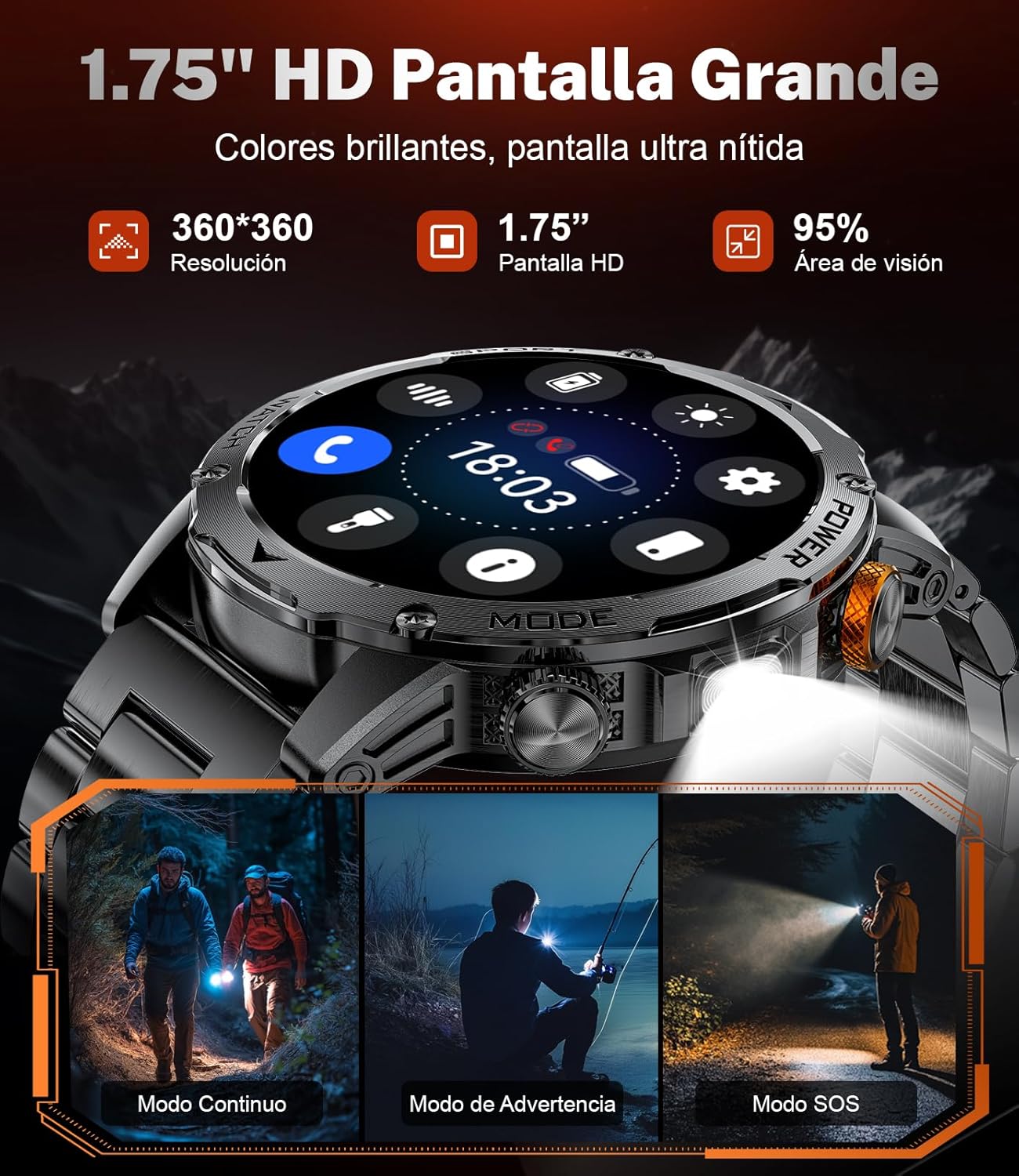
Figure 5: Smartwatch displaying social media message notifications.
4.3 Pangimeutan Kaséhatan
Smartwatch ieu terus-terusan ngawaskeun metrik kaséhatan anjeun:
- Laju Jantung: Real-time heart rate monitoring. Access the heart rate interface to view your current BPM.
- Oksigén getih: Ukur tingkat jenuh oksigén getih anjeun.
- Nyukcruk saré: Automatically detects and analyzes your sleep patterns, including deep and light sleep duration. View detailed sleep reports in the FitCloudPro app.

Gambar 6: Fitur ngawas kaséhatan kalebet denyut jantung, oksigén getih, sareng nyukcruk bobo.
4.4 Modeu Olahraga
Select from over 100 sports modes to track your workouts. The watch records steps, distance, calories, and other activity data.
- Navigate to the sports mode menu.
- Pilih kagiatan anu dipikahoyong (contona, leumpang, lumpat, ngagowes).
- The watch will begin tracking your performance.

Figure 7: Smartwatch displaying various sports modes and tracking data like calories, steps, and distance.
4.5 Fungsi senter
The smartwatch includes a built-in flashlight. Activate it via the quick settings or a dedicated button. It offers continuous, warning, and SOS modes for different situations.

Figure 8: The smartwatch's LED flashlight illuminating the path during outdoor activities.
4.6 Fungsi séjén
Explore additional features through the watch's menu:
- Kontrol Musik: Maénkeun, eureunkeun, luncatan lagu dina telepon anjeun.
- Kaméra jauh: Anggo jam tangan anjeun salaku jepret jauh pikeun kaméra telepon anjeun.
- Cuaca: View kaayaan cuaca ayeuna jeung ramalan.
- Jam alarem: Setel alarm langsung tina arloji.
- Pangatur Waktu/Stopwatch: Utilize for various timing needs.
- Pilarian Telepon / Jam tangan: Panggihan alat Anjeun dipasangkeun.
- Asistén Sora: Interact with your phone's voice assistant.

Figure 9: Smartwatch functions including music control, weather display, and remote camera operation.

Figure 10: Smartwatch features such as drink reminders, stopwatch, alarm, and sedentary alerts.
5. Pangropéa
5.1 beberesih
Regularly clean your smartwatch and strap with a soft, dry cloth. If necessary, use a slightly damp lawon sareng sabun hampang, teras bilas sareng garingkeun dugi ka tuntas. Hindarkeun bahan kimia anu keras atanapi bahan anu abrasif.
5.2 Tahan Cai (IP68)
The LIGE Smartwatch EF12-B is IP68 water-resistant, meaning it can withstand dust, splashes, and brief immersion in water. It is suitable for hand washing, rain, and sweat during exercise. However, it is teu dianjurkeun for hot showers, saunas, or diving, as steam and high water pressure can compromise the seals.
5.3 Panyimpenan
Store the smartwatch in a cool, dry place when not in use. Avoid extreme temperatures and direct sunlight.
6. Cara ngungkulan
Upami anjeun ngalaman masalah sareng jam tangan pinter anjeun, tingali solusi umum ieu:
| Masalah | Solusi anu mungkin |
|---|---|
| Arloji teu hurung | Pastikeun arloji dicas pinuh. Sambungkeun ka carjer sahenteuna 30 menit. |
| Teu tiasa dipasangkeun sareng telepon | Make sure Bluetooth is enabled on your phone. Ensure the watch is within range. Restart both the watch and phone. Check the FitCloudPro app for pairing instructions. |
| Bewara teu katarima | Verify that notifications are enabled in the FitCloudPro app and in your phone's settings for the relevant apps. Ensure the app is running in the background. |
| Data kaséhatan teu akurat | Ensure the watch is worn snugly on your wrist, not too tight or too loose. Keep the sensor clean. Note that the data is for reference and not for medical use. |
| Flashlight won't turn off | Cobi hurungkeun deui jam tanganna. Upami masalahna masih aya, hubungi dukungan palanggan. |
Lamun masalah persists sanggeus nyobian solusi ieu, mangga ngahubungan rojongan customer.
7. Spésifikasi
| Fitur | Rincian |
|---|---|
| Ngaran modél | EF12-B |
| merek | LIGE |
| Ukuran layar | 1.75 inci |
| Tipe tampilan | AMOLED |
| Resolusi | 360 x 360 |
| Kapasitas batré | 1000 mAh |
| Jenis Batré | Polimér |
| Waktu Ngecas | 2 Jam |
| Téhnologi konektipitas | Bluetooth |
| Standar Komunikasi Nirkabel | Bluetooth |
| Tingkat Résistansi Cai | IP68 (Tahan Cai) |
| Jenis Bahan Tali | Silikon |
| Dimensi produk | 6 x 2 x 3 séntiméter |
| Item Beurat | 90 gram |
| Alat nu cocog | Smartphone (Android 5.0+, ios 10.0+) |
| Jinis Pangukuran | Heart Rate Monitor, Sleep Duration, Distance, Step Count, Blood Oxygen Monitor |
| Fitur husus | Camera (Remote Control) |
8. Jaminan & Dukungan
8.1 Garansi Produk
This LIGE Smartwatch EF12-B comes with a 2-year product warranty. Please retain your proof of purchase for warranty claims. The warranty covers manufacturing defects but does not cover damage caused by misuse, accidents, unauthorized repairs, or normal wear and tear.
8.2 Rojongan Palanggan
For technical assistance, troubleshooting, or warranty inquiries, please contact LIGE customer support through the retailer where you purchased the product or visit the official LIGE websitus pikeun inpo kontak.
9. Video produk
Video 1: This video demonstrates the LIGE Smartwatch EF12-B's durability through various tests including impact, drilling, and freezing. It also showcases its water resistance and key user interface features such as Bluetooth calls, flashlight modes, sports tracking, and health monitoring functions like heart rate and sleep tracking.