Bubuka
Thank you for choosing the AOSU Solar Wall Light Camera System. This system integrates a security camera with a solar-powered wall light, offering comprehensive surveillance and illumination for your property. This manual provides detailed instructions for installation, operation, maintenance, and troubleshooting to ensure optimal performance of your device.
Eusi pakét
Please check the package for the following items. If any items are missing or damaged, please contact AOSU customer support.
- AOSU Solar Wall Light Camera Unit
- Detachable Solar Panel
- Ningkatna Kurung
- Mounting Screw Kit (screws, wall anchors)
- Kabel Ngecas USB
- Gancang Mimitian Guide
- Témplat Bor
Produk Leuwihview
Familiarize yourself with the components of your AOSU Solar Wall Light Camera System.
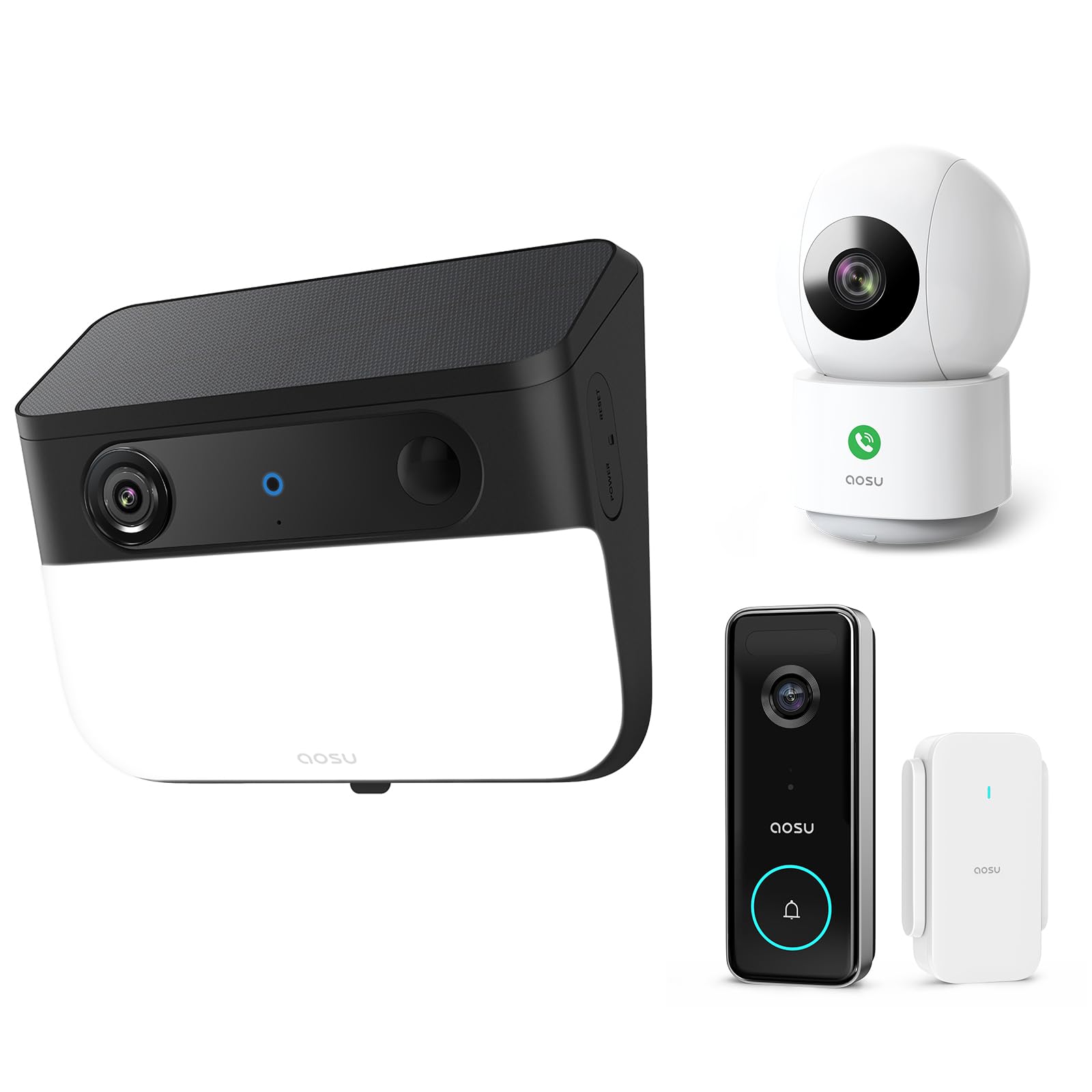
Image 1: AOSU Solar Wall Light Camera System. This image displays the main camera unit integrated with a wall light, alongside its detachable solar panel.
- Lensa kaméra: Nangkep video footage.
- Panel Lampu LED: Provides 400-lumen illumination.
- Sensor Pir: Detects passive infrared motion.
- Sénsor radar: Enhances motion detection accuracy.
- Mikropon: Ngarékam audio.
- Speaker: Enables two-way audio communication and siren.
- Solar Panel Port: Connects the detachable solar panel for charging.
- Tombol Reset: Used for factory reset (typically located under a cover).
- Lampu Indikator Status: Shows device status (e.g., charging, connected, recording).
Disetél
1. Ngecas Awal
Before installation, fully charge the camera unit using the provided USB cable. Connect the USB cable to the charging port on the camera and a standard 5V/2A USB power adapter (not included). The status indicator light will show charging progress.
2. Instalasi Aplikasi sareng Nyiptakeun Akun
- Download the "AOSU Security" app from the Apple App Store or Google Play Store.
- Buka aplikasi teras jieun akun anyar, atanapi lebet upami anjeun parantos gaduh.
3. Papasangan Parangkat
- In the AOSU Security app, tap the "+" icon to add a new device.
- Select "Solar Wall Light Camera" from the list of devices.
- Follow the on-screen instructions to power on the camera and scan the QR code displayed in the app using the camera's lens.
- Connect the camera to your 2.4GHz Wi-Fi network. Ensure your Wi-Fi signal is strong at the installation location.
- Once connected, name your device and complete the pairing process.
4. Pasang Kaméra sareng Panel Surya
Pilih lokasi pamasangan anu nyadiakeun cahaya anu jelas view daérah anu anjeun hoyong pantau sareng tampi ampsinar panonpoé langsung pikeun panel surya.
- Nyirian: Use the drill template to mark the screw positions on the wall.
- Pangeboran: Drill holes at the marked positions. Insert wall anchors if mounting on masonry or stucco.
- Ningkatna bracket: Ngamankeun bracket ningkatna kana témbok ngagunakeun screws disadiakeun.
- Pasang kaméra: Slide the camera unit onto the mounting bracket until it clicks into place. Adjust the camera angle as needed.
- Pamasangan Panel Surya:
- Mount the detachable solar panel in a location that receives maximum direct sunlight throughout the day.
- Connect the solar panel cable to the solar panel port on the camera unit. Ensure a secure connection.
Parentah Operasi
Hirup View jeung Rékam
- Open the AOSU Security app and select your camera to access the live view.
- Ti live view, you can manually record video, take screenshots, and use two-way audio.
- Recorded events are stored in the cloud or on a local storage card (if installed).
Deteksi gerak sareng Tanda
- The camera utilizes advanced radar and PIR motion sensors for accurate detection.
- Configure motion detection sensitivity and activity zones within the app settings.
- Aktipkeun bewara push pikeun nampi bewara dina smartphone anjeun nalika aya gerakan anu dideteksi.
- Smart Motion Tracking: Activate this feature in the app to allow the camera to automatically follow detected objects within its field of view.
Wall Light Operation
- The 400-lumen wall light automatically activates at night when motion is detected.
- Adjust light duration and brightness settings via the AOSU Security app.
Warna Peuting Visi
The camera provides vivid, full-color images even in low-light conditions or complete darkness, thanks to its advanced color night vision technology. This feature activates automatically.
Doorbell Camera Functionality (if applicable)
If your model includes doorbell functionality, visitors can press the doorbell button. This will trigger a notification on your phone, allowing you to see and speak to the visitor via the app.
Pangropéa
- beberesih: Regularly wipe the camera lens, light panel, and solar panel with a soft, damp lawon pikeun miceun lebu sareng kokotor. Entong nganggo bahan kimia anu keras.
- Efisiensi panel surya: Ensure the solar panel remains free from obstructions (e.g., leaves, snow) to maximize charging efficiency.
- Pembaruan firmware: Periodically check the AOSU Security app for available firmware updates. Keeping your device's firmware up-to-date ensures optimal performance and security. Follow the in-app instructions for updates.
- Perawatan batré: While solar-powered, extreme cold or prolonged periods without sunlight may reduce battery performance. Ensure the solar panel receives adequate sunlight.
Pamérésan masalah
Kaméra Teu Nyambung ka Wi-Fi
- Pastikeun jaringan Wi-Fi anjeun 2.4GHz. Kaméra henteu ngadukung Wi-Fi 5GHz.
- Check Wi-Fi signal strength at the camera's location. Move the router closer or use a Wi-Fi extender if necessary.
- Pastikeun kecap akses Wi-Fi anu diasupkeun dina aplikasi leres.
- Try resetting the camera by pressing the reset button for 5 seconds until you hear a prompt.
Kualitas Gambar Miskin
- Bersihkeun lénsa kaméra pikeun miceun smudge atanapi kokotor.
- Ensure there is adequate lighting in the monitored area, especially for color night vision.
- Check your internet connection speed. A slow connection can affect live view kualitas.
Motion Detection Not Working or Too Many False Alerts
- Adjust motion detection sensitivity settings in the app.
- Define specific activity zones to focus detection on critical areas and ignore irrelevant movements.
- Pastikeun kaméra urang view is not obstructed by moving objects like tree branches.
Panel Surya Teu Ngecas
- Pastikeun kabel panel surya parantos nyambung ka kaméra kalayan pageuh.
- Ensure the solar panel is positioned to receive direct sunlight for several hours daily, free from shade.
- Clean the surface of the solar panel to remove any dirt or debris.
spésifikasi
| Resolusi | 5MP Ultra HD (3K) |
| Visi Peuting | Advanced Color Night Vision |
| Kaluaran cahaya | 400 Lumén |
| Deteksi gerak | Triple Motion Detection (Radar + PIR + Human Detection) |
| nyukcruk | Smart Motion nyukcruk |
| Konektipitas | Wi-Fi 2.4GHz |
| Sumber Daya | Rechargeable Battery, Solar Panel |
| Lensa optik | 7-piece ultra-clear optical glass lens |
| ASIN | B0F7Y1PRVT |
| Kahiji Sadia | 25 Maret 2025 |
Garansi sareng Rojongan
AOSU provides a limited warranty for this product. For detailed warranty information, please refer to the warranty card included in your package or visit the official AOSU website. For technical support, product inquiries, or warranty claims, please contact AOSU customer service through the contact information provided on the official website or within the AOSU Security app.
Resmi Websitus: www.aosu.com (Catetan: Ieu placeholder a URL, please refer to your product documentation for the correct websitus.)


