1. Bubuka
The IRRADIO IR-203 Sound+ is a compact and portable wireless speaker designed for high-quality audio playback. Featuring Bluetooth 5.0 connectivity and a USB port for external media, it offers versatile listening options. Its robust design and long-lasting battery make it ideal for both home use and on-the-go entertainment.

Gambar 1.1: IRRADIO IR-203 Sound+ Wireless Speaker. This image shows the speaker from an angled perspective, highlighting its compact size and fabric grille.
2. Émbaran Kasalametan
Mangga baca sakabeh parentah kaamanan taliti saméméh ngagunakeun alat. Simpen manual ieu pikeun rujukan ka hareup.
- Do not expose the speaker to water or excessive moisture. This product is not waterproof.
- Avoid extreme temperatures. Do not place near heat sources or in direct sunlight.
- Do not disassemble, repair, or modify the device. This will void the warranty and may cause damage or injury.
- Paké ngan vol ngecas dieusiantage (DC 5V/2A).
- Jauhkeun tina jangkauan barudak.
3. Eusi Paket
Pastikeun sadaya item aya dina bungkusan:
- IRRADIO IR-203 Sound+ Wireless Speaker
- Kabel Ngecas USB
- Manual pangguna (dokumén ieu)
4. Produk Langkungview
4.1. Kontrol jeung palabuhan

Gambar 4.1: Samping view of the speaker showing control buttons. From left to right: Mode button (M), Volume Down (-), Volume Up (+), Play/Pause/Next Track button (▶).

Gambar 4.2: Balik deui view of the speaker showing connectivity ports. From left to right: TF (MicroSD) card slot, USB-A port, ON/OFF switch, DC 5V charging port.
The speaker features intuitive controls on its top edge and essential connectivity ports on its rear panel.
- Tombol Mode (M): Press to switch between Bluetooth and USB playback modes.
- Volume Turun (-): Pencét pikeun ngirangan polumeu.
- Volume Naik (+): Pencét pikeun ningkatkeun volume.
- Play/Pause/Next Track (▶): Press to play or pause audio. Long press to skip to the next track.
- Slot Kartu TF: Insert a MicroSD card for direct audio playback.
- Port USB-A: Selapkeun USB flash drive pikeun playback audio langsung.
- Hurungkeun ON / OFF: Slide to power the speaker on or off.
- Port DC 5V: Connect the USB charging cable here to charge the speaker.
5. Setélan
5.1. Ngecas Speaker
Before first use, fully charge the speaker. The battery capacity is 400 mAh.
- Connect the provided USB charging cable to the DC 5V port on the speaker.
- Connect the other end of the USB cable to a compatible USB power adapter (DC 5V/2A recommended) or a computer USB port.
- Lampu indikator ngecas bakal hurung (warna tiasa rupa-rupa) pikeun nunjukkeun yén spiker nuju ngecas.
- Ngecas biasana peryogi waktos sakitar 2 jam kanggo ngecas pinuh. Lampu indikator bakal robih atanapi pareum saatos ngecas réngsé.
A full charge provides approximately 2 hours and 40 minutes of continuous playback at 50% volume.
5.2. Powering on / Pareum
To power on the speaker, slide the ON/OFF switch to the 'ON' position. You will hear an audible prompt. To power off, slide the switch to the 'OFF' position.
6. Parentah Operasi
6.1. Papasangan Bluetooth
The speaker uses Bluetooth 5.0 for stable wireless connection up to 10 meters.
- Ensure the speaker is powered on and in Bluetooth mode. If not, press the 'M' (Mode) button to switch to Bluetooth mode. The speaker will enter pairing mode, indicated by a flashing LED light and an audible prompt.
- Dina alat anjeun (smartphone, tablet, laptop), aktipkeun Bluetooth sareng milarian alat anu sayogi.
- Select "IRRADIO IR-203 Sound+" from the list of found devices.
- Sakali dipasangkeun, speaker bakal masihan konfirmasi anu tiasa didangu, sareng lampu LED bakal eureun kedip-kedip.
- Anjeun ayeuna bisa muterkeun audio tina alat Anjeun ngaliwatan speaker.
Catetan: Spéker bakal otomatis nyobian nyambung deui ka alat anu dipasangkeun terakhir nalika diaktipkeun.
6.2. Putereun Kartu USB/TF
The speaker supports direct audio playback from a USB flash drive or a MicroSD (TF) card.
- Insert a USB flash drive into the USB-A port or a MicroSD card into the TF card slot.
- The speaker will automatically switch to USB/TF card mode and begin playing audio files (MP3, WAV, etc.) from the inserted storage device. If it does not switch automatically, press the 'M' (Mode) button to select the correct mode.
- Use the Play/Pause/Next Track button (▶) to control playback.
6.3. Volume Control
Anggo tombol '+' sareng '-' dina spiker pikeun nyaluyukeun volume. Anjeun ogé tiasa ngontrol volume tina alat anu nyambung.
7. Pangropéa
Pikeun mastikeun umur panjang sareng kinerja optimal spéker anjeun, turutan tungtunan pangropéa ieu:
- beberesih: Anggo lawon anu lemes sareng garing pikeun ngusap permukaan spiker. Entong nganggo pembersih anu abrasif, alkohol, atanapi pangleyur kimia.
- Panyimpenan: Lamun teu dipaké pikeun période nambahan, nyimpen speaker dina tiis, tempat garing jauh ti sinar panonpoé langsung jeung hawa ekstrim.
- Perawatan batré: Pikeun ngahémat umur batré, ulah sering-sering ngosongkeun batréna. Cas spiker sacara rutin, sanaos teu dianggo.
8. Cara ngungkulan
If you encounter issues with your IRRADIO IR-203 Sound+ speaker, refer to the following common problems and solutions:
| Masalah | Mungkin Cukang lantaranana | Solusi |
|---|---|---|
| Speaker teu hurung. | Batré béak. | Ngecas spéker sahenteuna 30 menit. |
| Taya sora. | Volume handap teuing atawa diredam. Modeu salah dipilih. | Increase volume on both speaker and connected device. Press 'M' button to switch modes. |
| Teu bisa masangkeun via Bluetooth. | Spiker teu dina modeu pairing. Alatna jauh teuing. Gangguan. | Ensure speaker is in Bluetooth pairing mode (flashing LED). Move device closer to speaker (within 10m). Turn off other Bluetooth devices. |
| USB / kartu TF teu maén. | Lepat file format. Kartu/drive teu dipasang kalawan bener. | Pastikeun audio files are in supported format (e.g., MP3). Reinsert the USB drive or TF card firmly. Press 'M' button to select USB/TF mode. |
Lamun masalah persists sanggeus nyobian solusi ieu, mangga ngahubungan rojongan customer.
9. Spésifikasi
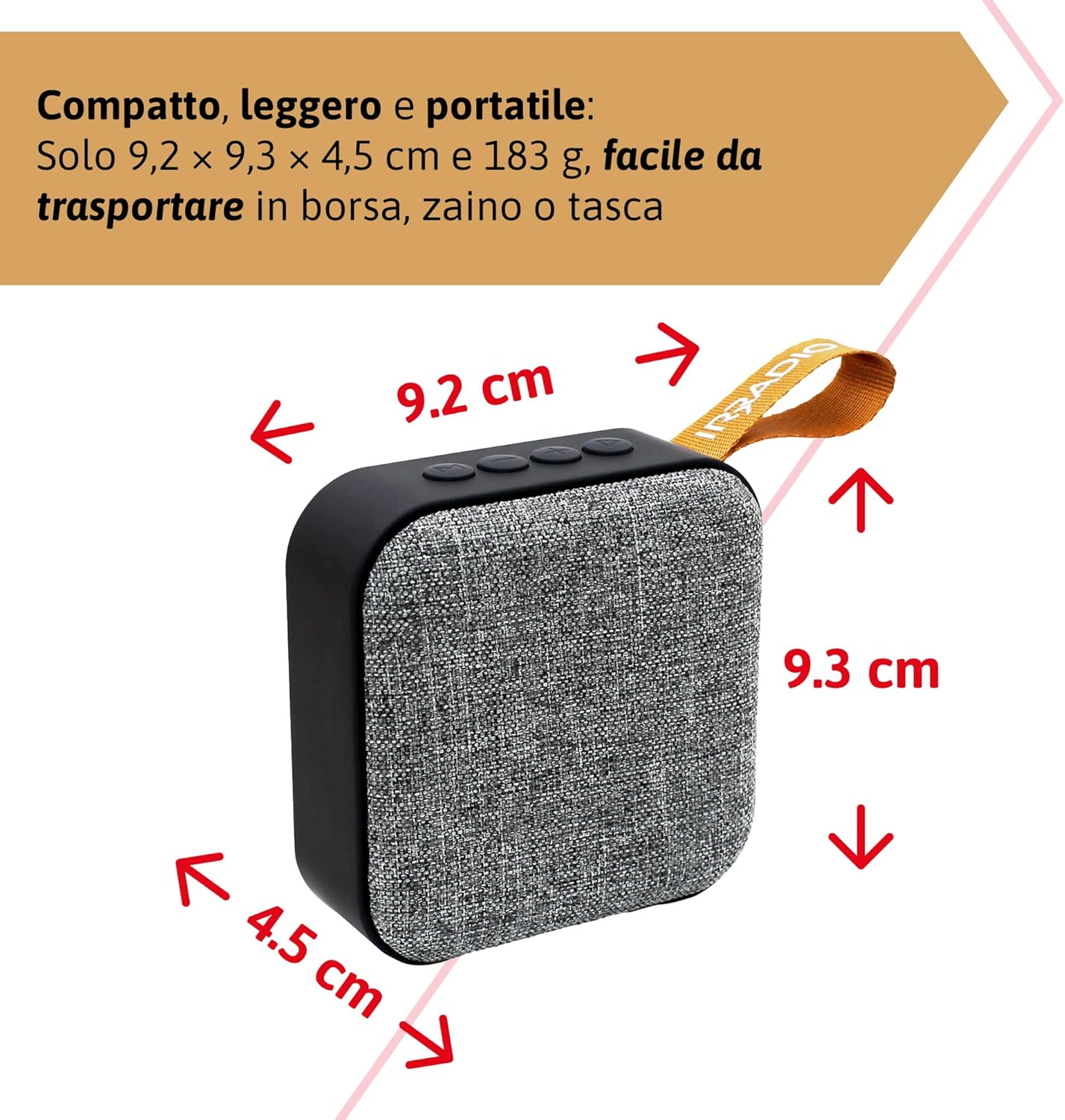
Gambar 9.1: Dimensions of the IRRADIO IR-203 Sound+ speaker: 9.2 cm (width) x 9.3 cm (height) x 4.5 cm (depth).
| Fitur | Rincian |
|---|---|
| Ngaran modél | IR-203 Sound+ |
| Nomer Modél Item | 550922126 |
| merek | IRRADIO |
| Dimensi produk | 9.2 x 9.3 x 4.5 cm |
| Beurat | 183 gram |
| Tipe Speaker | Woofer (Full Range 50mm Driver + Passive Radiator) |
| Max Speaker Kaluaran Power | 3.5 Watt RMS |
| Téhnologi konektipitas | Bluetooth 5.0, USB |
| Jarak transmisi nirkabel | Nepi ka 10 méter (tanpa halangan) |
| Mode Kaluaran Audio | Stereo |
| Kapasitas batré | 400 mAh (3.7V, 1.48 Wh) |
| Kahirupan batré | Approx. 2 hours 40 minutes (at 50% volume) |
| Waktu Ngecas | Kira-kira. 2 jam |
| Ngecas Input | DC 5V / 2A |
| Alat nu cocog | Smartphones, Tablets, Laptops, Desktop Computers, MP3 Players, USB Flash Drives |
| Warna | kulawu |
| Tahan cai | No |
10. Garansi jeung Rojongan
10.1. Émbaran jaminan
For information regarding warranty and returns, please refer to the purchase platform's policies. Typically, products purchased on Amazon.it can be returned within 30 days of receipt if you change your mind. For defective or damaged products, specific return policies apply.
For specific information on purchases made through the Marketplace, please consult the relevant help page on the platform.
10.2. Rojongan Palanggan
For further assistance, technical support, or inquiries about your IRRADIO IR-203 Sound+ speaker, please visit the official IRRADIO store page:


