1. Émbaran Kasalametan
Please read and understand all safety instructions before installing or using the MONTECH HS02 PRO PC Case. Failure to follow these instructions may result in damage to the product, personal injury, or voiding of the warranty.
- Kasalametan listrik: Ensure all power components are properly grounded and connected. Disconnect power before performing any installation or maintenance.
- Penanganan: The case contains tempered glass panels. Handle with care to prevent breakage. Avoid dropping or subjecting the case to strong impacts.
- Ventilasi: Ensure adequate airflow around the case to prevent overheating. Do not block ventilation openings.
- Lingkungan: Operate the case in a dry, stable environment. Avoid extreme temperatures, humidity, and direct sunlight.
- Barudak jeung Pets: Keep the product and its components out of reach of children and pets. Small parts can be a choking hazard.
2. Eusi Paket
Verify that all items listed below are present in your package. If any items are missing or damaged, please contact Montech customer support.
- MONTECH HS02 PRO ATX Mid-Tower PC Case
- Kotak Asesoris (screws, dasi seleting, standoffs, jsb)
- Manual pangguna (dokumén ieu)
- Pre-installed GF120 V2 ARGB Fans (5x)
3. Produk Langkungview
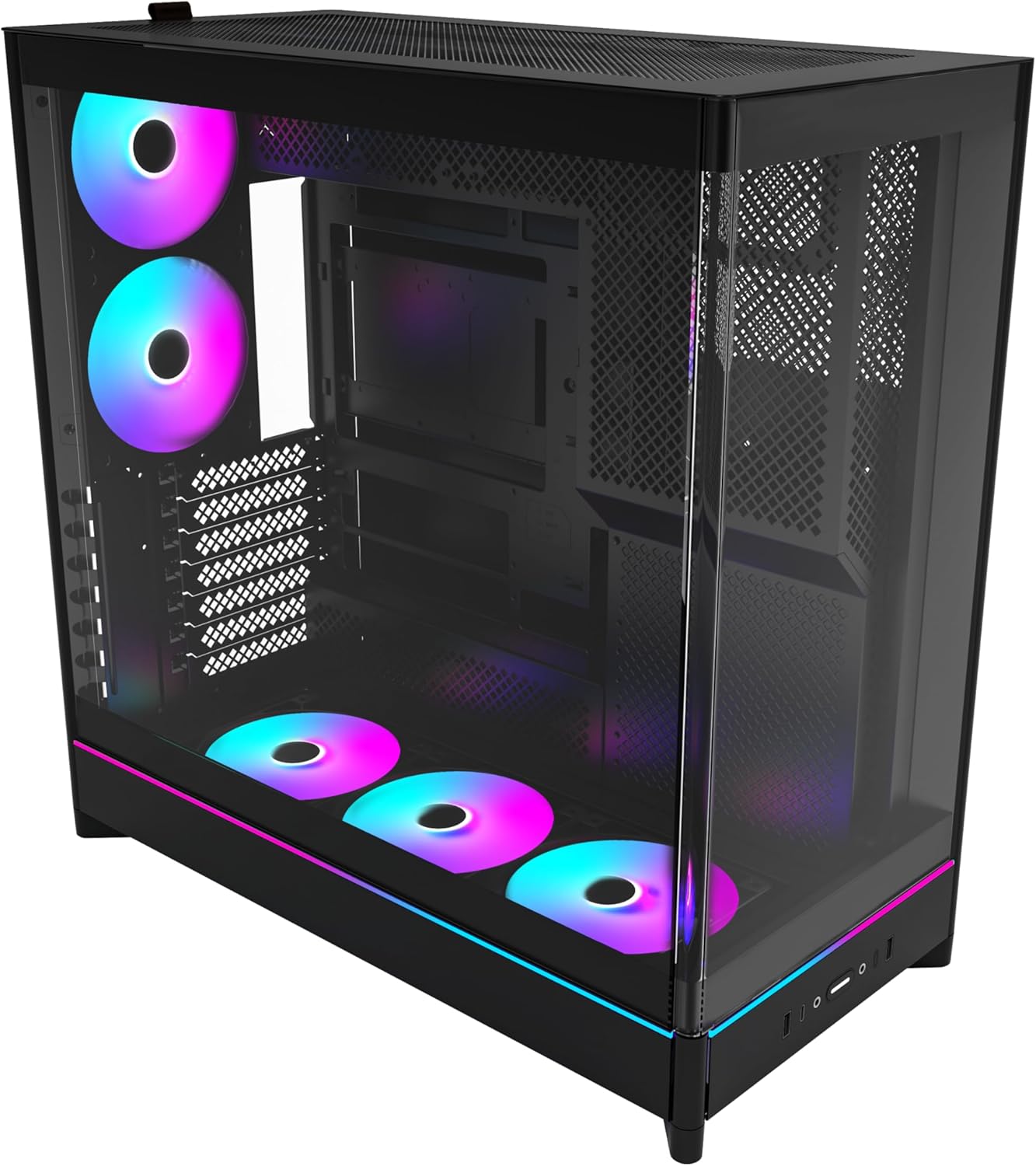
The MONTECH HS02 PRO is a high-airflow ATX mid-tower PC case designed for optimal thermal performance and aesthetic appeal. It features a unique reversible layout and a sturdy curved tempered glass front panel.
Fitur konci:
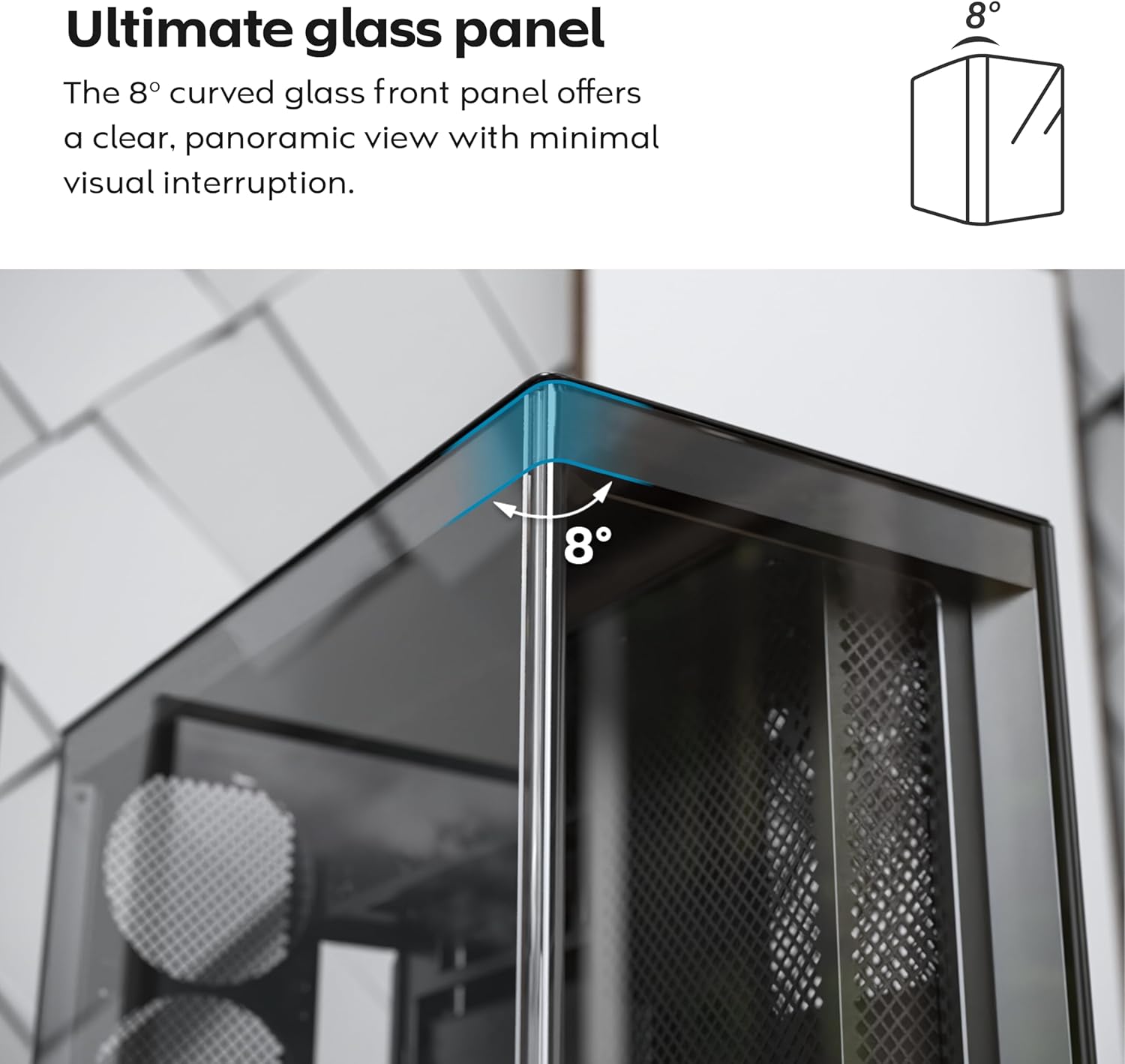
- 8-Degree Curved Glass Panel: The front tempered glass panel features a subtle 8-degree curved edge, offering a distinctive and refined view of the interior with minimal visual distortion.
- Desain anu tiasa dibalikkeun: A top-down reversible layout allows the entire setup to be positioned on either the left or right side, showcasing your build from your preferred angle.
- Vertical Ventilation: Bottom air intake and top exhaust create a natural chimney effect for efficient heat dissipation.
- Vertical GPU Ready: Rotatable PCIe slots enable an instant vertical GPU setup without requiring an extra holder or stand.
- Sink-In Design: A recessed bottom fan and motherboard layout maintain a clean, unobstructed side view.
- Kipas ARGB PWM anu tos dipasang sateuacanna: Comes with 5 pre-installed GF120 V2 ARGB fans, fully syncable with motherboard lighting control.
- Back-Connect Motherboard Ready: Supports standard and back-connect motherboards, including MSI Project Zero, ASUS BTF, and more.
- AmpKapasitas Panyimpen: Supports multiple storage drives (HDD/SSD) for flexible and expandable storage options.
Idéntifikasi komponén:





4. Setup jeung Instalasi
This section provides general guidelines for setting up your MONTECH HS02 PRO PC case. For detailed component-specific instructions, refer to your motherboard, GPU, and PSU manuals.
4.1 Nyiapkeun Pasualan
- Ngabongkar bungkusan: Kaluarkeun wadahna tina bungkusna kalayan ati-ati. Pariksa heula bisi aya karusakan nalika dikirim.
- Ngahapus Panel: Gently remove the tempered glass side panel and the rear metal side panel. The tempered glass panel is secured with toolless latches.
- Kotak aksésori: Panggihan kotak asesoris di jero wadahna, anu ngandung sadaya sekrup sareng perangkat keras anu diperyogikeun.
4.2 Pamasangan motherboard
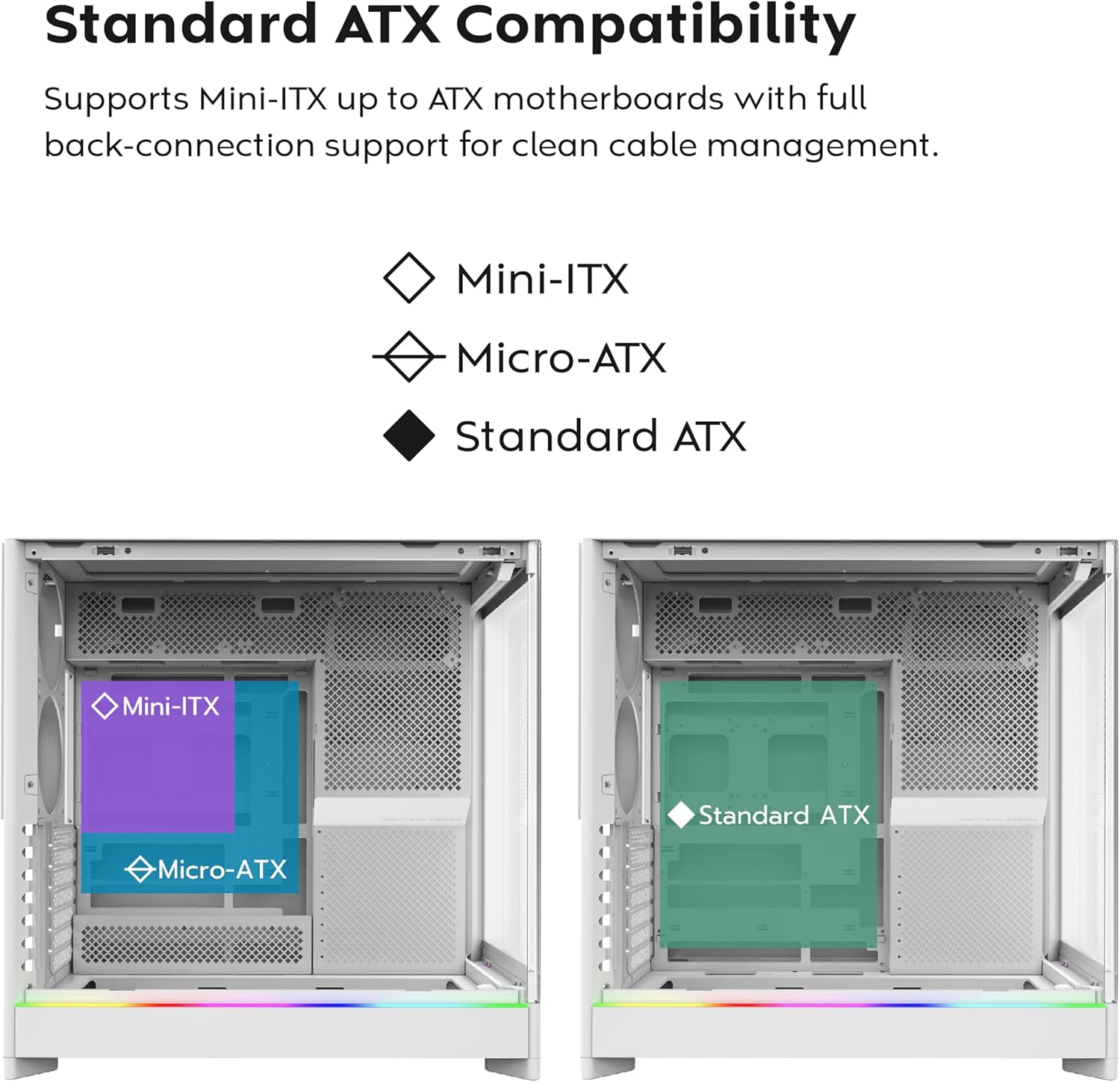
- Standoffs: Ensure the correct standoffs are installed for your motherboard form factor (Mini-ITX, Micro-ATX, or ATX). Adjust if necessary.
- Tameng I/O: Pasangkeun tameng I/O motherboard anjeun kana liang tukang casing.
- Pamasangan: Carefully align your motherboard with the standoffs and gently lower it into place. Secure it with the provided screws.
- Back-Connect Motherboards: If using a back-connect motherboard, ensure proper alignment with the designated cutouts for cable routing.
4.3 Pamasangan Power Supply Unit (PSU).
- Pamasangan: The PSU mounts at the bottom of the case. Slide the PSU into its designated bay from the rear.
- Ngamankeun: Amankeun PSU nganggo sekrup ti tukangeun casing.
- Kabel: Rute kabel kakuatan perlu ngaliwatan cutouts manajemén kabel ka motherboard sareng komponenana séjén.
4.4 Pamasangan Girang Panyimpenan (HDD/SSD)
- Teluk drive: Utilize the designated drive bays for 3.5" HDDs and 2.5" SSDs.
- Pamasangan: Secure drives using the provided screws or toolless mechanisms where applicable.
4.5 Pamasangan Kartu Grafika (GPU).
- Slot PCIe: Cabut panutup slot PCIe anu diperyogikeun.
- Pamasangan Horisontal: Insert the GPU into the primary PCIe slot on your motherboard and secure it with screws.
- Vertical Installation (Optional): The rotatable PCIe slots allow for vertical GPU mounting. Rotate the bracket and install your GPU vertically. A PCIe riser cable (not included) is required for vertical mounting.
4.6 Pamasangan Sistem Pendingin (Kipas/Radiator)
- Kipas anu tos dipasang: The case comes with 5 pre-installed ARGB PWM fans. Connect their power and ARGB cables to your motherboard or a fan controller.
- Additional Fans/Radiators: The case supports additional fans and radiators at the top, rear, and bottom. Refer to the specifications for supported sizes.
- AIO Cooler: Install your All-in-One (AIO) liquid cooler radiator and fans according to the cooler's instructions, utilizing the available mounting points.
4.7 Manajemén kabel
Mangpaatkeun ample space behind the motherboard tray and the cable management cutouts to route and secure cables. This improves airflow and aesthetics.
5. Parentah Operasi
Once all components are installed and secured, you can power on your system.
5.1 Powering On
- Sambungkeun Periferal: Connect your monitor, keyboard, mouse, and other peripherals to your system.
- Kakuatan Kabel: Connect the PSU power cable to a wall outlet and flip the PSU's power switch to the 'ON' position.
- Tombol Daya: Pencét tombol daya dina panel I/O hareup.
5.2 Fungsi Panel I/O Hareup
- Port USB 3.0: For connecting USB 3.0 compatible devices.
- Port USB Tipe-C: For connecting USB Type-C compatible devices.
- Jack audio: Pikeun headphone atanapi speaker.
- Jack mikropon: Pikeun nyambungkeun mikropon.
- Tombol Daya: Pikeun ngaktipkeun atanapi mareuman sistem.
- Tombol LED: To cycle through the 29 ARGB lighting modes for the pre-installed fans and integrated light strip.
6. Pangropéa
Pangropéa rutin ngabantosan mastikeun kinerja optimal sareng umur panjang komponén PC anjeun.
- beberesih lebu: Periodically clean dust filters (top, bottom, front) to maintain optimal airflow. Use compressed air to remove dust from internal components.
- Glass Panel Cleaning: Anggo lawon anu lemes sareng henteu ngaganggu sareng pembersih kaca anu henteu abrasif pikeun ngabersihkeun panel kaca anu di-temper. Hindarkeun bahan kimia anu keras.
- Manajemén Kabel: Pariksa périodik routing kabel pikeun mastikeun euweuh kabel anu ngahalangan aliran hawa atawa kipas wilah.
- Pamariksaan kipas: Ensure all fans are spinning freely and quietly. Clean fan blades if dust buildup is significant.
7. Cara ngungkulan
This section addresses common issues you might encounter. For more complex problems, consult Montech customer support or a qualified technician.
Masalah umum sareng Solusi:
| Masalah | Mungkin Cukang lantaranana | Solusi |
|---|---|---|
| Sistem henteu hurung. | PSU switch off, power cables loose, faulty PSU/motherboard. | Ensure PSU switch is ON. Check all power connections (24-pin, CPU, GPU). Test PSU if possible. |
| Fans are not spinning or RGB is not working. | Fan cables disconnected, ARGB cables disconnected, faulty fan/controller. | Verify fan power and ARGB headers are securely connected to motherboard/controller. Use the LED button to cycle modes. |
| Aliran hawa goréng atanapi suhu luhur. | Dust buildup, obstructed vents, incorrect fan orientation. | Clean dust filters and internal components. Ensure fans are oriented correctly for intake/exhaust. Check for cable obstructions. |
| Front I/O ports not functioning. | Front panel connectors loose or incorrectly connected to motherboard. | Refer to your motherboard manual to ensure all front panel headers (USB, audio) are correctly connected. |
8. Spésifikasi
Detailed technical specifications for the MONTECH HS02 PRO ATX Mid-Tower PC Case.
| Fitur | Spésifikasi |
|---|---|
| Ngaran modél | HS02 PRO Glass Black with Fans |
| Nomer modél | HS02PB |
| Jenis Kasus | Pertengahan Menara |
| Motherboard kasaluyuan | ATX, Micro-ATX, Mini-ITX (with back-connect support) |
| Ukuran (L x W x H) | 32 x 52.4 x 58.8 inci (kira-kira 81.3 x 133.1 x 149.4 cm) |
| Item Beurat | 24.2 pon (kira-kira 10.98 kg) |
| Panel hareup | Curved Tempered Glass (8-degree) |
| Kipas anu tos dipasang | 5x GF120 V2 ARGB PWM Fans |
| Métode Cooling | Air (Vertical Ventilation / Chimney Effect) |
| Power Supply ningkatna Tipe | Gunung handap |
| Port I / O payun | 2x USB 3.0, 1x USB Type-C, Audio, Mic, Power Button, LED Button |
| GPU Clearance | Up to 420mm (supports vertical GPU with rotatable PCIe slots) |
| Panyimpenan Bays | Multiple HDD/SSD support |
| Warna | Hideung |
9. Garansi jeung Rojongan
Kanggo inpormasi garansi sareng dukungan téknis, mangga tingal ka Montech resmi websitus atanapi ngahubungan layanan palanggan maranéhanana langsung. Simpen bukti pameseran anjeun pikeun klaim garansi.
- Resmi Montech Websitus: www.montechpc.com
- Palayanan palanggan: Rujuk kana website for contact details, including email and phone support.


