
1. Produk Langkungview
The Attoe AK680 is a wired mechanical gaming keyboard designed for performance and customization. It features a compact 60% layout, RGB backlighting, hot-swappable switches, and durable double-shot PBT keycaps. This manual provides essential information for setting up, operating, and maintaining your keyboard.

Figure 1: Attoe AK680 Mechanical Gaming Keyboard.
2. Eusi Paket
Pastikeun yén sadaya item aya dina bungkusan:
- Attoe AK680 Mechanical Gaming Keyboard
- Kabel USB-C
- Keycap Puller
- Switch Puller (often integrated with keycap puller or separate)
- Manual pangguna (dokumén ieu)
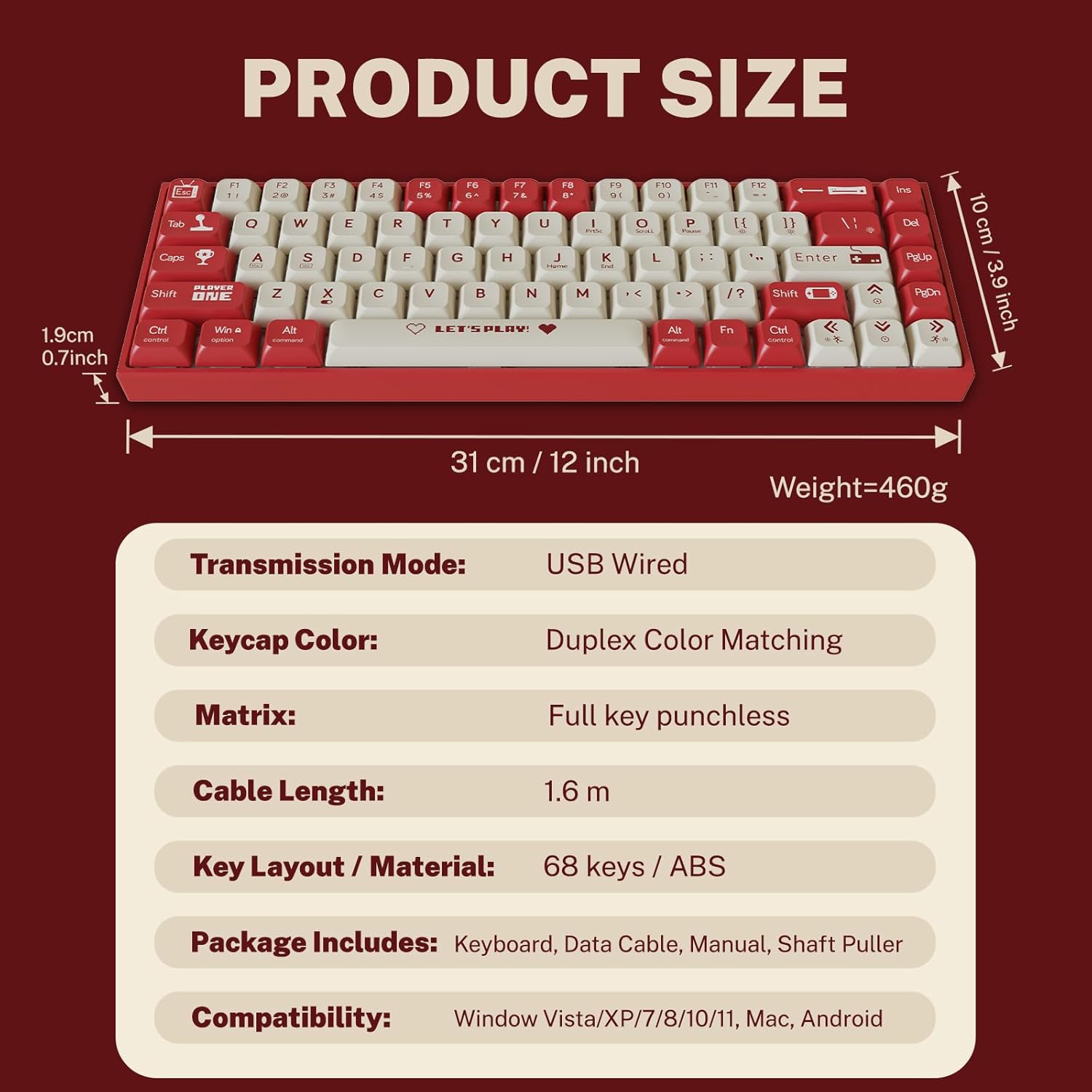
Figure 2: Package contents and product dimensions.
3. Parentah Setup
3.1 Nyambungkeun kibor
- Panggihan port USB-C di tukang atanapi sisi kibor.
- Sambungkeun hiji tungtung kabel USB-C anu disadiakeun ka port USB-C kibor.
- Connect the other end of the USB-A connector to an available USB port on your computer.
- Kibor bakal otomatis dikenal ku sistem operasi anjeun. Henteu aya supir tambahan anu biasana diperyogikeun pikeun fungsionalitas dasar.
3.2 Kasaluyuan Sistim
The Attoe AK680 keyboard is compatible with the following operating systems:
- Windows Vista / XP / 7 / 8 / 10 / 11
- macOS
- Android

Figure 3: Multi-system compatibility of the keyboard.
4. Parentah Operasi
4.1 Fungsi Keyboard Dasar
The AK680 features a 68-key layout, providing essential keys while maintaining a compact form factor. All keys support anti-ghosting, ensuring accurate input even during rapid key presses.

Figure 4: The 68-key layout for efficient use.
4.2 Lampu latar RGB
The keyboard features 16.8 million color RGB backlighting with various effects. Specific key combinations (often involving the Fn key) are used to cycle through lighting modes, adjust brightness, and change colors. Refer to the quick start guide or product page for detailed key combinations for lighting control.

Figure 5: RGB Backlighting in operation.
4.3 Panas-Swappable switch
The AK680 supports hot-swappable 3-pin and 5-pin mechanical switches. This allows you to easily change switches without soldering, customizing the typing feel to your preference. Use the included switch puller for safe removal and installation.
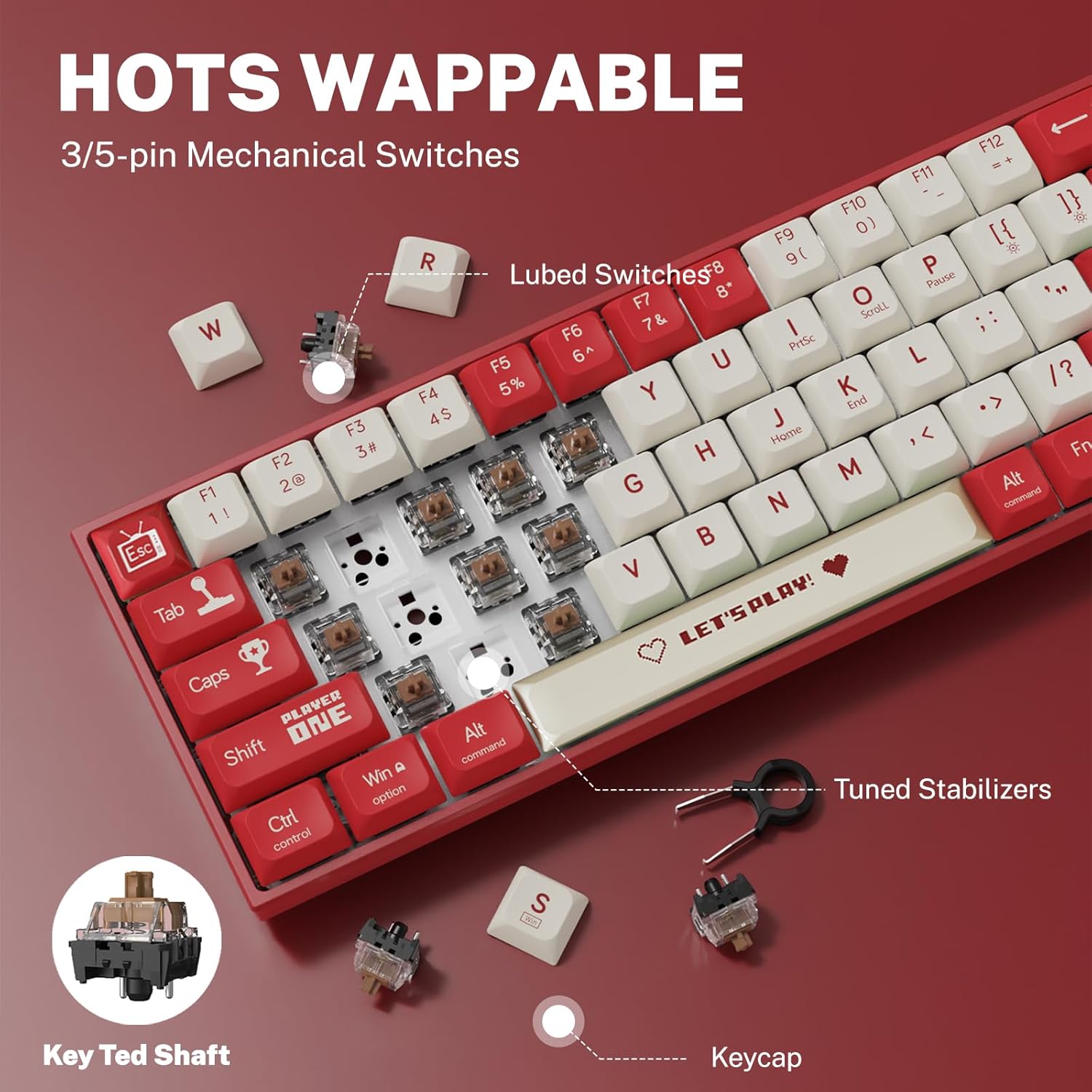
Gambar 6: Mékanisme saklar anu tiasa dipanaskeun.
5. Pangropéa
5.1 Ngabersihan kibor
- beberesih umum: Anggo lawon anu lemes sareng garing pikeun ngusap permukaan kibor. Pikeun kokotor anu bandel, usap sakedikampen lawon ku cai atawa hampang, cleaner non-abrasive.
- Antara Keycaps: Anggo hawa anu dikomprés pikeun miceun lebu sareng kokotor tina antara tutup tombol.
- Ngabersihan Keycap: For thorough cleaning, remove keycaps using the provided keycap puller. Wash keycaps with mild soap and water, rinse thoroughly, and ensure they are completely dry before reattaching.
5.2 Ngaganti Keycaps sareng Switches
The AK680's hot-swappable design allows for easy replacement of keycaps and switches.
- Ngahapus Keycaps: Use the keycap puller to gently grip and lift keycaps straight up.
- Ngahapus switch: After removing the keycap, use the switch puller to carefully grip the top and bottom clips of the switch and pull it straight out.
- Masang Saklar: Align the new switch's pins with the holes on the PCB. Press down firmly until the switch clicks into place. Ensure pins are not bent.
- Pamasangan Keycaps: Align the keycap with the switch stem and press down gently until it is seated securely.

Figure 7: Components of a mechanical switch and tools for maintenance.
6. Cara ngungkulan
- Keyboard Teu Ngabales:
- Pastikeun kabel USB-C disambungkeun sacara aman ka kibor sareng komputer.
- Coba sambungkeun kibor ka port USB anu béda dina komputer anjeun.
- Nguji keyboard dina komputer sejen pikeun ngaluarkeun masalah husus sistem.
- Konci Teu Kadaptar:
- Remove the keycap and switch for the affected key. Reinstall the switch, ensuring it is properly seated and its pins are not bent.
- Clean any debris that might be obstructing the switch mechanism.
- Lampu Latar RGB Teu Jalan:
- Check if the backlighting is turned off or set to minimum brightness using the keyboard's function keys.
- Pastikeun kibor nampi kakuatan anu cekap tina port USB.
7. Spésifikasi
| Fitur | Rincian |
|---|---|
| Nomer modél | AK680 |
| merek | Attoe |
| Tipe Sambungan | Kabel (USB-C) |
| Jumlah konci | 68 konci |
| Téhnologi konci | Mechanical Shaft (Red/Teal Shaft), Hot-Swappable (3-pin/5-pin) |
| Bahan Keycap | PBT Tembakan Ganda |
| Lampu tukang | RGB (16.8 juta warna) |
| Anti Ghosting | Full Keys Anti-Ghosting |
| Panjang kabel | 1.6 méter |
| Dimensi produk | 12 x 3.9 x 0.7 inci (31 x 10 x 1.9 cm) |
| Item Beurat | 1.01 pon (460g) |
| Kasaluyuan | Windows Vista/XP/7/8/10/11, macOS, Android |
| Fungsi waterproof | IPX4 rated protection (splash resistant) |
8. Garansi jeung Rojongan
Attoe provides a 12-garansi sasih for the AK680 Mechanical Gaming Keyboard from the date of purchase.
If you encounter any problems or have questions regarding your product, please contact Attoe customer service. We are committed to providing the best service and will respond within 24 hours to assist you.
For support, please refer to the contact information provided with your purchase or visit the official Attoe websitus.