1. Bubuka
Thank you for choosing the GOBOULT Astra Neo Bluetooth In-Ear Earbuds. This manual provides essential information for setting up, operating, and maintaining your earbuds to ensure optimal performance and longevity. Please read this manual thoroughly before use.
2. Émbaran Kasalametan
- Ulah ngantepkeun earbud atanapi wadah ngecas ka suhu, kalembaban, atanapi cairan anu ekstrim.
- Hindarkeun ngaragragkeun, mangaruhan, atanapi ngabongkar alat.
- Anggo ukur kabel ngecas anu disayogikeun atanapi kabel Type-C anu disertipikasi pikeun ngecas.
- Dengekeun dina tingkat polumeu sedeng pikeun nyegah karuksakan dédéngéan.
- Jauhkeun tina jangkauan barudak sareng piaraan.
3. Eusi Paket
Pastikeun yén sadaya item aya dina pakét anjeun:
- GOBOULT Astra Neo Earbuds (Left and Right)
- Ngecas Case
- Kabel Ngecas Tipe-C
- Bantalan Ceuli (rupa-rupa ukuran)
- Manual pamaké
- Kartu Garansi
4. Produk Langkungview
The GOBOULT Astra Neo earbuds feature a sleek design with touch controls and a compact charging case. The case includes breathing LED lights for status indication.

Image: GOBOULT Astra Neo Earbuds and Charging Case. The image displays the black earbuds removed from their charging case, which features a glowing blue LED strip.

Image: GOBOULT Astra Neo Comfort Grip Case and Earbuds. This image highlights the textured surface of the charging case and earbuds, along with the breathing case lights.
5. Setélan
5.1 Ngecas Earbuds sareng Case
Saméméh dipaké munggaran, eusian pinuh ku earbuds jeung wadah ngecas.
- Teundeun earbuds kana wadah ngecas. Pastikeun aranjeunna leres seated.
- Sambungkeun kabel ngecas Tipe-C ka port ngecas dina casing sareng ka sumber listrik.
- The LED indicator on the case will illuminate during charging and turn off or change color when fully charged.
A 10-minute charge provides approximately 100 minutes of playtime.

Image: GOBOULT Astra Neo Fast Charging Feature. This image illustrates the 70-hour playtime and the fast charging capability: 10 minutes of charge equals 100 minutes of playtime.
5.2 Ngapasangkeun sareng Alat (Bluetooth 5.4)
The Astra Neo uses Bluetooth 5.4 with Blink & Pair technology for quick and stable connections.
- Buka wadah ngecas. Earbuds bakal otomatis asup kana mode papasangan.
- Dina alat anjeun (smartphone, tablet, laptop), aktipkeun Bluetooth.
- Milarian pikeun available Bluetooth devices and select "GOBOULT Astra Neo" from the list.
- Sakali disambungkeun, ajakan sora bakal mastikeun papasangan suksés.

Image: GOBOULT Astra Neo Bluetooth 5.4 Pairing. This image shows a smartphone screen displaying a successful Bluetooth 5.4 connection to 'Astra Neo', emphasizing power efficiency and stable connection.
6. Parentah Operasi
6.1 Kontrol Toél
The Astra Neo earbuds feature intuitive touch controls on each earbud:
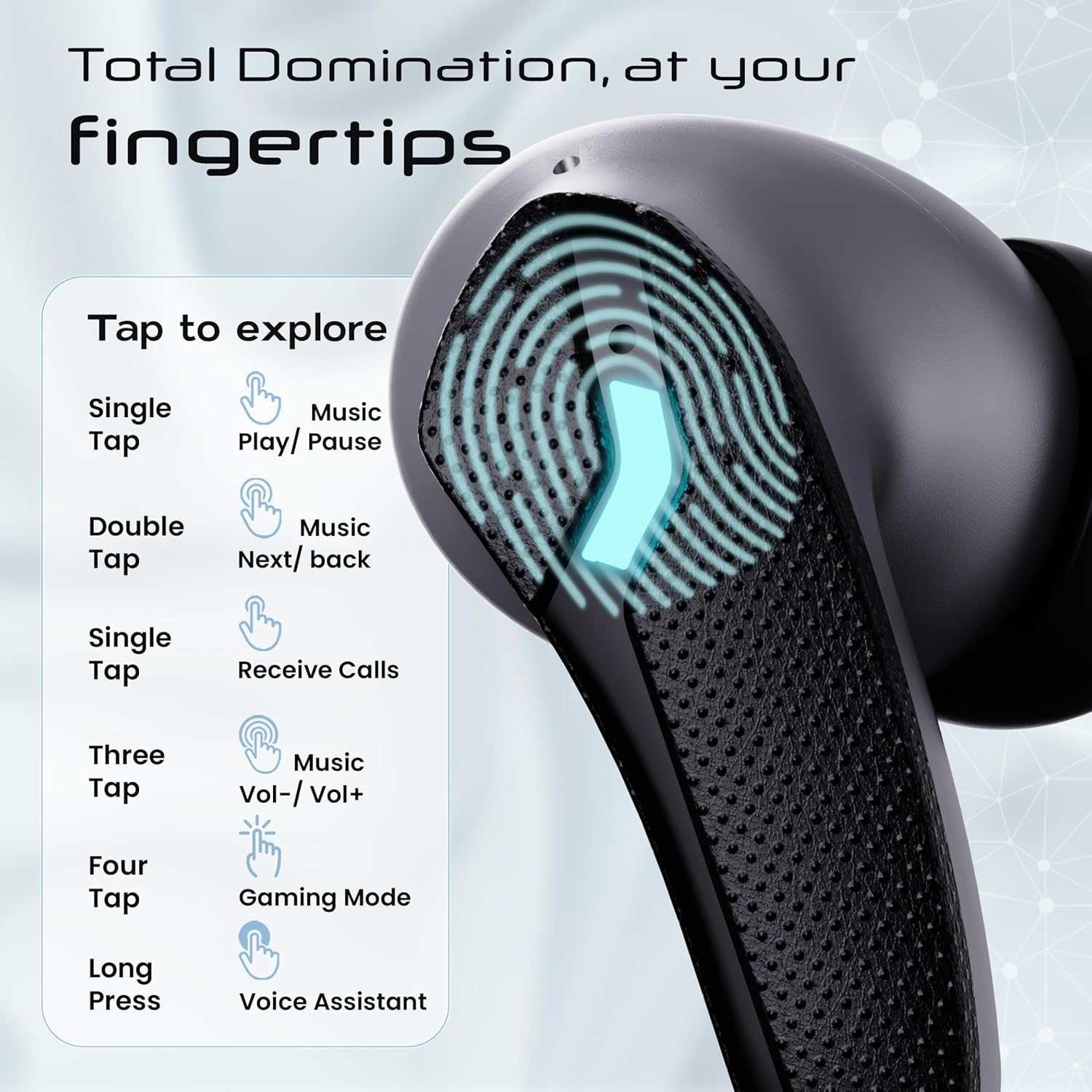
Image: GOBOULT Astra Neo Touch Controls Guide. This graphic details the various touch gestures for controlling music, calls, gaming mode, and voice assistant.
- Ketuk Tunggal: Play/Pause music, Receive Calls.
- Ketok Ganda: Music Next/Back (specific earbud for each function).
- Three Tap: Music Volume Up/Down (specific earbud for each function).
- Four Tap: Activate Gaming Mode.
- Pencét Panjang: Activate Voice Assistant (Google Assistant/Siri).
6.2 Gaming Mode (40ms Low Latency)
Activate Gaming Mode for a synchronized audio experience during gameplay, reducing audio delay to 40ms.
- To activate: Four tap on either earbud.
- To deactivate: Four tap again on either earbud.

Image: GOBOULT Astra Neo Gaming Mode with 40ms Low Latency. This image depicts a user playing a mobile game with the earbuds, highlighting the ultra-low latency feature for an immersive gaming experience.
6.3 ZEN Quad Mic ENC for Calls
The ZEN Quad Mic Environmental Noise Cancellation (ENC) system ensures clear voice calls by filtering out background noise.

Image: GOBOULT Astra Neo ZEN Quad Mic ENC Technology. This image illustrates the internal components and the function of the 4 microphones for clear in-game communication and crystal-clear calling with Acoustic Echo Cancellation (AEC).
6.4 Modeu EQ
The Astra Neo earbuds support 4 EQ modes for customized audio experiences. Refer to the product packaging or official GOBOULT website for specific instructions on how to switch between these modes, as this functionality is typically managed via a companion app or specific touch gestures not detailed here.
7. Pangropéa
7.1 beberesih
- Lembut usap earbuds sareng wadah ngecas ku lawon anu lemes, garing, teu aya serat.
- Ulah make bahan kimia kasar, pangleyur beberesih, atawa detergents kuat.
- Bersihkeun kontak pangisi daya dina earbud sareng wadahna sacara rutin pikeun mastikeun pangisian daya anu leres.
7.2 Tahan Cai (IPX5)
The Astra Neo earbuds are IPX5 water-resistant, meaning they are protected against sweat, rain, and splashes. They are not designed for submersion in water.
- Ulah ngahaja ngalelepkeun earbud kana cai.
- If exposed to sweat or rain, wipe them dry before placing them back in the charging case.

Image: GOBOULT Astra Neo IPX5 Water Resistance and Voice Assistant. This image highlights the earbuds' sweatproof, rainproof, and splashproof capabilities, along with compatibility with Google Assistant and Hey Siri.
7.3 Panyimpenan
Nalika henteu dianggo, simpen earbuds dina wadah ngecasna pikeun ngajagi sareng tetep dicas.
8. Cara ngungkulan
- Earbuds teu dipasangkeun: Ensure both earbuds are in the charging case, then open the lid to re-enter pairing mode. Check your device's Bluetooth settings and try reconnecting.
- Ngan hiji earbud jalan: Place both earbuds back in the case, close the lid, wait a few seconds, then open it again. This often re-syncs them.
- Teu aya sora: Pariksa tingkat volume dina alat sareng earbud anjeun. Pastikeun earbud disambungkeun kalayan leres kana alat anjeun.
- Masalah ngecas: Clean the charging contacts on the earbuds and inside the case. Ensure the charging cable is securely connected and the power source is active.
- Kualitas telepon goréng: Pastikeun mikroponna teu kahalangan. Coba pindah ka lingkungan anu langkung sepi.
9. Spésifikasi
Key technical specifications for the GOBOULT Astra Neo Earbuds:
| Fitur | Spésifikasi |
|---|---|
| Ngaran modél | Astra Neo |
| Vérsi Bluetooth | 5.4 |
| Waktu maén | Dugi ka 70 jam (kalayan ngeusi batre) |
| Ngecas Gancang | 10 mins charge = 100 mins playtime |
| Latency Lemah | 40ms (Modeu Kaulinan) |
| Ukuran supir | 13mm BoomX Drivers |
| Mikropon | ZEN Quad Mic ENC |
| Tahan cai | IPX5 |
| Métode kontrol | Toél |
| Téhnologi konektipitas | Bluetooth, Nirkabel |
| Headphone Jack | Type-C Fast Charging Jack |
| Item Beurat | 47 gram |
| Dimensi produk | 6.2 x 5.3 x 3.2 cm |
| Jenis Batré | Litium Polimér |
| Rentang Bluetooth | 10 Méter |
| Impedansi | 32 ohm |

Image: GOBOULT Astra Neo 13mm BoomX Drivers. This image highlights the 13mm BoomX drivers, emphasizing crystal clear sound and support for MSBC, SBC, and AAC codecs.
10. Garansi jeung Rojongan
The GOBOULT Astra Neo Earbuds come with a 1-taun jaminan produsén from the date of purchase. This warranty covers manufacturing defects. For warranty claims or technical support, please refer to the contact information provided on your warranty card or visit the official GOBOULT websitus.


