Bubuka
This manual provides detailed instructions for the operation, maintenance, and troubleshooting of your TOPTRO TP1 Smart Projector. Please read this manual thoroughly before using the product to ensure proper function and longevity.
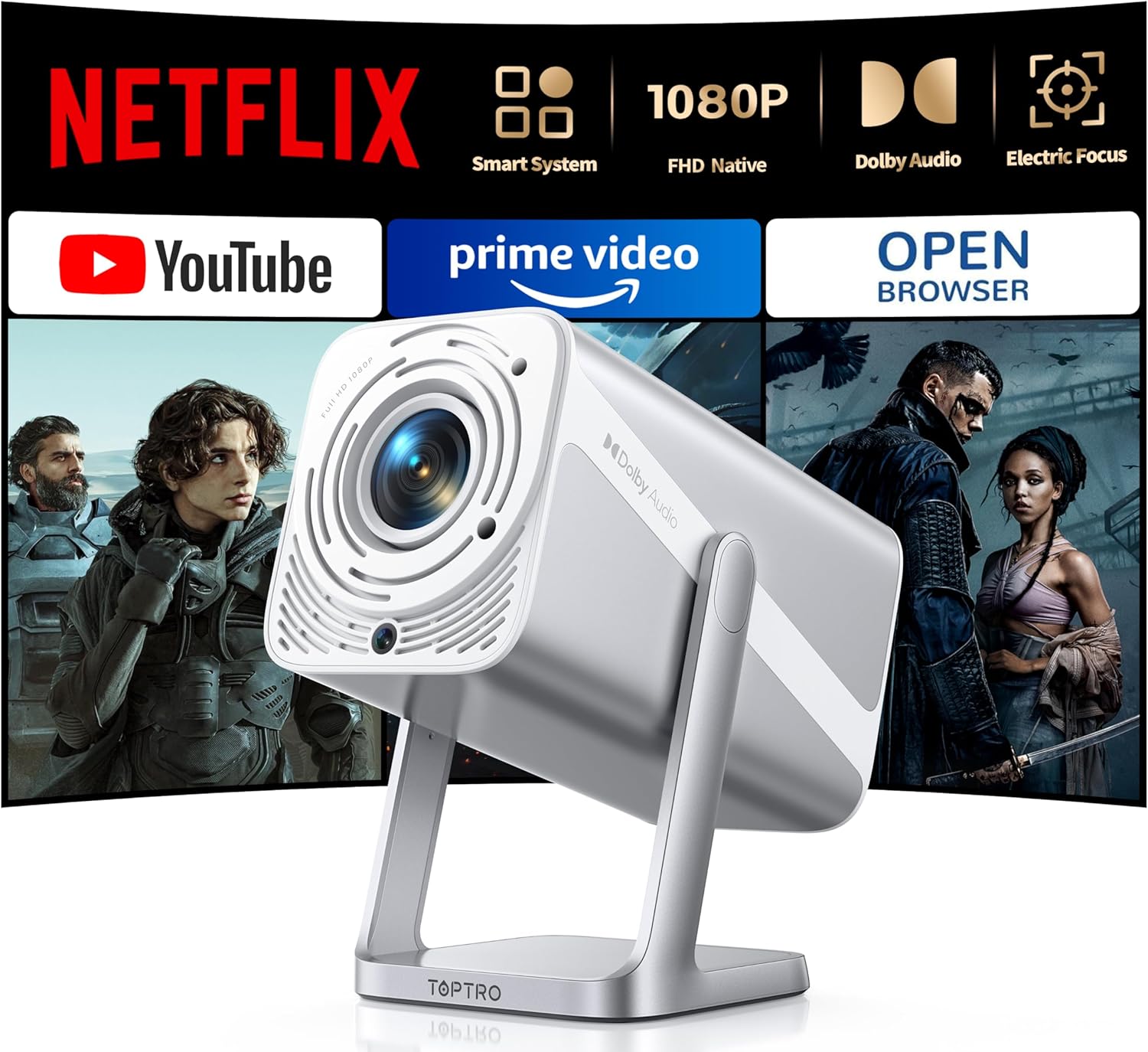
Image: The TOPTRO TP1 Smart Projector, a compact and portable device designed for versatile projection.
Naon dina Box
Pastikeun yén sadaya barang aya dina bungkusan:
- Portable mini projector x 1
- Kadali jauh x 1
- HDMI kabel x 1
- Adaptor x 1
- Buku Panduan x 1
- Kit beberesih x 1
- Pitunjuk Mimitian Gancang x 1
Produk Leuwihview jeung Fitur
The TOPTRO TP1 Smart Projector is designed for a comprehensive entertainment experience, offering advanced features in a compact form factor.
Fitur konci:
- Netflix Officially Licensed: Breaks through HDCP restrictions, pre-loaded with Netflix, YouTube, and Prime Video. Supports OTA updates.
- Immersive Dolby Sound: Features Dolby technology and 2x10W speakers for 3D surround sound. Includes HDMI ARC and two-way Bluetooth 5.2.
- Native FHD 1080P & 4K Support: Delivers true native 1080p resolution, up to 600 ANSI lumens brightness, 4K video decoding, and HDR10 support with a 20000:1 contrast ratio.
- Smart Electric Focus & Auto Keystone: Automatic electric focus and 4D/4P keystone correction for clear, rectangular images. Supports 100%-50% digital zoom.
- 360° Adjustable Stand & Short Throw: Integrated 360° rotatable stand for multi-angle projection. Lightweight (2.4lb) with a 1.1:1 throw ratio, projecting 50-200 inches from short distances.
- No-Lag WiFi 6 & Universal Compatibility: Supports WiFi 6 and 2.4G dual-band WiFi for stable connections. Compatible with Miracast, DLNA, AirPlay, HDMI, USB, and 3.5mm Audio Jack interfaces.

Image: The projector's interface displaying pre-installed streaming applications like Netflix, YouTube, and Prime Video, highlighting its official licensing.

Image: A visual comparison demonstrating the superior clarity and detail of the TOPTRO TP1's native 1080P resolution compared to a 720P projector.

Image: An illustration of the projector's immersive Dolby Audio experience, with sound waves emanating from the device and filling a room.

Image: Depiction of the projector's WiFi 6 and two-way Bluetooth 5.2 capabilities, showing seamless connection to external speakers and mobile devices for screen mirroring.

Image: A diagram illustrating the automatic electric focus and auto vertical keystone correction features, ensuring a perfectly clear and rectangular image without manual adjustments.

Image: The projector positioned to project onto a ceiling, demonstrating its 360-degree adjustable stand for flexible viewdina sudut.
Disetél
- Ngabongkar bungkusan: Cabut sadaya komponén tina bungkusna kalayan ati-ati. Simpen bungkus aslina kanggo panyimpenan atanapi transportasi ka hareup.
- panempatan: Position the projector on a stable, flat surface. Utilize the 360° adjustable stand to achieve the desired projection angle (e.g., wall, ceiling). Ensure adequate ventilation around the device.
- Sambungan Daya: Connect the provided power adapter to the projector's power input and then to a power outlet.
- Daya mimiti Hurung: Pencét tombol daya dina proyektor atawa kadali jauh pikeun ngahurungkeun alat.
- Penyesuaian otomatis: The projector will automatically perform electric focus and auto vertical keystone correction to optimize the image clarity and shape.
- Sambungan jaringan: Navigate to the network settings and connect to your WiFi 6 or 2.4G network for access to streaming applications and updates.
Parentah Operasi
Navigation and Interface:
Use the remote control to navigate the projector's smart interface. The home screen provides access to pre-installed applications such as Netflix, YouTube, and Prime Video. Additional applications can be downloaded via the APP Assistant or OPEN BROWSER.
Nyambungkeun alat éksternal:
- HDMI: Connect devices like TV sticks, Roku, laptops, or gaming consoles (Switch, PS5) using the HDMI cable to the HDMI ARC port.
- USB: Insert USB drives into the USB port for media playback. Note: Some 4K videos may not play over USB due to format compatibility; built-in streaming apps are recommended for 4K content.
- Bluetooth: Utilize two-way Bluetooth 5.2 to pair with mobile devices (iOS/Android) for screen mirroring or connect to external Bluetooth speakers/AirPods for enhanced audio.
- 3.5mm Audio Jack: Sambungkeun headphone kabel atanapi spiker éksternal.
Pangeunteungan layar:
The projector supports Miracast, DLNA, and AirPlay for seamless screen mirroring from compatible devices. Access these functions through the projector's application menu.
Penyesuaian Gambar:
- Fokus listrik: The projector automatically adjusts focus. If manual adjustment is needed, use the remote control.
- Otomatis Vertikal Keystone: This feature automatically corrects image distortion.
- Ngazum Digital: Adjust the screen size from 100% to 50% using the zoom function on the remote control without moving the projector.
Pangropéa
- Ngabersihan lensa: Use the provided cleaning kit or a soft, lint-free cloth to gently wipe the projector lens. Avoid abrasive materials or harsh chemicals.
- Ngaleungitkeun lebu: Regularly clean the projector's vents to prevent dust buildup, which can affect performance and lifespan. Use a soft brush or compressed air.
- Panyimpenan: Lamun teu dipaké pikeun période nambahan, nyimpen projector dina tiis, tempat garing, idéal dina bungkusan aslina atawa wadah pelindung.
- Apdet parangkat lunak: Ensure the projector's software is kept up-to-date through regular OTA (Over-The-Air) updates to maintain security and stability.
Pamérésan masalah
| Masalah | Mungkin Cukang lantaranana | Solusi |
|---|---|---|
| Taya gambar projected | kabel listrik dipegatkeun; Sumber input teu dipilih; Tutup lénsa. | Pariksa sambungan daya; Pilih sumber input anu leres (HDMI, USB); Cabut tutup lénsa. |
| Image blurry or out of focus | Automatic focus issue; Projector too close/far from screen. | Allow auto-focus to complete; Manually adjust focus if needed; Adjust projection distance. |
| Gambar distort (bentuk trapesium) | Koréksi Keystone diperlukeun. | Allow auto keystone correction to complete; Manually adjust keystone if necessary. |
| Teu aya sora atanapi volume handap | Volume teuing leutik; Alat audio éksternal teu nyambung kalawan bener; Dibisukeun. | Increase volume; Check audio cable connections; Unmute device. |
| Teu bisa nyambung ka Wi-Fi/Bluetooth | Sandi salah; Alat di luar jangkauan; Gangguan. | Verify password; Move projector closer to router/device; Reduce interference. |
| Netflix/Streaming app issues (black screen, not loading) | Network issues; App cache; App update needed. | Check internet connection; Clear app cache/data; Update app via OTA or APP Assistant. |
For further assistance, please refer to the video tutorials available on YouTube by searching for "@TOPTRO-R" or contact customer support.
spésifikasi
| Fitur | Rincian |
|---|---|
| merek | TOPTRO |
| Nomer modél | TP1 |
| Resolusi tampilan | Native 1920 x 1080 (FHD), 4K Support |
| Caang | 600 ANSI Lumens |
| Babandingan Kontras | 20000:1 |
| Fitur husus | Netflix Officially Licensed, Dolby Audio, 360° Rotatable Stand, Electric Focus, Auto Keystone, HDR10 |
| Téhnologi konektipitas | Wi-Fi 6, USB, Bluetooth 5.2 (Two-way), 3.5mm Audio Jack, HDMI ARC |
| Panyatur | 2 x 10W |
| Ukuran proyéksi | 50 nepi ka 200 inci |
| Babandingan Lempar | 1.1:1 |
| Zum Digital | 100%-50% |
| Item Beurat | 2.2 pon |
| Dimensi produk | 4.57 x 4.8 x 9.45 inci |
Garansi sareng Rojongan
TOPTRO is committed to providing excellent customer service and product reliability.
- Garansi: The TOPTRO TP1 Smart Projector comes with a 3-year repair coverage.
- Kabijakan pamulangan: Enjoy a 2-year hassle-free return policy.
- Bantosan Téknis: Lifetime technical assistance is available.
- Kontak: For any inquiries or support, please contact service@toptro.com.
- Sumberdaya Online: Quick start guides and video tutorials are available on YouTube by searching for "@TOPTRO-R". A detailed electronic manual is also available on the TOPTRO official websitus.

Image: The TOPTRO brand logo, representing quality and customer commitment.


