PRUNUS J-177 Retro Vintage Alarm Clock Radio User Manual
Model: J-177 | Brand: PRUNUS
1. Bubuka
Thank you for choosing the PRUNUS J-177 Retro Vintage Alarm Clock Radio. This device combines classic aesthetics with modern functionality, offering dual alarms, FM radio, fast wireless charging, and a clear LED display. This manual provides detailed instructions to help you set up and operate your new alarm clock radio effectively.
2. Émbaran Kasalametan
- Pastikeun alat disimpen dina permukaan datar anu stabil.
- Keep away from water, moisture, and direct heat sources.
- Use only the provided power adapter or a compatible 15W+ fast charger and cable for optimal performance and safety.
- Ulah nyobian ngabongkar atawa ngalereskeun alat sorangan. Kontak tanaga layanan mumpuni pikeun pitulung.
- For wireless charging, remove phone cases for better charging efficiency and to prevent overheating.
3. Eusi Paket
- PRUNUS J-177 Alarm Clock Radio
- USB-C Power Cable (Note: Wall adapter not included)
- Manual pamaké
4. Produk Langkungview
Familiarize yourself with the main components and controls of your PRUNUS J-177.

Gambar 1: Panel hareup Leuwihview
The front panel features a large LED display showing time, date, day of the week, and temperature. Below the display are control buttons for various functions, and a central knob for dimmer control and confirmation.

Gambar 2: Panel Tukang di Luhurview
The rear panel includes the USB-C power input, a USB-A output port for charging other devices, and the connection point for the telescopic FM antenna.
5. Setélan
5.1 Sambungan Daya
- Connect the provided USB-C cable to the "DC 5V" port on the back of the alarm clock.
- Plug the other end of the USB-C cable into a compatible USB wall adapter (not included). A 15W+ fast charger is recommended for optimal wireless charging performance.
- Layar bakal hurung, nunjukkeun alat parantos dihurungkeun.
5.2 FM Antenna Setup
For improved FM radio reception, extend the telescopic antenna located on the back of the unit.
Video 1: PRUNUS 177 Radio Overview
This video demonstrates various features of the PRUNUS J-177, including power connection, time setting, alarm setting, sleep timer, and FM radio functionality. It provides a visual guide to the initial setup and basic operations.
6. Parentah Operasi
6.1 Setélan Waktos sareng Tanggal
- Switch 12/24H Format: Long press the <TIME/DATE> button to toggle between 12-hour and 24-hour time formats.
- Adjust Time/Date: Press the <TIME/DATE> button to enter time setting mode. Use the <-> / <+ / °F/°C> buttons or rotate the <OK> knob to adjust the hour, minute, year, month, and day. Press <OK> to confirm each setting.
6.2 Setélan alarem
The PRUNUS J-177 supports dual alarms (ALARM 1 and ALARM 2).
- Atur Waktos Alarm: Press <ALARM 1> or <ALARM 2> to select the desired alarm. Use the <-> / <+ / °F/°C> buttons or rotate the <OK> knob to set the hour and minute. Press <OK> to confirm.
- Select Alarm Tone: After setting the time, use <-> / <+ / °F/°C> to browse 8 available alarm sounds (S01-S08) or FM radio. Press <OK> to confirm.
- Atur Volume Alarm: Rotate the <OK> knob to adjust the alarm volume (16 levels). Press <OK> to confirm.
- Enable/Disable Alarm: Long press <ALARM 1> or <ALARM 2> to enable or disable the respective alarm. An alarm icon will appear on the display when active.
- Fungsi Tungkul When the alarm sounds, press the <OK> knob to activate snooze for 9 minutes. The alarm icon will flash.
- Dismiss Alarm: Press any button (except <OK>) to dismiss the alarm.

Figure 3: Dual Alarms & Smart Snooze
Set two independent alarms for different schedules and utilize the smart snooze function for extra rest.
6.3 Display Brightness Control
The display offers 4 adjustable brightness modes:
- Press the <OK> knob to cycle through brightness levels: Bright > Medium > Off > Auto Dimming.
- Otomatis dimming: In this mode, the display brightness intelligently adjusts to ambient light conditions.
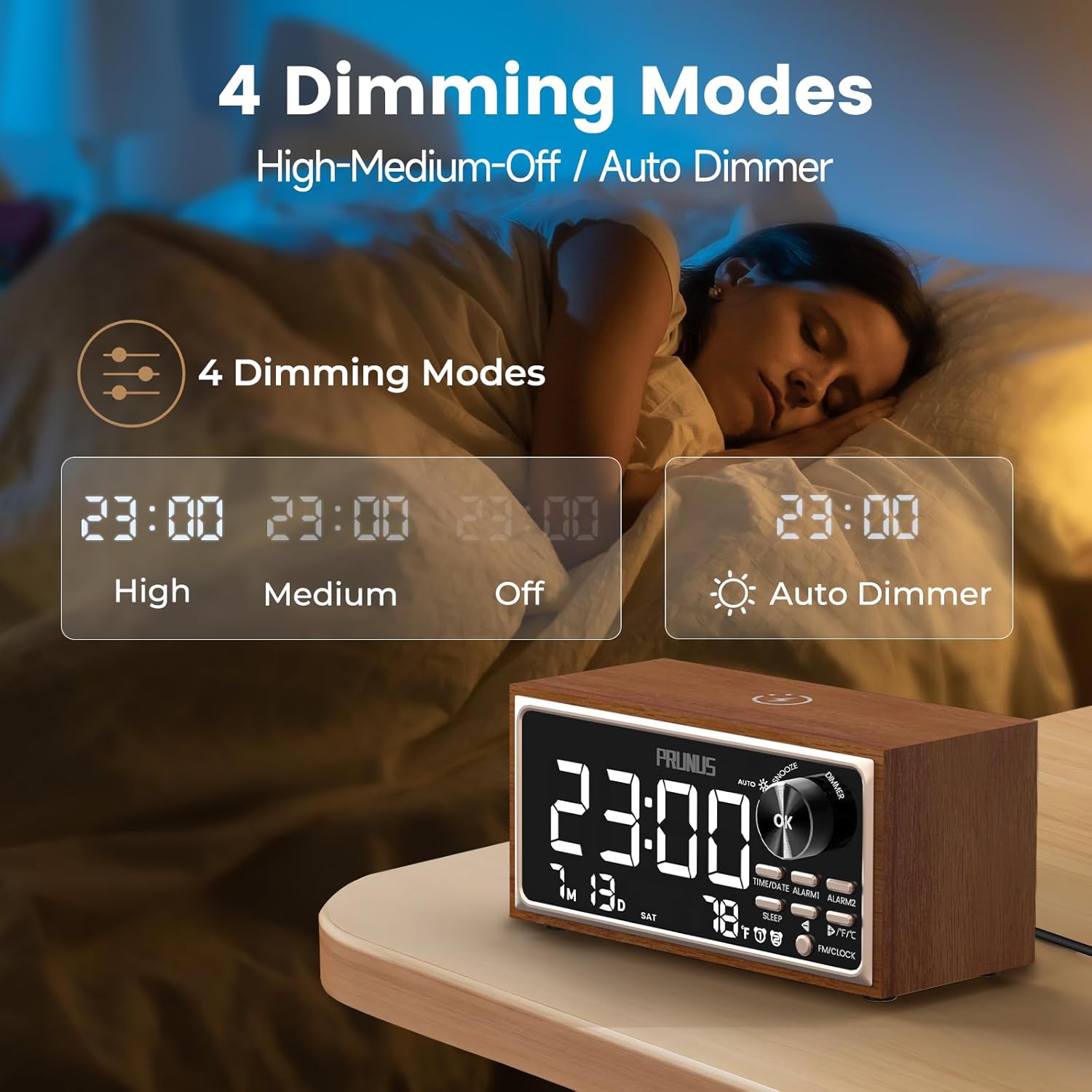
Figure 4: 4 Adjustable Brightness Modes
Customize the display brightness to suit your preference and environment, including an auto-dimming feature.
6.4 Operasi Radio FM
- Pindah ka Modeu FM: Press the <FM/CLOCK> button to switch to FM radio mode. The display will show the current FM frequency.
- Stasion Pindai Otomatis: Long press the <-> or <+ / °F/°C> button to auto-scan for the next available FM station.
- Saluyukeun Volume: Rotate the <OK> knob to increase or decrease the volume. Alternatively, short press <-> or <+ / °F/°C> to adjust the volume.

Figure 5: Digital Clock & FM Radio
Enjoy clear FM radio reception with the extendable antenna and easily tune to your favorite stations.
6.5 Ngecas Nirkabel
The top of the alarm clock features a 15W wireless charging pad.
- Place your Qi-compatible smartphone on the wireless charging pad.
- Ensure the phone is centered on the pad for optimal charging.
- The charging indicator on your phone will confirm that charging has begun.
- For best results, remove thick phone cases during wireless charging.

Figure 6: 15W Wireless Charging
Conveniently charge your Qi-compatible devices by simply placing them on the top surface.
6.6 Kaluaran Ngecas USB
A 5W USB-A port is located on the back of the device for charging other gadgets.
- Connect your device (e.g., tablet, earbuds, smartwatch) to the USB-A output port using its charging cable.
- Alat bakal mimiti ngecas.
Figure 7: 5W USB Charging Output
Charge additional devices like earbuds or smartwatches using the convenient USB-A port.
6.7 Timer Saré
The sleep timer allows you to fall asleep to music or white noise, which will automatically turn off after a set duration.
- Press the <SLEEP> button to activate the sleep timer.
- Use the <-> / <+ / °F/°C> buttons to select the desired duration (15 / 30 / 60 / 90 minutes).
- You can also select a sleep sound (S01-S07) or FM radio to play during the sleep timer.
- Press <OK> to confirm the setting.
- Long press <SLEEP> to disable the sleep timer.
7. Pangropéa
- Bersihkeun alat ku kaen anu lemes sareng garing. Ulah make cleaners cair atawa bahan abrasive.
- Keep the wireless charging pad free from dust and debris to ensure efficient charging.
- Avoid blocking the speaker grille or ventilation openings.
8. Cara ngungkulan
| Masalah | Solusi anu mungkin |
|---|---|
| Alat teu hurung. | Ensure the USB-C cable is securely connected to both the device and a working power source. Verify the power adapter is functional. |
| Ngecas nirkabel laun atanapi henteu tiasa dianggo. | Ensure your phone is Qi-compatible and correctly centered on the charging pad. Remove any thick phone cases. Use a 15W+ fast charger and compatible cable. |
| panarimaan radio FM goréng. | Fully extend the telescopic antenna. Try repositioning the device to find a better signal. |
| Alarm teu disada. | Verify the alarm is enabled (alarm icon visible). Check the alarm volume setting. Ensure the time is set correctly. |
| Pintonan caang teuing / taram. | Press the <OK> knob to cycle through brightness modes or select auto-dimming. |
9. Spésifikasi
- merek: PRUNUS
- model: J-177
- Jenis tampilan: LED digital
- Sumber Daya: Kabel Listrik (USB-C)
- Kaluaran Ngecas Nirkabel: 15W
- Kaluaran USB: 5W
- Frékuénsi Radio FM: 87.5-108MHz
- Fitur Alarm: Dual Alarms, 8 Tones (including FM), 16 Volume Levels, 9-minute Snooze
- Timer Saré: 15-90 menit
- Kacaangan tampilan: 4 Modes (High, Medium, Off, Auto-Dimming)
- ukuran: 3.5"W x 3.3"H (Product Dimensions)
- Bahan: Wood (Frame Material)
- Beurat barang: 1.28 pon
10. Garansi jeung Rojongan
For warranty information and customer support, please refer to the contact details provided with your purchase or visit the official PRUNUS websitus. Simpen bukti pameseran anjeun pikeun klaim garansi.