
ANLEON S3D
Buku Panduan Pangguna Sistem Monitor In-Ear Nirkabel ANLEON S3D
Model: S3D | Brand: ANLEON
Bubuka
This user manual provides detailed instructions for the setup, operation, and maintenance of your ANLEON S3D Wireless In-Ear Monitor System. The S3D system is designed to provide high-quality audio monitoring for live performances, studio recording, and band rehearsals, operating in the 560-596MHz frequency band.
Produk Leuwihview
The ANLEON S3D system consists of a stereo transmitter and a beltpack receiver, designed for robust and clear audio transmission.
Komponén
- S3D Transmitter (Rack-mountable unit)
- S3D Beltpack Receiver (Portable unit)
- Adaptor kakuatan pikeun pamancar
- anteneu
- Audio Cables (as included)

Gambar 1: The ANLEON S3D Wireless In-Ear Monitor System, showing both the main transmitter unit and the compact beltpack receiver.

Gambar 2: Front panel of the S3D Transmitter, featuring the display, control buttons, headphone output, and volume knob.

Gambar 3: The S3D Beltpack Receiver, showing its compact size, display, and antenna connection.
Disetél
Follow these steps to set up your ANLEON S3D Wireless In-Ear Monitor System.
- Panempatan Pemancar: Place the S3D Transmitter on a stable surface, ideally in a rack or near your audio mixer. Ensure adequate ventilation.
- Sambungan Antenna: Connect the provided antenna to the antenna port on the rear of the transmitter.
- Input Audio: Connect your audio source (e.g., mixer output) to the "AF IN BAL/UNBAL" inputs on the rear of the transmitter using appropriate cables (XLR or 1/4" TRS).
- Sambungan Daya: Connect the power adapter to the 12V DC input on the transmitter and plug it into a power outlet.
- Batré panarima: Ensure the S3D Beltpack Receiver has a charged 2000mAh battery. The battery life is approximately 17 hours, with a charging time of about 3 hours via the Type-C connector.
- Sambungan panarima: Connect your in-ear monitors or headphones to the 3.5mm output jack on the beltpack receiver.
- Daya Hurung: Power on both the transmitter and the receiver.
- Frequency Synchronization: Follow the on-screen instructions on both units to synchronize the transmitter and receiver to the same frequency within the 560-596MHz band. The system supports up to 12 sets operating simultaneously without mutual interference.
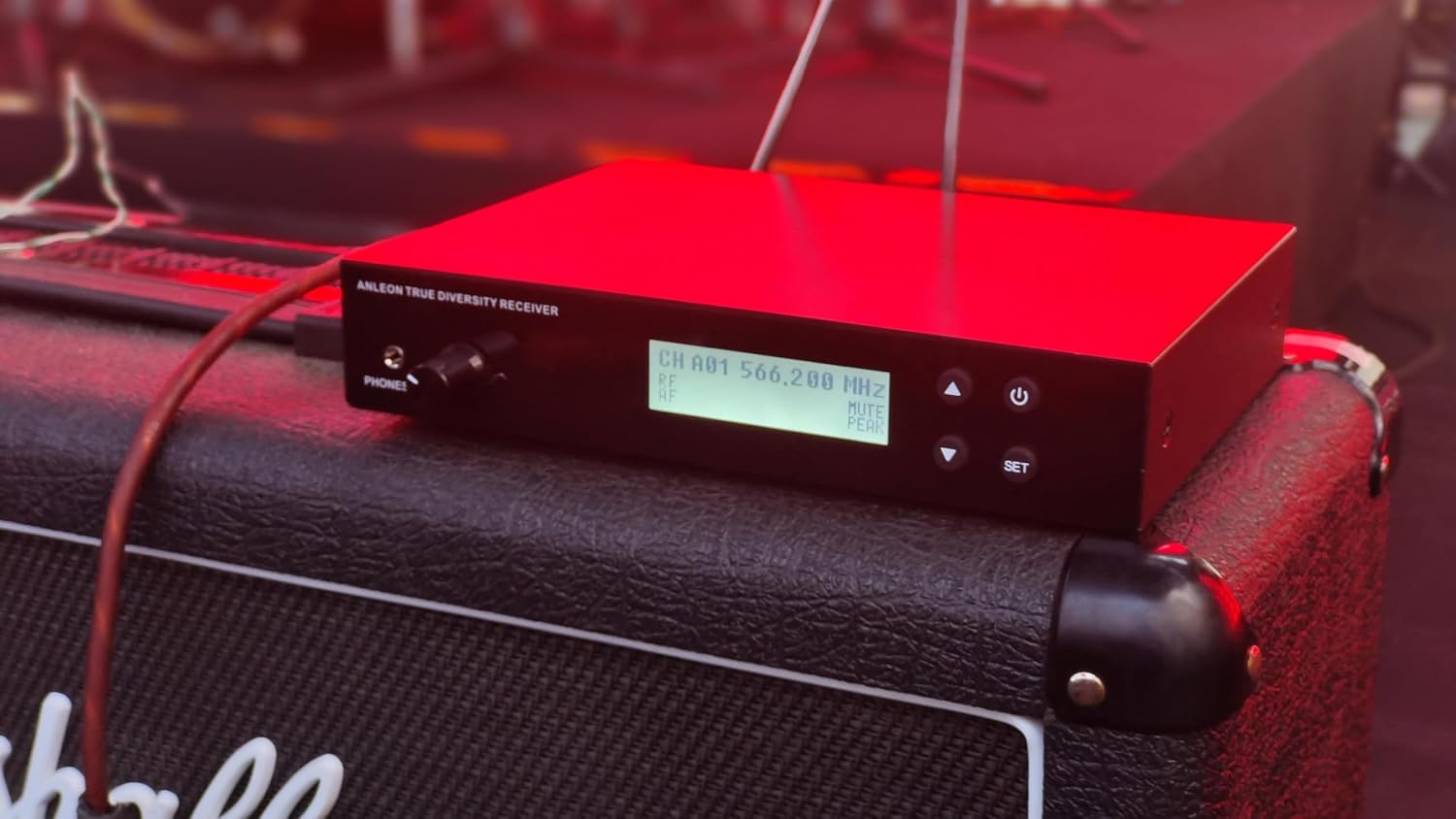
Gambar 4: The S3D Transmitter integrated into a live stage setup, demonstrating typical placement near other audio equipment.
Operasi
Once set up, operate your ANLEON S3D system as follows:
- Kontrol volume: Adjust the volume on the beltpack receiver to a comfortable listening level. The transmitter also has a headphone output with volume control for local monitoring.
- Pilihan Frékuénsi: Use the menu on both the transmitter and receiver to select and change operating frequencies. The LCD displays frequency, channel, and battery level.
- Pisahkeun stéroid: The optimized internal digital signal processing provides exceptional stereo separation for a clear monitoring experience.
- rentang: The system offers a long operating range of up to 50 meters (approximately 164 feet).
- Fitur canggih: The user-friendly menu offers more control options, including HiBoost and balance adjustments on the receiver.

Gambar 5: A musician wearing the S3D beltpack receiver, demonstrating its discreet and practical placement during a performance.
Pangropéa
Proper maintenance ensures the longevity and optimal performance of your ANLEON S3D system.
- beberesih: Use a soft, dry cloth to clean the exterior of both the transmitter and receiver. Avoid using liquid cleaners or solvents.
- Panyimpenan: Simpen sistem di tempat anu tiis sareng garing, jauh tina sinar panonpoé langsung sareng suhu anu ekstrim nalika henteu dianggo.
- Perawatan batré: For the receiver, fully charge the battery before extended storage. Avoid completely draining the battery frequently to prolong its lifespan.
- Perawatan Antenna: Ati-ati dina ngurus anteneu pikeun nyegah bengkok atanapi karusakan.
Pamérésan masalah
If you encounter issues with your ANLEON S3D system, refer to the following common problems and solutions:
| Masalah | Mungkin Cukang lantaranana | Solusi |
|---|---|---|
| No audio from receiver |
|
|
| Interferensi atanapi statik |
|
|
| Receiver display not working |
|
|
spésifikasi
| Fitur | Rincian |
|---|---|
| Ngaran modél | S3D |
| Operating Frequencies Band | 560-596MHz |
| Sampling Laju | 24-bit / 48 kHz |
| Max Rentang Operasi | Nepi ka 50m |
| Kapasitas batré panarima | 2000 mah |
| Kahirupan batré panarima | ~17 jam |
| Receiver Ngecas Time | Typ 3 hours (via Type-C) |
| Kontrol bising | Pembatalan Noise Pasip |
| Téhnologi konektipitas | Wired (for input to transmitter) |
| Komponén Kaasup | Cable (as per product description) |
| Perumahan pamancar | Sturdy metal |
| Receiver Tampilan | High visibility TFT LCD |
Garansi sareng Rojongan
For warranty information or technical support, please refer to the documentation included with your purchase or visit the official ANLEON websitus. Simpen bukti pameseran anjeun pikeun klaim garansi.
Ask a question about this manual
Ask about setup, troubleshooting, compatibility, parts, safety, or missing instructions. Manuals+ will review the question and use this page’s manual context to help answer it.